A **smart chatbot** becomes profitable when it is connected to a real process (support, sales, operations) and produces a measurable result, not when it merely "chats" nicely on a website.
février 11, 2026·10 min de lecture
A smart chatbot becomes profitable when it is connected to a real process (support, sales, operations) and produces a measurable result, not when it merely "chats" nicely on a website.
In 2026, SMEs that succeed in their deployments no longer look for "a bot that can do everything." They choose 1 to 2 frequent journeys, instrument them, integrate them with existing tools (CRM, helpdesk, ERP, messaging), and then iterate.
This guide proposes 7 concrete use cases, with what is needed to make them profitable (data, integrations, KPIs, guardrails), and how to choose the ones that will pay off the fastest.
What we (really) call a smart chatbot in business
A "classic" chatbot follows a script via buttons and rules. A "Generative AI" chatbot responds in natural language but can make mistakes if left to improvise.
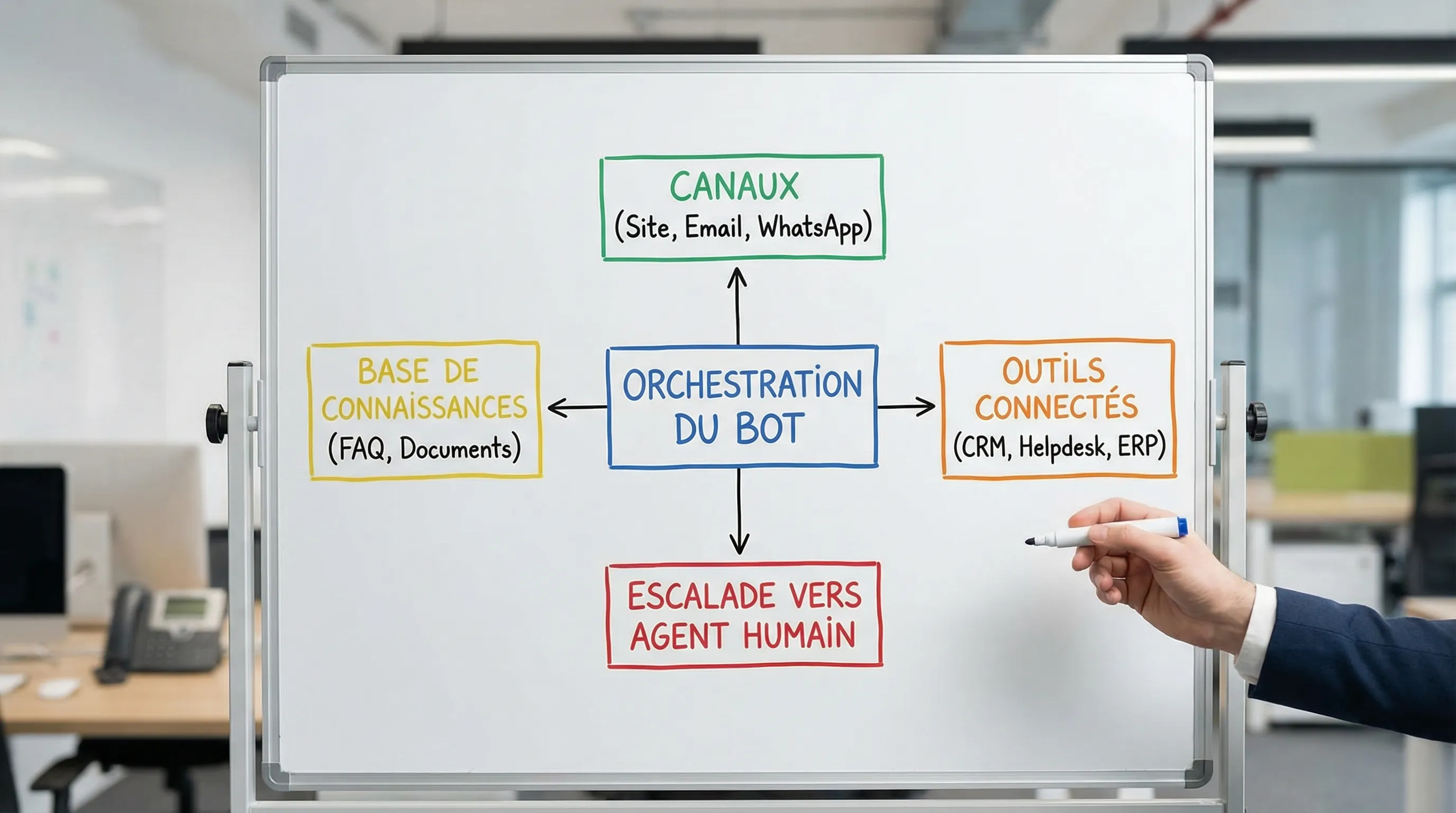
A smart chatbot useful for SMEs generally combines these building blocks:
Intent comprehension (natural language) to avoid endless menus.
Answers anchored on reliable sources (often via RAG, i.e., Retrieval-Augmented Generation) to limit invented responses.
Actions (ticket creation, appointment booking, order lookup, quote generation, CRM update), via controlled integrations.
Escalation to a human when confidence is insufficient, or when the topic is sensitive.
It is precisely this mix of "conversation + evidence + actions" that moves things from a demo to ROI.
How to recognize a profitable use case (before building)
Before choosing a use case, look for three simple signals.
1) Frequency: The topic comes up often (tickets, emails, internal requests). Without volume, you won't recover your investment.
2) Standardization: 60 to 80% of requests follow patterns. AI handles the common core, humans handle the exceptions.
3) Action capability: The bot doesn't just explain; it can trigger a step (ticket, appointment, search, entry, reminder). This is where time and cash are gained.
To secure the project, add a "risk" layer from the start: personal data, sensitive decisions, reputation. For SMEs in Europe, this also implies working cleanly on GDPR and, depending on the scope, keeping in mind the framework of the European AI Act (see the official EU portal on the AI Act).
Summary table: 7 use cases and their KPIs
Use Case
Where it pays off most
Typical Integrations
"North Star" KPI
Risks to frame
1. Triage + support pre-response
Reduced L1 load, better responsiveness
Helpdesk, FAQ base, messaging
Rate of tickets avoided or deflected
Source quality, escalation
2. Support agent copilot
Productivity and response quality
Helpdesk, docs, CRM
Average Handling Time (AHT)
Confidentiality, traceability
3. Qualification + appointment booking
More opportunities, fewer no-shows
Calendar, CRM, email/SMS
Rate of qualified appointments
Commercial data, consent
4. Quote assistant (collection + draft)
Shorter sales cycle
CRM, CPQ/quotes, catalog
Time to quote sent
Pricing, business rules
5. Order tracking + returns (e-commerce)
Fewer inquiries, more trust
OMS/ERP, carriers, helpdesk
Autonomy rate on "where is my order?"
Client data, authentication
1) Triage and support pre-response (before the ticket)
Many SMEs lose time right at the first step: reading, classifying, asking for details, redirecting. A smart chatbot placed before ticket creation (site, widget, WhatsApp, incoming email) can capture the right information and resolve simple issues.
Why it's profitable: You save L1 time on repetitive requests (hours, procedures, tracking, resets, manuals) and reduce back-and-forth.
To plan for integration: Connection to the helpdesk (ticket creation with clean fields), access to an up-to-date knowledge base, and routing (by product, language, urgency).
Useful KPIs:
Share of conversations that conclude without a ticket (deflection)
Qualification quality (complete tickets from the first message)
Time to first human response (when escalated)
Vigilance point: Do not let the bot "invent." Anchor answers on sources (FAQ, docs, policies) and display a clear escalation path.
2) Copilot for support agents (during the ticket)
When support is already structured, the best ROI often comes not from self-service, but from agent augmentation: the bot suggests an answer, proposes documentation excerpts, and pre-fills fields.
Why it's profitable: Lower handling time and better consistency (tone, procedures, compliance). The gain is strong when the team handles "semi-repetitive" but demanding tickets.
To plan for integration: Helpdesk + client history (CRM) + knowledge base. Ideally, log the source used for the suggestion.
Useful KPIs: AHT (Average Handling Time), reopening rate, CSAT, ramp-up time for new agents.
Practical tip: Start with a "suggestion only" mode, where the agent validates before sending. It is often the fastest way to capture value without taking risks.
3) Qualification and appointment booking (B2B or services)
On a B2B site or for a service company, a smart chatbot can do what a good SDR does in light mode: understand the need, verify 2 or 3 criteria (budget, scope, timeline), then book a slot with the right person.
Why it's profitable: You increase the conversion rate of high-intent visitors ("pricing", "services", "contact" pages), and you reduce time spent manually qualifying.
To plan for integration: Calendar (appointment booking), CRM (lead creation, attribution, tags), email/SMS (confirmation and reminder). If you want to push further, a routing logic by segment (size, sector, urgency).
Useful KPIs: Conversation-to-appointment rate, rate of appointments kept, rate of appointments becoming opportunities.
To go further on the "site that converts" logic, you can also draw inspiration from a contextual chat approach on key pages (see the Impulse Lab article on the intelligent landing page).
4) Quote assistant (info collection + draft ready to validate)
Many SMEs lose sales because the quote arrives too late, or because the team has to recontact the prospect for basic information.
A smart chatbot can:
Collect scoping information (volume, options, constraints)
Propose a range or packs (if your rules allow)
Generate a quote draft or a structured internal request
Why it's profitable: Acceleration of the sales cycle, less back-and-forth, better quality of incoming requests.
To plan for integration: Catalog (products, options, rules), quote tool/CPQ (or at least a template), CRM (opportunity, structured notes), and human validation.
Useful KPIs: "Request → quote sent" delay, rate of signed quotes, rate of complete requests.
Vigilance point: If your prices are complex, avoid "instant pricing" at the start. Aim first for pre-qualification and the validated draft; the ROI arrives there already.
5) Order tracking and returns management (e-commerce, distribution)
The trio of "where is my order? / I want to return / I have a delivery problem" creates an enormous and highly standardizable load.
Why it's profitable: Decrease in incoming contacts, better trust, and often fewer disputes because the customer quickly gets the exact procedure.
To plan for integration: Access to order status (OMS/ERP), carrier tracking, returns policy, and if possible light authentication (email + order number, or customer area). The bot must also be able to create a ticket if the status is abnormal.
Useful KPIs: Share of "tracking/return" requests resolved without an agent, rate of tickets avoided, resolution time.
Vigilance point: Reliability depends less on the model than on the quality of statuses and labels. If your ERP is "messy," start by normalizing 10 readable statuses.
6) Reminders and "soft" collection (invoices, subscriptions, unpaid bills)
Collection doesn't have to be aggressive to be effective. A smart chatbot, or a conversational agent on a chosen channel (email, WhatsApp, client portal), can: explain an invoice, find a receipt, propose a payment link, record a payment promise, and escalate at the right moment.
Why it's profitable: Cash improvement and reduction of administrative time. This is an often underestimated use case, but very measurable.
To plan for integration: Invoicing (invoice status), PSP/payment (link), CRM (history), and tone rules (guidelines) according to the segment.
Useful KPIs: DSO (Days Sales Outstanding) if you track it, payment rate after reminder, rate of promises kept, time spent by admin.
Vigilance point: Zero tolerance for errors. Work with rules, guardrails, and validations on amounts and statuses.
7) Internal service desk (IT + HR) on Teams/Slack
An internal smart chatbot is often the fastest ROI, as it avoids interruptions: "how to request access?", "password", "leave procedure", "remote work policy", "where to find the contract template?".
Why it's profitable: Time recovered by internal support teams (IT, HR, office management) and decrease in ad hoc solicitations.
To plan for integration: SSO and permissions (not everyone should see everything), document base (intranet, drive), ITSM if you have one, and logging (who asked what, which document was served).
Useful KPIs: L0 resolution rate, average handling time for internal requests, number of internal tickets.
Vigilance point: Security and access rights. A good internal bot respects the ACLs (Access Control Lists) of your tools; it does not "summarize" a document the user does not have access to.
A simple method to prioritize your 7 use cases (without spreading yourself thin)
If you need to decide quickly, score each idea on 3 criteria (1 to 5): volume, value, risk/complexity. Then choose 2 topics:
1 "foundation" case (reliable, repetitive, low risk) to install usage and measurement
1 "showcase" case (more business visible) to get the team on board and justify the investment
Next, impose a steering rule: a chatbot without instrumentation is not a product. Before launch, define events and KPIs, and prepare a minimal dashboard. If you want a framework dedicated to measurement, Impulse Lab has published a guide on essential KPIs to prove the ROI of an AI chatbot.
Mistakes that destroy ROI (even with a good model)
Failures rarely come from the "wrong LLM." The most frequent causes in SMEs:
Scope too broad from V1, instead of a precise journey
No integration, so the bot doesn't act and redirects to a human
No escalation protocol, resulting in bad answers in silence
No measurement, making it impossible to improve or defend the budget
For a complete framework (steps, cost centers, errors to avoid), you can also read the Impulse Lab guide: Building a chatbot in 2026.
Going from idea to pilot in 3 sprints (SME format)
An effective deployment often fits into 3 short sprints:
Sprint 1 (3 to 5 days): Scoping the journey, defining KPIs, inventory of sources, escalation rules.
Sprint 2 (1 to 2 weeks): Integrated MVP (one channel, one main intent, logging, human handoff).
Sprint 3 (2 to 4 weeks): Instrumented pilot, weekly review, improvement of sources, hardening security and costs.
If you are hesitant about the "right" starting use case, a quick audit format can already clarify opportunities. Example: the express checklist for AI quick wins.
When to get help (and how Impulse Lab can assist)
A profitable smart chatbot is a product: it requires conversational design, integrations, data governance, tests, and an improvement cycle.
Impulse Lab supports SMEs and scale-ups via:
AI Opportunity Audits to choose cases with rapid ROI
Custom development (web + AI), integration with existing tools
Automation of workflows, with guardrails and traceability
Training for adoption, at the point of use, so the chatbot is actually used
If you want to prioritize 1 to 2 use cases and launch a measured pilot in a few weeks, you can contact the team via impulselab.ai and frame an execution plan adapted to your volumes, your data, and your GDPR constraints.