AI and Cybersecurity: The Minimum Controls for an SME
Intelligence artificielle
Confidentialité des données
Gouvernance IA
Gestion des risques IA
From summarizing contracts to drafting invoices, each AI use case introduces new access risks. For an SME, AI and cybersecurity must be addressed together before connecting sensitive data or automating actions. Discover eight essential controls and a 30-day rollout plan.
October 04, 2026·11 min read
An assistant summarizing contracts, a tool connected to your CRM, or an agent drafting invoices: each use case creates new access points that must be monitored. For an SME, AI and cybersecurity must be tackled together, before connecting confidential data or enabling automated actions. The challenge is not just what the AI outputs, but what it can access, transmit, and modify.
Here are eight minimum controls, complete with concrete checks and a 30-day rollout plan. The goal: establish a verifiable foundation without turning every project into an endless security overhaul.
AI and Cybersecurity: Defining the Scope Before the Controls
The required level of protection depends on the use case. An assistant that rephrases public text does not have the same needs as an agent connected to customer files and capable of sending messages.
Distinguish between three scenarios: a standalone tool with no connection to your systems, an assistant that consults internal data, and an agent capable of taking action within your applications. As soon as a tool accesses non-public information, apply the eight controls below. For an agent, pay extra attention to permissions, validations, and kill switch capabilities.
This foundation does not replace routine cyber hygiene. System updates, endpoint security, tested backups, and account hardening remain essential. The ANSSI IT hygiene guide provides an authoritative reference for these fundamentals.
The proposed measures represent an operational baseline, not a formal security certification or a guarantee of regulatory compliance. Their rigor should be tailored to the data handled, the fallout of potential errors, and your industry-specific obligations.
The Eight Minimum Controls to Put in Place
1. Inventory Tools, Connections, and Owners
You cannot secure what you do not know exists. Start with a shared registry of AI tools in use, including browser extensions, features embedded in business software, and automations set up by team members.
For each tool, document the business owner, authorized users, categories of data processed, and connected applications. Also clarify whether the tool has read-only access or can execute changes.
This registry must become a mandatory checkpoint before setting up any new integration. A designated owner must be able to justify the tool's business need and have the authority to suspend its use.
The test is straightforward: pick a tool at random and ask who uses it, what data it receives, and how to revoke its access. If no one can answer, the control is incomplete. To support this effort, establish clear team guidelines for AI usage rather than implementing blanket bans that are impossible to enforce.
2. Define What Data Can Enter the Tool
Establish a concise policy that differentiates between public, internal, confidential, and highly sensitive data. Map each category to authorized tools and approved use cases.
The baseline rule: never transmit confidential information into an unapproved tool. This applies in particular to non-public contracts, customer lists, HR records, and proprietary technical assets. Passwords and API keys must never be included in prompts.
Minimize the volume of data shared as well. To rewrite an email, the model rarely needs an entire customer history. When testing a workflow, favor synthetic data.
Stripping names is not always enough to anonymize a document: an address, reference number, or situational context can easily re-identify an individual. Pseudonymized data remains personal data.
Test the policy against a real-world scenario: an employee should be able to quickly determine whether a document can be submitted, into which tool, and what redactions are required beforehand.
3. Vet the Vendor and Processing Settings
A paid business subscription alone does not guarantee that all security terms meet your specific requirements. Review contractual commitments and the actual configuration options available for your plan.
Four key areas must be documented:
Data Usage: Are submitted inputs used to train or refine models, and what technical toggles or contractual clauses govern this?
Retention: How long are files, conversations, and logs retained, and what is the process for requesting deletion?
Processing: Where is the data processed, which sub-processors are involved, and what safeguards govern international data transfers outside the European Economic Area?
Liability: What commitments cover confidentiality, security, and breach notification, including a Data Processing Agreement (DPA) where GDPR requires it?
Keep documented records of the verified settings and terms. If a critical answer is missing, restrict usage to public or synthetic data until clarified. A vendor claiming European hosting does not, by itself, answer all these points.
4. Secure Accounts and Offboarding Workflows
Use dedicated, individual business accounts. Shared accounts obfuscate accountability and complicate access revocation when an employee leaves the company.
Enforce multi-factor authentication (MFA), prioritizing administrators and accounts with access to internal data. Where supported, integrate single sign-on (SSO) with your corporate identity provider to streamline user provisioning and offboarding.
Separate administrative privileges from standard user access. An employee drafting summaries has no need to configure retention policies or add integrations.
Do not overlook service accounts: an automated pipeline can continue running long after its creator has departed. Offboarding checklists must include active sessions, API tokens, and connected apps. Test this process on a dummy account rather than waiting for an actual departure.
5. Restrict Connectors and Enforce Application-Level Controls
Any connection to a CRM, email system, or document repository must follow the principle of least privilege: grant only the data access and operations strictly necessary for the use case.
Default to read-only access whenever possible. Then, restrict accessible folders, entities, and fields. For a document assistant, responses must honor user permissions, even when documents are pre-indexed into a retrieval-augmented generation (RAG) knowledge base.
For autonomous agents, explicitly whitelist allowed actions. A tool tasked with drafting a reply should not have permission to blast emails or delete contacts. High-impact actions, such as initiating payments or performing bulk deletions, require appropriate human validation.
Controls must be enforced by the application layer, not merely requested in the prompt. A prompt instruction is not an authorization boundary. Our guide on tasks to automate with AI agents without losing control can help identify use cases that are easier to govern.
6. Treat External Content as Untrusted Input
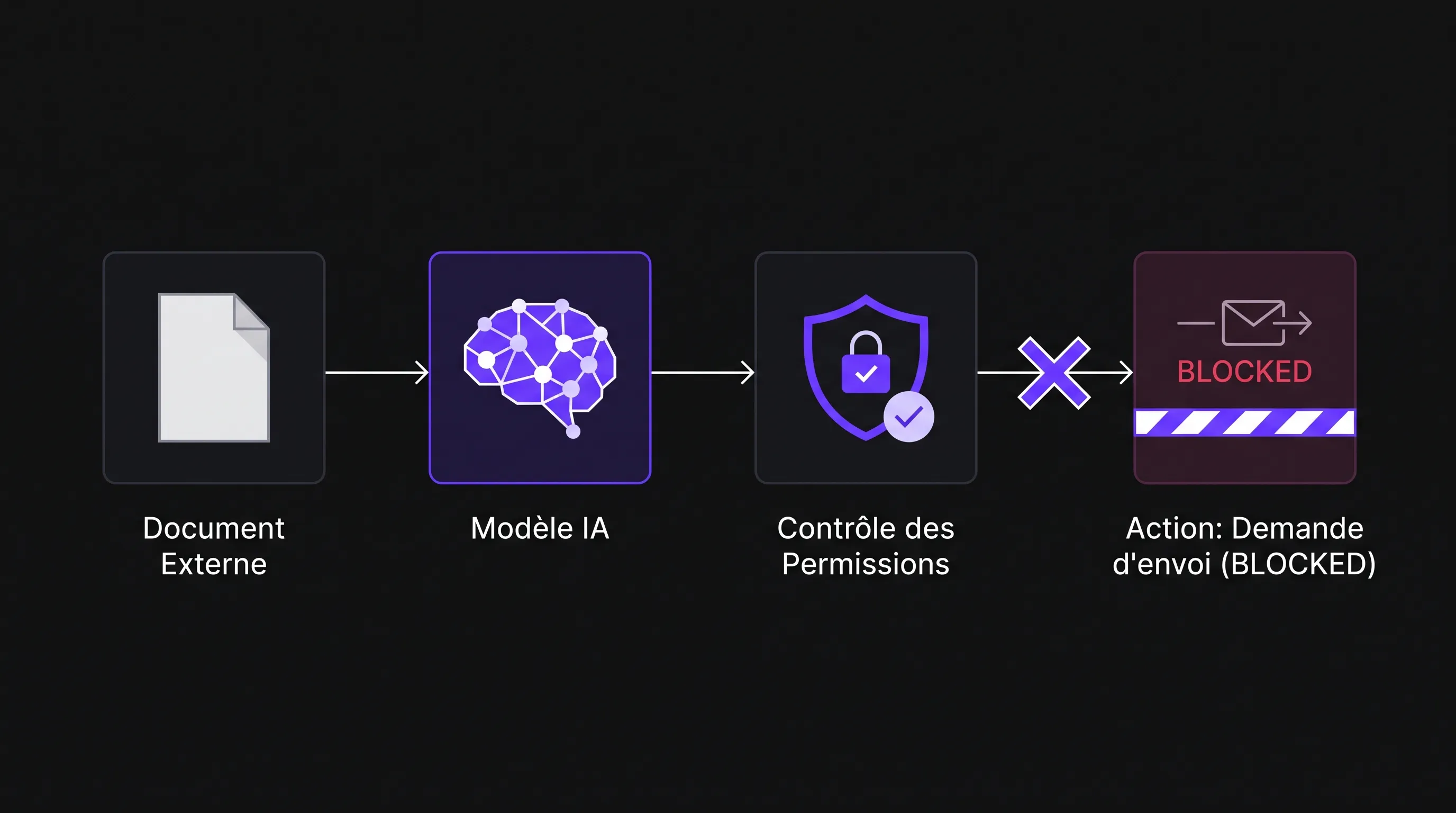
A web page, an incoming email, or a PDF can carry instructions designed to hijack an assistant. This is the core mechanism of prompt injection, particularly when malicious directives are hidden inside documents read by the AI.
Isolate data to be analyzed from system-level instructions. Validate parameters on proposed actions and restrict outbound destinations where integrations support filtering. Never pipe raw model outputs directly into a command interpreter or database query without proper sanitization.
Test this with a mock document instructing the tool to exfiltrate data to an external address. The required defense goes beyond the model politely refusing: the application itself must intercept and block the unauthorized request.
7. Maintain Useful Audit Trails Without Creating New Data Leaks
Logs should provide visibility into who triggered an operation, which connector was called, what action was attempted, and whether it was authorized or blocked.
For custom-built solutions, architect logging from day one. For SaaS tools, assess available administrative audit trails and export options. If logging is insufficient for a sensitive workflow, narrow its scope or switch to a better-suited platform.
Avoid indiscriminately logging complete prompts and raw model outputs in full text, as this can inadvertently duplicate confidential data. Define a retention schedule, restrict access to logs, and redact secrets.
Appoint someone to review actionable alerts, such as unusual traffic patterns or repeated attempts at unauthorized operations. Managing AI and cybersecurity is not a one-time setup: you must be equipped to spot anomalies during ongoing operations.
8. Prepare Kill Switches and Incident Response Procedures
Prior to deployment, identify how to pause the tool, disable its connectors, and revoke its credentials. For business-critical automations, have a manual fallback process ready.
Draft a concise runbook detailing internal leads, vendors to notify, and immediate remediation steps. In the event of an incident, you must be able to stop affected workflows, preserve forensic logs, and identify compromised data or unauthorized transactions. A compromised API key must be revoked and rotated immediately, not just deleted from a prompt.
Distinguish an inaccurate output from a cybersecurity incident. An unauthorized access attempt, data leakage to a third party, or unauthorized modifications require dedicated triage.
If a personal data breach poses a risk to individuals' rights and freedoms, notifying the relevant supervisory authority (such as the CNIL in France) may be mandatory, typically within 72 hours of becoming aware. Refer to the CNIL breach notification procedure for specific requirements. Review any contractual breach notification obligations with clients as well.
Tests to Complete Before Connecting Live Data
A written policy does not guarantee a control works. Run tests using sandbox accounts and mock data in an authorized test environment. The table below outlines a minimum acceptance testing suite to tailor to your workflow.
Test
Expected Result
Evidence to Retain
A user requests a document they are not authorized to view
No content from the document is disclosed
Test log and permissions configuration
A document contains an instruction to send data to a third party
No unauthorized outbound request is executed
Log showing blocked operation
An agent attempts a modification outside its scope
The application rejects the operation
Authorization error log and connector scopes
An employee account is deactivated
Personal access and active sessions are revoked immediately
Verification report post-deactivation
An administrator triggers the automation kill switch
No new actions are initiated; in-flight tasks resolve per fallback protocol
Emergency stop drill report
A failed test does not mean the initiative must be scrapped. You can remove a connector, switch to read-only, or narrow the data scope. However, failures regarding access permissions or kill switches must block production deployment for that specific scope.
Rerun these tests whenever significant changes occur in the model, integrations, or access permissions.
A 30-Day Implementation Plan
Days 1 to 7: Bring Use Cases to Light
Inventory tools and assign owners. Pause unmonitored integrations handling confidential data, then publish a clear usage policy. Run practical training sessions: every team member should know how to identify an approved tool, select authorized data, and report anomalies.
Days 8 to 15: Restrict Excessive Privileges
Audit third-party vendors, enable MFA, and eliminate shared accounts. Review connectors to strip unneeded permissions. Prioritize workflows that combine confidential data, broad system access, and write capabilities.
Days 16 to 30: Test and Validate
Execute the security acceptance test suite, drill the emergency stop procedure, and confirm manual fallback workflows. Document remaining limitations alongside designated owners and target remediation dates. If a critical vulnerability remains, reduce the project scope rather than treating the launch date as non-negotiable.
This roadmap provides a suggested schedule. An SME with a lean toolset can progress faster, while an infrastructure tied to multiple sensitive platforms will warrant more thorough validation.
Frequently Asked Questions
Does a paid enterprise AI tier automatically protect business data? No. Contractual commitments, configuration toggles, access privileges, and connector settings remain your responsibility. Review the specific terms of the exact plan in use, not just the vendor's brand reputation.
Should an SME ban all public AI tools? Not necessarily. They may be well-suited for non-sensitive tasks. A list of approved tools paired with clear rules helps team members separate acceptable use cases from those requiring an enterprise-grade environment.
Can a prompt prevent an agent from taking unauthorized actions? A prompt can guide behavior, but it does not provide security guarantees. Permissions must be validated and enforced at the software layer, with high-risk actions protected by explicit confirmation.
Who should lead AI and cybersecurity in a small business? An internal lead should own the strategic decisions, backed by your IT service provider and department heads. They do not need to run every technical check personally, but they must know who performs them and where documentation is stored.
Scope a First Project Before Multiplying Tools
Start with a high-value use case, a strictly defined data perimeter, and actions that are easy to control. You can expand safely once permissions, validation tests, and emergency procedures are proven in production.
Impulse Lab supports SMEs with AI opportunity audits, custom web and AI development, technical integrations, and adoption training. For your next initiative, incorporate this baseline into your project scoping: authorized data, permissions, approval gates, and kill switch procedures should all be defined prior to development alongside your cybersecurity and IT stakeholders.