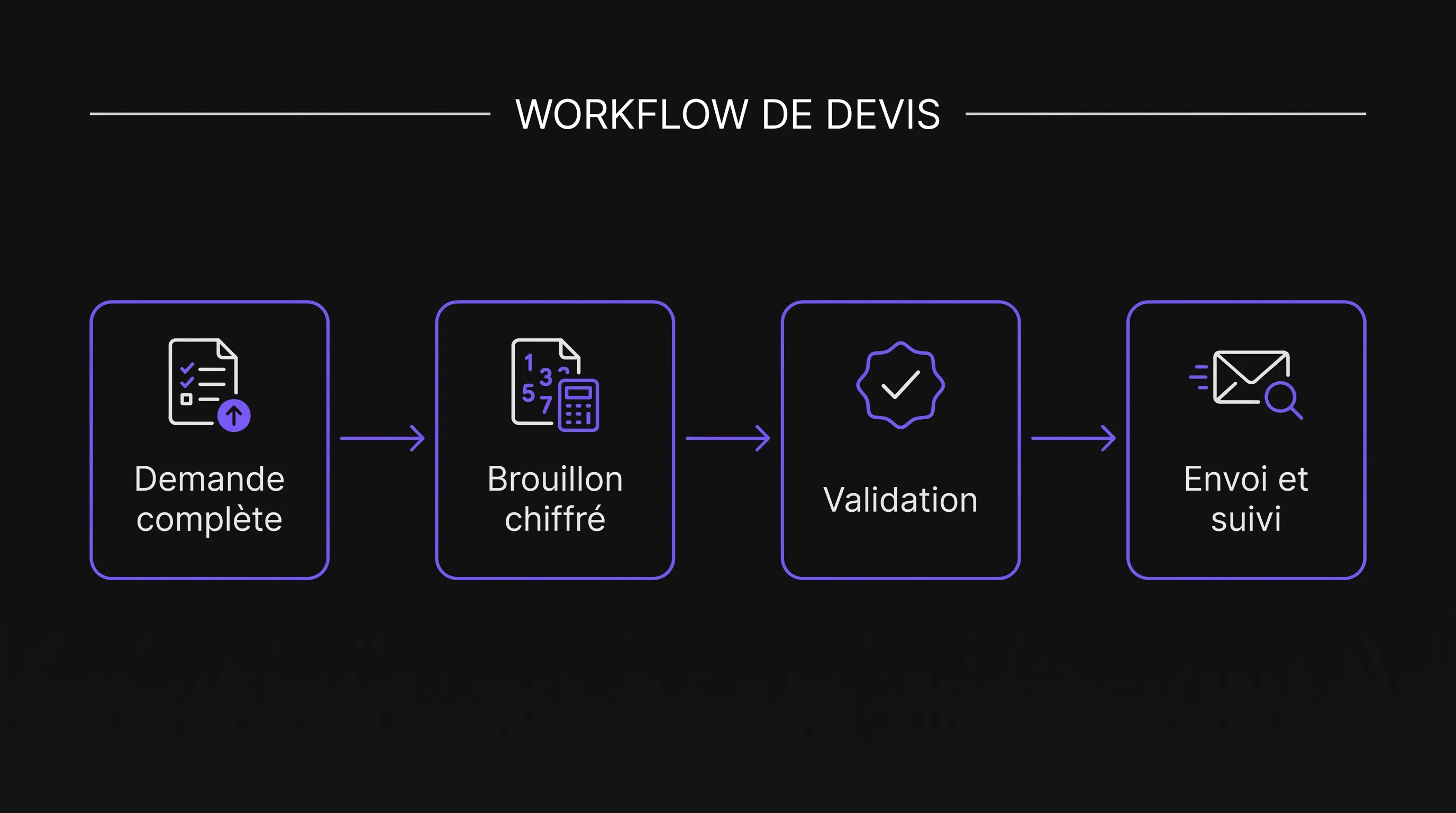
Automating Quotes: The Workflow That Prevents Forgotten Follow-Ups
Productivité
Automatisation
Optimisation
Sales
A client requests a quote by email. The sales rep awaits clarification, the manager must approve a discount, and no one knows if the document was sent. Automating quotes isn't just about generating PDFs faster: it means organizing the entire journey, from inquiry to follow-up.
October 02, 2026·10 min read
A client requests a quote by email. The sales rep is waiting for clarification, the manager needs to approve a discount, and nobody knows whether the document was ever sent. Automating quotes isn't just about generating a PDF faster: it requires organizing the entire journey, from request to follow-up.
For an SMB or a growing business, a useful workflow is one that makes oversights visible. Every request has an owner, a status, and a next action. Automation advances straightforward cases and flags bottlenecks, without deciding pricing or commercial commitments on its own.
Here is how to build this process using your existing tools.
Automating Quotes: Start with Explicit Statuses
A file marked "in progress" might hide missing information, an overlooked approval, or a failed delivery. This status is not enough to manage the work.
Before choosing software, define the quote's stages and the required condition to move to the next one.
Status
Condition to Advance
Action if Blocked
Request received
An owner is assigned
Alert the person responsible for dispatching requests
Information needed
Data required for pricing is available
Request clarification from the client
To price
Draft created with applicable pricing
Flag missing rate or reference
To approve
Authorized person approves this version
Remind them of the pending approval
Ready to send
Delivery confirmed by the tool used
Address the error or verify the result
Sent
Client response or deadline arrives
Prepare follow-up according to defined rules
Accepted, rejected, or expired
Decision or expiration recorded
Stop follow-ups and trigger the next step
Add an owner and a next-action date to these statuses. A quote should never sit in an active state without someone responsible for moving it forward.
To clarify handoffs between teams, start by mapping your process before automating it. This helps spot informal approvals and exchanges that currently slip through the cracks.
1. Centralize Requests Without Forcing Clients to Change Their Habits
Your inquiries may arrive via web form, email, or after a meeting. The goal isn’t necessarily to force a single channel on clients, but to create a single reference record in your CRM or tracking tool.
Each entry must contain at least:
A request ID, distinct from the final quote number.
The client, recipient contact, and relevant contact details.
The stated need and the documents required for pricing.
The case owner and their backup.
The status, date received, and expected next action.
An API integration can pass form data to the CRM. For phone requests, a short internal form lets the sales rep create the same type of record.
Plan for duplicates as well. A client who submits a form and then sends an email shouldn’t automatically generate two competing quotes. The system can suggest matching with an existing request, requiring manual confirmation if in doubt.
2. Verify Information Before Launching the Pricing Process
A completed form isn't necessarily an actionable request. To automate quotes properly, you must distinguish between data that is present and data that is sufficient.
The blocking fields depend on your business: quantity, dimensions, site location, scope of work, or requested timeline. A maintenance service and custom manufacturing do not have the same prerequisites.
The rule should be simple: if indispensable data is missing, the case does not move to pricing. It stays in "Information needed", paired with a clarification request or a task for the sales rep.
AI can extract information from an email or document and prepare a summary. However, it should not invent quantities, infer an unstated budget, or turn ambiguous wording into a concrete commitment. Uncertain information must remain flagged as such.
For example, "work across multiple locations" does not allow calculating travel expenses. The workflow should request the list of locations rather than producing an apparently complete, but inaccurate quote.
Also, limit the data sent to AI tools to what is necessary, and verify their data processing terms before sending client documents.
3. Generate Drafts from Controlled Pricing Rules
Pricing must rely on a single authoritative source: a catalog, rate card, or approved calculation rules. If multiple files contain conflicting prices, automation will only amplify that inconsistency.
Define the required data for each line item: item code/reference, description, unit, quantity, price, and applicable tax treatment. Discounts, fees, and optional add-ons must also follow explicit rules.
AI can help draft sales descriptions, but figures must come from verified calculations. It should not guess a tax rate or price simply because it looks plausible.
The draft then maps this data to a document template. Ensure you include the mandatory disclosures relevant to your business, customer base, and terms of sale. The rules applicable to quotes outlined by Service Public serve as a starting point, particularly for identifying when a formal quote is legally required.
Finally, manage versioning. If the client changes quantities after approval, create a new version and rerun the necessary checks. A catalog update shouldn't silently alter a quote already sent: preserve the pricing and terms used for that specific proposal.
4. Require Approval for Sensitive Commitments
Automating quotes doesn't mean eliminating all human oversight. The right level of approval depends on commercial risk.
A standard offer adhering to your standard rules can follow an expedited path. An exceptional discount, thin margin, unusual delivery timeframe, or customized clause must be reviewed by an authorized person.
Define your thresholds based on your business model, rather than copying another company's setup. The approver receives an approval request detailing the context, total amount, flagged discrepancies, and the exact document version.
Avoid fragmented approvals across messaging apps and informal chats. The approval must be recorded directly in the record, along with the approver, timestamp, and version involved. Any major modification after approval must invalidate it.
Also, establish a deadline and a backup approver for absences. Without this, the workflow merely shifts the bottleneck: quotes are no longer lost in inboxes, but sit stuck in an approval queue instead.
5. Send the Quote and Retain Proof of Delivery
A generated PDF is not a sent quote. Dispatch is a distinct step with an outcome that must be recorded.
Before sending, the workflow verifies the recipient, attachment, approved version, and expiration date. It then logs the timestamp, channel, document sent, and message ID when provided by the delivery system.
Distinguish between levels of proof: an email service may confirm that a message was accepted for delivery without proving receipt or that it was opened. An error response must open a task, not leave the record marked as complete.
To automate quoting without double-sends, assign an idempotency or unique key to each action—e.g., combining record ID, version, and recipient. If a technical confirmation is dropped, check what occurred before attempting to resend.
When someone manually sends a document in exceptional circumstances, they must be able to log this action in the same record. Otherwise, automation might send a duplicate quote or trigger follow-ups to a client who already received it.
6. Follow Up Based on the Client’s Actual Situation
Effective follow-ups depend on the status of the record, not just the number of days elapsed.
For example, you could schedule a first follow-up after three business days, and a second after seven business days. This cadence should be tailored to your sales cycle, existing touchpoints, and the validity window of the offer.
Before sending any follow-up, the workflow confirms that the quote is still awaiting a decision, that no recent replies are pending review, and that the quote has not expired. A client reply can pause automated reminders and generate a task for the sales rep.
Acceptance should be tied to a verifiable action according to your process, not just an email open. Once the decision is recorded, reminders stop. An accepted quote can then trigger order or project preparation if that step is integrated.
Automating quotes also requires distinguishing between expiration and rejection. An expired quote may need updated pricing; it should not automatically be re-sent as-is.
Build an Exception Queue, Not Just the Happy Path
The standard process is rarely the hardest part. Oversights typically happen when an event veers off script.
Create a dedicated view for blocked records. It should display the reason, owner, duration of the blockage, and next action.
Exception
Expected Action
Missing or inconsistent pricing
Block the draft and request arbitration
Overdue approval
Alert the approver or their backup
Invalid address or delivery failure
Create a correction task, without automated follow-ups
Requirement changed after sending
Prepare a new version and pause old follow-ups
Tool outage
Hold the action in queue and flag the incident
Add a recurring audit that scans for active records with no next action or those exceeding target turnaround times. This check backs up event-driven automation: if a webhook or trigger fails, the record still gets flagged.
An export or a tracking dashboard is enough to start, provided someone is tasked with reviewing the queue and resolving alerts.
Test the Workflow on a Single Quote Category
Avoid connecting every department, offer, and variant all at once. Start with a common quote category with relatively stable pricing rules and an identified owner.
Test realistic scenarios: complete request, missing info, duplicate, non-standard discount, edits after approval, delivery failure, and a reply received right before a follow-up.
Also replay the same event to ensure it doesn't trigger duplicate sends. If e-signatures are integrated, verify that acceptance applies to the correct document version.
During the pilot, automation can stage actions without actually sending quotes or follow-ups. The team compares results with their standard process, fixes discrepancies, and gradually rolls out reliable steps.
Document fallback procedures. If an outage occurs, team members need to know how to generate and send a quote manually, then update the record. Reliable automation should never leave the team helpless if a single tool goes down.
Measure Prevented Oversights, Not Just Generated PDFs
Document volume alone is not a good metric for workflow performance. Instead, track the turnaround time between receipt and first delivery, separating internal processing time from client wait time for information.
Also measure the percentage of records exceeding deadlines without action, forgotten follow-ups, and post-delivery corrections. These indicators show whether the system is truly improving oversight.
To automate quotes sustainably, review recurring exceptions. If numerous records get stuck on the same field, the intake form might be poorly designed. If approvals consistently bottleneck, review approval thresholds and assigned responsibilities.
Benchmark the pilot against a sufficiently representative baseline period. Expected ROI must factor in time spent on corrections, monitoring, and maintenance—not just time saved on formatting.
Frequently Asked Questions
Is AI necessary to automate quotes? No. Web forms, calculation rules, and integrations may be plenty. AI is mainly helpful for handling unstructured requests, extracting data, or drafting descriptions for human review.
Can we keep our existing CRM and invoicing software? Often, yes—provided their integration options support the required data flows. Check APIs, permissions, and available webhooks/events before finalizing scope.
Can quotes be sent without human validation? This can work for standardized offers with reliable guardrails. Atypical cases should always keep an approval step tailored to the risk.
How do we prevent follow-ups after an acceptance? By logging the decision in the primary record and checking this status before every send. Any remaining scheduled follow-up tasks must be canceled or deactivated.
Build a Workflow Tailored to Your Business
The starting point isn't picking a quote generator. It’s a traceable request, controlled pricing, and a clear next action up until the client makes a decision.
Impulse Lab can assist you with an AI opportunity audit, tool integrations, and custom solution development. To scope your project, gather a few representative quotes, your pricing rules, and examples of lost or stalled requests. These materials will help clarify which steps to automate and which to keep under human supervision.