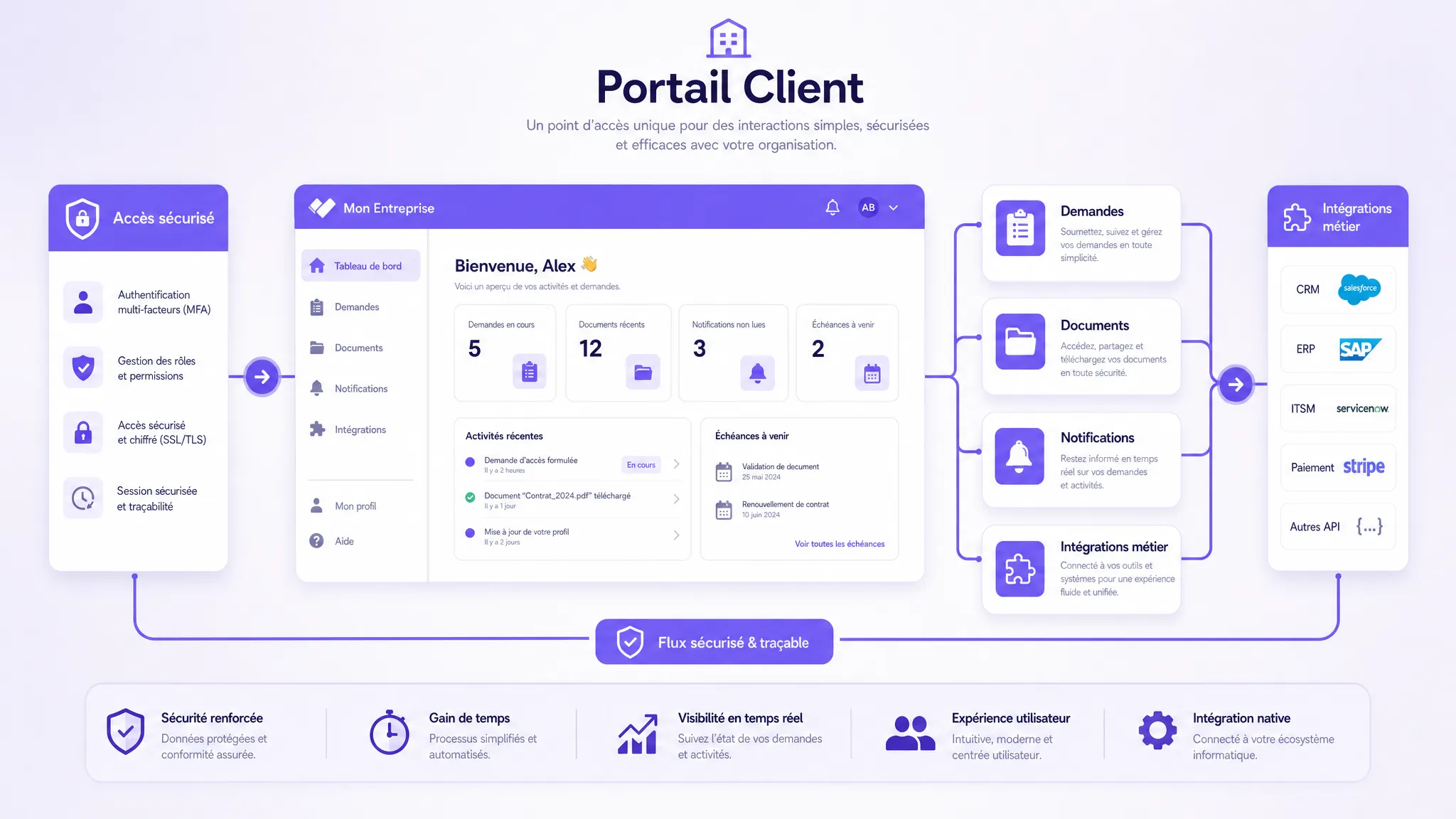
Custom Client Portal: The Building Blocks of a Useful V1
Stratégie d'entreprise
Productivité
Optimisation
Développement logiciel
SaaS
A custom client portal becomes useful when it replaces scattered exchanges with a single, clear, and actionable space. For an SME or scale-up, a V1 shouldn't cover everything, but rather reduce a specific pain point: lost requests, emailed documents, or untrackable statuses.
A custom client portal becomes useful when it replaces scattered exchanges with a single, clear, and actionable space. For an SME or scale-up, the goal of a V1 is not to cover everything. It is to reduce a specific pain point: lost client requests, documents sent by email, untrackable statuses, overly manual onboarding, or support overwhelmed by the same questions.
The right question is therefore not: "What features can we put in a portal?" The right question is: "What minimal building blocks allow a client to do things better, faster, without going back and forth through five emails?"
This article details the building blocks of a useful V1, the trade-offs to make, the mistakes to avoid, and a pragmatic method for launching a custom client portal without turning it into an endless project.
Custom client portal: what exactly are we talking about?
A client portal is a private space where your clients can access information, perform actions, and track the progress of their requests. Unlike a simple standard member area, a custom client portal is designed around your business processes, your existing tools, and your way of delivering service.
It can be used to centralize documents, track projects, open requests, view invoices, validate steps, communicate with your teams, or access personalized resources. Technically, it is often a web platform with authentication, roles, workflows, a database, integrations, and an administration interface.
The difference compared to a generic tool lies in its adaptation to the field. If your clients have complex journeys, if your teams copy data between multiple tools, or if your service depends on specific business statuses, a custom solution can prevent the piling up of poorly connected SaaS solutions.
But a useful V1 must remain deliberately limited. It must prove that the portal creates value before expanding the scope.
The true role of a V1: proving a complete workflow
A successful V1 is not a poor version. It is a focused version. It must cover an end-to-end scenario, from the client's action to internal processing and feedback.
For example, instead of building a portal with billing, messaging, reporting, support, documents, training, and AI right from the start, it is better to choose a priority flow: submitting a request, tracking processing, and update notifications. This flow must be robust, understandable, and measurable.
This principle avoids the classic trap of the "showcase" portal, pretty but rarely used. Clients return to a portal when it gives them a faster answer, clearer visibility, or an action impossible elsewhere.
The essential building blocks of a useful V1
The building blocks below are not all mandatory in every project. They provide a basis for reflection to help prioritize. The right portal always depends on the type of client, the volume of interactions, and the business process to simplify.
1. Simple and secure authentication
Secure access is the first building block of a client portal. It must be reliable, but also seamless. If logging in is a hassle, users will go back to emails.
For a V1, the essential thing is to properly manage accounts, passwords, sessions, and permissions. Depending on the sensitivity level of the data, multi-factor authentication may be relevant. The best practices described by the CNIL on password security provide a useful foundation for framing this topic.
The key question is not just "who can log in?", but "what can each profile see and do?". A client executive, an operational collaborator, and an internal administrator do not have the same needs.
2. Roles and permissions aligned with the business
Roles structure trust. In a B2B portal, multiple users can belong to the same client company. Some need to submit requests, others to validate, and others only to view.
A useful V1 can start with few roles, for example, client user, client administrator, and internal team. The mistake lies in modeling all exceptions too finely right from the start. It is better to start with clear logic, then refine after observing real usage.
This building block also dictates compliance. The principle of least privilege remains a simple rule: each user must access only the information necessary for their role.
3. An action-oriented dashboard
The dashboard is often the first page after logging in. It shouldn't be a wall of widgets. It must answer the client's priority questions: what do I need to do, what is the status of my request, what has changed since my last visit?
For a V1, a good dashboard can display ongoing requests, recent documents, expected actions, and important notifications. The interface should prioritize readability over exhaustiveness.
The rule of thumb: if an element does not trigger any decision or action, it probably does not belong on the initial dashboard.
4. A system of intelligent requests or forms
This is often the building block that creates the most value. Instead of receiving incomplete emails, your teams collect the right information from the start. The client knows what to provide, and processing becomes faster.
A useful form is not limited to fields. It must guide the user, contextualize choices, avoid useless information, and structure data for your internal teams.
In a V1, you can start with one or two priority forms: support request, quote request, file submission, modification request, booking, onboarding. The goal is to replace a vague exchange with actionable data.
5. Self-service status tracking
A lot of time is wasted answering messages like "What is the status of my file?". A custom client portal can reduce these inquiries by exposing a clear, understandable, and updated status.
The difficulty is choosing statuses that speak to the client, not just to the internal team. "Pending validation", "Missing information", "Processing", "Completed" are often more useful than technical statuses from the back-office.
Tracking must also specify who needs to act. If the file is blocked because the client needs to provide a document, the portal must make this obvious.
6. A well-structured document library
The portal can become the source of truth for contracts, deliverables, reports, invoices, guides, support materials, or shared documents. This building block is particularly useful when attachments get lost in email inboxes.
For a V1, there is no need to recreate a complete drive. The main thing is to organize documents by client, project, type, and date, with consistent access rights. Search can remain simple initially, provided the structure is clear.
If the documents are sensitive, rules for retention, access, and deletion must be framed. The GDPR specifically requires processing personal data with a clear purpose, controlled duration, and appropriate rights.
7. Useful, non-intrusive notifications
A portal without notifications risks remaining invisible. A portal that notifies too much becomes irritating. The V1 must therefore choose a few important events: new reply, status change, action required, document available, approaching deadline.
Email often remains the simplest channel to start with. Depending on your usage, notifications can later expand to Slack, Teams, SMS, or your CRM. But the principle remains the same: a notification must help the user take action, not simply signal that something exists.
8. An internal administration interface
A client portal is only useful if your teams can manage it without depending on a developer for every update. The V1 must therefore provide an administration interface adapted to the scope: viewing requests, changing a status, uploading a document, assigning an owner, replying to a client.
This interface doesn't need to be sophisticated at first. Above all, it must reduce internal manual work. If your teams still have to copy data into three different tools, the portal risks displacing the problem rather than solving it.
9. Targeted integrations with your existing tools
The portal must not become yet another silo. It must connect to the tools that already drive your operations: CRM, billing, support, project management, document storage, ERP, or business tools.
A V1 should not integrate the entire information system. It must connect the points that prevent double data entry or critical errors. For example, automatically creating a request in the support tool, synchronizing the status from a project tool, or pushing information to the CRM.
Integrations are often an underestimated area of complexity. It is better to choose one highly useful integration than five secondary ones.
10. Usage tracking from the start
Without measurement, it is impossible to know if the portal is working. A V1 must track a few simple KPIs: number of active users, requests submitted, processing time, form completion rate, volume of emails avoided, client satisfaction.
Measurement is not just for reporting. It is used to decide what to improve next. If clients log in but don't use the form, the problem might be UX. If requests increase but processing time doesn't decrease, the internal workflow might be incomplete.
Prioritization table for choosing your V1 building blocks
The following table helps with trade-offs. It does not replace business scoping, but it provides a quick overview of often indispensable building blocks.
Building Block
Main Objective
Include in V1 if...
Useful KPI
Authentication
Secure access
Private data or closed client area
Successful login rate
Roles and permissions
Control access
Multiple profiles use the portal
Incidents or access requests
Dashboard
Provide visibility
Clients frequently ask for statuses
Recurring logins
Forms
Structure requests
Incoming emails are incomplete
Completion rate
Status tracking
Reduce follow-ups
Clients ask "where things stand"
Follow-up emails avoided
Documents
Centralize files
Attachments get scattered
Documents viewed
Notifications
Trigger action
Clients need to react quickly
Open or click rate
What not to include too early
A useful V1 also means saying no. Some features seem attractive but can slow down the launch without proving more value.
Features to postpone are often the following: advanced personalization for each client, complex search engine, highly detailed reporting, real-time messaging, integrated payment, generative AI, advanced document management, native mobile app.
This doesn't mean they are useless. It means they must answer a proven need. For example, a document search AI can be highly relevant if your clients consult many resources. But before adding an AI layer, you must already have a clean document base, reliable access rights, and well-identified frequently asked questions.
Minimal architecture: robust without over-engineering
A custom client portal needs a solid architecture, but not necessarily a complex one. For a V1, the challenge is to guarantee security, maintainability, and the ability to scale.
Technical foundations generally include a responsive web interface, an API, a database, an authentication layer, file storage, logs, backups, and a reliable deployment environment. The details depend on the context, but the principles remain stable: modularity, traceability, access management, testing, and monitoring.
On application security topics, OWASP frameworks offer a recognized structure for requirements. For an SME, the goal is not to apply a maximum level everywhere, but to adapt controls to data sensitivity and real risks.
A portal that handles confidential documents, financial data, or personal information requires more safeguards than a simple, non-sensitive tracking space.
UX: the V1 must be obvious to the client
The value of a portal relies heavily on the user experience. If the client requires extensive training, the V1 is probably too complex.
A good client portal UX relies on a few simple principles: understandable business vocabulary, short navigation, visible actions, progressive forms, explicit empty states, useful error messages, and responsive design. Clients must be able to use the portal on a desktop, but also check a status or reply to a request from a mobile device.
Accessibility must not be forgotten. Legible contrasts, keyboard navigation, correct form labels, and clean HTML structure improve the experience for all users, not just for people with disabilities.
The method to scope a V1 in a few weeks
Before developing, the portal must be scoped like a product. The expected deliverable is not a list of features, but a priority workflow with users, data, business rules, and KPIs.
A pragmatic approach can follow five steps:
Choose a priority problem: Identify the flow that costs the most time or creates the most client dissatisfaction.
Map the current journey: List the emails, files, tools, validations, and exceptions used today.
Define the V1 as a complete scenario: Specify what the client does, what the internal team processes, and what the system automates.
Limit integrations: Connect only the necessary tools to avoid double entry or to make the status reliable.
Measure before and after: Set a baseline, then compare time saved, volume of follow-ups, adoption, and satisfaction.
This approach aligns with the best practices of custom software creation: deliver a first usable version, test with real users, and expand later.
Examples of V1s depending on the business context
A custom client portal does not take the same shape for every company. Here are a few realistic scenarios to guide the scoping.
Context
Useful V1
Priority Building Blocks
Agency or consulting firm
Project tracking and deliverables
Dashboard, documents, statuses, notifications
Recurring B2B provider
Structured client requests
Forms, tracking, internal admin, CRM
Field services company
Intervention requests
Form, scheduling, status, notifications
Training organization
Resource access and tracking
Authentication, documents, progress, support
SaaS or software publisher
Client support and onboarding
Document base, requests, support integration
Administrative back-office
File submission and validation
Documents, statuses, roles, compliance
The common thread: each V1 handles a central journey, not the entire client relationship.
Where AI can help, and where it should wait
AI can enrich a client portal, but it shouldn't be added just to check a box. Interesting use cases emerge when the portal already has structured data and reliable sources.
In a V1, AI can help pre-fill forms, automatically classify requests, summarize exchanges, suggest internal replies, or offer augmented document search. But these functions must remain supervised, especially if they involve sensitive data or client decisions.
To start, a well-designed deterministic automation is often better than an overly autonomous AI agent. AI becomes relevant when it reduces measurable friction without diminishing trust.
Common mistakes to avoid
The first mistake is building the portal around the internal organization rather than the client. If the labels, statuses, and steps are only understandable by your teams, adoption will be low.
The second mistake is replicating all existing processes without simplifying them. A portal should not digitize chaos. It must clarify the flow before automating it.
The third mistake is underestimating internal administration. A portal with a beautiful client interface, but without an efficient operational interface for the team, quickly creates an additional burden.
The fourth mistake is postponing integrations when they are what drives value. If the status displayed to the client is not synchronized with the tool actually used by the team, trust degrades.
Finally, many companies neglect change management. Even a simple portal must be announced, explained, and integrated into habits. Teams must know when to reply in the portal, when to use email, and how to handle exceptions.
KPIs to track after launch
A V1 must be monitored during the first few weeks. KPIs should remain few in number, but actionable.
KPI
What it indicates
Warning signal
Client activation rate
Clients create and use their access
Many invitations remain unanswered
Requests created via portal
The portal replaces emails
Requests continue via email
Average processing time
The workflow saves time
Processing time doesn't drop despite usage
Client follow-ups
Visibility is sufficient
Clients still ask for statuses
Form completion rate
The journey is clear
Users abandon halfway through
Client satisfaction
The portal improves the experience
Clients perceive it as an added constraint
These indicators help decide what's next: improve the UX, add an integration, expand to another type of request, enrich the document library, or automate a step.
FAQ
What is the difference between a client portal and an extranet? An extranet generally refers to a private space accessible to external parties. A client portal is more oriented towards client experience and workflows: requests, documents, statuses, actions, notifications, and business integrations. In practice, the two concepts can overlap.
How many features should be planned for a V1? The right scope depends on the priority problem. A useful V1 often contains 4 to 6 well-integrated building blocks rather than a long list of superficial features. The goal is to handle a complete end-to-end workflow.
Should the portal be connected to the CRM from the start? Yes, if the CRM is the source of truth for clients, accounts, or sales tracking. No, if the integration does not yet create a concrete gain. The priority is to avoid double data entry and inconsistencies visible to the client.
Is a custom client portal suitable for an SME? Yes, if the SME has a sufficient volume of interactions, specific processes, or repeated time losses. If the need is very standard, an existing SaaS might suffice. Custom solutions become relevant when the client experience and business workflow need to be highly tailored.
Can AI be added to a client portal? Yes, but the AI must answer a specific use case: document search, summarization, triage, reply assistance, pre-filling, or support assistant. You must first secure the data, access rights, and quality measurement.
Building a useful V1 with Impulse Lab
A custom client portal doesn't need to be massive to create value. It must be well-scoped, connected to the right tools, and delivered around a workflow that is actually used.
Impulse Lab supports SMEs and scale-ups in the scoping, design, and development of custom web and AI platforms: opportunity audits, process automation, integration with your existing tools, end-to-end development, and team adoption.
If you want to transform a scattered client process into a simple, secure, and measurable portal, start by scoping a realistic V1. You can contact Impulse Lab to identify the priority building blocks and build a useful first version, without scope creep.
Why Artificial Intelligence Isn't Reducing Your Delivery Times
You adopted AI to write proposals or code, but client wait times remain unchanged. Speeding up individual tasks doesn't guarantee faster delivery if queues, handoffs, and approvals aren't addressed. Here is how to target the true bottlenecks.