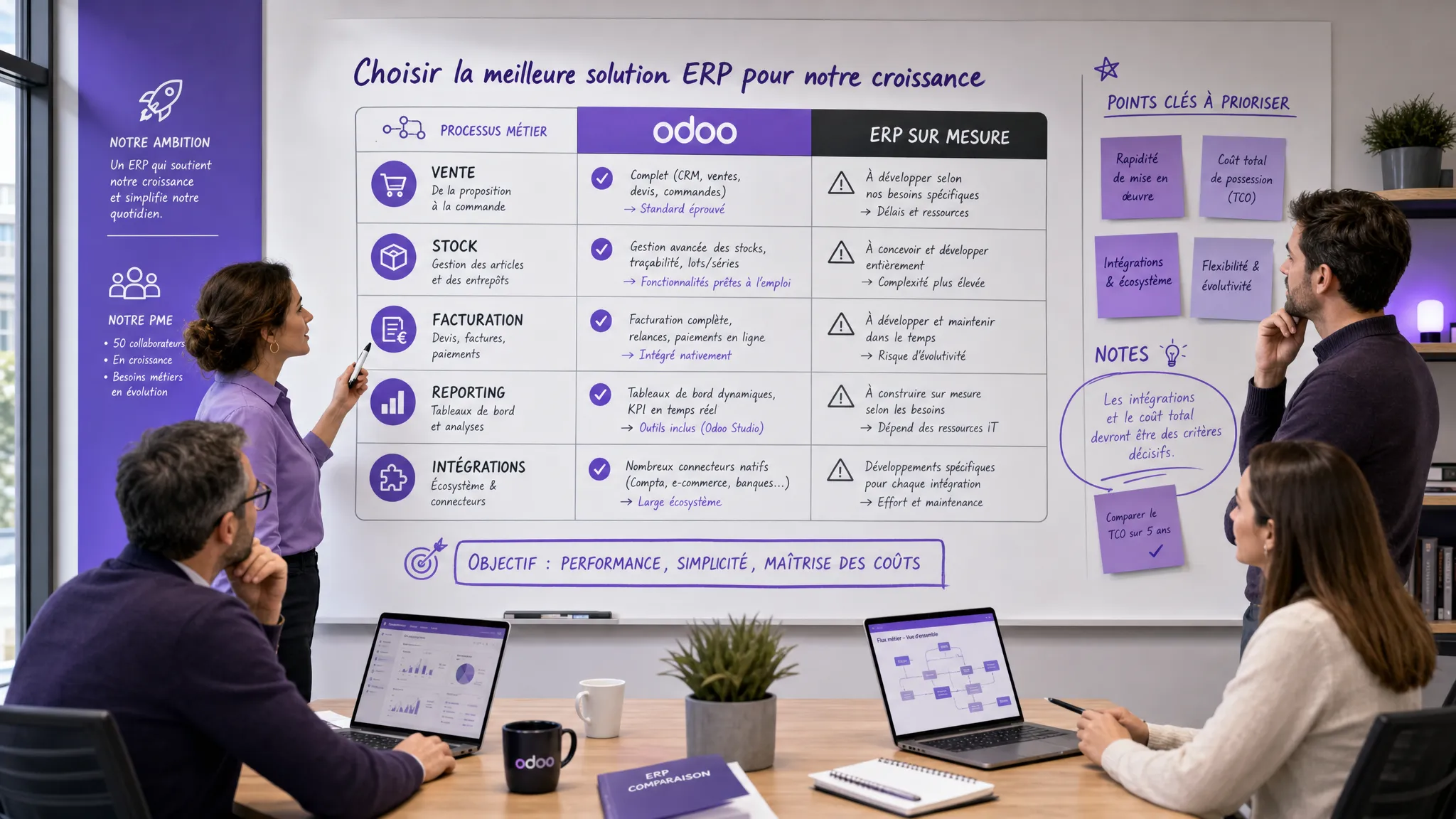
Custom ERP vs Odoo: The Useful Comparison for SMEs
Stratégie d'entreprise
Automatisation
Optimisation
Développement logiciel
ERP
If your teams juggle spreadsheets, CRMs, billing tools, inventory software, and Slack messages to advance an order, the ERP question inevitably arises. And with it, an often poorly framed choice: should you adopt Odoo or build a custom ERP?
June 02, 2026·16 min read
If your teams juggle spreadsheets, CRMs, billing tools, inventory software, and Slack messages to advance an order, the ERP question inevitably arises. And with it, an often poorly framed choice: should you adopt Odoo or build a custom ERP?
The useful answer isn’t "one is better than the other". For an SME or a scaling scale-up, the right choice depends mainly on three factors: the acceptable level of standardization, the criticality of your business processes, and the total cost of evolution over 12 to 36 months.
Odoo can be excellent for accelerating the implementation of a modular ERP foundation. A custom ERP becomes relevant when your operations don't fit neatly into a standard, or when your competitive advantage lies in your internal workflows. Here is a pragmatic comparison to help you decide without locking yourself into an overly rigid solution or a project that is too heavy.
What we are really comparing
An ERP, for Enterprise Resource Planning, centralizes the company's key flows: sales, purchases, inventory, production, billing, accounting, support, reporting, sometimes HR or projects. Its role is not only to store information. It must synchronize teams, reduce double data entry, make decisions more reliable, and make operations measurable.
Odoo is a modular ERP suite that covers many business needs via ready-to-use applications: CRM, sales, inventory, accounting, e-commerce, projects, support, marketing, and other modules. The main interest is to start from an existing, documented foundation with an ecosystem of integrators and modules. You can explore the modular logic on the official Odoo Apps website.
A custom ERP, on the other hand, is a platform designed around your specific processes. It can cover your entire operational system, but it can also be limited to a business layer that connects your existing tools. The goal is not to "remake Odoo", but to develop exactly what creates value when standard solutions become too constrained.
Do you need a broad foundation quickly or a perfectly adapted critical flow?
Functional coverage
Broad, with many available modules
Defined according to your priorities
Do you want to cover everything or solve a specific business problem?
Adaptation to processes
Good if your processes are standard
Excellent if the scoping is solid
Should your workflows adapt to the software or vice versa?
Initial cost
Often more accessible at the start
Often higher for an equivalent scope
Are you comparing the starting price or the total cost over several years?
Cost of evolution
Depends on configuration, modules, and customizations
Depends on architecture, team, and governance
How many operational changes do you anticipate each quarter?
Integrations
Numerous connectors, but constraints depending on the case
API-first possible from the design stage
Must your ERP orchestrate a complex existing stack?
1. Start by distinguishing standard processes from differentiating processes
The most common trap is wanting the ERP to reflect every internal habit. However, some practices deserve to be standardized. Others truly constitute your operational advantage.
For example, a classic "quote, order, invoice" cycle can very well be managed by Odoo if your commercial rules are simple. On the other hand, if your quotes depend on complex rules regarding margin, availability, production capacity, geography, client priorities, and multi-level validation, a custom ERP or a custom layer can become more rational.
A good decision workshop classifies your processes into three categories.
Process type
Example
Often relevant option
Commodity process
Standard billing, simple catalog, basic sales pipeline
Odoo or specialized SaaS
Adaptable process
Quote validation, project management, client tracking with a few specific fields
This distinction avoids two costly mistakes: custom-building functions already very well covered by the market, or twisting a standard ERP until updates, adoption, and maintenance become painful.
2. Implementation time: Odoo is faster if you accept the standard
Odoo scores points when an SME wants to quickly structure its operations with broad functional coverage. You can start with a few modules, then expand gradually. This is often relevant when the company wants to move away from spreadsheets, centralize data, and harmonize practices.
But Odoo's speed depends on an important condition: accepting part of the standard functioning. If every screen, every status, every permission, and every workflow must be modified, the project can lose its initial advantage. At this stage, you are no longer simply doing an ERP deployment. You are financing a progressive customization of a foundation that may not have been designed for your business logic.
A custom ERP requires more scoping at the start, but it is not necessarily synonymous with an endless project. The right approach is to build a narrow, complete, and measurable V1. For example: "automate the order, preparation, delivery, billing flow for a customer segment", rather than "remake the entire information system".
3. Total cost: don't just compare license vs. development
The advertised price of a tool or the initial quote for a development is not enough. For an ERP, the right measure is the Total Cost of Ownership, or TCO. It includes configuration, licenses, hosting, integrations, data migration, training, maintenance, evolutions, and time lost during the transition.
Easy if covered by the ecosystem, more sensitive if highly customized
Controlled if modular architecture and governed backlog
A custom ERP can cost more initially, but be more efficient if your processes change often or if the operational gains are high. Conversely, Odoo can be more economical if you limit specific developments and agree to align with its logic.
To avoid unpleasant surprises, also consult our guide on the hidden costs of custom software development. Many of these costs also exist in a standard ERP project as soon as there is migration, integration, and adoption.
4. Integrations: the real issue behind the ERP choice
In a scaling SME, the problem is rarely a "lack of tools". It's rather the absence of a single source of truth. The CRM contains one version of the client, accounting another, support a third, and operations work in a spreadsheet that is never fully up to date.
Odoo is interesting if you want to group several building blocks into the same suite. This can reduce fragmentation and simplify governance. But if your company already uses specialized tools that you do not want to replace, for example an advanced CRM, a WMS, an e-commerce tool, business software, or a data platform, you must look at the quality of APIs, connectors, and synchronizations.
A custom ERP can be designed as an orchestration layer. It does not necessarily replace everything. It connects tools, imposes business rules, centralizes certain statuses, and triggers actions. This approach is often relevant for scale-ups that already have a solid stack, but lack a unified operational system.
The key question is simple: should your ERP be the center of everything, or the conductor between several tools?
5. Data, security, and compliance: standard does not mean automatic
Whether it is based on Odoo or custom-developed, an ERP processes sensitive data: customer data, invoices, margins, orders, contracts, HR information, sometimes health data or regulated data depending on the sector.
The GDPR notably requires controlling the purposes, access, retention periods, and rights of individuals. The CNIL resources on the GDPR are useful to recall the basic principles, but the ERP topic must be treated operationally: who can see what, modify what, export what, and with what traces?
Odoo offers rights and role mechanisms, but your implementation must be correctly configured. A custom ERP allows designing very fine-grained permissions, aligned with your internal processes, but it imposes technical rigor from the start: authentication, logging, backups, environment management, monitoring, access review.
In both cases, ask for concrete evidence: permission matrix, backup plan, log policy, recovery procedure, export rules, inactive account management, and data flow documentation.
6. AI and automation: the ERP becomes a foundation for action
In 2026, an ERP is no longer just used to centralize information. It can become the basis for many automations: quote generation, invoice extraction, inventory forecasting, customer follow-up, anomaly control, file summarization, request routing, or assistance to sales teams.
With Odoo, these automations can go through modules, connectors, workflows, or specific developments. This is relevant if the action remains relatively standardized.
With a custom ERP, you can integrate AI directly into the business flow, with validation rules, permissions, logs, and adapted safeguards. For example, an assistant can prepare a restocking recommendation, but let a human validate before ordering. Or an agent can pre-fill a quote, while respecting your margin and escalation rules.
The important point: do not add AI just to look modern. Add it where it reduces a cost, accelerates a cycle, or decreases errors. If this topic concerns you, our guide artificial intelligence and automation: where to start provides a method to prioritize the first use cases.
When to choose Odoo?
Odoo is often the right choice when your priority is to quickly structure classic functions, with a controlled initial budget and a desire to adopt more standard processes.
It is particularly suitable if:
Your needs cover common ERP functions like CRM, sales, billing, inventory, projects, or accounting.
Your processes can adapt to the tool's functioning without major loss of performance.
You want to reduce the number of tools and quickly centralize part of the information system.
You have an internal manager capable of driving adoption and making trade-offs.
Your customizations remain limited and documented.
You agree to build progressively, module by module.
The proper use of Odoo often consists of starting simple, measuring adoption, then customizing only what truly blocks performance. A customization requested by a single person or a single rare case must be challenged.
When to choose a custom ERP?
A custom ERP becomes relevant when your operational process is a strategic asset. If your way of selling, producing, delivering, planning, or serving your customers is difficult to model in a standard tool, custom-built can avoid an accumulation of workarounds.
It is particularly suitable if:
Your business rules are complex, changing, or differentiating.
Your teams waste a lot of time compensating for the limits of existing tools.
You need to connect several tools without wanting to replace them.
The user experience must be highly adapted to field, sales, ops, or finance roles.
Workflows include specific validations, exceptions, priorities, or calculations.
You want to integrate AI or automations with fine-grained control of actions.
You need an API-first, scalable, and controlled architecture.
Custom-built is also interesting when you do not want your organization to conform entirely to a tool. But it requires strong discipline: limited scope, prioritized backlog, testing, documentation, maintenance, business ownership.
The hybrid path: often the best option for a growing SME
In many cases, the best choice is neither "Odoo everywhere" nor "build everything". It is a hybrid architecture.
Three models often come up:
Odoo as a back-office, custom for differentiating operations: Odoo manages standard billing, accounting, CRM, or inventory, while a custom application drives the specific business flow.
Odoo as an ERP foundation, specific modules or connectors around it: you keep the Odoo core, but develop a few targeted extensions for your internal rules.
Custom ERP as an orchestration layer, specialized tools retained: your custom platform synchronizes CRM, e-commerce, support, finance, and data without replacing every building block.
This hybrid approach is often very rational. It avoids rebuilding commodity functions, while protecting what makes you different. The main risk is creating a "Frankenstein" of integrations. To avoid this, you must clearly define the sources of truth: which tool is the master of the client, the product, the inventory, the price, the invoice, the order status?
Quick decision grid
Use this grid in a management committee or operational workshop. The goal is not to obtain a mathematical truth, but to make trade-offs visible.
Question
Answer favoring Odoo
Answer favoring Custom ERP
Are your processes close to market standards?
Yes, overall
No, they are specific or differentiating
Do you want to cover many functions quickly?
Yes
No, the priority need is a critical flow
Can your teams adapt their practices?
Yes
Very little, the current process is strategic
Do you have many existing tools to keep?
No, you want to consolidate
Yes, you need to orchestrate an existing stack
Do business rules change often?
Rarely
Often
Is the business UX a strong factor in adoption?
Moderately
Yes, it must be designed by role
Are the planned customizations limited?
Yes
No, they are central
Should AI execute controlled actions in the workflow?
Not at the beginning
Yes, with permissions, logs, and validations
If the majority of your answers are on the Odoo side, probably start with a serious Odoo scoping, limiting customizations. If several strong answers are on the custom side, especially regarding differentiating processes, UX, and integrations, scope at least a custom or hybrid option before committing.
Recommended deployment method
Before signing for Odoo or a custom ERP, build a proof of decision. It must compare the options on your real flows, not on a generic demo.
Phase
Expected deliverables
Decision to make
Scoping
Mapping of processes, pain points, data, roles, KPIs
What business problem must the ERP solve first?
Standard fit
Testing Odoo modules or existing solutions on 3 to 5 real scenarios
Does the standard cover the need sufficiently?
Custom option
Mockup or prototype of the critical flow, target architecture, TCO estimate
Does the business gain justify custom-built?
Trade-off
Comparison of TCO, risks, adoption, roadmap, sources of truth
A healthy V1 should not try to cover everything. It must solve an important end-to-end flow, with pilot users, real data, and KPIs. For example: order processing time, data entry error rate, billing delay, number of double entries, adoption rate, training time, margin per file.
Common mistakes to avoid
The first mistake is choosing Odoo because "it's cheaper", without measuring the cost of customizations and adoption. The second is choosing a custom ERP because "our processes are unique", without distinguishing what is truly differentiating from what stems from historical habits.
The third mistake is neglecting data. An ERP does not automatically fix inconsistent product data, customer duplicates, undocumented pricing rules, or vague order statuses. The quality of the system will depend on the quality of your business definitions.
The fourth mistake is pushing integration to the end. An ERP gains its value when it connects to the tools that matter: CRM, accounting, e-commerce, support, logistics, BI, internal tools. APIs, rights, and synchronizations must be thought out from the scoping phase.
Finally, avoid the big bang if your organization is not ready. A gradual migration, by flow or by pilot team, helps reduce risks and adjust the system before generalization.
FAQ
Is Odoo suitable for SMEs? Yes, Odoo can be very suitable for SMEs that want to quickly structure classic processes like sales, billing, inventory, CRM, or project management. The key is to limit unnecessary customizations and accept a degree of standardization.
Does a custom ERP necessarily cost more? The initial cost is often higher than a standard deployment, but it is not always more expensive over time. If your teams compensate daily for the limits of an ill-adapted tool, or if Odoo customizations become numerous, a custom ERP can be more cost-effective in the medium term.
Can we start with Odoo and then add custom-built? Yes, this is a common strategy. Odoo can cover the back-office or certain standard functions, while a custom layer manages differentiating workflows, integrations, or specific automations.
Do you have to replace everything during an ERP project? No. A mature SME often benefits from keeping the best existing tools and clarifying the sources of truth. The ERP can replace certain software, but it can also orchestrate an existing stack.
How long does it take to implement an ERP? It depends on the scope, data, integrations, and level of customization. A targeted initial scope can be deployed in a few weeks, while a complete, multi-team ERP can take several months. The most important thing is to deliver in measurable stages.
How to prevent a custom ERP from becoming an endless project? You must define a narrow V1, a success KPI, acceptance criteria, a prioritized backlog, and regular demonstrations. Custom-built works when it is managed like a product, not like an endless list of requests.
Need to decide between Odoo, Custom ERP, or a hybrid approach?
At Impulse Lab, we help SMEs and scale-ups transform their processes into useful web and AI platforms, without over-engineering. Our approach combines opportunity audits, product scoping, custom development, automation, integration with your existing tools, and team training.
If you are hesitating between Odoo, a custom ERP, or a hybrid architecture, start with a short audit: flow mapping, scorecard, total cost, risks, integrations, and priority V1. You get a reasoned decision before investing in the wrong project.
Contact Impulse Lab to scope your ERP project, automate your processes, and build a solution adapted to your growth.
5 Artificial Intelligence Examples for SME Procurement
Looking for practical AI examples to improve SME procurement? The most useful applications tackle concrete tasks: comparing quotes, analyzing spend, forecasting demand, auditing invoices, and locating key contract clauses.