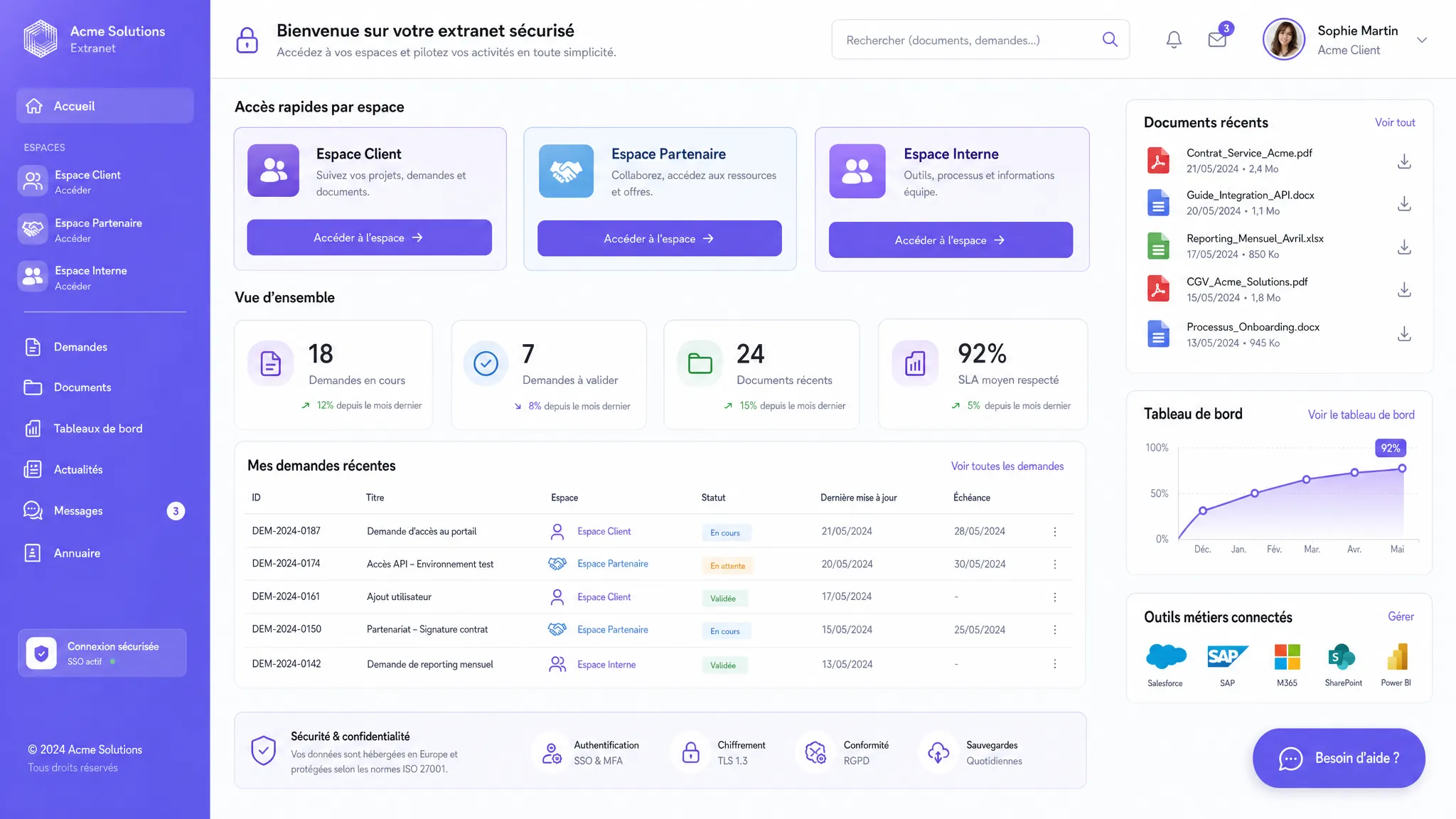
A custom extranet becomes profitable when it replaces repetitive exchanges with a single, secure space connected to company tools. For SMEs and scale-ups, it's not just a "client portal" but a lever to reduce follow-ups and save time.
June 01, 2026·13 min read
A custom extranet becomes profitable when it replaces repetitive exchanges with a single, secure space connected to the company's tools. For an SME or scale-up starting to structure its operations, it is not just a "client portal". It is a lever to reduce follow-ups, eliminate duplicate data entry, standardize requests, and give visibility to the right people at the right time.
The question is therefore not "what features can we add?", but "which features will truly save time for teams, clients, partners, or suppliers?". Here are the 6 features to prioritize to design a useful, adopted, and measurable extranet.
Custom extranet: what exactly are we talking about?
An extranet is a private web space accessible to users external to the company, such as clients, distributors, franchisees, service providers, partners, suppliers, or network members. Unlike an intranet, which is reserved for internal employees, an extranet serves as a collaboration zone between the company and its ecosystem.
A custom extranet goes further than a standard tool. It is designed around your actual processes: incoming requests, documents, approvals, reporting, role-based access, integrations with CRM or ERP, automations, and specific business rules. Technically, it is often a private web platform, with business logic tailored to your organization.
A custom approach is particularly relevant when your teams spend too much time answering the same questions, sending the same documents, verifying already known information, tracking statuses manually, or reconciling multiple tools.
The 6 features that truly save time
Before diving into the details, here is a summary view of the most useful features.
Feature
Problem solved
Main benefit
Secure role-based access
Information sent manually or poorly targeted
Fewer back-and-forths and reduced risks
Document library
Documents scattered across emails and drives
Faster search and reliable versions
Forms and workflows
Incomplete requests or handled case-by-case
Less duplicate entry and better qualification
Request tracking
Constant follow-ups to know the progress
Self-service visibility
Business integrations
Double data entry between tools
Synchronized data and seamless processes
Notifications, reporting, and AI
Manual management and delayed decisions
Faster prioritization and augmented support
1. Secure role-based access to avoid manual sorting
The first feature to implement is clear access management. In an extranet, not everyone should see the same information. A client should only access their contracts, invoices, projects, or requests. A partner might see sales resources, training materials, or shared leads. A supplier can track orders, quality documents, or approvals.
A good custom extranet allows you to define roles, permissions, and personalized spaces. This prevents teams from manually filtering information before every send. The time savings are immediate: fewer emails like "I'm resending the right document", fewer recipient errors, and fewer repeated verifications.
Security should not be an afterthought. It is part of the initial design: reliable authentication, potentially two-factor authentication, session management, logging of sensitive actions, and the principle of least privilege. To understand the technical basics, you can consult our guide on authentication.
It is also an important GDPR consideration. As soon as the extranet contains personal data, access rights, retention periods, traceability, and data minimization must be thought out from the scoping phase. The CNIL reminds us of best practices for personal data security, particularly regarding access control and authorization management.
2. A document library with search and reliable versions
In many companies, wasted time stems from a simple problem: no one knows where the right version of a document is. Terms of sale, manuals, contracts, purchase orders, training materials, meeting minutes, procedures, technical documents, invoices, guidelines, marketing kits—everything often ends up in inboxes or shared folders that are hard to maintain.
A document library integrated into the extranet centralizes these resources and makes them accessible based on the user's profile. The goal isn't just to "store files". You need to plan for clear categories, efficient search, tags, update dates, validity statuses, and, if necessary, a version history.
The time saved is quickly measurable: fewer incoming requests to find a document, fewer errors linked to obsolete versions, and less reliance on a person who "knows where it is".
If the document volume is large, an AI layer can be useful. For example, a search assistant can answer a question based on validated documents in the extranet, complete with citations and links to sources. This type of approach must remain controlled: sources of truth, access rights, logs, quality testing, and the ability to flag an incorrect answer.
3. Smart forms to qualify requests right from the start
A well-designed form saves more time than a long email thread. In an extranet, recurring requests can be structured: quote requests, support tickets, proof approvals, document submissions, access requests, incident reports, training registrations, or administrative information updates.
The key is to collect the right information from the start. A smart form can display fields based on the profile, pre-fill known data, block missing attachments, automatically route the request to the right team, and trigger an approval workflow.
This reduces an invisible but frequent cost: the time spent getting missing information. An incomplete request often generates several exchanges before the real work even begins. With a well-designed extranet, the request arrives already qualified, categorized, and actionable.
Workflows can remain simple at first. An effective V1 can be limited to three statuses, for example, "received", "processing", "approved", or "needs info". The important thing is to make the process visible, repeatable, and measurable before adding edge cases.
4. Self-service tracking of requests and projects
Self-service tracking is one of the most appreciated features by external users. Instead of sending an email asking "what's the status of my file?", the user checks their space: status, next step, assignee, deadline, expected documents, and communication history.
For the internal team, the benefit is major. Status follow-ups are often time-consuming because they interrupt work without creating value. An extranet reduces these interruptions by making information available in the right place.
This feature can take several forms depending on your industry: ticketing portal, order tracking, client project tracking, onboarding space, supplier portal, administrative file tracking, or partner space. In all cases, the logic is the same: a clear status, a reliable history, and a visible next action.
However, you must avoid turning the extranet into an overly complex system. Users don't need 15 internal statuses. They need to know if the request was received, if it's progressing, if something is expected from them, and when they can expect an answer.
5. Integrations with your existing tools to eliminate double data entry
An isolated extranet often ends up creating just another tool to manage. For it to truly save time, it must be connected to the tools already in use: CRM, ERP, billing tool, helpdesk, business software, e-signature tool, document base, messaging, or payment solution.
The goal is not to synchronize everything blindly. The goal is to identify the data that must flow automatically to avoid duplicate entry and inconsistencies. For example, a client created in the CRM can have their extranet space generated automatically. A request submitted in the extranet can create a support ticket. An invoice status can be visible in the portal without the finance team having to reply manually.
Integrations are often the real ROI driver. A pretty but disconnected portal provides visibility, but little automation. A connected extranet allows you to trigger actions, maintain a single source of truth, and reduce administrative tasks.
The right approach is to prioritize integrations based on frequency and operational pain. An integration that eliminates 30 manual actions a day is often worth more than an advanced feature used once a month.
6. Notifications, dashboards, and AI assistants to prioritize faster
Once requests, documents, and statuses are centralized, the extranet can become a management tool. Notifications save users from manually monitoring the space. Dashboards help teams identify overdue files, blocked requests, missing documents, or at-risk clients.
The golden rule: notify less, but better. Too many alerts recreate the noise the extranet was supposed to eliminate. A good notification must be targeted, actionable, and tied to a clear rule: expired document, pending approval, unanswered request for X days, new comment, or important status change.
AI can add value if it serves a specific use case. It can summarize a file's history, suggest a response to a request, detect urgent requests, automatically classify attachments, or help a user find a procedure. But it should not replace basic controls: reliable data, permissions, human validation for sensitive actions, and traceability.
For an SME or scale-up, the right level of AI is often progressive. First, centralize and structure. Then, automate repetitive rules. Finally, add AI assistance where it reduces a real volume of questions, sorting, or summarizing.
How to prioritize features for a useful V1?
The main risk of a custom extranet is wanting to integrate everything in the first version. An effective V1 must solve a well-identified operational problem. It should not cover all theoretical edge cases.
Start by observing current friction points: repetitive emails, documents sent multiple times, status follow-ups, data entry errors, incomplete requests, or loss of visibility between teams. Then, choose the features that eliminate these frictions with the least possible complexity.
A good V1 generally answers four questions: who logs in, what information this person needs to see, what actions they can take, and what data must be synchronized with your internal tools. This logic aligns with best practices for custom software creation, where a narrow, useful, and testable scope is prioritized.
Here is a simple grid to help you decide.
Criterion
Question to ask
Why it matters
Frequency
Does this action happen every day or every week?
The higher the frequency, the greater the cumulative gain
Internal time
How many minutes does the team lose on each occurrence?
Helps quantify the ROI
User friction
Does the client or partner have to follow up often?
Improves the experience and reduces frustration
Available data
Does the information already exist in a tool?
Determines the feasibility of the integration
Risk
Does the action involve sensitive data or a critical decision?
Determines the necessary safeguards
Mistakes to avoid during design
A custom extranet can become an excellent productivity lever, but only if certain traps are avoided right from the scoping phase.
The first mistake is replicating your current processes without simplifying them. If a workflow is unnecessarily complex offline, digitizing it as-is will only make the complexity more visible. Development should be an opportunity to eliminate steps, not just put them online.
The second mistake is neglecting adoption. External users won't log in if the portal doesn't provide them with a clear benefit. Therefore, the extranet must be designed around their moments of need: finding a document, submitting a request, tracking a status, or responding to an expected action.
The third mistake is underestimating integrations. An extranet that requires constant internal duplicate entry will eventually be bypassed. Conversely, a well-chosen integration can save time every day.
Finally, beware of delayed security. Access rights, data management, activity logs, and retention rules must be thought out from the start, especially if the extranet contains commercial, contractual, financial, or personal information.
Which KPIs to track to prove time savings?
An extranet should be managed like a product. Before developing, define a baseline: how many requests arrive by email, how many follow-ups are sent, how long processing takes, and how many errors appear in files.
Then, track a few simple indicators.
KPI
What it measures
Positive signal
Number of incoming emails per file
Coordination load
Drop in repetitive requests
Average processing time
Operational efficiency
Reduction in time between request and resolution
Rate of complete requests upon submission
Form quality
Fewer back-and-forths
Self-service usage rate
User adoption
More views without internal solicitation
Number of duplicate entries avoided
Impact of integrations
Fewer errors and admin tasks
User satisfaction
Client or partner experience
Better perception of the service
These KPIs don't need to be numerous. It's better to track 4 useful indicators every week than to build a comprehensive dashboard that no one looks at.
Standard extranet or custom extranet: how to choose?
A standard tool may suffice if your needs are simple: sharing documents, creating a few accesses, or publishing generic information. In this case, a SaaS portal or an existing collaborative solution can be faster and cheaper to launch.
A custom approach becomes relevant when your processes are specific, multiple profiles need to interact differently, access rights are granular, integrations are central, or the extranet needs to become a sustainable operational advantage.
In practice, many companies adopt a hybrid approach: using existing building blocks when they are suitable, then custom-developing the workflows, interfaces, and integrations that create real value.
FAQ
Is a custom extranet reserved for large companies? No. It can be highly relevant for an SME if it manages many repetitive exchanges with clients, partners, suppliers, or franchisees. The challenge is to start with a targeted V1 rather than an overly broad platform.
What is the difference between an extranet, an intranet, and a client portal? An intranet is intended for internal teams. An extranet is open to external users with controlled rights. A client portal is a type of extranet focused on clients, but an extranet can also target partners, suppliers, or networks.
Should AI be integrated into a custom extranet? Not systematically. AI becomes useful if it reduces a real volume of searching, sorting, summarizing, or support. It must be connected to reliable sources, respect access rights, and remain measurable.
How many features should be planned for a first version? Generally, 2 or 3 well-chosen features are enough for a V1: secure access, documents, structured requests, or status tracking. Critical integrations can be added from the start if they are essential for saving time.
How to prevent the project from taking too long? Set a measurable business goal, limit the scope of the V1, involve a few pilot users, and organize regular demos. The backlog must distinguish what is essential now from what can wait.
Transforming an extranet into a productivity lever
A successful custom extranet is not the one with the most features. It is the one that eliminates repetitive tasks, clarifies responsibilities, and connects the right users to the right information.
At Impulse Lab, we support SMEs and scale-ups in designing custom web and AI platforms: opportunity audits, process automation, integration with existing tools, end-to-end development, and team adoption. If you want to identify the features that would truly save time in your organization, start by scoping a measurable V1 with your current workflows.
You can contact Impulse Lab to transform an extranet need into a concrete, useful solution integrated with your way of working.