Scaling isn't just about selling more. For an SME or scale-up, scaling means absorbing more clients, orders, data, and decisions without multiplying errors or hiring someone at every new growth stage.
May 31, 2026·16 min read
Scaling doesn't just mean selling more. For an SME or a scale-up, scaling means absorbing more clients, more orders, more data, and more decisions, without multiplying errors or recruiting a new person at each new growth stage.
It’s often at this point that the question arises: should you keep your current SaaS stack, cobble together automations, or invest in custom management software?
The right answer isn't "yes" on principle. Custom software can become a major operational advantage, but only if the problem is recurring, measurable, strategic, and difficult to solve properly with off-the-shelf tools. Otherwise, it risks becoming an expensive, overly broad, or underutilized project.
Here is a concrete method to decide.
What we mean by custom management software
Custom management software is an application designed to drive one or more internal processes according to your business rules: operations tracking, sales management, production, scheduling, validation, invoicing, reporting, customer relations, administrative workflows, etc.
Unlike a standard SaaS, it doesn't force your organization into a generic model. It is built around your workflows, your data, your roles, your integrations, and your metrics.
This can take several forms:
An internal portal to centralize requests, validations, and statuses.
A business platform that replaces multiple spreadsheets and scattered tools.
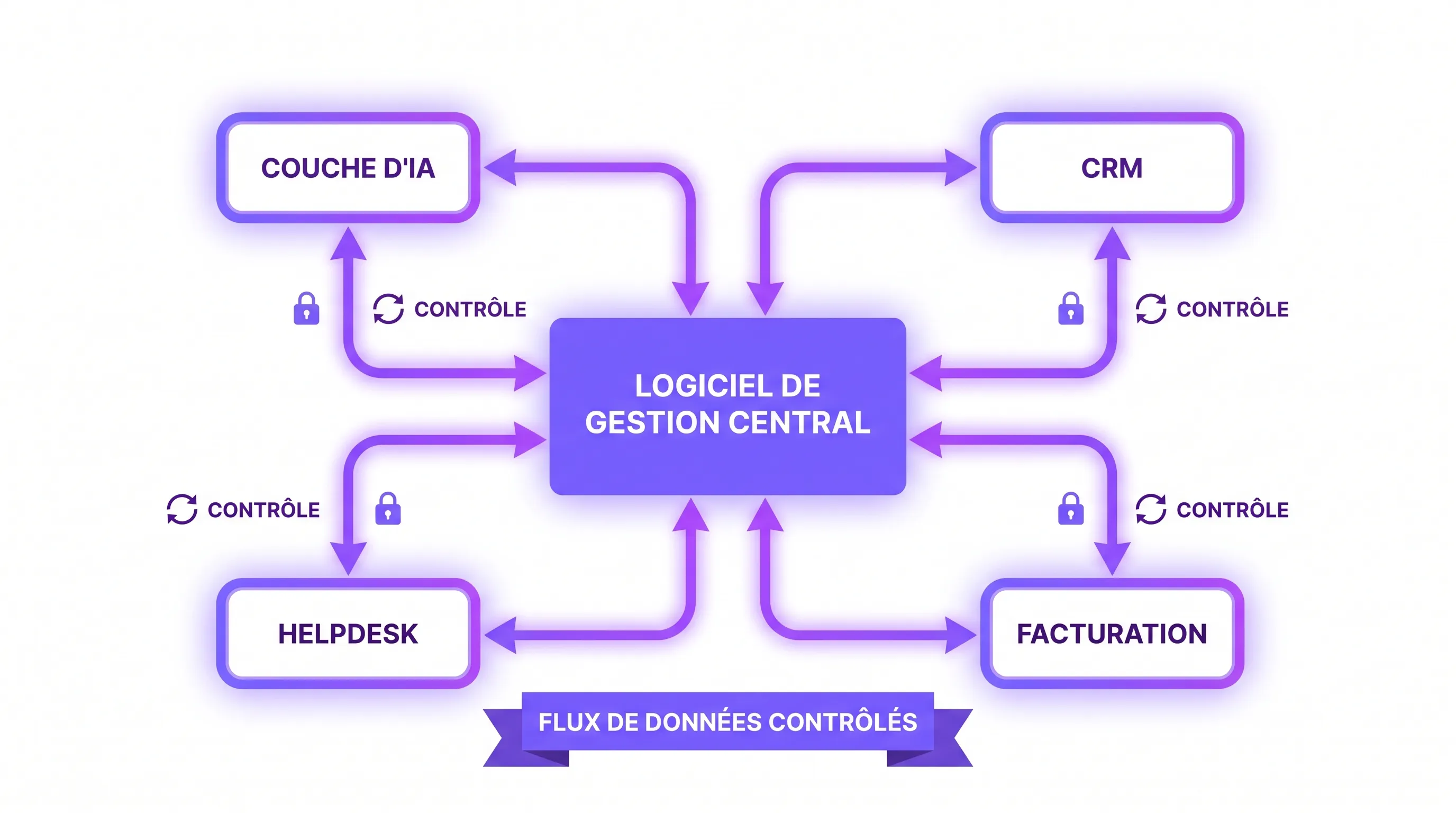
A back-office connected to your CRM, ERP, invoicing tool, or helpdesk.
An operational tool enriched by AI to automate data entry, routing, analysis, or team assistance.
The question is therefore not just "do we need software?". The real question is: do we have a key process that is blocking our ability to scale?
Signs that standard software is no longer enough
In the beginning, an SME can operate perfectly well with a CRM, a project management tool, a few automations, and spreadsheets. This is often the best approach: fast, inexpensive, and easy to modify.
But as the company grows, certain symptoms appear. They indicate that your tools can no longer support your operational complexity.
The first signal is the multiplication of double data entry. The same information goes from a form to a spreadsheet, from the spreadsheet to the CRM, then from the CRM to invoicing. Each transfer adds delay, errors, and frustration.
The second signal is the reliance on "memory people". If only two people know where to find information, how to handle an exception, or which status is reliable, your system doesn't scale. It relies on individual experience, not on a repeatable process.
The third signal is manual reporting. If your team spends several hours a week compiling numbers rather than acting on them, data is not yet a management asset.
The fourth signal is the explosion of exceptions. Generalist SaaS handle standard cases well. But if your business advantage relies on specific rules, particular statuses, complex validations, or multi-team workflows, the standard tool eventually gets bypassed.
Finally, the fifth signal is the loss of visibility. When no one can easily answer "what is the status of this file?", "who is blocking it?", "how much is this costing us?", or "which team is overloaded?", growth becomes difficult to manage.
When custom software becomes a real lever for scaling
Custom management software becomes relevant when it isn't just used to "organize better," but to increase the company's operational capacity.
It must allow you to process more volume without increasing headcount at the same rate. It must reduce errors in a costly process. It must accelerate sales, production, delivery, or support cycles. It must also make data actionable without manual consolidation.
Here is a simple grid to help you decide.
Criterion
Standard SaaS is sufficient
Custom software to consider
Process
Simple, close to market standards
Specific, differentiating, or complex
Volume
Low to moderate
Rapidly growing or already saturating
Data
Few tools to connect
Data scattered across multiple systems
Business rules
Few
Numerous, evolving, difficult to model in a SaaS
Business impact
Comfort or organization
Direct gain on margin, revenue, quality, or speed
Adoption
A generic tool is accepted
Teams bypass existing tools
Reporting
Sufficient in current tools
Too manual, incomplete, or unreliable
If you mostly check the right column, it is likely that a dedicated business tool is worth investigating.
The wrong reasons to develop custom software
Custom software is powerful, but it shouldn't be chosen for the wrong reasons.
The first wrong reason is personal preference. "I don't like our current tool" is not enough. You must identify what the tool concretely prevents: delays, errors, loss of margin, lack of visibility, administrative burden, poor customer experience.
The second wrong reason is the desire to centralize everything too early. A single platform that manages everything, for everyone, from V1, is often the shortest path to an endless project. It is better to start with a critical and complete workflow.
The third wrong reason is copying an existing SaaS. If you simply want to remake Airtable, HubSpot, Notion, Monday, or Odoo "your way," the cost will rarely be justified. Custom software becomes interesting when your process doesn't fit neatly into these tools, or when stacking them creates more friction than value.
The fourth wrong reason is automating a poorly defined process. Software amplifies your organization. If there are no clear rules, no business owner, and no reliable data, development will not solve the underlying problem.
Before building, you must therefore scope the process, the users, the decisions, and the metrics. On this point, you can rely on a scoping method like the one detailed in our guide on custom software creation.
Build, buy, or assemble: the three realistic options
The decision is not limited to "SaaS or full development". In practice, the best management systems often combine several approaches.
Buy a SaaS
This is the fastest option when the need is standard. CRM, accounting, invoicing, customer support, project management, or HR: many areas are already well covered by mature tools.
The advantage is obvious: rapid deployment, included maintenance, generally industrialized security, and an ecosystem of integrations. The limit appears when the tool forces you to modify a process that makes you different, or when every adaptation becomes a workaround.
Assemble multiple tools
This is often the right compromise. You keep solid SaaS for generic functions, then add automations, connectors, or a lightweight business interface.
For example, your CRM remains the sales source, your invoicing tool remains the financial source, but a custom layer orchestrates validations, statuses, assignments, notifications, and dashboards.
This approach reduces costs and avoids rebuilding what already exists. However, it requires a good mastery of APIs, access rights, data quality, and monitoring.
Build custom software
This is relevant when the process is at the heart of your operational model. For example: a specific pricing engine, a file processing chain, a multi-actor production workflow, a customer platform, a partner portal, or an operational cockpit connected to several tools.
In this case, the software becomes a growth infrastructure. It structures the way the company works, measures, and decides.
The simple formula to measure if the investment is justified
Custom management software must be justified by a business case. Not necessarily with a complex financial model, but at least with a clear estimate.
The basic formula:
Net monthly gain = time saved + errors avoided + accelerated revenue + protected margin - recurring costs
Then:
Payback = initial project cost / estimated net monthly gain
Let's take a simple example. A company processes 1,000 files per month. Each file requires 12 minutes of manual coordination between three tools. Software reduces this time to 4 minutes thanks to automatic statuses, centralized validations, and integrations.
This represents 8,000 minutes saved per month, or about 133 hours. If the average fully loaded cost is 45 euros per hour, the potential time savings is about 5,985 euros per month, not counting avoided errors and better visibility.
This calculation is not an absolute truth. It serves to verify the order of magnitude. If the problem only represents a few hours a month, custom software is probably too heavy. If the problem absorbs dozens or hundreds of hours, blocks growth, or degrades the customer experience, it deserves serious scoping.
KPIs to define before developing
A management software project should not be driven solely by a list of features. It must be driven by results.
Here are the most useful KPIs depending on the type of process:
Objective
Recommended KPI
Measurement example
Reduce manual workload
Processing time per file
Minutes before/after
Accelerate operations
Cycle time
Time between request and delivery
Improve quality
Error or rework rate
Corrected files / processed files
Increase capacity
Volume processed per person
Files per FTE
Improve visibility
Rate of files with reliable status
Up-to-date files / total
Reduce lost sales
Response or quote time
Average time before sending
Better management
Reporting production time
Hours per week
These KPIs must be measured before the project. Without a baseline, you won't be able to prove that the software actually improves performance.
This is particularly important if you integrate AI: document extraction, intelligent routing, internal assistant, report generation, scoring, semantic search, or agents. AI must be evaluated on its operational effects, not just on the apparent quality of a demo.
What a V1 must contain to help scale
A common mistake is wanting to integrate all rules, all profiles, all dashboards, and all historical exceptions from the start. This is rarely necessary.
A good V1 should cover a complete, but narrow, workflow. It must allow a pilot team to process a real case from end to end with less friction than before.
For management software, a useful V1 generally contains:
Simple authentication and roles.
A clean data model for key objects: clients, files, orders, tasks, statuses.
A main workflow with steps, validations, and responsibilities.
One or two critical integrations with existing tools.
A minimal dashboard to track the decided KPIs.
Logs or history to understand what happened.
A user feedback mechanism to prioritize what's next.
This V1 doesn't have to be perfect. It must be reliable enough to test the impact on a real scope. Then, the product evolves in short cycles: improving rules, adding integrations, automating tasks, enriching reporting, integrating AI if the need is clear.
This is also why a weekly delivery mode, with regular user involvement, strongly reduces the risk of building a theoretical tool.
Architecture: what really matters for scaling
Management software designed to scale must be thought of as an evolving platform, not just an improved form.
This doesn't mean over-engineering. It means making the right decisions early.
The first decision concerns data. Where is the source of truth? Does the CRM remain the master of accounts? Does the invoicing tool remain the master of invoices? Does the custom software become the master of operational files? These responsibilities must be explicit.
The second decision concerns integrations. An isolated tool quickly recreates silos. It must communicate with existing systems via APIs, webhooks, controlled exports, or connectors. You can consult our definition of a web platform to better understand the technical building blocks of a modern application system.
The third decision concerns access rights. The more the software centralizes important data, the more it must manage roles, permissions, traceability, and confidentiality rules.
The fourth decision concerns observability. In production, you need to know if processes are working, if integrations are failing, if response times are degrading, or if costs are increasing. This is even more true when an AI layer is added.
Finally, the fifth decision concerns maintainability. Software that scales must be able to evolve without a complete rewrite for every new team, new country, new product, or new channel.
Where AI can add value in management software
AI is not mandatory in management software. But it can create significant leverage if integrated into specific workflows.
The most useful cases are often highly operational. For example, AI can summarize client exchanges, extract information from documents, suggest categorization, detect an anomaly, help draft a response, search an internal knowledge base, or prepare a weekly report.
To go further, an AI can also trigger controlled actions: create a task, pre-fill a file, route a request to the right team, propose a quote, or alert a manager. In this case, safeguards are needed: human validation, action logs, permissions, testing, confidence thresholds, and the ability to roll back.
The key point is simple: AI must fit into the management software to reduce a concrete friction. It should not be added as a decorative feature.
Custom management software can accelerate growth, but it also creates responsibilities. They must be anticipated right from the scoping phase.
The first risk is uncontrolled scope. Every team will want "just one little feature." Without prioritization, the V1 turns into an overly broad platform.
The second risk is underestimating integrations. Properly connecting a CRM, an ERP, a business tool, or a historical database often takes more time than the visible screen. Mappings, permissions, API errors, and synchronizations must be planned for.
The third risk is data quality. New software does not automatically correct inconsistent, obsolete, or duplicated data. It can even make them more visible.
The fourth risk is adoption. If teams haven't participated in the scoping, if the tool adds data entry without removing workload, or if managers continue to request parallel exports, usage won't catch on.
The fifth risk is the total cost. The budget is not limited to initial development. You must plan for maintenance, hosting, evolutions, security, support, documentation, training, and operations. To avoid surprises, read our dedicated article on the hidden costs of custom software development.
A 5-question decision method
Before launching a project, you can use this quick filter.
1. Is the process frequent? A problem handled every day or every week justifies an investment more easily than an occasional need.
2. Is the problem measurable? Lost time, errors, delays, blocked volume, lost margin, customer satisfaction: at least one metric must be trackable.
3. Is the process differentiating? If your way of selling, producing, delivering, or serving your customers is specific, custom software can protect your advantage.
4. Do current tools create operational debt? Double data entry, exports, workarounds, manual reporting, reliance on a few people: these invisible costs increase with growth.
5. Can a narrow V1 be delivered quickly? If you can isolate a priority workflow and test it with a pilot team, the risk becomes much more manageable.
If the answer is yes to at least three of these questions, scoping a custom management software is probably relevant.
Scenario example: moving from a spreadsheet to a business cockpit
Imagine a B2B services company that manages complex client requests. Initially, everything works with a CRM, emails, a tracking spreadsheet, and an invoicing tool.
At 20 clients, it's acceptable. At 80 clients, statuses are no longer reliable. At 150 clients, the team spends too much time asking for updates, checking documents, chasing validations, and producing reports.
The right project isn't necessarily to replace the entire stack. A more realistic approach is to create a business cockpit that centralizes files, displays reliable statuses, triggers reminders, synchronizes important data with the CRM, and generates simple reporting.
The V1 can focus on a single type of file. If it reduces processing time, improves status quality, and gives managers better visibility, the company can then expand the scope.
This is how management software becomes a lever for scaling: it transforms a people-dependent process into a manageable system.
How Impulse Lab supports this type of decision
At Impulse Lab, the goal is not to push custom software when a SaaS is sufficient. The right choice depends on your context, your existing tools, your processes, and your growth objectives.
Support can start with an opportunity audit to identify the workflows that truly deserve to be automated or structured. Then, a scoping phase defines the V1, KPIs, integrations, risks, and total cost. If the business case is solid, development can move forward in short cycles, with regular deliveries and user involvement.
The challenge is not just to deliver software. It is to transform a critical process into a reliable, adopted, and measurable platform capable of supporting growth.
FAQ
Is custom management software reserved for large companies? No. It can be relevant for an SME if the process involved is frequent, costly, strategic, or difficult to manage with standard SaaS. The most important thing is to start with a targeted V1.
How long does it take to create a first version? It depends on the scope, integrations, and business complexity. A useful V1 can often be scoped and then delivered progressively in a few weeks if the workflow is well limited and decisions are made quickly.
Should all existing tools be replaced? Rarely. In many cases, custom software acts as a business layer that connects and orchestrates existing tools rather than replacing them.
How do you prevent a custom project from drifting? You must define a main KPI, limit the V1 to a complete but narrow workflow, prioritize the backlog, involve pilot users, and organize regular demonstrations.
Is AI essential in modern management software? No. AI should only be added if it reduces real friction: extraction, summarization, search, routing, assistance, or controlled automation. The workflow and data remain the priority.
When should you choose a SaaS over custom software? If your need is standard, not very differentiating, well covered by the market, and without complex integrations, a SaaS is often faster and more cost-effective.
Ready to find out if custom software is relevant for your scale?
If your growth is hindered by spreadsheets, double data entry, vague workflows, or tools that don't communicate, custom management software can become a real productivity lever.
Impulse Lab helps you scope the right perimeter, audit your opportunities, integrate your existing tools, and develop a web or AI platform tailored to your business processes.
Contact Impulse Lab to transform a critical process into a measurable, scalable solution that is actually used by your teams.