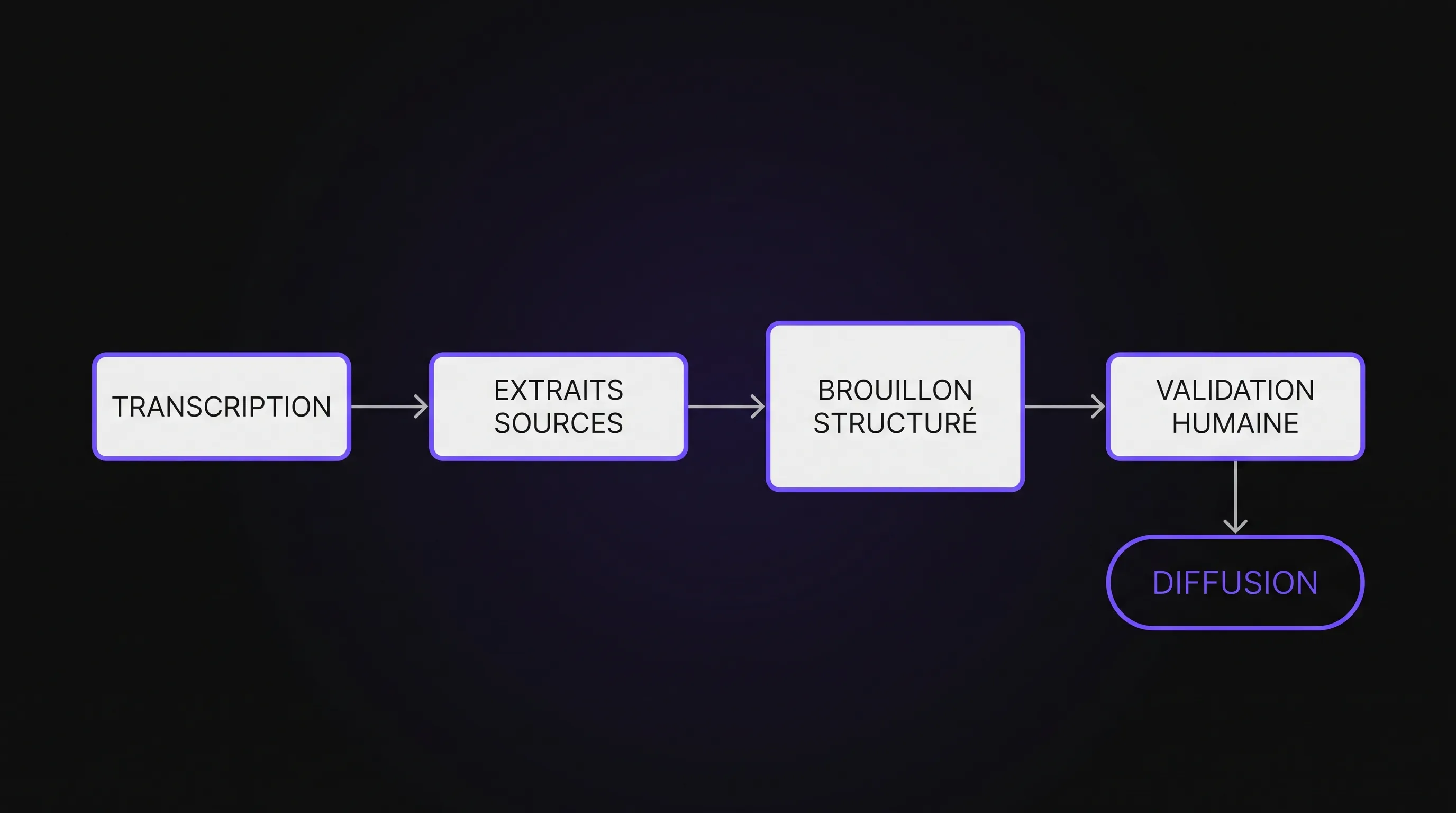
How to Make AI-Generated Meeting Summaries Reliable
Intelligence artificielle
Outils IA
Validation IA
Gestion des risques IA
Automatisations
To make AI-generated meeting summaries reliable, treat meeting notes as documents to verify, not automatically accurate accounts. Fluent phrasing can conceal misattributions or invented deadlines. Anchor commitments in source evidence, flag uncertainties, and validate action items.
To make AI-generated meeting summaries reliable, you must treat meeting notes as documents to be verified, not as automatically accurate records. Fluent phrasing can hide misattributions, invented deadlines, or suggestions turned into decisions. The most effective approach is to anchor commitments to their source, flag uncertainties, and validate items that trigger action.
For an SME or a scale-up, the goal isn't to reread every meeting in full. It is to focus reviews on what could cause operational errors: who does what, by when, and with whose agreement.
Identifying Where Errors Occur
Automated meeting notes typically rely on several steps: audio capture, transcription, speaker identification, and synthesis. An error introduced early on can cascade through the entire pipeline.
A language model can also produce a plausible conclusion even when participants decided nothing. Its ability to write clearly does not guarantee fidelity to the actual discussion.
Stage
Possible Error
Useful Check
Audio capture
An important remark is inaudible
Flag the passage and request confirmation
Transcription
“Not before June” becomes “before June”
Check negations and critical dates
Speaker identification
A task is assigned to the wrong person
Review named commitments
Synthesis
A hypothesis becomes a decision
Require evidence and an explicit status
A reference to the transcript is not absolute proof. If the transcription is flawed, the summary may faithfully reflect inaccurate text. For critical commitments, verification should be able to trace back to the audio—where recording and usage are permitted—or to confirmation from the participants.
Improve Input Data Before Switching Models
Make Discussions Understandable
Start by testing audio under real meeting conditions: shared conference rooms, remote attendees, and overlapping speech. A tool that excels in a demo may struggle with your microphones or industry jargon.
A few habits reduce ambiguity: avoid speaking over one another, name the person taking on an action, and rephrase decisions before moving to the next topic. The meeting lead can simply conclude: “So we confirm that Léa will send the proposal on Tuesday.”
These practices also make human note-taking easier. They improve the source rather than expecting AI to reconstruct what was never clearly stated.
Provide Limited, Verified Context
Add the agenda, attendee list, and a glossary of project names. This context helps identify terminology, but it should never be used to invent meeting conclusions.
The usual owner is not necessarily the designated owner this time. Similarly, a deadline mentioned in a prep document does not automatically become an agreed deadline.
Maintain a clear distinction between what was said during the meeting and background context. If the two conflict, prompt for verification rather than silently resolving it.
Structure AI-Generated Meeting Summaries Around Evidence
Output formatting matters as much as model selection. A broad paragraph helps provide an overview of the discussion, but makes omissions and fabricated commitments difficult to spot.
Request two levels of output: a brief executive summary for reading and a structured log for execution. The latter should clearly distinguish decisions, confirmed action items, proposals, and open questions.
For each action item, include the following fields:
Action: a precise description of the expected task.
Status: confirmed, proposed, or to be verified.
Owner: only if explicitly assigned or committed.
Deadline: only if stated in the source.
Condition: any stated dependencies, such as client approval.
Evidence: a short quote with a timestamp or available passage identifier.
Missing information should stay missing. “Unspecified” is far better than an estimated date or an owner guessed from the org chart.
Evidence exists to speed up verification, not to decorate the document. It should enable the reader to quickly locate the relevant passage. If your tool provides no source markers, do not ask the model to fabricate them.
Use Prompts That Allow Uncertainty
A request like “Write a clear summary with next steps” encourages a complete output even when the conversation was not complete. To make AI-generated meeting summaries reliable, specify instead what the system must leave undetermined.
Here is a starter prompt to adapt to your tool:
Based on the provided transcript, produce a brief summary, then separate confirmed decisions, confirmed actions, proposals, and open questions.

Use only the conversation as evidence for decisions and commitments. The provided context serves only to understand names and industry terms, not to fill in missing information.

For each decision or action, quote a short excerpt and its source reference where available. Never invent timestamps.

Only assign an owner and deadline if explicitly stated. Otherwise, indicate "unspecified". Preserve all conditions and reservations expressed.

Do not turn a suggestion, question, or intention into a confirmed commitment. In case of contradictions, display the relevant excerpts and flag as "to verify".

Conclude with items requiring human validation.
This prompt reduces certain errors, but it is no substitute for testing on your actual meetings. A strict format can still contain misinterpretations.
Also avoid mistaking a model-provided confidence score for a probability of accuracy. When verifying a decision, an audit-ready excerpt is far more actionable than a “95% reliable” claim backed by no calibration method.
Review Decisions and Actions, Not Just the Phrasing
Consider this fictional exchange:
“We could ask Julie to prepare a V2 for Friday, if the client confirms tomorrow.”
A poor summary would state: “Julie will prepare the V2 for Friday.” This version drops the condition and frames a contemplated assignment as confirmed.
The accurate summary preserves its status as a conditional proposal. Julie is the mentioned owner, but her assignment is not confirmed. Friday is the proposed deadline, and client approval remains a condition.
This example illustrates why AI-generated meeting summaries must distinguish what was discussed from what was agreed upon. The difference often hinges on just a few words: “could,” “subject to,” “not yet,” or “to be confirmed.”
During review, prioritize checking names, amounts, dates, negations, and conditions. Also watch for omissions: a document may contain zero hallucinations yet leave out the most critical decision.
Validate Before Sharing or Creating Tasks
Designate an Owner for Meeting Notes
Define who approves the document: the meeting facilitator, project manager, or account lead. Their role is to verify decisions and commitments, not rewrite every sentence.
People assigned an action item can confirm their commitment or request a correction. Use a visible status workflow—such as “Draft,” “Under Review,” and “Approved”—along with an identifiable source of truth.
Silence from attendees should not automatically be taken as agreement. Establish explicit rules for required sign-offs, especially when meeting minutes commit a budget, delivery date, or client deliverable.
To embed this practice long-term, you can incorporate validation into your team AI guidelines, rather than leaving each team member to improvise.
Separate Drafts from Execution
An error in a summary becomes much costlier when it automatically creates a task, updates a CRM, or sends an external message.
Initially, route all outputs to a staging or draft space. Only validated actions should feed business tools. Maintain a reference to the meeting and source excerpt with every created task so its origin remains clear.
Making AI-generated meeting summaries reliable therefore also means controlling their downstream effects: who can approve, what data can be transmitted, and how to correct an action item that has already been dispatched. A verbal cue spoken in a meeting should never suffice to trigger an operation in a connected system.
Measure Quality on Your Own Meetings
Before rolling it out company-wide, build a small benchmark set of representative meetings. Include straightforward discussions, but also meetings with disagreements, deadline shifts, domain-specific terminology, and unresolved decisions.
For each case, establish a ground-truth baseline validated by a qualified person: decisions actually made, confirmed actions, and unresolved points. Then compare the automated output to this baseline.
Metric
What it measures
How to track it
Fabricated commitments
Actions framed as confirmed without evidence
Count occurrences after review
Assignment or date errors
Actions assigned to the wrong owner or deadline
Compare with the validated baseline
Omitted key decisions
Loss of critical information
Verify presence of baseline decisions
Actionable traceability
Ability to verify an assertion
Verify that the excerpt genuinely supports the claim
Validation time
Human cost of review
Measure time spent until the document is approved
You can start, for instance, with ten to fifteen meetings. This pilot is designed to spot recurring failure modes, not to prove universal reliability.
Define your acceptance criteria before testing. For workflows that generate tasks, an action confirmed without supporting evidence should block automatic export. Time savings are measured up to the approved minutes, including corrections.
Re-run the same test cases after any update to the model, prompt, or transcription system. Without this regression testing, an update might polish the prose while degrading task attribution.
Protect Information Shared in Meetings
High-quality meeting notes are of little value if recording or distributing them exposes confidential information. Meetings often contain personal data, HR matters, or sensitive business details meant only for select participants.
When personal data is processed, the General Data Protection Regulation requires an appropriate legal basis, defined purpose, limited data retention, and adequate security. Inform data subjects about the setup. Consent is not automatically the only viable legal basis; the choice depends on context.
Check where the audio, transcript, and summary are stored, who can access them, and the terms governing data processing by the vendor. Specifically review clauses regarding data reuse/training, retention, deletion, and transfers outside the European Economic Area.
These checks are part of the criteria for choosing a reliable AI tool. An approved summary should never be shared to a channel more open than its content warrants.
Frequently Asked Questions
Is a good prompt enough to eliminate hallucinations? No. It can limit unwarranted inferences, but it will not fix an erroneous transcript. Key commitments must remain verifiable and undergo appropriate validation.
Should you keep all audio recordings? No. Retention must have a justified purpose and defined duration. If audio is not retained, rely on transcript markers and seek participant confirmation whenever a critical point remains ambiguous.
Can task creation be directly automated? It is best to start with draft tasks that require validation. Broader automation should be grounded in proven benchmark results, safeguard blocking rules, and clear correction workflows.
Which tool produces the most reliable meeting notes? The right choice depends on your audio quality, vocabulary, and governance requirements. Benchmark tools on identical meetings by evaluating error rates, omissions, and verification time—not just surface readability.
Implementing a Tailored Process for Your Team
To make AI-generated meeting summaries reliable, begin with a recurring meeting type and a straightforward review workflow. Stabilize capture, formatting, and checks before piping results into your core business tools.
Impulse Lab supports organizations with AI audits, training, and custom solution development integrated into their existing tools. An initial audit can help scope this workflow: data to extract, validations to enforce, and the automations that make sense for your business.