Internal and External Communication Tools: How to Align Them Effectively
Productivité
Optimisation
Communication interne
Outils internes
Gestion de projet
When a company grows, the problem is almost never a lack of tools. There is already a messaging app, an inbox, a CRM, a project management tool, sometimes an intranet, customer support, a shared client space, and several marketing channels.
When a company grows, the problem is almost never a lack of tools. There is already a messaging app, an inbox, a CRM, a project management tool, sometimes an intranet, customer support, a shared client space, and several marketing channels.
The real issue lies elsewhere: internal and external communication tools are not always aligned with each other. A sales promise stays in the CRM but doesn't reach the delivery team. Customer feedback reaches support but never feeds into the roadmap. An internal decision is not reflected in the messages sent to clients. The result: duplicates, lost information, delayed responses, frustration on the team's side, and inconsistency on the client's side.
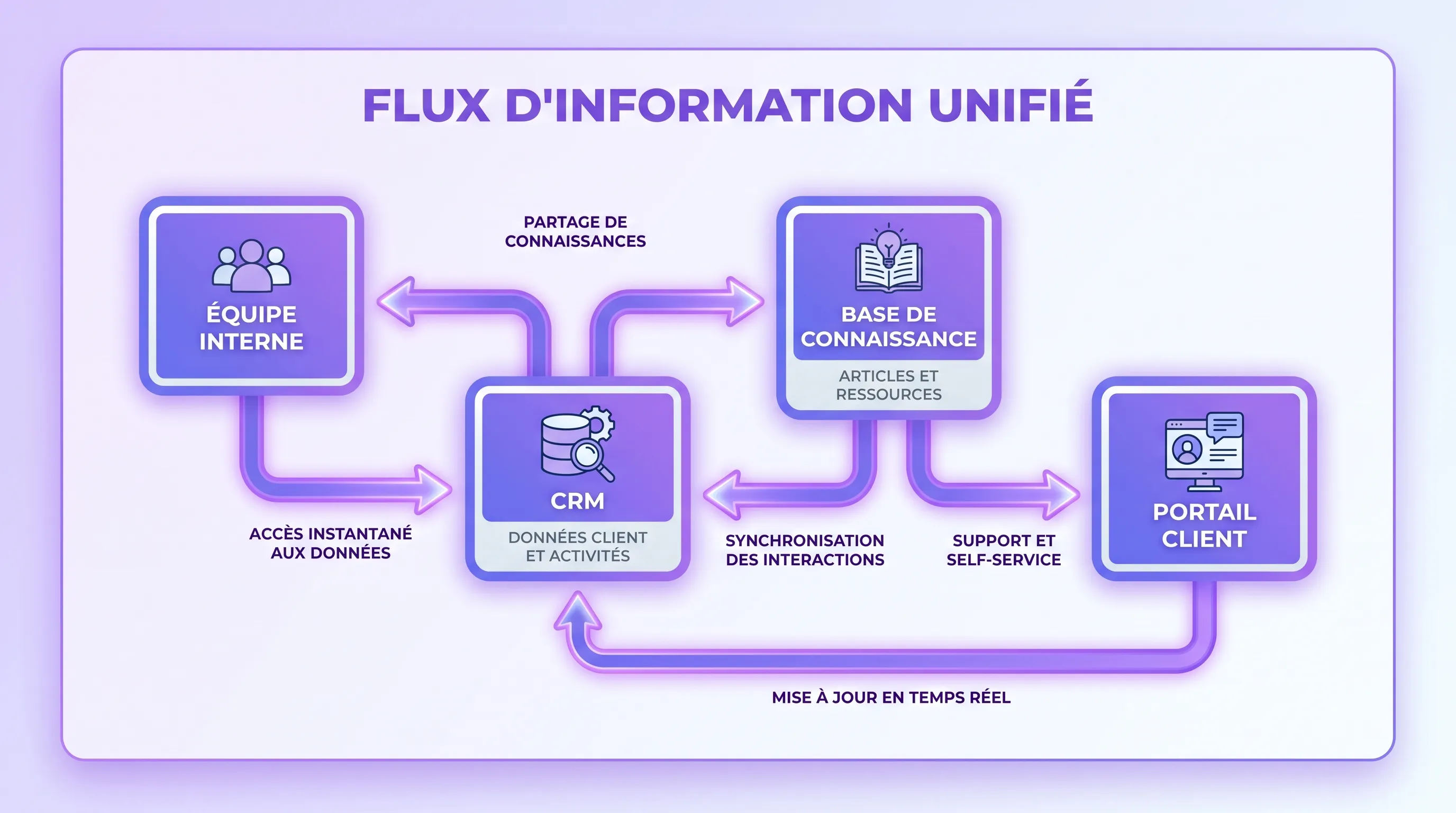
Properly aligning these tools doesn't mean centralizing everything into a single platform. It means defining who communicates what, where, when, with what level of traceability, and how information passes between the internal and external spheres.
Why Alignment Matters More Than Tool Selection
At a small size, a lot of information flows naturally. The founder talks directly to clients, teams are close-knit, and decisions are made quickly. But as soon as the company structures its functions—sales, operations, support, product, marketing, finance—the flows become fragmented.
Each team then adopts its own tools according to its immediate needs. Sales reps live in the CRM. Support in a helpdesk. Marketing in its email tool. Project teams in Notion, ClickUp, Asana, Jira, or an equivalent. Executives in email and dashboards. No tool is bad in itself, but each only sees a part of the reality.
This is precisely where communication breaks down. According to the Microsoft Work Trend Index, 68% of respondents say they lack uninterrupted focus time at work. The pile-up of messages, notifications, and requests aggravates this phenomenon when there are no clear rules.
For an SMB or a scale-up, the goal is therefore not just to choose good tools. You have to create a clear communication system, where client information flows to the right teams, and where internal decisions are correctly translated into external touchpoints.
Internal and External: Two Different Logics
Internal communication serves to align, decide, produce, document, and coordinate. External communication serves to attract, sell, inform, reassure, support, and retain. Both are linked, but they do not have the same pace or the same level of confidentiality.
Here is a simple reading of the main uses:
Need
Typical Internal Tools
Typical External Tools
Critical Alignment Point
Track an opportunity
Messaging, shared CRM, sales meeting
Form, email, call, CRM
Transmit the client context to the delivery team
Manage a client project
Project management, knowledge base, team channel
Client portal, email, meeting minutes
Share progress without exposing internal exchanges
Handle a support request
Helpdesk, internal messaging, knowledge base
Ticket, chat, email, FAQ
Turn recurring problems into product or process improvements
Announce a new feature
Internal notes, meeting, documentation
Newsletter, website, social media
Align teams before the public announcement
Capitalize on field feedback
Knowledge base, product tool, CRM
Surveys, reviews, client conversations
Escalate weak signals to decision-makers
This table shows one important thing: tools shouldn't all do the same thing. A CRM is not a knowledge base. Slack or Teams are not reliable archives for structural decisions. A client portal shouldn't become an operational catch-all. Each tool has a role, and alignment consists of organizing the transitions between these roles.
The best method is to start from actual flows, not software. Before adding a platform, ask yourself how information circulates today during the key moments of your business.
Start by mapping a few simple journeys: a prospect becoming a client, a client reporting a problem, a team preparing an announcement, a project changing scope, field feedback that should influence a decision. For each journey, identify the origin of the information, the owner, the tools involved, the necessary approvals, and where the final decision should be stored.
Five questions are often enough to reveal friction points:
Where does the information first appear?
Who needs to be informed immediately?
Who needs to act, approve, or decide?
Where should the information be archived to be found later?
What message needs to be transmitted to the client, partner, or prospect?
This mapping often reveals simple disconnects: a form not connected to the CRM, customer support isolated from product teams, meeting minutes sent by email but never capitalized on, sales promises not visible to operational teams.
Assign a Clear Role to Each Channel
Effective alignment relies on a simple rule: a channel must have a primary function. When the same message can be sent via email, messaging, task comment, shared document, and call, the team wastes time guessing where to look.
A usage matrix helps reduce this ambiguity:
Type of Communication
Recommended Channel
Why
Short operational emergency
Internal messaging
Fast, visible, suited for immediate coordination
Important decision
Project tool or approved document
Traceable, searchable, less dependent on conversations
Official internal information
Intranet, internal email, or knowledge base
Stable, accessible to all relevant audiences
Individualized sales exchange
CRM and email
Linked to account history and next actions
Recurring client follow-up
Client portal, meeting minutes, or shared project tool
Provides a clear view without exposing internal discussions
Client problem
Helpdesk or ticketing
Allows tracking, prioritization, and response time measurement
This clarification avoids two common traps. The first is noise, when everything becomes urgent and every channel turns into a continuous feed. The second is memory loss, when decisions remain in conversations that are impossible to find. If this is your main problem, the detailed approach to reducing noise in internal communication can complement this work.
Create Crossing Points Between Internal and External Communication
Alignment is not just about saying which tool to use. It must also define the crossing points between internal and external. These are the bridges that prevent information from getting stuck in one department.
A good crossing point generally contains four elements: source data, an owner, an expected action, and a trace. For example, when a new client signs, the source data is in the CRM, the owner might be the sales manager, the expected action is launching onboarding, and the trace should appear in the project tool or client portal.
Another example: when a client opens three tickets on the same topic, support shouldn't just reply. They can qualify the problem, link the tickets to a theme, alert the product or operations team, and then document the solution in the knowledge base. The external flow then becomes an internal learning opportunity.
Automate Transitions Without Dehumanizing the Relationship
Once flows are clarified, automation becomes useful. It shouldn't replace human judgment, but rather eliminate repetitive transmission tasks and oversights.
A few high-value automations:
Automatically create an onboarding task when an opportunity moves to signed client in the CRM.
Alert the relevant team when a support ticket exceeds a defined timeframe.
Synchronize certain fields between the CRM, project tool, and client portal to avoid double entry.
Generate a draft of meeting minutes from meeting notes, then have it approved before sending.
Group recurring client feedback to feed a knowledge base or roadmap.
The nuance is essential: automating routing, summarization, or task creation is often relevant. Automating a sensitive client response without oversight can create image, compliance, or quality risks. The best systems therefore keep human validation on important messages, while accelerating the flow of information.
This is also where AI becomes interesting. It can help classify requests, summarize exchanges, extract action items, detect recurring themes, or make a knowledge base easier to query. But to produce value, it must be connected to the right processes, not just added as an extra layer.
Architecture Example by Maturity Level
There is no universal combination. A small business doesn't need the same architecture as a scale-up with multiple teams, multiple markets, and structured support. The challenge is to build progressively, without piling up overlapping tools.
Company Stage
Recommended Architecture
Priority
Very Small Business (VSB) structuring
Email, internal messaging, simple CRM, lightweight knowledge base
Industrialize without breaking relationship quality
Multi-team organization
Integrations between tools, shared repositories, access rights, supervised automations
Give a coherent view to each team without exposing everything
The right mix depends mostly on your critical flows. If 80% of friction comes from the transition from sales to delivery, start there. If your support always receives the same questions, work on the knowledge base and the internal feedback loop. If your clients lack visibility on projects, a portal or shared space can create more value than a new messaging app.
Governance Rules to Formalize
Tools only work sustainably if the rules are explicit. Lightweight governance is often enough, provided it is applied.
The most useful rules concern channel ownership, response times, confidentiality, archiving, and access rights. For example, a client channel shouldn't contain unfiltered internal debates. A budget decision shouldn't stay solely in a discussion thread. Sensitive information shouldn't be copied into a tool not designed for it.
It is also important to appoint owners. Who maintains the knowledge base? Who cleans up CRM duplicates? Who decides on client message templates? Who approves automations? Without an owner, tools degrade quickly, even when they were well chosen initially.
In practice, a quarterly review is often enough to check three points: are the channels still being used as intended, what information is still getting lost, and what automations need to be adjusted or removed?
Common Mistakes to Avoid
The first mistake is wanting a single tool to do everything. It's tempting, but rarely realistic. The needs of a sales team, customer support, and a project team are different. Seeking total unification often produces a clunky tool that is poorly adopted and bypassed.
The second mistake is integrating too quickly. Connecting poorly configured tools doesn't solve underlying problems. It can even spread bad data faster. Before automating, you must clarify fields, statuses, responsibilities, and usage rules.
The third mistake is forgetting the client experience. The internal side might be perfectly organized, but if the client receives contradictory messages or has to repeat their context three times, the alignment fails. A good architecture is also measured by the fluidity perceived by the client.
The fourth mistake is neglecting adoption. Training teams doesn't mean presenting all the features of a tool. It means explaining the expected uses, edge cases, good habits, and the consequences of misuse.
How AI Can Strengthen Tool Alignment
In 2026, AI is no longer just a subject of experimentation. It is becoming a concrete lever to better connect internal and external communication, provided you start from business processes.
In a well-structured organization, AI can help transform raw exchanges into actionable information. It can summarize client conversations, propose ticket categorization, detect recurring signals, prepare responses consistent with a knowledge base, or generate an internal summary before a follow-up meeting.
But AI does not compensate for vague governance. If information is scattered, contradictory, or poorly qualified, it risks producing incomplete summaries. The priority work therefore remains the architecture of flows: what data, what tools, what rights, what approvals, what control points?
This is precisely the type of subject where a tailored approach can make a difference. A company doesn't always need a new tool, but an audit of its automation opportunities, better-designed integrations, or a platform adapted to its actual uses.
FAQ
What are the main internal and external communication tools? Internal tools include team messaging, email, intranets, knowledge bases, project management tools, and collaborative suites. External tools include CRMs, customer support, chat, email marketing, social media, websites, forms, and client portals.
Should internal and external communication be strictly separated? Yes for confidentiality and clarity, but no for useful data. Internal exchanges must remain controlled, while certain information, like project status or client history, must flow between tools with precise rules.
Which tool should you choose first when structuring an SMB? The first choice depends on the most critical flow. For a sales team, the CRM is often a priority. For a project team, the tracking tool and documentation matter more. For a business with many client requests, the helpdesk and knowledge base can create an immediate gain.
How can you avoid tool pile-up? You must assign a clear role to each channel, eliminate duplicate uses, limit notifications, and document decisions in reliable spaces. Before adding a tool, check if the problem really comes from a functional lack or a missing usage rule.
Can AI replace a communication tool? No, AI does not replace structured communication. It can improve it by summarizing, classifying, automating, or facilitating information retrieval. However, it must rely on reliable data and clear processes.
Structure Your Flows Before Adding a Tool
Properly aligning your internal and external communication tools means creating continuity between what your teams know, what they decide, and what your clients perceive. It's less a question of software than a question of architecture, rules, and integration.
If you want to identify the right automation points, connect your existing tools, or design a platform tailored to your processes, Impulse Lab supports companies with AI audits, integrations, and the development of custom web and AI solutions.