Internal Communication Intranet: The Features That Matter
Productivité
Optimisation
Communication interne
Outils internes
As an SMB or scale-up grows, internal communication rarely gets simpler. Announcements go out via email, decisions get lost in Slack or Teams, documents live in multiple folders, and new hires spend their first weeks asking where to find information.
June 05, 2026·14 min read
As an SMB or scale-up grows, internal communication rarely gets simpler. Announcements go out via email, decisions get lost in Slack or Teams, documents live in multiple folders, and new hires spend their first weeks asking where to find the right information.
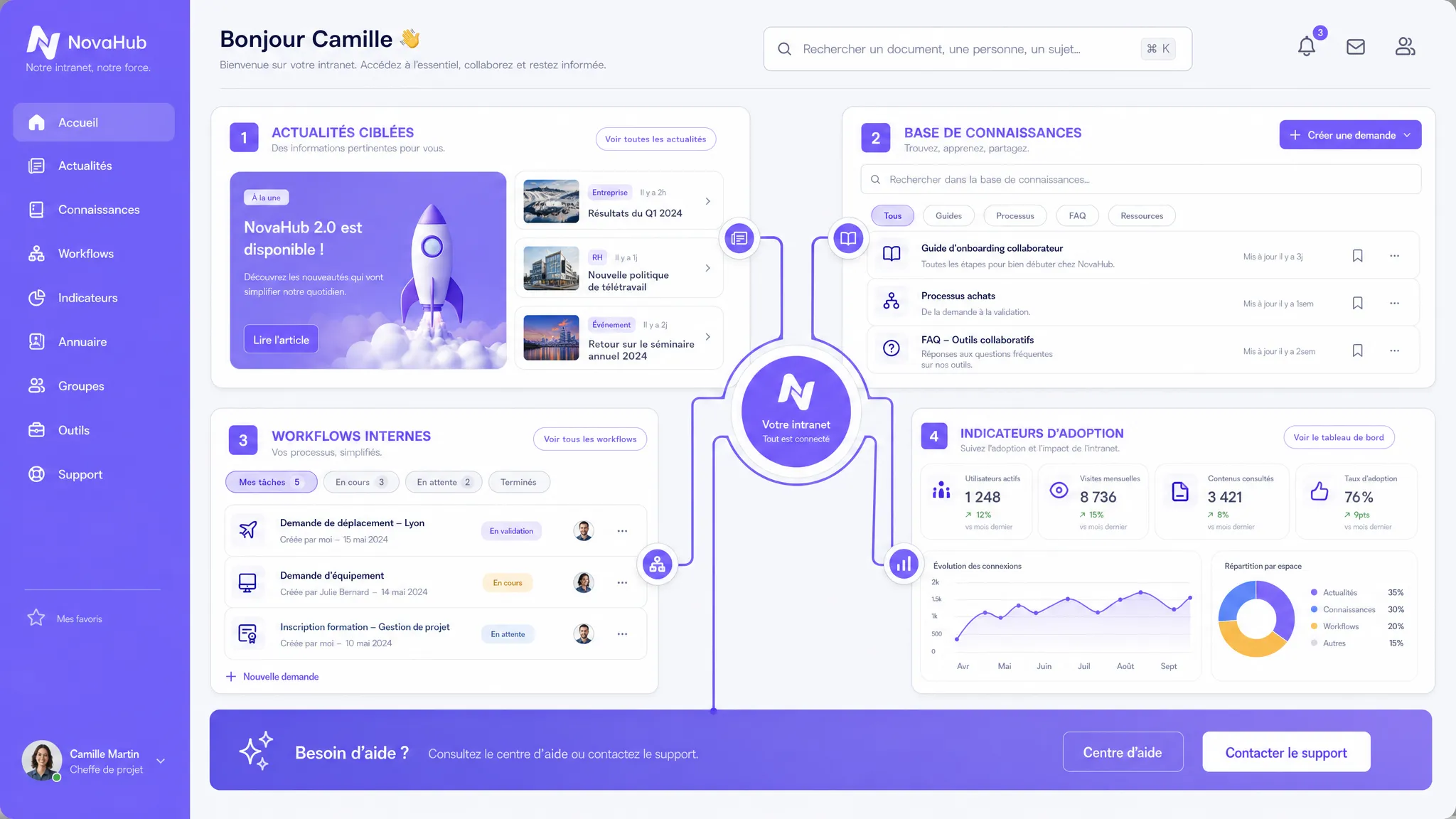
This is precisely where an internal communication intranet can create value. Not as a simple corporate portal that no one checks, but as an operational platform that helps teams stay informed, understand, find, and act.
In 2026, a good intranet is no longer just a news feed. It combines content, search, workflows, integrations, governance, and sometimes AI. The goal is not to add yet another tool, but to build a reliable single source of truth to support growth without increasing organizational noise.
What an intranet really needs to solve
An effective internal communication intranet addresses four very concrete needs: broadcasting important information, centralizing knowledge, streamlining internal requests, and measuring what works.
Gallup's reports on workplace engagement regularly remind us that engagement remains a major challenge for organizations. Internal communication plays a direct role in clarity, alignment, and the sense of belonging.
But a common confusion must be avoided: an intranet is not just another channel. If your teams already use email, instant messaging, Drive, Notion, SharePoint, or an HR tool, the intranet should orchestrate these uses, not replace them without reason.
Common problem
What the intranet should provide
Concrete example
Too much scattered information
An organized source of truth
HR policy pages, procedures, official announcements
Too many unread messages
Targeted news by team or location
Product announcement visible to Sales, Customer Success, and Marketing
Slow onboarding
A clear journey for new hires
Checklist, org chart, essential documents, training
A good intranet is therefore halfway between a web platform, a communication tool, a knowledge base, and an entry point to internal processes.
The features that really matter
Not all features are created equal. Some look great in a demo but are rarely used on a daily basis. Others seem basic, yet they determine the actual adoption of the intranet.
1. An action-oriented homepage
The homepage shouldn't look like a static billboard. It must quickly answer the question: what do I need to know or do today?
Useful elements are often simple: priority announcements, shortcuts to key tools, pending tasks, internal events, recent documents, and quick access to frequent requests. For a growing company, this page becomes the daily hub for teams.
The trap is trying to highlight everything. A good homepage prioritizes. A security announcement or critical HR information shouldn't be drowned out between a team photo and an internal blog post.
2. Targeted news, not a generic feed
Internal communication often fails because it treats everyone the same way. A developer, a sales team, an operational manager, and a new employee do not have the same priorities.
An effective intranet allows information to be segmented by role, team, entity, country, office, or project. This avoids overwhelming employees with irrelevant messages.
Editorial governance matters just as much as technology. You need to define who can publish, who approves, what information is a priority, how long an announcement remains visible, and how obsolete content is archived.
3. A structured knowledge base
The document base is often the most underestimated feature. Yet, it is what transforms the intranet into a productivity tool.
It should contain stable information: internal policies, HR processes, IT procedures, sales playbooks, product documentation, document templates, charters, security guides, and training materials.
The structure must be designed for users, not for the org chart. Categories like HR, Finance, or IT are useful, but intent-based entries are even more so: requesting access, preparing for a business trip, creating a sales proposal, onboarding a client, reporting an incident.
If your intranet relies on a CMS, the challenge isn't just publishing. You must manage permissions, versions, review dates, and the ownership of each page.
4. Reliable internal search
If employees can't find information in under a minute, they revert to old habits: asking a colleague, sending a message in a channel, or recreating an already existing document.
Search must therefore be treated as a core feature. It needs to handle synonyms, internal acronyms, common typos, filters by content type, and permissions.
In some contexts, AI can greatly improve this experience through semantic search or an assistant connected to internal documents. But this must be done with caution: the assistant must cite its sources, respect access rights, and indicate when it doesn't have enough information.
For organizations that want to go further, a RAG (Retrieval-Augmented Generation) architecture can connect an AI assistant to a knowledge base without training a model on all company data.
5. A directory and organizational mapping
The internal directory seems mundane, but it becomes critical as soon as the company structures itself. Who is responsible for this topic? Which team does this person work in? Who approves this request? Who should I talk to for this client, tool, or process?
A good directory includes roles, teams, expertise, location, manager, scope of responsibility, and links to associated tools. The org chart shouldn't just show the hierarchy; it should help find the right point of contact.
For scale-ups, this feature reduces reliance on the informal memory of founders or early employees.
6. Onboarding journeys
Onboarding is one of the best use cases for an internal communication intranet. Every new hire needs to quickly understand the company, its tools, its rules, its key contacts, and its rituals.
An onboarding journey can group administrative steps, mandatory training, documents to read, access requests, team presentations, and initial goals.
The value is twofold: the new employee gains autonomy, and HR teams or managers spend less time repeating the same explanations. For an SMB that recruits regularly, this is a significant and measurable time-saver.
7. Internal forms and workflows
An intranet becomes truly useful when it allows you to act, not just read. Forms and workflows transform scattered requests into tracked processes.
Frequent use cases include IT requests, software access, purchases, expense reports, HR requests, content approval, incident reporting, or improvement suggestions.
Even a simple workflow can create a lot of value if it clarifies three elements: who is requesting, who is approving, and what the status is. Automation doesn't need to be complex to reduce friction.
8. Integrations with existing tools
The intranet shouldn't become an island. It must integrate with the tools the company already uses: office suites, messaging, SSO, HR tools, CRM, project management tools, helpdesks, document storage, or training platforms.
Integration is often what makes the difference between an intranet checked once a month and one used every day. For example, displaying pending internal tickets, requests awaiting approval, or recently modified documents makes the tool immediately more useful.
This is also where a custom build can be relevant. If your intranet needs to orchestrate several specific processes, an approach based on a custom web platform can offer more consistency than a stack of poorly connected SaaS tools.
9. Feedback and participation spaces
Internal communication isn't just top-down. Teams must be able to react, ask questions, share ideas, and point out gray areas.
Useful features include comments, polls, suggestion boxes, Q&As, reactions to announcements, and feedback forms. The key point is closing the loop: if employees give their opinion but never see a response, participation drops.
Smart moderation is also required. Not everything should become a public debate, but recurring questions should feed the knowledge base and managerial decisions.
10. A mobile, accessible, and fast experience
A slow or hard-to-use intranet quickly loses credibility. The experience must be seamless on desktop and mobile, especially if some teams are in the field, sales, operational, or hybrid.
Accessibility must be built in from the design stage: sufficient contrast, keyboard navigation, clear heading structure, alt text, and understandable forms. The W3C's WCAG recommendations remain a benchmark for designing inclusive interfaces.
You can also rely on web accessibility principles to avoid creating an internal tool that excludes a portion of users or degrades the experience for everyone.
11. Security, permissions, and compliance
An intranet often contains sensitive information: HR data, sales documents, financial information, internal procedures, client data, or access to business tools.
Security features are therefore essential: robust authentication, role management, content-level permissions, logging, encryption, retention policies, and rapid access revocation upon departure.
Authentication via SSO or MFA may be necessary depending on the level of sensitivity. Regarding personal data, GDPR compliance must be anticipated, particularly for directories, internal analytics, comments, and logs.
The CNIL reminds us that GDPR applies to any organization handling personal data. An intranet is not exempt from this rule simply because it is internal.
12. Adoption analytics and continuous improvement
Without measurement, the intranet quickly becomes a launch project rather than a living product. Analytics should help understand what is read, searched for, ignored, or blocking.
Good metrics go beyond the number of logins. You need to look at zero-result searches, obsolete content, most viewed pages, onboarding completion rates, blocked workflows, and recurring feedback.
Dimension
Useful KPI
What it reveals
Adoption
Weekly active users
Is the intranet integrated into routines?
Communication
Read rate of critical announcements
Are important messages reaching the right people?
Knowledge
Zero-result searches
What information is missing or poorly named?
Operations
Average request processing time
Are workflows reducing friction?
Onboarding
Journey completion rate
Are new hires becoming autonomous?
Content quality
Pages without an owner or not updated
Does the base remain reliable over time?
Where AI brings real value
AI can make an intranet much more useful, but only if it addresses specific use cases. Adding an internal chatbot without reliable data, permissions, and measurement often creates more risk than value.
The most relevant uses are generally the following: semantic search with cited sources, summarizing long internal policies, generating announcement drafts, translating content, suggesting HR or IT responses, automatically routing requests, and detecting obsolete content.
AI use case
Expected value
Essential safeguard
Internal search assistant
Reduce time spent finding information
Cited sources and respect for permissions
Document summarization
Accelerate understanding of long policies
Link to the official document
Internal announcement drafts
Help HR or Comms teams publish faster
Human validation before publication
Request routing
Send a request to the right department
History and ability to correct
Obsolete content detection
Keep the knowledge base up to date
Identified owner for each page
To put these uses into production, the main challenge isn't the AI model. It's integration, data governance, and user experience. You can explore these choices further in our guide on enterprise AI integration.
Prioritizing according to your maturity
Not all companies need the same intranet. A 35-person SMB doesn't have the same priorities as a 250-employee scale-up spread across multiple countries.
Integrations, federated search, controlled AI assistant
Copying all documents without cleaning the sources
The right approach is often to deliver a useful V1 rather than a complete intranet. It's better to start with three critical journeys, then gradually expand: getting informed, finding a procedure, making a request.
SaaS, no-code, or custom intranet?
The choice depends less on the size of the company than on the specificity of its processes. If your main need is to publish internal content, an intranet SaaS or a well-configured CMS may suffice.
If your needs include business workflows, complex integrations, specific permissions, advanced search, or an AI assistant connected to internal data, a custom or hybrid approach may become more relevant.
Custom-built doesn't mean an endless mega-project. Properly scoped, it can start with a targeted V1, delivered in short cycles, with limited but useful integrations. The important thing is to manage the project like an internal product, with pilot users, KPIs, and regular trade-offs.
To avoid scope creep, you can draw inspiration from the principles of custom software development in 2026: clear scope, vertical slice, priority integrations, value measurement, and anticipated maintenance.
A simple method to launch a useful intranet
The success of an intranet depends as much on scoping as on the tool itself. Before choosing a solution, you must clarify priority uses and responsibilities.
Map current pain points: Identify where information gets lost, which questions come up often, and which internal processes generate the most friction.
Choose 3 priority user journeys: For example, reading a critical announcement, finding an HR procedure, and requesting tool access.
Clean up sources of truth: Remove duplicates, assign content owners, and set a review date for important pages.
Prototype with a small group: Test with real users before the global launch, especially managers, new hires, and internal support teams.
Implement KPIs from V1: Measure adoption, search, workflow completion, feedback, and read rates of important announcements.
Plan for continuous governance: Define who publishes, who approves, who maintains, who arbitrates, and how feature requests are prioritized.
This method avoids the classic mistake: launching a beautiful intranet on day one, then not knowing who should manage it the following month.
Mistakes that cause an intranet to fail
The first mistake is thinking about the tool before the use case. An intranet doesn't solve a communication problem if no one has defined the priority messages, audiences, and responsibilities.
The second mistake is migrating all existing documentation without sorting it. This gives an impression of richness at launch, but users lose trust as soon as they stumble upon contradictory or obsolete information.
The third mistake is underestimating adoption. Teams need to understand what is changing, why the intranet is becoming the source of truth, and which old channels should be abandoned for certain uses.
Finally, many companies forget about operations. An intranet needs maintenance, moderation, updates, analytics, and continuous improvement. Without a product owner, it quickly becomes a document graveyard.
Frequently Asked Questions
What is the difference between an intranet and Teams or Slack? Teams and Slack are conversational tools. An intranet serves more as a structured source of truth: official announcements, procedures, documents, directory, workflows, and onboarding. Both can coexist if the rules of use are clear.
Which features should be launched first for an internal communication intranet? Start with features that reduce daily friction: targeted news, knowledge base, search, directory, and onboarding. Workflows and AI can come later if the information sources are reliable.
Should you add an AI assistant to your intranet? Yes, if the use case is clear and safeguards are in place: access rights, cited sources, human validation, logs, and quality measurement. Without a clean document base, the assistant risks producing unreliable answers.
How do you measure the success of an intranet? Track active adoption, read rates of critical announcements, zero-result searches, request processing time, onboarding completion, and content quality. Logins alone are not enough.
When should you choose a custom intranet over a SaaS? Custom builds become relevant if you have specific workflows, strong integrations, complex permission rules, or a differentiating internal experience to build. For a primarily editorial need, a SaaS or CMS may suffice.
Transforming your intranet into a true operational lever
A successful intranet is not just another portal. It's an internal platform that clarifies information, accelerates onboarding, structures requests, and makes the organization more readable as it grows.
Impulse Lab helps SMBs and scale-ups design custom web and AI platforms, automate processes, integrate with existing tools, and drive team adoption. If you want to scope a useful V1, prioritize high-impact features, or integrate AI without creating unnecessary risk, contact Impulse Lab to discuss your project.
Behind the search for 'AI today', business leaders ask a concrete question: which tasks can actually be delegated to AI, and with what level of control? The answer goes far beyond writing text. AI can extract data, analyze images, classify requests, and take action in software.