When an SME or scale-up starts growing, the early signs are almost always the same: critical spreadsheets no one dares to modify, approvals happening on Slack, customer data copied across three tools, and managers asking for different reporting every...
June 04, 2026·16 min read
When an SME or scale-up starts growing, the early signs are almost always the same: critical spreadsheets no one dares to modify, approvals happening on Slack, customer data copied across three tools, and managers asking for different reporting every week.
This is often when the question arises: which internal tools should you develop first?
The short answer: don't start with the most visible tool, start with the most frequent, measurable, and stable bottleneck. A good internal tool is not a technical gadget. It is a productivity asset that removes friction from a key process, reduces errors, and allows the team to scale without hiring solely to absorb complexity.
Here is a pragmatic method to prioritize your internal tools, avoid endless projects, and build a truly useful first V1.
Internal tools: what exactly are we talking about?
An internal tool is an application, interface, or automation designed for a company's internal teams. It can be custom-developed, assembled with existing building blocks, or built using no-code when the risk and complexity are low.
The most common examples are:
A back-office console to manage customers, orders, files, or operations.
An approval workflow for quotes, invoices, refunds, or internal requests.
A sales cockpit connected to the CRM to qualify, follow up, and track opportunities.
An operational dashboard with shared KPI definitions.
An internal AI assistant connected to the knowledge base and business tools.
An internal support tool for HR, IT, finance, or operations.
The difference compared to a traditional SaaS lies in the level of adaptation. A SaaS meets a standard need. An internal tool caters to your way of working, your business rules, your data, and your integrations.
This is exactly why rigorous prioritization is necessary. A poorly chosen internal tool becomes just another piece of operational debt. A well-chosen internal tool becomes a silent growth lever.
The golden rule: don't develop a tool, eliminate a bottleneck
The most common trap is starting with the desire for an interface: a dashboard, a portal, a console, an AI agent. It's reassuring because it gives the project a concrete form. But it's not the right starting point.
The right question is: which process is currently blocking growth, quality, or margins?
A good candidate for an internal tool generally ticks four boxes: it is frequent, it costs time or money, it generates errors, and it relies on a process stable enough to be tooled. If the method changes every three days, the tool will be obsolete before it's even adopted.
Conversely, if a task is repeated every week by several people, involves copy-pasting, approvals, sensitive data, and customer deadlines, you probably have a good first candidate.
The scorecard to prioritize your first internal tools
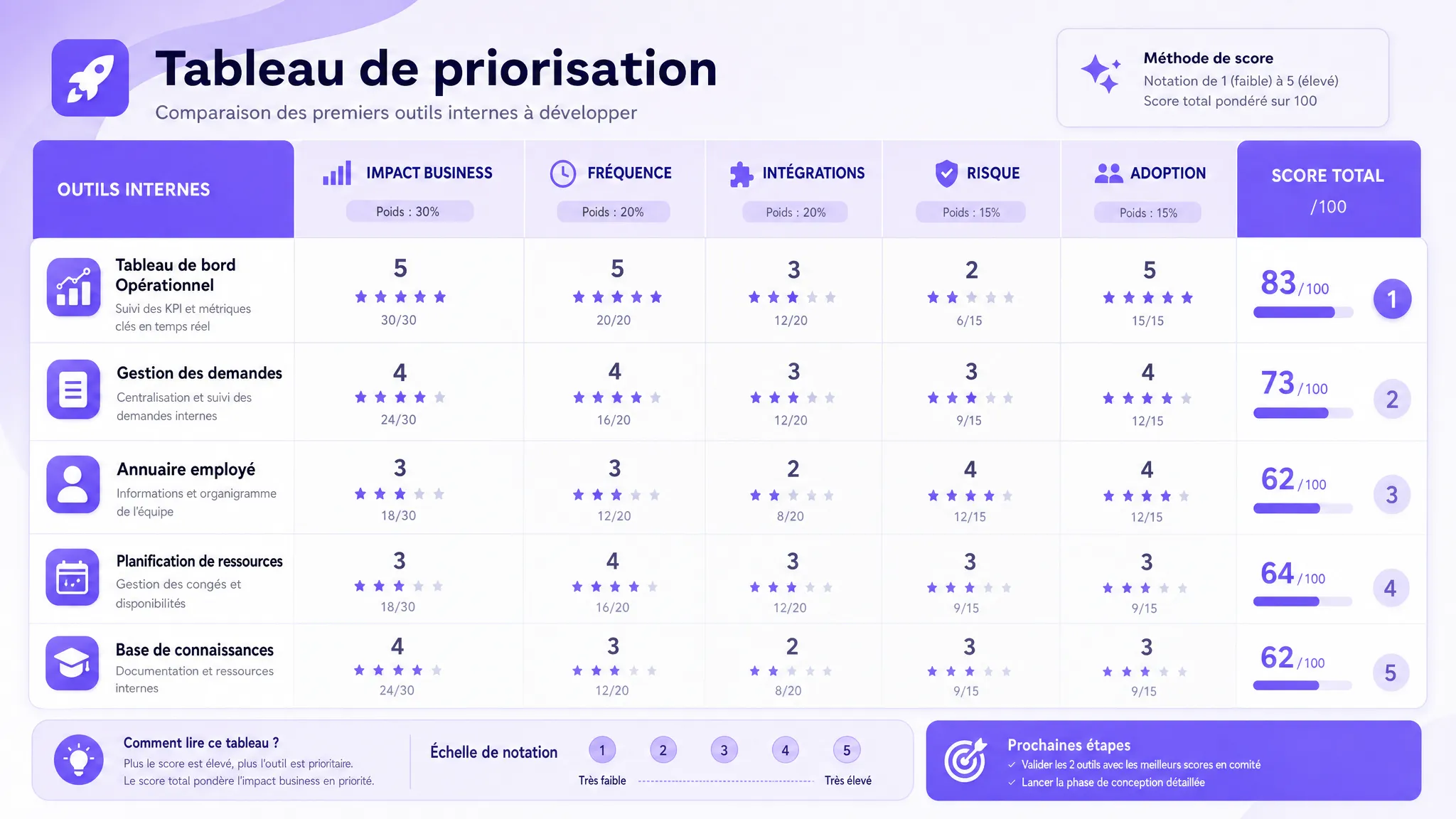
Before deciding what to develop, assign a score from 1 to 5 to each internal tool idea. The goal is not to produce a perfect mathematical truth, but to avoid decisions based solely on intuition or momentary pressure.
Criteria
Question to ask
What a high score means
Business impact
What direct gain can be measured?
Time saved, accelerated revenue, reduced errors, better customer satisfaction
Frequency
How often does the problem occur?
Daily or weekly task, volume increasing with growth
Process stability
Is the workflow clear enough?
Known rules, identified exceptions, aligned stakeholders
Data and integrations
Are the necessary sources accessible?
CRM, ERP, support tools, internal databases, or available APIs
Manageable risk
What is the security, GDPR, or business risk?
Limited scope, simple permissions, human validation possible
Adoption
Who will use and champion the tool?
Identified business owner, available pilot users, obvious benefit
A simple rule: start with topics where impact and frequency are high, but where the risk remains manageable. High-impact, high-complexity projects can come later, once the team has gained maturity and the technical foundations are in place.
The internal tools to develop first
There is no universal order applicable to all companies. A service SME, a marketplace, a B2B SaaS, and an industrial company do not have the same bottlenecks. However, certain types of internal tools very often emerge as priorities when a company starts structuring its operations.
1. The operational console that centralizes daily work
This is often the best first tool when teams spend their time navigating between multiple platforms to process a single file.
Example: a support team has to open the CRM, the payment tool, the product back-office, and a spreadsheet to answer a customer request. Each case takes ten minutes, errors are frequent, and no one has a complete view of the situation.
An operational console doesn't necessarily replace your existing tools. It can simply create a unified interface that reads the right data, triggers the right actions, and keeps track of decisions. This is particularly relevant if you already have a CRM, an ERP, or business tools, but the internal experience remains fragmented.
The KPIs to track are average processing time, error rate, number of actions per file, response time, and the volume of requests processed per person.
2. The automation workflow for repetitive tasks
The second major candidate is the repetitive workflow: quote approval, customer onboarding, invoice processing, document generation, request assignment, follow-ups, or synchronization between tools.
This type of tool is often more cost-effective than a large dashboard because it directly impacts the work to be done. It reduces back-and-forth, standardizes steps, and prevents oversights.
In many cases, it's better to start with deterministic automation rather than AI. If the rules are clear, a simple, robust, and traceable logic will be more reliable than an intelligent agent. AI becomes relevant when the process involves unstructured text, classification, summarization, or decision support.
To dive deeper into this point, you can consult our guide on artificial intelligence and automation, which helps distinguish between classic automation, copilots, and actionable agents.
3. The sales or RevOps cockpit if revenue depends on follow-ups
If your main problem is lost leads, poor qualification, forgotten follow-ups, or a lack of pipeline visibility, a sales-oriented internal tool might take priority.
Warning: this is not about recreating a complete CRM. In most cases, the right choice is to enrich or connect the existing CRM. A useful sales cockpit can help prioritize accounts, prepare follow-ups, display important signals, standardize the MQL to SQL transition, or generate post-meeting tasks.
This type of tool becomes even more relevant when marketing, sales, and customer success teams need to share common definitions. This is the core of a RevOps approach, especially when the company starts structuring its growth.
KPIs to track: conversion rate between stages, lead response time, meeting show rate, follow-up completion rate, pipeline velocity, and CRM data quality.
4. The internal knowledge assistant, if questions repeat
An internal AI assistant can be very useful, but rarely as the very first project if documentation is disorganized. It works well when the company already has relatively reliable sources of truth: procedures, knowledge bases, standard contracts, product documents, internal policies, support histories, or training content.
The right use case is not "putting ChatGPT in the company." The right use case is rather: reducing repetitive questions, accelerating information retrieval, and helping teams produce consistent answers from validated sources.
For this, a RAG-type architecture may be necessary to connect the assistant to internal documents and cite the sources used. If the assistant needs to act within tools, for example, creating a ticket or updating a customer profile, you must add permissions, logs, and often human validation.
KPIs to track: search time, useful response rate, escalation rate, perceived quality by users, number of recurring questions avoided, and correct source citation rate.
5. The management dashboard, but only after stabilizing definitions
Many companies want to start with a dashboard. It's understandable: executives want visibility. However, a dashboard built too early quickly becomes an aesthetic screen fed by disputed data.
A reporting tool should take priority if the lack of visibility truly blocks decision-making. But before developing, definitions must be clarified: what is a qualified lead, an active opportunity, a churned customer, a resolved request, recurring revenue, or margin per file?
If each team has its own definition, the first project is not the dashboard. It's data governance.
Once definitions are stabilized, an internal dashboard can become very powerful. It allows tracking the right KPIs, identifying anomalies, and reducing meetings where everyone shows up with their own export.
6. The internal request portal when support teams are saturated
As the company grows, internal support functions—HR, finance, IT, legal, ops—quickly become friction points. Requests arrive via email, Slack, forms, private messages, or meetings. Result: blurred priorities, unpredictable delays, and loss of context.
An internal request portal can be an excellent structuring tool. It helps standardize inputs, route requests, track statuses, measure delays, and progressively build a response base.
This is a good first project if internal support teams are already an operational bottleneck. It is often less risky than a complex business tool, as the scope can be limited to a few types of requests initially.
Quick decision table: which internal tool to choose based on your symptom?
Observed symptom
Internal tool to prioritize
Main KPI
Teams copy the same data across multiple tools
Operational console or automated synchronization
Processing time per file
Approvals take too much time
Approval workflow
Delay between request and decision
Leads are lost or poorly qualified
CRM or RevOps cockpit
MQL to SQL conversion rate
The same internal questions come up every week
Knowledge assistant or internal base
Average time to find an answer
Decisions are based on contradictory exports
Dashboard with shared definitions
Rate of disputed KPIs in meetings
Internal requests arrive from everywhere
Internal request portal
Average resolution time
Manual errors increase with volume
Business automation with control
Error or rework rate
This table helps avoid a common mistake: choosing the most appealing tool instead of choosing the tool that removes the most friction.
What you generally shouldn't develop first
Some projects seem strategic but are rarely good first internal tools.
A complete custom ERP, unless your business model truly requires it and you have the means to operate it long-term.
An executive dashboard if the source data is inconsistent or entered manually.
An autonomous AI agent that acts within your tools without safeguards, logs, or validation.
A tool for a process that is still unstable, debated, or constantly being overhauled.
An overly broad internal platform that aims to replace five tools right from V1.
A tool without a business owner clearly responsible for adoption and trade-offs.
The right first project must be ambitious enough to create value, but narrow enough to be delivered, tested, and improved quickly.
SaaS, no-code, or custom: how to decide?
Developing an internal tool doesn't necessarily mean coding a complete application from scratch. The right choice depends on the level of specificity, risk, and integrations.
Option
Best when
Main limitation
Existing SaaS
The need is standard and well covered by the market
The process is simple, low-criticality, and needs fast testing
Scalability, security, maintainability, and business logic sometimes limited
Custom development
The workflow is specific, integrated, sensitive, or differentiating
Requires scoping, maintenance, governance, and a realistic budget
Hybrid approach
You want to keep existing SaaS while creating an adapted business layer
Requires a good integration architecture
In many SMEs and scale-ups, the hybrid approach is the most pragmatic. You keep market tools where they excel, then develop an interface, automation, or AI layer that connects everything to your actual process.
The right format for a first internal tool is a vertical V1. This means it covers a complete end-to-end flow, but within a deliberately reduced scope.
For example, rather than building the entire back-office, you develop the complete processing of one priority file type. Rather than creating an AI assistant for the whole company, you start with a specific knowledge base and a pilot team. Rather than automating the entire sales cycle, you target the qualification and follow-up of inbound leads.
A solid V1 must contain:
A clearly identified target user.
A bounded process with a start and an end.
Two or three integrations maximum at the start.
Simple rights and access rules.
A log of important actions.
Three to five success KPIs.
A rollback plan if the tool doesn't work as expected.
Security must be integrated from the start, even for an internal tool. Access management, authentication, logs, data minimization, and role separation are not topics to postpone. The CNIL recalls the key principles of the GDPR, notably minimization and purpose limitation. On the application security side, the OWASP Top 10 resources remain a good baseline to avoid the most common vulnerabilities.
Typical roadmap to develop your first internal tools
Here is a realistic trajectory for an internal tool of reasonable scope. It must be adapted according to business complexity, integrations, and security constraints.
Phase
Objective
Expected deliverable
Days 1 to 10
Identify the bottleneck and prioritize
Scorecard, V1 scope, KPIs, business owner
Weeks 2 to 4
Design and prototype
User journey, mockup, architecture, prioritized backlog
Go, no-go or iteration, adoption plan, minimal runbook
The important thing is not to stick to a perfect schedule. The important thing is to maintain a visible delivery pace, with frequent demonstrations and quick trade-offs. An internal tool project rarely fails because it lacks ideas. It fails because the scope inflates, users don't test early enough, or no one makes the compromise decisions.
The KPIs to track from day one
An internal tool should be judged on its impact, not on the number of features delivered. KPIs depend on the use case, but a few families often recur.
Productivity KPIs measure time saved, the number of automated tasks, the volume processed per person, or the reduction in the number of tools opened to complete an action.
Velocity KPIs measure the delay between two steps: lead received and processed, request created and approved, invoice received and checked, ticket opened and resolved.
Adoption KPIs measure the number of active users, the usage rate of the new flow, workarounds, and qualitative feedback.
Finally, risk KPIs track access, sensitive actions, anomalies, usage costs, and incidents. They are particularly important as soon as a tool handles personal, financial, or commercial data.
When to integrate AI into your internal tools?
AI is relevant if it improves a step that classic rules handle poorly: understanding a message, extracting information, summarizing a file, classifying a request, proposing an answer, or helping to decide.
It is less relevant if the process is perfectly deterministic. In this case, classic automation will often be more reliable, less costly, and easier to explain.
A good approach is to start with the workflow, then add AI where it genuinely increases productivity. For example, an internal request processing tool can first standardize forms and statuses. Then, AI can help categorize requests, suggest an answer, or detect incomplete cases.
If your project involves AI, specific scoping is necessary: data sources, hallucination risks, human validation, inference costs, logs, and acceptance criteria. Our scoping checklist before developing an AI project can help you secure this step.
The best priority depends on your growth stage
A 10-person company often needs a tool that replaces a critical spreadsheet. A 30 to 80-person company generally needs to integrate its tools and standardize its workflows. A more advanced scale-up often needs to consolidate data, secure permissions, and create business layers that prevent teams from living in exports.
The right order often looks like this: first eliminate repetitive manipulations, then centralize critical operations, then secure management data, then add AI or agents where workflows are already solid.
Developing an internal tool first, therefore, is not about choosing the most modern technology. It's about choosing the most costly problem you can solve right now with a controlled scope.
FAQ
What is the best internal tool to develop first? The best first internal tool is the one that addresses a frequent, measurable, and sufficiently stable problem. In many companies, this is an operational console, an approval workflow, or automation between existing tools.
Should you start with an internal dashboard? Not always. A dashboard is useful if data definitions are shared and if the lack of visibility blocks decisions. If data is still entered manually or disputed, start instead by securing processes and sources.
When to choose custom over a SaaS? Custom becomes relevant when your workflow is specific, integrated with multiple tools, sensitive in terms of data, or differentiating for your business. If the need is standard, a SaaS or a no-code approach may suffice.
Should an internal tool integrate AI from V1? No. AI must answer a specific need: classification, summarization, extraction, document search, or decision support. If the process relies mostly on clear rules, start with classic automation.
How to prevent an internal tool project from becoming endless? Limit V1 to a complete but narrow flow, appoint a business owner, measure three to five KPIs, involve pilot users, and deliver in short iterations. The scope must remain value-driven, not driven by the list of possible features.
Need to prioritize your internal tools?
Impulse Lab helps SMEs and scale-ups transform their internal processes into concrete, measurable tools integrated into their existing stack. We can support you with opportunity audits, V1 scoping, process automation, custom web and AI platform development, as well as team training for adoption.
If you have several internal tool ideas but don't know where to start, the most useful step is often a short audit: mapping bottlenecks, scoring opportunities, choosing a V1, and defining KPIs before developing.
You can contact Impulse Lab to scope your first internal tools and build a solution that truly helps your teams scale.
5 Artificial Intelligence Examples for SME Procurement
Looking for practical AI examples to improve SME procurement? The most useful applications tackle concrete tasks: comparing quotes, analyzing spend, forecasting demand, auditing invoices, and locating key contract clauses.