MCP for Business: Should You Connect Your Tools to AI Agents?
Intelligence artificielle
Stratégie IA
Outils IA
Gouvernance IA
Automatisation
Model Context Protocol (MCP) promises to make AI agents far more useful by connecting them to business tools and data. In business, the real question isn't just technical: should you connect your CRM, ERP, email, and documents to an autonomous agent, and with what level of control?
The Model Context Protocol (MCP) promises to make AI agents much more useful by giving them access to your business tools, data, and actions. For businesses, the real question is not just technical: should you connect your CRM, ERP, email, documents, or support tools to an autonomous agent—and with what level of control?
For an SMB or a scale-up, MCP can accelerate process automation, cut down on copying and pasting between apps, and turn an AI assistant into a true operational copilot. But without proper framing, it can also expose sensitive data, trigger unwanted actions, or create an automation layer that nobody knows how to audit.
MCP in Business: What Really Changes
The Model Context Protocol is an open standard that enables AI agents to connect to data sources and tools via dedicated servers. Instead of building a custom integration for every model, application, and use case, MCP defines a standardized way to expose resources, actions, and context.
The official Model Context Protocol documentation presents it as an interoperability layer between applications and models. In practice, an agent can request to view a customer profile, retrieve a document, create a task, query an internal knowledge base, or draft a response using up-to-date information.
This point is key: MCP doesn't magically make an agent smarter. It gives it access to an environment. The real value then depends on the quality of the use case, permissions, available data, and operational guardrails.
MCP, APIs, RAG, and Agents: Don't Confuse Them
Many teams confuse AI integration, RAG, APIs, and agents. These are complementary patterns, not synonyms. Before connecting your tools via MCP, you need to understand which problem you are actually trying to solve.
Business Need
Recommended Pattern
Example
Main Limitation
Add a specific AI capability
API
Classify a ticket, summarize a call
Limited autonomy
Answer using internal knowledge
RAG
Questions on policies or contracts
Doesn't necessarily trigger actions
Orchestrate multi-step tasks
AI Agent
Analyze, decide, suggest next steps
Requires tighter control
Give access to external tools
MCP
Read CRM, search docs, create tasks
Risk if permissions are poorly configured
If you're designing an AI architecture, start by clarifying these categories. Impulse Lab's article on API, RAG, and agent patterns details this integration logic prior to rolling out more advanced automation.
The Best Use Cases for Connecting Your Tools to AI Agents
A good MCP use case is rarely spectacular at the start. It is frequent, time-consuming, and well-scoped enough to be verified. The best first projects are not those granting full autonomy to an agent, but those that allow it to gather the right context and suggest an action.
In a sales team, for example, an agent can compile an account overview by pulling data from the CRM, email threads, and meeting notes. In customer support, it can read a ticket, retrieve relevant documentation, and draft a response for human review. In operations, it can cross-reference project data, flag bottlenecks, and prepare weekly updates.
MCP becomes valuable in enterprise settings when relevant information is scattered across multiple tools. If an employee currently has to toggle between five tabs to answer a simple request, a connected agent can eliminate that friction.
When You Shouldn't Connect Your Tools
Connecting all your tools to an AI agent right out of the gate is a risky strategy. Unstable processes, ambiguous access rights, and low-quality data produce fragile automations. AI ends up magnifying organizational flaws rather than fixing them.
Avoid starting with irreversible or highly sensitive actions: payments, data deletions, legal validations, bulk edits to customer databases, or HR decisions. These workflows can be partially automated later, but they require robust governance, audit logs, and mandatory human-in-the-loop approvals.
A good rule of thumb is to start read-only. The agent observes, searches, summarizes, and recommends. Write permissions come later, with a strictly scoped perimeter and explicit rules.
A Simple Decision Matrix
Before launching an MCP initiative, assess it in terms of value, risk, and maturity. The table below helps evaluate whether a use case is ready for a connected agent.
Criterion
Green Flag
Red Flag
Frequency
Task performed daily or weekly
Rare or one-off task
Data
Identified and accessible sources
Scattered, outdated, or unreliable data
Output
Output easy to review or validate
Opaque decision or hard to audit
Permissions
Clear roles and restrictable access
Shared accounts or overly broad rights
Reversibility
Action is reversible or non-critical
Irreversible or highly regulated action
Adoption
Team is eager and engaged
Project driven solely by tech curiosity
If several red flags pop up, it is better to start with an AI audit, traditional automation, or a standalone assistant. MCP should solve a tangible business problem, not serve as a tech demo.
What Does a Well-Governed MCP Architecture Look Like?
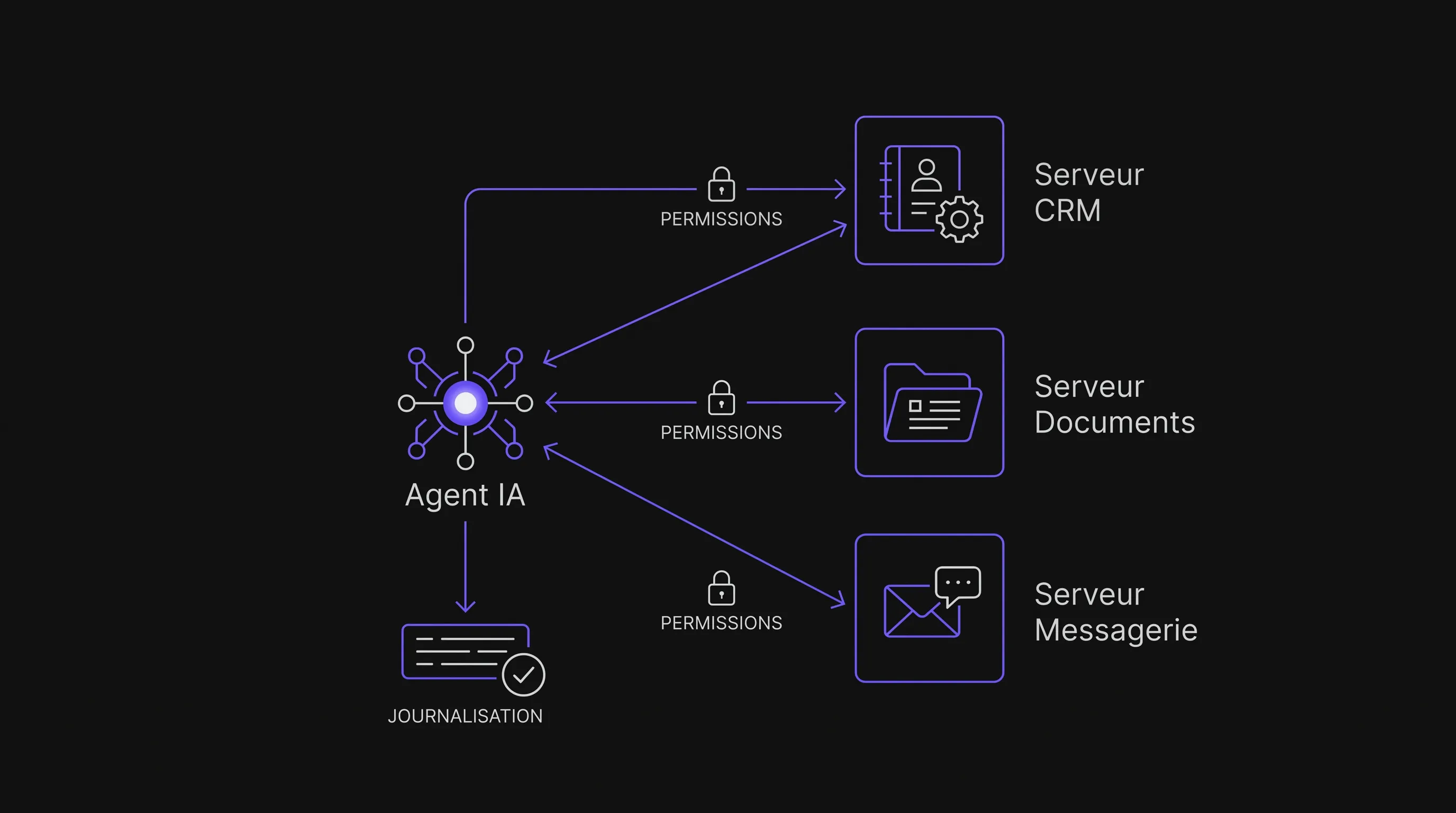
A sound architecture isolates the agent, connectors, permissions, and monitoring. An agent should never have unrestricted access to your systems. Instead, it must route requests through MCP servers that expose only the exact resources and actions needed for the specific use case.
Each MCP server acts as a controlled gateway. It can provide access to a document repository, a CRM, a ticketing tool, or an internal database. Authorization rules must remain transparent: who can call what, in which context, and under what constraints.
Logging is just as critical as connectivity. You need to know what data was accessed, what action was proposed, who approved it, and what outcome was generated. Without traceability, automation becomes hard to maintain and impossible to defend if an incident occurs.
Security: Essential Guardrails
MCP introduces specific enterprise risks because it bridges the model's reasoning directly to actions in your tools. Guidelines from the OWASP Top 10 for Large Language Model Applications provide a solid framework for risks such as prompt injection, data leakage, and excessive permissions.
The most critical guardrails are simple in concept, but require discipline to implement:
Enforce the principle of least privilege for every connected tool.
Start with read-only access wherever possible.
Require human validation for sensitive actions.
Log prompts, responses, and tool calls.
Separate test and production environments.
Never expose secrets, API keys, or sensitive credentials directly to the model without safeguards.
An often overlooked vector is indirect prompt injection. A document, email, or support ticket might contain adversarial instructions designed to hijack the agent. If that agent can trigger external tools, the threat level increases. Untrusted content must always be treated as potentially hostile input.
Build, Buy, or Custom AI Platform?
Off-the-shelf connectors are sometimes enough. If you rely on mainstream tools, have simple requirements, and need limited actions, an existing solution can quickly validate value. This is often the right move for a prototype, internal doc search, or lightweight assistance.
Custom development makes sense when your business logic is proprietary, your data is sensitive, or your systems are tightly integrated. A scale-up wanting to connect CRM, back-office workflows, financial reporting, and internal tools isn't just looking for an agent; it needs a reliable, maintainable platform aligned with its operational processes.
This is where product framing comes in. An effective AI agent doesn't start with the technology—it starts with a clear mission, defined users, and measurable business outcomes. If you're at this stage, our guide on building a truly useful enterprise AI agent provides a helpful next step.
Roadmap for Your First MCP Project
A first MCP project should be fast, measurable, and reversible. The goal is not to hook up the entire company at once, but to prove that an agent can assist a team on a real workflow without introducing unnecessary risk.
Map a specific process with its tools, data points, pain points, and current approval steps.
Select a frequent, reviewable, and low-risk use case, ideally with a willing business stakeholder.
Launch a read-only MVP to evaluate context accuracy and answer quality.
Introduce a limited action, such as creating a draft, preparing a task, or pre-filling a field.
Measure time saved, error rates, team adoption, and governance needs before expanding.
This step-by-step approach avoids the classic trap of building an impressive prototype that fails in production. It also engages business teams early on, which remains the single best driver of adoption.
Key Metrics to Track
A successful MCP project must deliver tangible ROI. Time saved is a great start, but it's not the only metric. You also need to track quality, reliability, and real-world adoption.
Metric
What It Measures
Why It Matters
Processing Time
Duration before vs. after automation
Validates operational gains
Correction Rate
Edits made by human reviewers
Assesses output quality
Adoption Rate
Active users and usage frequency
Confirms actual team usage
Incident Rate
Errors, blocked actions, access denials
Monitors operational risk
Coverage
Percentage of requests the agent can handle
Guides future expansions
For an SMB, a smart initial goal is usually reducing the burden on a specific task rather than trying to replace an entire role or process. ROI comes from compounding reliable small wins, not from chasing full autonomy overnight.
FAQ
Does MCP replace APIs? No. MCP frequently relies on existing APIs, but it standardizes how an AI agent discovers and invokes tools. APIs remain the underlying technical layer for most systems.
Is MCP only for large enterprises? No. SMBs can benefit just as much if they have core digital tools and repetitive processes. However, they should start small with a targeted use case and restricted permissions.
Can you connect a CRM to an AI agent? Yes, provided access rights are tightly defined and the use case is clear. Reading a customer record to prepare for a meeting is far less risky than letting an agent automatically update pipeline stages.
How does it differ from automation tools like Zapier or Make? Traditional automation executes deterministic, rule-based workflows. An agent connected via MCP can interpret context, gather relevant data dynamically, and propose actions. Both approaches can complement each other.
What is the best first use case? Choose a frequent, easily reviewable, and repetitive task, like drafting customer meeting summaries, triaging incoming tickets, or synthesizing answers from internal documentation.
Considering Connecting Your Tools to AI Agents?
MCP can unlock tremendous business value, provided you anchor it in a proven use case, robust security guardrails, and an architecture tailored to your stack. The strategic question is not whether to connect your tools, but which tools to connect, for whom, with what permissions, and under what control.
Impulse Lab helps organizations with AI opportunity audits, custom web and AI development, process automation, and team adoption. If you want to identify high-impact use cases before writing code, explore our approach at Impulse Lab.