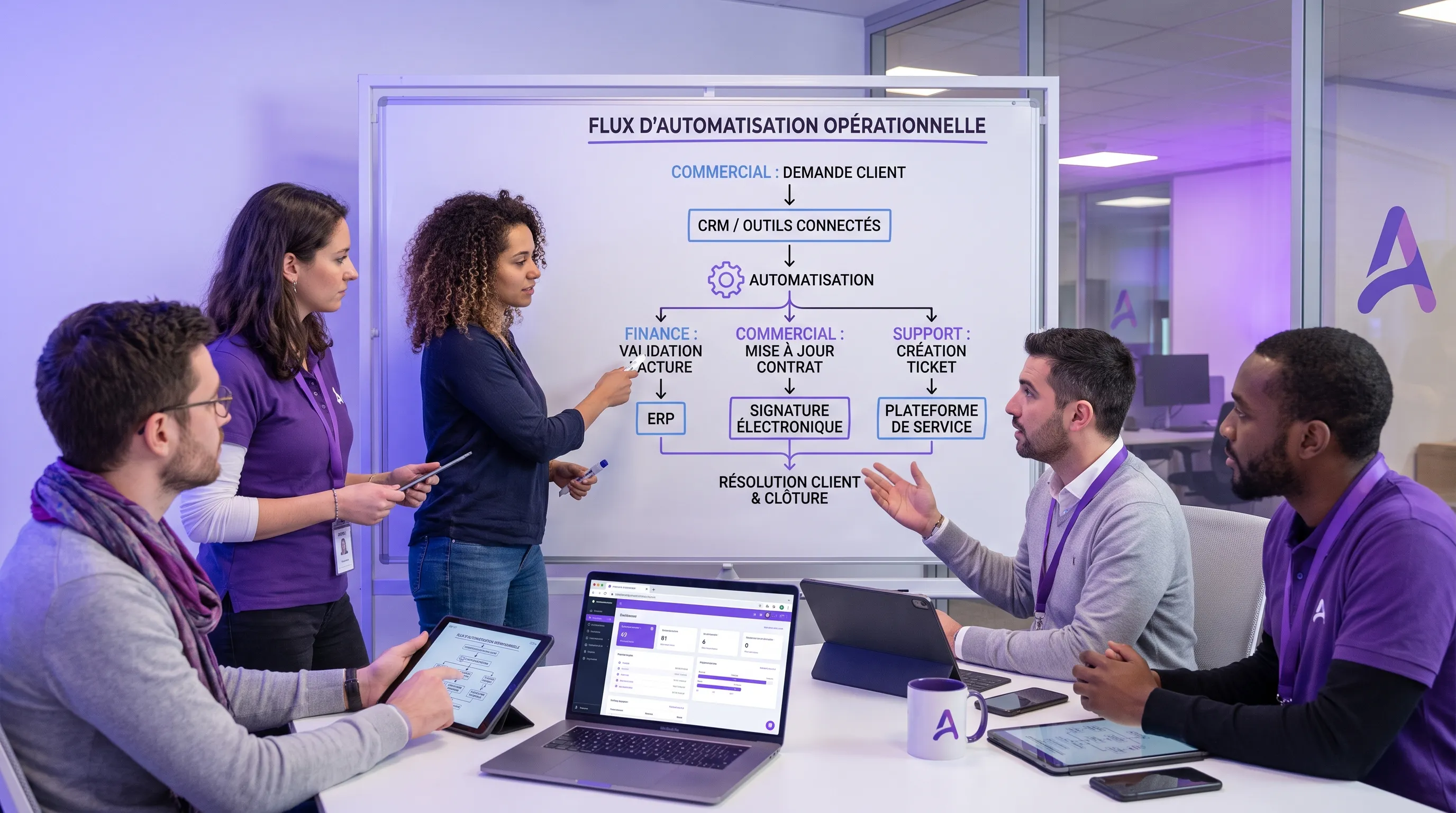
Robotic Process Automation (RPA) involves delegating repetitive tasks currently performed by humans on digital tools to software. Copying data from a spreadsheet to a CRM, generating a report, or verifying an invoice are typical actions RPA can execute faster and without fatigue.
Robotic Process Automation, more commonly known as RPA, consists of delegating certain repetitive tasks currently performed by humans on digital tools to software. Copying data from a spreadsheet to a CRM, generating a report, verifying an invoice, sending a follow-up email, updating a status in a business tool: these are typically actions that RPA can execute faster, more consistently, and without fatigue.
For an SME or a scale-up, the challenge is not to "robotize" the entire company. The challenge is simpler: identify the tasks that consume time, create errors, slow down teams, and can be automated without putting the business at risk. In 2026, RPA remains highly relevant, but it must be approached methodically, especially since generative AI allows us to go beyond fixed rules.
Here is how to start without buying a tool too early, without launching an overly broad project, and without promising an impossible-to-keep ROI.
Robotic Process Automation: What are we really talking about?
RPA relies on "software robots". These robots are not physical machines. They are programs capable of executing actions in digital interfaces, often just as an employee would: opening an application, retrieving information, filling out a field, downloading a document, triggering a notification, or consolidating data.
According to IBM, RPA allows for the automation of rule-based, repetitive, and high-volume tasks. This is a useful definition because it highlights an essential point: classic RPA works very well when the process is predictable. It is less suitable if each case requires complex interpretation, human judgment, or a sensitive business decision.
In practice, three levels must be distinguished:
Automation Level
What the system does
Example
Recommended level of control
Simple RPA
Executes fixed rules
Copying data between two tools
Occasional check
RPA with human validation
Prepares the action, then requests confirmation
Pre-filling a supplier invoice
Validation before action
AI-augmented RPA
Interprets text or categorizes requests before acting
Reading a customer email and creating a ticket
Supervision and logging
RPA is therefore not always artificial intelligence. It can be purely deterministic. However, it can be combined with AI to process emails, extract information from a document, summarize a request, or direct an action. If your topic is precisely at the border between AI and automation, you can explore the differences further in this guide on artificial intelligence and automation.
Why SMEs and scale-ups are getting interested now
Operational pressure often increases before structuring does. Teams sell more, deliver more, and recruit more, but processes remain manual. The same files circulate, the same information is entered multiple times, follow-ups depend on everyone's memory, and managers waste time verifying what should be reliable by default.
RPA becomes interesting when the company already has tools in place, but these tools do not communicate well enough with each other. It can serve as a bridge between a CRM, an ERP, an invoicing tool, support software, a messaging system, or an internal database.
The sought-after benefits are generally very concrete:
Reduce time spent on repetitive administrative tasks.
Decrease data entry errors and processing oversights.
Accelerate sales, financial, or support cycles.
Free up teams for higher value-added tasks.
Standardize processes before a growth phase.
But these benefits do not appear automatically. A poorly framed automation can simply accelerate a bad process. That is why the starting point is not the RPA tool, but the business process.
Step 1: Start from the field, not the technology
The first mistake is to start by comparing RPA platforms. UiPath, Power Automate, Make, Zapier, n8n, internal scripts, or automations integrated into your software: each option can make sense, but only after understanding the need.
Start by observing a real work week in a team. Not a theoretical version of the process, but what actually happens: temporary files, manual emails, copy-pasting, exceptions, informal validations, errors caught by hand.
A good RPA candidate generally has four characteristics: it is frequent, repetitive, based on clear rules, and low-risk in case of error. For example, generating a weekly sales report every Monday from standardized data is often a better first project than automating a complex business decision.
Conversely, avoid starting with a rare, poorly documented, or politically sensitive process. If teams are not aligned on how the work should be done, the robot will only execute an ambiguity faster.
To frame this reflection at the SME level, it can also be useful to read this approach to process automation in SMEs, which emphasizes choosing a simple and measurable first process.
Step 2: Map the process before automating it
Once the process is chosen, document it simply. You do not need a six-month audit. You need a map precise enough to understand the inputs, outputs, rules, exceptions, and tools involved.
Ask these questions in particular:
What event triggers the process?
What data is needed to execute it?
Where is this data located?
What rules determine the next action?
What exceptions come up regularly?
Who validates the result today?
What happens in case of an error?
This step often reveals that the real problem is not the lack of a robot, but the lack of a standard. If three people handle the same task in three different ways, the priority might be to unify the method before automating.
Good mapping also helps identify integrations that are more robust than surface-level RPA. Sometimes, it is better to connect two tools via API rather than simulating clicks in an interface. RPA is useful, but it should not become a permanent band-aid on a fragile architecture.
Step 3: Choose a low-risk first use case
The first project must prove value, not impress everyone. In an SME or scale-up, the right scope is often a process that takes between 3 and 10 hours per week, follows stable rules, and can be easily supervised.
Here are examples of good first use cases:
Function
RPA Use Case
Why it's suitable to start
Finance
Simple reconciliation between invoices and payments
Structured data, clear rules
Sales
Automatic creation of a prospect profile from a form
Immediate time savings, low complexity
Support
Categorization of incoming requests
Frequent volume, supervision possible
HR
Preparation of onboarding documents
Repetitive process, standardized steps
Operations
Updating statuses between two tools
High repetition, measurable impact
The right test is not only technical. It is also organizational. Is the team willing to change its way of working? Is the data reliable? Is someone responsible for the process? If the answer is no, the scope must be reduced.
Step 4: Calculate a realistic ROI
Robotic Process Automation is often sold with promises of spectacular gains. In reality, ROI depends on very concrete factors: task volume, time saved, current error rate, maintenance cost, change cost, and process criticality.
A simple formula can be enough to start:
Element
Question to ask
Calculation example
Current time
How many hours per month are spent on the task?
25 h/month
Automated time
How many hours will remain after automation?
5 h/month
Gross savings
How many hours are freed up?
20 h/month
Value of time
What fully loaded hourly cost to use?
€45/h
Estimated monthly savings
Gross savings multiplied by the value of time
€900/month
Recurring costs
Licenses, maintenance, supervision
To be deducted from savings
This calculation should not be used to justify just any project. It should help in making a decision. If the automation costs more to maintain than the time it saves, it is probably not a priority.
Qualitative gains must also be integrated: fewer errors, better customer experience, shorter lead times, better managerial visibility. These gains are real, but it is better not to overestimate them in the initial business case. To go further on this topic, Impulse Lab details the methods and pitfalls in its article on the ROI of automation and artificial intelligence.
Step 5: Define the right level of human control
Reliable automation is not necessarily automation without humans. On the contrary, the best projects often start with a human in the loop. The robot prepares, executes part of the work, or proposes an action, and then an employee validates sensitive cases.
This principle is particularly important if the automation involves invoicing, customer data, HR decisions, contracts, or external communications. In these contexts, simple safeguards must be planned: action logs, validation before sending, alert thresholds, possible manual takeover, and an identified owner.
The question to ask is not "can everything be automated?". The right question is "what part can be automated without losing control?".
In many cases, progressive automation is healthier:
Phase 1: The system prepares the data but does not act alone.
Phase 2: The system executes simple cases and flags exceptions.
Phase 3: The system processes a broader scope, with supervision and metrics.
This progression reassures teams, reduces risks, and allows the process to be improved instead of freezing it too early.
Step 6: Choose the architecture, not just the tool
The choice of tool comes after the scoping. For a first project, several options exist.
No-code or low-code tools are well suited for simple workflows, for example, triggering an action from a form or synchronizing data between compatible applications. More advanced RPA platforms are useful when processes go through complex interfaces, legacy business applications, or large volumes. Custom developments become relevant when the process is strategic, when integrations must be robust, or when needs exceed the limits of standard tools.
The key criterion is maintainability. An automation that works on demo day but breaks with every interface change creates more debt than value. Before choosing, check the quality of connectors, error handling, security, logs, access rights, and the ability to scale the workflow.
For personal data, the GDPR must also be taken into account from the start. The CNIL recalls the main principles to respect, notably purpose, data minimization, and processing security. An automation that handles customer or employee data must be designed with these constraints, not corrected afterward.
Step 7: Measure, stabilize, then only expand
The success of a first RPA project is measured over time. Once the robot is deployed, track a few simple indicators for several weeks: number of tasks processed, time saved, errors detected, exceptions, human interventions, incidents, and team satisfaction.
Do not move on to the next use case too quickly. Stabilize the first one beforehand. Document what was learned: which rules were vague, what data was poorly formatted, which special cases surprised the team, what validations were necessary.
This phase transforms an isolated project into an internal capability. The company learns to spot good candidates, frame risks, choose the right level of automation, and maintain workflows. This is where RPA becomes a structuring lever, not just a productivity gadget.
Common mistakes to avoid
The first mistake is wanting to automate too broadly. A complete end-to-end process can contain several sub-processes, only some of which are automatable. It is better to succeed on a critical portion than to fail on a large cross-functional project.
The second mistake is automating an unstable process. If the rules change every week, the robot will have to be constantly adjusted. This may be acceptable for a strategic process, but rarely for a first project.
The third mistake is ignoring exceptions. Demos often show the nominal case. Daily operations reveal edge cases: missing data, duplicates, unexpected formats, specific clients, late validations. A serious RPA project plans for these situations right from the scoping phase.
The fourth mistake is neglecting adoption. Employees may fear a loss of control, increased surveillance, or their jobs being questioned. It must be explained that the goal is to eliminate repetitive tasks, not business expertise. Training and involving teams are often as important as technical development.
When should RPA and AI be combined?
Classic RPA excels when rules are explicit. AI becomes useful when the input is less structured: emails, PDFs, customer requests, free-text notes, meeting minutes, scanned documents, or problem descriptions.
For example, RPA can create a support ticket from a structured form. But if the request arrives via a free-text email, an AI layer can help identify the subject, extract useful information, and suggest a category. RPA then takes over to create the ticket, assign the right team, or trigger a notification.
This combination is powerful, but it requires more control. As soon as a model interprets language or makes a probabilistic decision, you must monitor the quality of the answers, manage errors, and define the cases where a human takes back control. For more advanced projects, a structured approach like the one described in this guide on the AI process from idea to production helps avoid getting stuck at the prototype stage.
Where to start concretely this week?
If you want to launch an RPA initiative without spreading yourself too thin, start with a short workshop with an operational team. Choose a function, for example, finance, sales ops, support, or HR. List the repetitive tasks, estimate their frequency, identify the tools involved, and note the pain points.
Next, select a single use case with this simple grid:
Criterion
Good signal
Bad signal
Frequency
The task comes up every day or week
The task is rare
Rules
Decisions are clear
Rules depend heavily on context
Data
Information is available and reliable
Data is scattered or inconsistent
Risk
An error is reversible
An error has a strong client or legal impact
Adoption
The team wants to reduce this workload
The team is not aligned on the problem
Then formalize a mini-scope: objective, scope, tools involved, business owner, success metrics, risks, level of human validation, and testing timeframe. At this stage, you do not need a one-year roadmap. You need a clean, measurable, and useful pilot.
FAQ
What is the difference between RPA and classic automation? RPA often automates actions performed in existing interfaces, such as clicking, copying, pasting, or filling out fields. Classic automation can also use APIs, scripts, or integrated workflows. In practice, the best projects sometimes combine several approaches.
Is Robotic Process Automation suitable for small businesses? Yes, if the scope is well chosen. A small business does not need a massive RPA program. It can start with a repetitive, frequent, and easy-to-control task, then gradually expand.
Do you need AI to do RPA? No. Many RPA automations work with deterministic rules. AI becomes useful when the process involves free text, unstructured documents, classification, or decision support.
What is the best first process to automate? The best first process is frequent, repetitive, stable, measurable, and low-risk. Common examples include data entry, simple reconciliations, report generation, follow-ups, or automatic file creation.
How long does it take to see the first results? It depends on the scope and the tools, but a well-framed first pilot can often show value quickly. The most important thing is to limit the scope, measure real gains, and plan a stabilization phase.
Transforming RPA into business value
Robotic Process Automation is not a tool project. It is an operational performance project. It works when it starts from a real pain point, an understood process, a measurable ROI, and an appropriate level of control.
For an SME or a scale-up, the right starting point is simple: choose a repetitive process, map it, launch a limited pilot, measure the gains, and then decide whether to expand. This approach avoids large abstract programs and turns automation into concrete results.
If you want to identify the best use cases in your organization, Impulse Lab supports companies with AI opportunity audits, custom automations, integrations with existing tools, and adoption training. You can discover the agency's approach on Impulse Lab.
Accelerating Product Sheet Creation with Artificial Intelligence
Exploring AI content creation addresses a key need for e-commerce SMBs: producing more product listings without monopolizing copywriting teams. AI can draft descriptions and adapt tone, but compelling copy does not ensure factual accuracy—making clean data and structured review essential.