Sensitive Data and AI: The Traffic Light System for SMEs
Intelligence artificielle
Stratégie IA
Confidentialité des données
Gouvernance IA
Gestion des risques IA
An employee pastes a payslip into an AI chatbot. A sales team asks AI to summarize a client contract. In an SME, these scenarios happen fast. To handle sensitive data and AI safely without blocking innovation, adopt a simple traffic light system.
An employee pasting a payslip into an AI chatbot. A sales team asking AI to summarize a client contract. A business leader testing an outreach tool with an entire contact database. In an SME, these situations happen fast, often without bad intentions. To manage sensitive data and AI without stifling innovation, the simplest instinct is also the most practical: adopt a traffic light system.
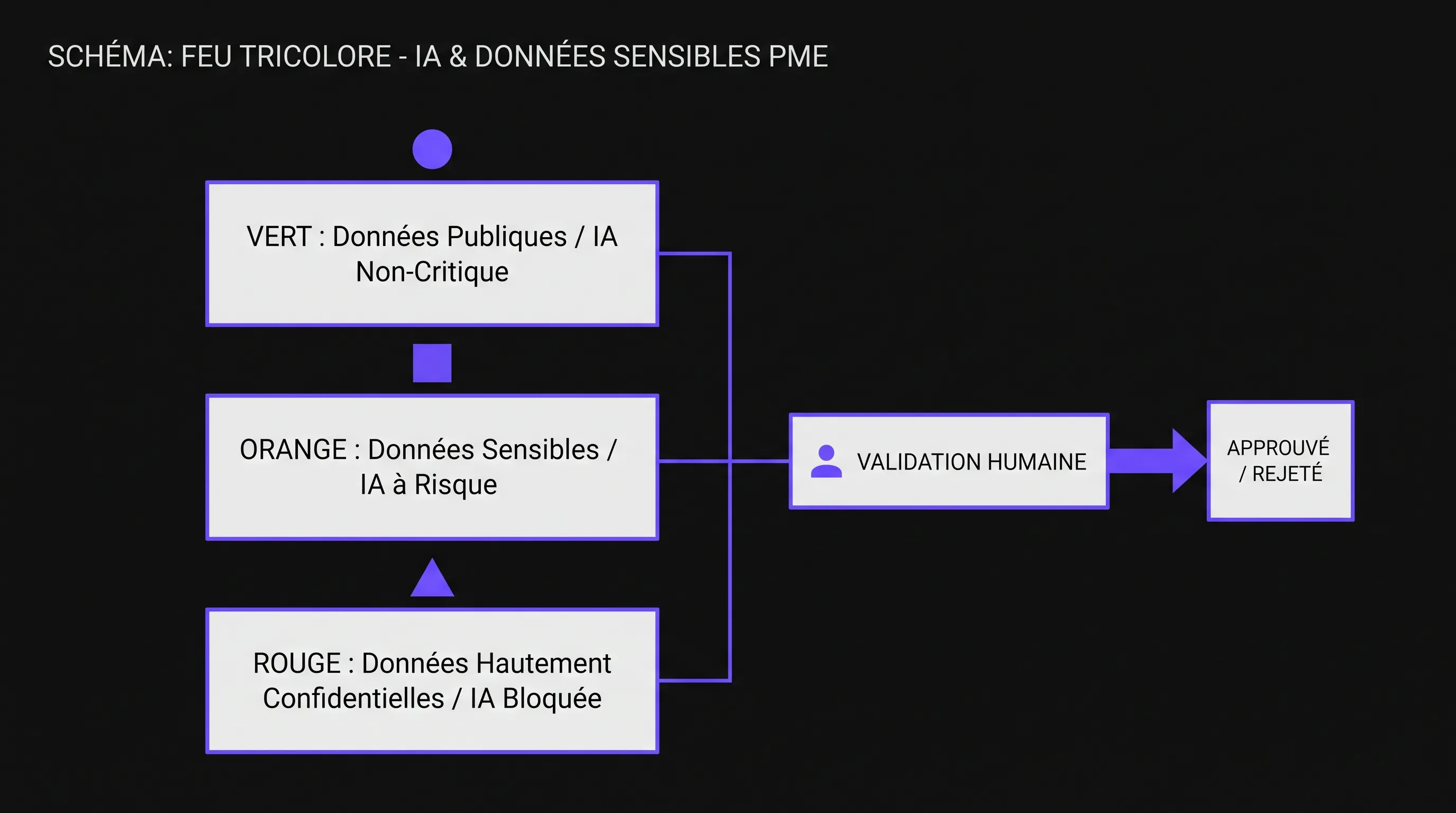
This framework replaces neither GDPR nor legal counsel. Its purpose is to turn an abstract question—can I use this data with AI?—into a clear decision for teams. Green, amber, red: three tiers, three usage rules, three degrees of control.
Why a Traffic Light System Works Better Than a 40-Page Charter
Most SMEs don't need an endless governance document to get started. They need a rule that teams can apply before copy-pasting information into an AI tool, connecting an assistant to business software, or automating a process.
The traffic light system works because everyone understands it. Green allows. Amber urges caution. Red prohibits unrestricted use and triggers an approval workflow. This simplicity reduces hesitation, prevents ad-hoc decision-making, and provides a shared baseline across sales, HR, finance, support, and leadership teams.
The goal is not to hold AI back. It is to separate low-risk use cases from those requiring a controlled environment. This allows an SME to move faster on high-value use cases while preventing data leaks, contractual breaches, and compliance errors.
Before the Traffic Light System: What Is Truly Sensitive
Under European law, sensitive data has a precise legal meaning. The CNIL defines sensitive data as information revealing racial or ethnic origin, political opinions, religious or philosophical beliefs, trade union membership, health, sex life or sexual orientation, as well as certain genetic or biometric data.
In real-world SME operations, the scope of what needs protection is much broader. Data may not be sensitive under strict GDPR definitions yet still be dangerous to feed into an uncontrolled AI tool: commercial margins, strategic contracts, source code, credentials, ongoing litigation, internal HR memos, product roadmaps, client lists, or trade secrets.
You must therefore evaluate two questions. First: is this data protected by law, contract, or a non-disclosure agreement? Second: if it leaked outside the company, what would be the financial, human, legal, or reputational impact? The traffic light system builds on these two questions.
Type of Information
SME Examples
Main AI Risk
Public Data
Web pages, brochures, published FAQs, public catalogs
Inaccurate answers or clumsy reuse
Internal Data
Processes, reporting, meeting notes, support tickets
Disclosure of business or customer information
Confidential Data
Contracts, margins, roadmaps, code, HR records
Leaks, contractual breaches, loss of competitive edge
GDPR Sensitive Data
Health, biometrics, opinions, trade union, minors' data depending on context
Unlawful processing, regulatory sanctions, harm to individuals
Sensitive Data and AI: Rules by Color
The traffic light model should be written in plain language, posted across internal tools, and reinforced during training. One practical rule fits into a single sentence: if I don't know how to classify the data, I treat it as amber at minimum and request validation before any external use.
Green: Data Usable with Minimal Restrictions
Green data is public, already approved for external release, or generic enough not to expose the company. It can be used in approved AI tools to brainstorm ideas, rephrase copy, outline articles, translate content, or summarize public documentation.
Examples: public service descriptions, website content, published press releases, product sheets without confidential specs, generic email templates, FAQs already visible to customers.
Even in the green tier, two best practices apply. You must verify outputs, as AI can hallucinate or distort facts. You should also avoid feeding it unvalidated commercial promises, pricing, or commitments.
Amber: Internal Data Subject to Conditions
Amber is the most common zone in an SME. It covers information useful for work that must not circulate freely: meeting minutes, client tickets, internal documentation, knowledge bases, tracking sheets, SOPs, aggregated sales figures, or anonymized excerpts.
This data can only be used with AI if the tool has been approved, confidentiality settings are understood, and the volume of data shared is minimized. Anonymization, pseudonymization, masking names, and stripping out unnecessary details should become second nature.
Amber is also the right tier for more structured projects, such as an internal assistant connected to a company knowledge base. In that scenario, AI should only access strictly necessary documents, respecting the same permissions as the user. An HR assistant shouldn't see commercial contracts, and a sales assistant shouldn't read individual employee records.
Red: Data Strictly Prohibited for Free Use
Red covers information that must never be pasted into public consumer AI tools or sent to third-party providers without a clear contractual framework. This includes GDPR-defined sensitive data, credentials, critical trade secrets, identifiable payroll data, disciplinary files, medical records, sensitive legal documents, complete banking details, and cybersecurity incident logs.
Red doesn't always mean impossible. It means strictly controlled use. It requires approval from executive leadership, the DPO (if the company has one), the security lead, or legal counsel depending on the matter. It also requires an appropriate technical environment: access controls, audit logging, encryption, controlled retention, contractual guarantees, and strict purpose limitation.
The Matrix to Display Within the Company
A good matrix fits on a single page. It should be specific enough to guide decisions, yet simple enough to remember. Here is a baseline you can adapt to your business.
Color
Examples
Authorized AI Use
Minimum Safeguards
Green
Public content, approved marketing collateral, published FAQs
This matrix should be integrated into your prioritization decisions. If two AI projects offer the same ROI potential, start with the one handling the least amber or red data. It's a straightforward way to prioritize profitable AI use cases without creating disproportionate risk.
How to Roll Out the Traffic Light System in 10 Days
The trap is trying to classify the entire enterprise before doing anything. In an SME, it's far better to start from actual usage. Which AI tools are already being used? Which teams are pasting data into assistants? Which processes could be automated over the next three months?
A pragmatic rollout can be completed in ten business days if leadership makes quick decisions and business teams are actively engaged.
Period
Action
Deliverable
Days 1 & 2
Audit existing AI usage, both official and shadow AI
AI usage registry, point of contact, monthly review
The registry does not need to be complex. It should outline the tool used, the use case, the data type, the color tier, the business owner, and the protective measures. This paper trail becomes invaluable when a client, investor, insurer, or auditor asks how your company governs AI.
Practical Rules by Department
The traffic light framework truly delivers value when each team recognizes its own daily scenarios. A generic policy is easily ignored. Real-world department examples trigger the right reflexes.
For sales teams, green covers public sales pitches and generic email templates. Amber covers meeting recaps, client objections, and anonymized CRM histories. Red covers unexecuted contracts, confidential discount schedules, and identifiable client financial data.
For customer support, published FAQs are green. Anonymized tickets can be amber. Tickets containing personal data, passwords, health details, or security incidents are red until cleansed and processed within an approved framework.
For HR, heightened caution is required. A public job posting is green. An interview guide without personal data can be amber. Individual performance reviews, sick leaves, disciplinary actions, identifiable compensation figures, and sensitive notes are red. AI can assist HR, but it must never become an uncontrolled shortcut involving identifiable individuals.
For finance, aggregated data can often be amber, provided it cannot identify a client or employee. Bank details, identifiable invoices, confidential cash-flow forecasts, and information linked to fundraising or M&A are red.
Choosing the Right Tools Is Not Enough
Many companies believe they can solve the problem simply by banning free tools and purchasing a professional license. It's a good first step, not a guarantee. You must verify data processing agreements (DPAs), whether prompts are used to train models, data retention periods, hosting locations, sub-processors, administrative controls, and deletion options.
An SME must also determine who can create accounts, connect applications, import databases, or activate integrations. Risk doesn't just stem from manual prompting. It also comes from overly broad API connectors, poorly scoped automations, and AI assistants granted more data access than necessary.
If an AI project involves hiring, employee evaluation, access to essential services, or regulated domains, confidentiality is only part of the story. You must also account for EU AI Act obligations for SMEs and scale-ups, especially when a system falls into a high-risk category.
Three Common Mistakes to Avoid
The first mistake is marking everything red. The intention is safe, but the outcome is counterproductive: teams bypass the rules, shadow AI proliferates, and the company misses out on quick wins. Green must exist to empower straightforward use cases.
The second mistake is confusing anonymization with simply stripping names. A client can still be identified by job title, company, transaction history, location, or narrow contextual clues. For amber data, you must remove anything not strictly required for the prompt.
The third mistake is writing policy without providing training. Teams need hands-on practice with real-world examples: is this prompt green, amber, or red? What needs to be removed? Which tool is allowed? Who signs off? This repetition builds a genuine AI culture, not just another ignored compliance document.
A Simple Rule Before Every Prompt
Before submitting any information to an AI tool, every employee should ask three questions: Is this data public or already approved for external release? Can an individual, client, employee, or partner be identified? Would the leakage of this information cause serious harm to the company?
If the answer is yes to the first question and no to the other two, the data is likely green. If personal identification or business exposure is involved, it is amber at least. If the data touches on health, sensitive HR records, credentials, critical trade secrets, strategic agreements, or strict statutory duties, it is red.
This discipline doesn't slow AI down. It prevents costly mistakes and enables you to invest in the right technical infrastructure for genuinely transformative use cases.
FAQ
Is a traffic light system enough to comply with GDPR? No. It empowers teams to make better daily decisions, but it is no substitute for a lawful basis, data subject notices, a record of processing activities (ROPA), data processing agreements, or Data Protection Impact Assessments (DPIA) where required.
Can we use customer data with AI? Yes, but rarely without safeguards. Anonymized or aggregated customer data can fall into amber. Identifiable, contractual, or sensitive data must be handled within an approved tool, with an explicit purpose and restricted access.
Does a paid version of an AI tool guarantee data security? Not automatically. It may offer better governance features, but you must still review contractual terms, retention policies, model training opt-outs, sub-processors, data residency, and admin settings.
Who should approve red-tier data use? Approval channels depend on your organization. Sign-off can come from executive management, the IT lead, the DPO, the CISO/security officer, legal counsel, or an AI committee. What matters most is that the escalation path is established before an employee encounters a red-tier scenario.
Should we ban AI for HR and finance teams? No, but these use cases require tighter guardrails. HR and finance handle identifiable, confidential, and highly regulated data. AI can assist with templates, anonymized syntheses, or internal audit checks, but not through ad-hoc pasting of red-tier data.
From a Simple Rule to Mastered AI Implementation
The traffic light framework is an excellent starting point. It equips teams with a common vocabulary, mitigates immediate risks, and smooths early automation efforts. However, as soon as an SME wants to connect AI to core business systems, automate workflows, or deploy internal assistants, a more structured architecture becomes essential.
This is precisely the purpose of an AI audit: identifying opportunities, classifying data, implementing the right safeguards, and turning use cases into high-value solutions. If you want to move forward without exposing sensitive information, Impulse Lab can support you with audits, custom AI platform design, process automation, and team training.