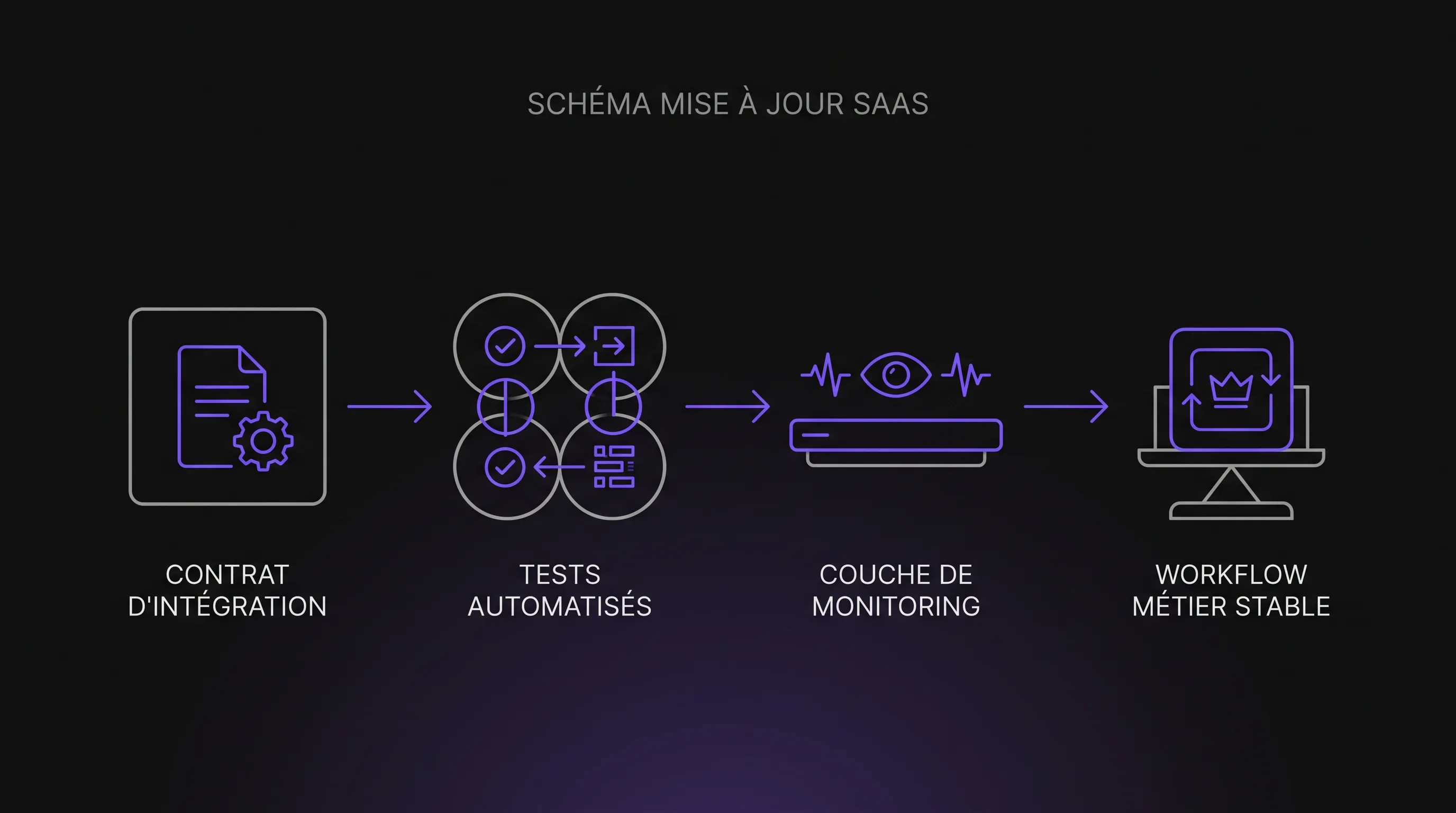
An automation almost never breaks for no reason. When a SaaS CRM, billing tool, or helpdesk updates, it often exposes existing fragile dependencies: renamed fields, revoked permissions, modified connectors, or untested workflows.
September 25, 2026·12 min read
An automation almost never breaks "for no reason." When a CRM, billing tool, marketing platform, or SaaS helpdesk updates, the incident often exposes an already fragile dependency: a renamed field, revoked permission, modified connector, implicit business step, or untested scenario.
For an SME or scale-up, the issue is not merely technical. A broken automation can block quotes from being sent, generate duplicates in your CRM, prevent support tickets from being created, or skew executive reporting. As a company scales, these small breakdowns become increasingly costly because they cascade across multiple tools and teams.
A SaaS Update Doesn't Break Your Automations—It Exposes Their Fragility
A SaaS platform evolves continuously: new interfaces, security adjustments, API rate limits, updated native connectors, enriched fields, and improved internal workflows. That is precisely one of the main advantages of the model: you benefit from a maintained product without having to manage the underlying infrastructure.
However, an automation is a chain of dependencies. It assumes that certain data exists, certain buttons remain accessible, specific statuses keep the same name, and APIs always respond identically. When a vendor modifies any of these elements—even with good reason—the automation may no longer know how to proceed.
The key question is not "should we stop automating?" The real question is: are your automations designed as quick hacks and handy prototypes, or as reliable components of your information system?
The Most Common Causes After a SaaS Update
Incidents often look similar. A task ran smoothly yesterday, the platform announces an update, and suddenly a Make, Zapier, n8n, Power Automate, Airtable scenario, or internal script begins to fail. Yet, the exact cause varies depending on the integration level.
1. A Field Changed Its Name, Format, or Behavior
This is the most classic scenario. An automation fetches a field such as "company_name", "deal_stage", or "invoice_status". Following a SaaS update, that field is renamed, moved, converted into a dropdown list, or made mandatory. The connector still receives a response, but it no longer matches what the workflow expected.
The catch is that things don't always fail immediately. An empty value can go unnoticed for several days before generating business errors: quotes without company names, incomplete marketing segments, distorted reporting, or customer follow-ups triggered at the wrong moment.
2. Permissions or Authentication Were Hardened
SaaS vendors routinely tighten their security rules. They may update OAuth scopes, revoke legacy tokens, enforce stricter authentication, or restrict access to specific resources based on user roles.
The result: the automation loses the permission to read, create, or update the data it previously accessed. This frequently happens when a workflow relies on an individual employee's personal account instead of a dedicated service account. The day that person changes roles, leaves the company, or resets their credentials, the automation becomes hostage to an HR event rather than depending on a sound architecture.
3. A Webhook or Trigger No Longer Delivers the Same Event
Webhooks are powerful because they trigger an action as soon as an event happens: a new lead, a paid invoice, a support ticket opened, or a signed contract. However, they rely on the SaaS platform's event contract.
If the provider alters the payload structure, merges two distinct events, renames a status, or introduces a processing delay, your automation might trigger too early, too late, or not at all. Major vendors typically publish changelogs—as Slack does for its developer ecosystem—but someone still needs to monitor them.
4. The UI Changed and Your RPA Can No Longer Find Its Way
UI-based automations, often built with RPA or browser scripts, are the most vulnerable to visual changes. A moved button, an altered label, a reorganized menu, or a new modal window is enough to halt execution.
This type of automation is sometimes necessary, especially when a tool lacks a usable API. However, one must accept its nature: it mimics a human user. If the screen changes, it must be recalibrated.
5. API Limits, Quotas, or Response Times Evolve
An automation can also fail without any visible change. A SaaS provider might lower or restructure its API rate limits, introduce anti-abuse mechanisms, or slow down certain endpoints during internal migrations.
If your scenario lacks retry logic, queues, or clean error handling, it will fail at the first timeout. In a growing business, this issue often surfaces when volume surges: what worked seamlessly with 30 leads per week breaks down at 800.
6. The Business Rule Changed, but the Automation Was Not Updated
Not all breakdowns stem from the SaaS provider. Often, the business updates its sales pipeline, customer tiers, billing logic, or support ticket qualification rules. The SaaS tool is configured to reflect the new structure, but the automations remain aligned with the old process.
This is the most underestimated cause because it masquerades as a technical bug when it actually stems from a lack of business governance.
Failure Cause
Concrete Example
Common Symptom
Effective Prevention
Modified field
Renamed CRM status
Missing data or broken conditions
Data contract and automated tests
Changed permissions
Expired OAuth token
401 error or access denied
Service accounts and documented scopes
Altered webhook
Enriched or restructured payload
Missed trigger or duplicates
Event schema validation
UI changes
Moved button
Bot stuck on a step
Prioritize APIs or monitor RPA
API quota reached
Too many concurrent requests
Intermittent failures
Retries, queuing, and monitoring
Updated business rule
New sales pipeline stages
Inconsistent automation behavior
Business owner and regular reviews
Fragility Depends on Your Automation Architecture
Not all automations carry the same level of risk when SaaS updates roll out. A versioned API integration will generally be much more stable than a bot clicking on an interface. A no-code scenario can be robust if well architected, but extremely brittle if it piles connectors on top of each other without error handling.
Automation Type
Typical Robustness
Main Risk
Best Use Case
UI-based RPA
Low to Medium
Visual changes
Tools without APIs, simple tasks
No-code connector
Medium
Abstraction of actual changes
Prototypes, non-critical workflows
API integration
Good
Contract breaking or deprecation
Core processes and steady volumes
Custom platform
Very good if maintained
Governance cost
Critical processes, complex data
The right choice depends on the process, volume, criticality, and internal maintenance capacity. If your goal is to automate end-to-end workflows across multiple systems, the principles covered in our hyperautomation use cases for SMEs can help you look beyond simply "connecting two apps."
How to Prevent Automations from Breaking with Every SaaS Update
Reliability does not come from a silver-bullet tool. It comes from disciplined design: mapping dependencies, decoupling business logic from technical execution, monitoring errors, and planning for maintenance.
Map Dependencies Before Automating
Before adding a new scenario, identify the tools involved, the fields used, the triggers, required permissions, and the impact of a failure. This mapping can remain simple, but it must exist.
A great test is asking: "If this field disappears tomorrow, who will know, and what process will break?" If no one can answer, the automation is already an operational risk.
Prioritize Versioned APIs for Critical Processes
When a workflow impacts revenue, billing, customer support, or executive data, an API is almost always preferable to UI automation. Well-managed APIs provide documentation, standard error codes, versioning, and transition grace periods.
Stripe, for example, thoroughly documents its approach to API versioning, allowing engineering teams to control when they adopt breaking changes. Not all SaaS vendors go that far, but the principle holds: the clearer the technical contract, the more maintainable the integration.
Introduce an Adaptation Layer Between Your Tools
A common pitfall is connecting every SaaS tool directly to one another. The CRM talks to the invoicing tool, which talks to customer support, which feeds a reporting spreadsheet. At first, it is quick to set up. A few months later, nobody knows where the business logic actually lives.
An adaptation layer can be middleware, an operational database, a lightweight backend, or an internal platform. Its role is to centralize rules: data formatting, status mapping, error handling, deduplication, and event transformations.
Test Sensitive Scenarios Before Going to Production
Testing isn't reserved for large engineering teams. Even an SME can implement simple tests: verifying that a test lead lands in the CRM, that a mock invoice triggers the right email, or that a support ticket retains all required fields.
The goal is not to test everything like a complex software suite. It is about identifying high-stake workflows where failures are costly and regularly verifying that they function properly—especially after SaaS updates, connector upgrades, or internal process changes.
Monitor Errors Instead of Waiting for User Complaints
A dependable automation must emit signals: logs, alerts, failure rates, execution times, processed counts, and blocked records. Without monitoring, companies usually discover issues only after a customer complains or a team spots an anomaly in an executive report.
The minimum viable approach is sending a clear notification to a designated channel or owner whenever a critical scenario fails repeatedly. An isolated error can happen; a streak of errors on the same connector warrants an immediate investigation.
Assign a Business Owner and a Technical Owner
Automations frequently span multiple teams: sales, finance, operations, support, and marketing. Without clear ownership, they become orphaned assets. The business owner defines the rules: when to trigger, what to create, and which exceptions to handle. The technical owner ensures the integration remains robust and maintainable.
For growing SMEs, this lightweight governance prevents countless incidents. It also makes strategic decisions clearer: should an automation be patched, refactored, or replaced entirely?
What to Do When an Automation Is Already Broken
The worst reaction is tweaking settings at random until the scenario runs again. This often hides the root cause and builds technical debt that becomes harder to fix later. A more reliable approach follows a diagnostic process:
Isolate the breaking point: trigger, authentication, data transformation, final action, or target tool.
Compare the last successful execution with the first failure: the time gap helps connect the incident to a SaaS update, an internal change, or a traffic spike.
Read full error logs: a 401, 429, or 400 error points to entirely different root causes.
Check fields and permissions: many failures stem from an added mandatory field or an expired access token.
Replay using a controlled test case: avoid testing directly on sensitive live customer data.
Document the resolution: if the issue happens again, the team shouldn't have to start from scratch.
Once the workflow is restored, evaluate its overall robustness. If the same type of outage recurs every month, it is no longer an isolated glitch—it is an architectural warning sign.
When Should You Replace a Patchwork Automation with a Structured Solution?
Pragmatic tinkering has its place. A no-code workflow is perfect for validating an idea, saving time quickly, or handling non-critical tasks. The problem starts when a quick prototype turns into a core operational process without being reinforced.
Key indicators that it is time to rethink your architecture include: multiple teams relying on the workflow, data directly impacting billing or financial reporting, rising exception rates, surging volume, workflows becoming incomprehensible to newcomers, or recurring outages after SaaS updates.
In these scenarios, a hybrid or custom approach is often more cost-effective than an endless series of hotfixes. The decision is rarely just "SaaS vs. custom code." Intermediate options exist: structured connectors, internal APIs, custom business portals, robust data sync engines, or dedicated web apps. To guide this decision, our guide on custom development vs. SaaS offers a solid starting point.
The Role of AI in Building Resilient Automations
AI can help classify inbound requests, extract unstructured data from documents, detect anomalies, or draft suggested responses. However, it does not remove the need for sound architecture. A fragile AI automation remains fragile if it relies on volatile fields, unversioned prompts, or out-of-sync databases.
The right mindset is to treat AI as a functional component of the process, not a magical band-aid for poor system design. The same best practices apply: documented inputs, validated outputs, confidence thresholds, comprehensive logging, human-in-the-loop oversight for high-risk cases, and performance monitoring.
If you plan to deploy AI workflows quickly, start with well-defined scopes. Our examples of AI automation workflows to deploy in 30 days are great reference points, provided maintenance guardrails are built in from day one.
FAQ
Why do my automations break after a SaaS update? Because they often depend on elements subject to change: fields, permissions, webhooks, UI elements, API quotas, or business logic. An update surfaces an undocumented or untested dependency.
Are no-code tools less reliable than custom development? Not necessarily. A well-designed, documented, and monitored no-code workflow can be very reliable. It becomes fragile when built on invisible assumptions without logs, ownership, or structured error handling.
Should we always favor APIs over RPA bots? No. RPA remains valuable when no API exists or for short-term processes. For critical, long-term workflows, an API integration or an adaptation layer is generally far more dependable.
How can I tell if an automation is critical? An automation is critical if its failure halts a sale, blocks invoicing, disrupts customer experience, corrupts executive reporting, violates compliance, or paralyzes daily operations across multiple teams. The higher the impact, the more it demands automated testing and monitoring.
Stabilize Your Automations Before the Next Update
SaaS updates aren't going to stop. Your software stack will keep evolving, and so will your business processes. The real difference lies in how you design, document, and maintain your automations.
Impulse Lab supports SMEs and scale-ups with AI audits, process automation, system integrations, and custom web & AI platforms. If your automations are becoming difficult to maintain, an audit can help identify failure points, prioritize fixes, and structure a resilient architecture.
To turn your automations into durable business assets rather than fragile scripts, reach out to our team at Impulse Lab.