We talk a lot about AI, but the real topic in 2026 is no longer “does it work?”. It is rather: **where are the concrete gains, how to measure them, and how to avoid creating a new layer of tools**.
février 09, 2026·9 min de lecture
We talk a lot about AI, but the real topic in 2026 is no longer “does it work?”. It is rather: where are the concrete gains, how to measure them, and how to avoid creating a new layer of tools.
In an SME or a scale-up, artificial intelligence doesn't bring value “by magic”. It brings benefits when it is plugged into your processes, your data, and managed with simple KPIs.
Artificial intelligence benefits, seen as measurable gains
To remain pragmatic, artificial intelligence benefits almost always fall into 4 families of gains.
Gain family
What AI really improves
KPI examples
Where it works best
Productivity
Less time on repetitive tasks, better preparation
Processing time, tickets handled/agent, cycle time, hours saved
Support, back-office, sales, ops, dev
Revenue
More qualified leads, better conversions, average basket
3) Automate the back-office (and remove daily irritants)
Many companies think “chatbot” first, whereas the most reliable quick wins are often on the back-office side: document processing, data entry, checks.
Typical cases:
Data extraction from invoices, purchase orders, contracts
Simple reconciliations (with human validation)
Pre-filling and categorization (tickets, requests, emails)
KPIs to track: processing time per file, error rate, manual rework rate, closing time.
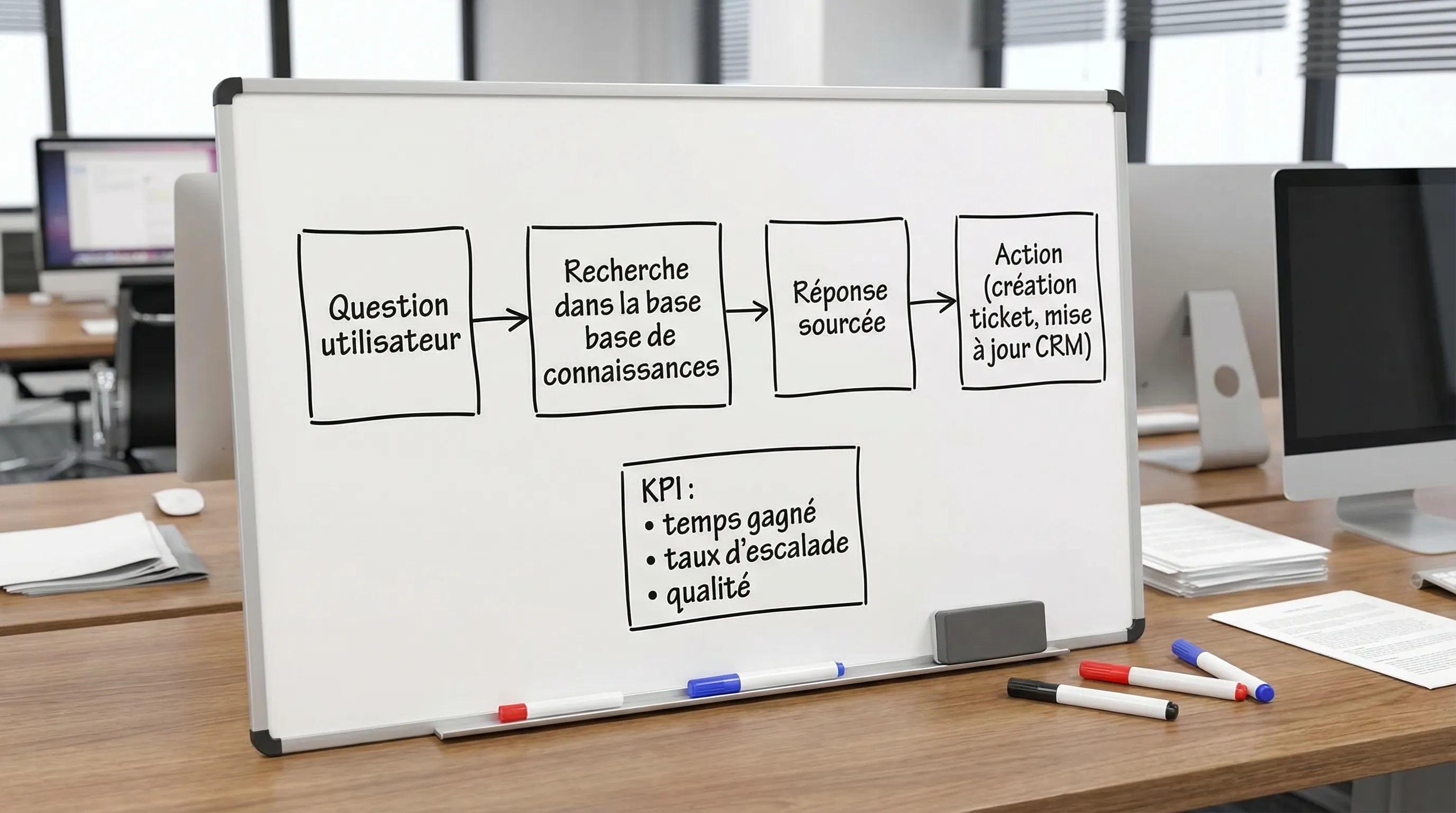
4) Transform internal knowledge into an “actionable response”
In an SME that is scaling, the problem is not the lack of info. It is the dispersion: Drive, Notion, emails, Slack, CRM, product docs.
The advantage of AI here is not “answering like ChatGPT”. It is answering with verifiable sources, and ideally triggering an action (creating a ticket, finding a contract, pulling up a procedure).
Technically, we often speak of RAG (retrieval-augmented generation). Impulse Lab details the subject here: RAG (Retrieval-Augmented Generation).
KPIs to track: search time, sourced response rate, usage rate, reduction in interruptions (repetitive questions).
5) Improve quality, reduce errors and rework
This is an underestimated benefit: AI can play a quality control role (not a final judge), by spotting inconsistencies, omissions, tone variations, non-compliance with rules.
Examples:
Checking that a sales email respects a charter (promises, mentions, tone)
Detecting inconsistencies in a file (missing documents)
Alerting on risks (PII, sensitive information)
KPIs to track: error rate, customer return rate, rework time, incidents.
6) Accelerate IT and product (without confusing prototype and production)
Yes, AI helps code faster, write tests, summarize PRs, document. But the main advantage in business is elsewhere: reducing the delivery cycle, while maintaining standards (security, observability, QA).
Concrete gains:
Less time on “mechanical” tasks (boilerplate, docs, scripts)
Let's assume an “internal assistant” case that reduces search time.
25 people
10 searches per week per person
6 minutes per search
That makes 25 × 10 × 6 = 1500 minutes, or 25 hours/week.
If your solution reduces this time by 30% (realistic goal to validate in pilot), you recover 7.5 hours/week. Only then do you discuss cost, integration, deployment.
How to choose the right use case (SMEs and scale-ups)
What sources say about gains (and how to read them)
Two useful readings to put benefits into perspective:
McKinsey estimates that GenAI has significant economic potential across several functions (customer service, software engineering, marketing, operations). Source: The economic potential of generative AI.
Tracking trends and impacts in business is well consolidated by the annual Stanford report. Source: Stanford AI Index.
The important point: these reports give macro orders of magnitude. Your truth is your baseline (your volumes, your times, your errors).
Frequently Asked Questions
What are the main artificial intelligence benefits for an SME? The most frequent gains are productivity (time saved), speed (reduced delays), quality (fewer errors) and, in some cases, revenue increase (conversion, upsell). The key is to choose a frequent and measurable use case.
Which AI use case gives the fastest ROI? Often: customer support (ticket deflection, response assistance), internal knowledge search (RAG), and back-office automation (document extraction and processing). The “fastest” depends mostly on frequency and integration.
How to measure concrete gains before investing heavily? By setting a baseline (volume, time, error rate), then launching a limited pilot with 1 main KPI and a few guardrails (quality, costs, compliance). Measurement must be planned before the build.
Does AI replace jobs? In the majority of SMEs, the immediate impact is rather to reduce time spent on repetitive tasks and increase processing capacity. HR effects depend on the organization, growth, and adoption strategy.
What risks can cancel out benefits? The main ones are data leakage, undetected hallucinations, lack of integration (low usage), underestimated operating costs, and lack of governance (shadow AI). A “guardrails + measurement” approach strongly reduces these risks.
Should we buy an AI tool or develop custom? If a tool covers 80% of the need, integrates well, and respects your data constraints, buying is often relevant. Custom becomes interesting when integration, traceability, compliance, or product differentiation are critical.
Moving from promises to concrete gains with Impulse Lab
If you see the potential but want to avoid POCs that go nowhere, Impulse Lab can help you transform artificial intelligence benefits into measurable results:
AI Opportunity Audit to prioritize 2 to 5 use cases with fast ROI, with KPIs and risks
Development of custom web and AI solutions, integrated into your existing tools
Automation and integration (so that AI lives in your workflows, not in a tab)
Training and adoption to industrialize usage on the team side
You can start simply with a conversation: impulselab.ai (audit, training, custom solutions).