AI Agent: 7 Tasks to Automate Without Losing Control
Intelligence artificielle
Outils IA
Gouvernance IA
Productivité
Automatisation
Automating with an AI agent is no longer just for large corporations. In 2026, an SME can already entrust an agent with repetitive tasks connected to its tools, yielding real gains in support, sales, administration, or reporting.
May 19, 2026·13 min read
Automating with an AI agent is no longer just for large corporations. In 2026, an SME can already entrust an agent with repetitive tasks connected to its tools, yielding real gains in support, sales, administration, or reporting.
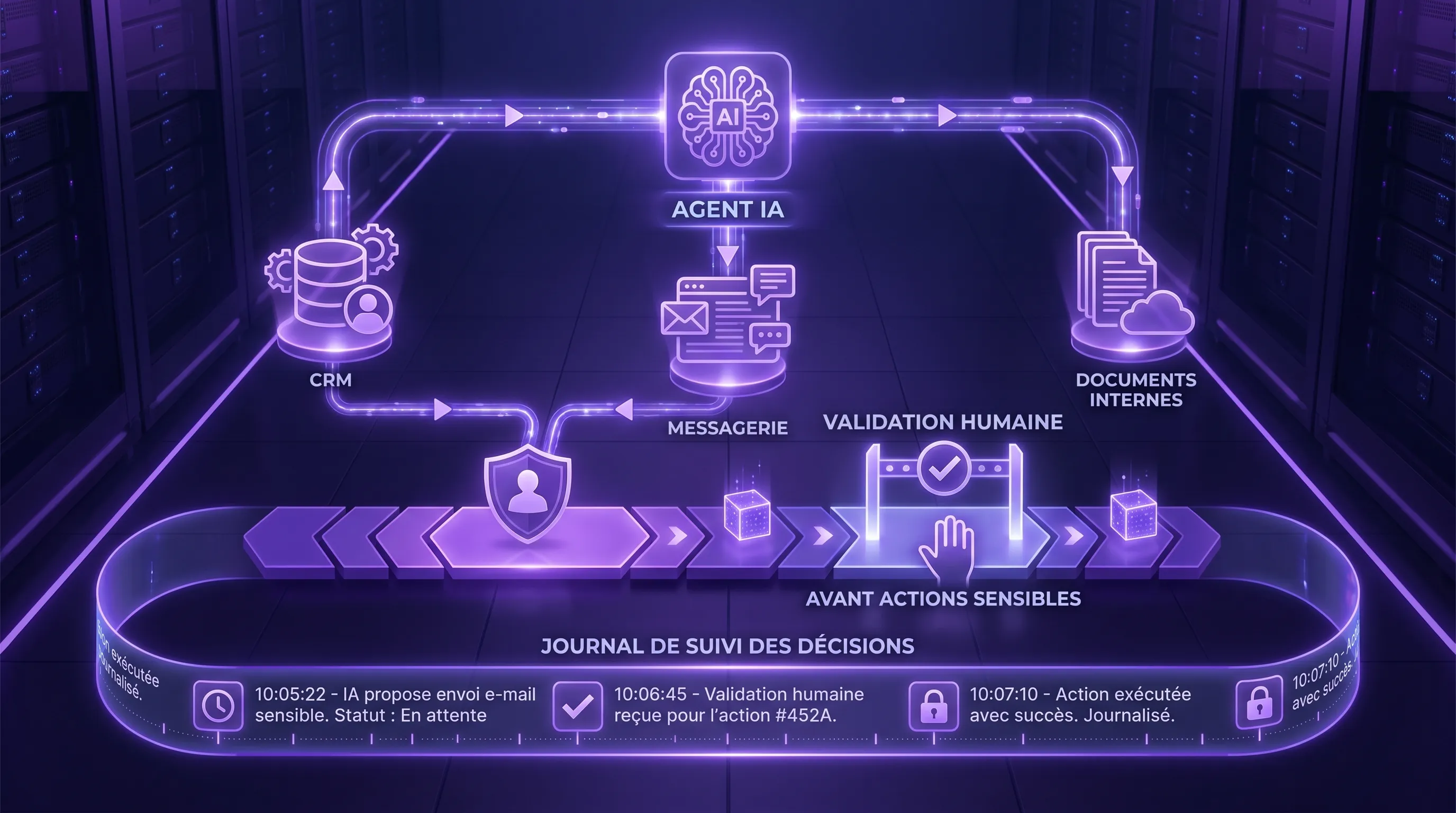
But there is a condition: do not confuse autonomy with a loss of control. A useful AI agent is not one that does everything, all by itself, everywhere. It is one that acts within a specific scope, with limited rights, human validations in the right places, and KPIs that prove its value.
If you are discovering the concept, start with the definition of an AI agent. In this article, we move on to the operational side: which tasks to automate first, how to frame them, and how to prevent the agent from becoming a black box in your company.
What an AI agent really changes
An AI agent is different from a simple chatbot. A chatbot answers. An agent observes a situation, interprets data, decides on a next step, and can trigger an action via your tools: CRM, helpdesk, ERP, spreadsheet, messaging, knowledge base, or ticketing tool.
This capacity for action is precisely what creates value, but also what increases risk. A bad summary is annoying. A bad email sent to a strategic client, a discount applied without validation, or an invoice routed to the wrong place can cost much more.
The right approach is therefore to choose the level of autonomy based on the business risk.
Level of autonomy
What the agent does
Suitable case
Recommended control
Assistant
Analyzes and proposes an output
Summary, draft, classification
Systematic human validation
Semi-automatic
Prepares the action and executes it upon approval
Client follow-up, CRM update, support ticket
Preview before action and logging
Scoped agent
Executes reversible actions alone within a limited scope
Tags, routing, alerts, simple assignment
Thresholds, permissions, logs, and regular review
Extended autonomy
Plans and acts across multiple tools
Mature, stable, and measured process
Reserve for tested cases, with rollback and monitoring
For an SME or a scale-up, the best starting point is rarely full autonomy. It is better to aim for a scoped agent on a frequent, unambiguous, and measurable task.
The simple filter: frequency, structure, reversibility
Before connecting an agent to your tools, ask three questions.
Is the task frequent? If it happens once a month, the gain will probably not outweigh the effort of integration, security, and training. The best cases involve regular volumes: tickets, leads, follow-ups, invoices, reports, internal requests.
Is the task structured? An AI agent works best when it has rules, sources, and a clear output format. For example, qualifying a support request into five categories is more reliable than freely processing any client message.
Is the task reversible? The harder an action is to undo, the more human validation must remain present. Adding a CRM tag is low risk. Sending a quote, modifying a contract, or triggering a payment requires a higher level of control.
A good framework can fit on one page. This is the principle of the agent contract, which we also recommend in projects involving autonomous agents with guardrails. It must specify the objective, authorized sources, accessible tools, permitted actions, prohibited actions, validation thresholds, metrics, and the business owner.
7 tasks to automate with an AI agent without losing control
1. Sort and prioritize client requests
Sorting support requests is one of the best initial use cases. The agent reads incoming tickets, identifies the intent, detects urgency, proposes a category, spots duplicates, and assigns the ticket to the right team.
The gain comes from reducing qualification time and decreasing forgotten tickets. The agent can also flag VIP requests, messages with a negative tone, or recurring issues that warrant a product fix.
The required control is simple: the agent can automatically tag low-risk requests, but it must not close a ticket or reply alone to sensitive cases initially. Legal, strategic commercial, security-related, or highly emotional requests must be escalated.
Useful KPIs: time to first response, correct routing rate, average backlog age, share of escalated tickets, post-resolution satisfaction.
2. Prepare support responses from your internal sources
An AI agent can generate draft responses from your knowledge base, procedures, product documentation, and client history. This is particularly effective when requests come up often: password, billing, configuration, order status, return procedure, use of a feature.
The key is to connect the agent to a source of truth, often via a RAG pattern, to avoid invented answers. The agent must not only produce fluent text. It must indicate which source it relies on, signal its confidence level, and refuse to answer if the information does not exist.
The right guardrail consists of keeping human validation for the first batches of responses, then gradually opening up automation on very stable cases. An agent can automatically answer a simple question if the answer is sourced, verified, and non-sensitive. It must transfer to a human as soon as the request involves a commercial gesture, a complaint, personal data, or a contractual commitment.
Useful KPIs: response time, first contact resolution rate, human correction rate, transfer rate, CSAT, number of responses without a source.
3. Update the CRM after calls and sales exchanges
Sales teams often waste time summarizing calls, filling out CRM fields, creating next tasks, and updating the status of opportunities. An AI agent can transform a call transcript, an email thread, or raw notes into a structured report.
It can propose pain points, objections, next steps, interest level, follow-up date, involved contacts, and CRM fields to complete. This is a highly profitable case because it improves both sales productivity and data quality.
Control is essential: the agent must not overwrite critical fields without a preview, notably the amount, stage, probability, closing date, or account owner. It must display the proposed modifications, keep the source of each piece of information, and allow the sales rep to validate with one click.
Useful KPIs: administrative time per sales rep, CRM completeness, corrected fields rate, freshness of opportunities, pipeline reliability.
4. Manage simple sales follow-ups
An agent can monitor opportunities with no activity, detect unanswered quotes, prepare personalized follow-ups, and suggest the best time to send them. It can also adapt the message to the context: last exchange, known objection, sector, prospect maturity, content already viewed.
This is a good use case when your follow-ups are already partially standardized. The agent does not replace the sales strategy. It reduces execution friction and prevents oversights.
To avoid losing control, impose strict rules: frequency cap, respect for unsubscribes, human validation for strategic accounts, prohibition on promising an unapproved discount or feature, tone aligned with your brand. For low-risk sequences, you can switch from a draft mode to a semi-automatic mode after a few weeks of measurement.
Useful KPIs: response rate, meetings generated, reactivated opportunities, complaint rate, unsubscribe rate, average time between two sales actions.
5. Prepare quotes and commercial proposals
An AI agent can accelerate the production of a quote by collecting available information, identifying missing elements, proposing a scope, generating a first draft of the proposal, and verifying that standard conditions are included.
The gain is significant for SMEs selling services, B2B offers, or solutions with multiple options. The agent helps standardize quality, reduce oversights, and shorten the time between a qualified meeting and sending a proposal.
The main control point concerns price, margin, and contractual commitment. The agent can prepare, but never decide alone initially. It must use an approved pricing grid, flag exceptions, block off-policy discounts, and require approval above a threshold.
Useful KPIs: quote production time, error rate, rate of quotes sent within 24 or 48 hours, conversion rate, average margin, number of internal back-and-forths.
6. Route and pre-check back-office documents
Invoices, purchase orders, forms, supporting documents, supplier contracts, HR requests: many documents follow a repetitive process. An AI agent can extract key information, compare data against an order or an internal rule, identify anomalies, and route the document to the right person.
This case is often more profitable than a visible chatbot because it touches recurring volumes and unappreciated tasks. It reduces manual data entry, errors, and processing times.
The guardrail depends on the business consequence. The agent can classify, extract, pre-fill, and alert. It must not trigger a payment alone, approve an unusual expense, or accept a contractual clause. Amount thresholds, unknown suppliers, VAT discrepancies, modified bank details, and incomplete documents must be treated as exceptions.
Useful KPIs: cycle time, touchless processing rate, detected anomaly rate, data entry errors, volume processed per employee, validation times.
7. Produce weekly reporting and trigger alerts
An AI agent can retrieve data from your tools, prepare a weekly summary, explain variations, detect anomalies, and propose actions. For example: an increase in tickets for a product, a drop in conversion rate, at-risk opportunities, overdue invoices, or a drift in the cost of an AI API.
This use case is interesting because it transforms reporting into an action ritual. The agent doesn't just produce a table. It highlights what requires a decision.
To maintain control, the numbers must come from reliable queries, APIs, or existing dashboards, not from a free estimation by the model. The agent can comment and prioritize, but it must cite the data source. It must not modify data or trigger budget decisions without validation.
Useful KPIs: reporting preparation time, number of anomalies detected, rate of followed-up actions, reaction time, quality perceived by managers.
Summary table of tasks to automate
Task
What the agent automates
Recommended level of control
Main KPI
Support triage
Categorization, priority, assignment
Auto on low risk, escalation on sensitive
Time to first response
Support responses
Sourced drafts, self-service
Validation then gradual opening
First contact resolution
Post-call CRM
Summary, fields, next actions
Preview before modification
Administrative time saved
Sales follow-ups
Detection of inactive opportunities, drafts
Validation on key accounts
Response rate
Quotes
Proposal preparation and checks
Price and exceptions approval
Quote sending time
Back-office documents
Extraction, checking, routing
Validation on payments and exceptions
Cycle time
Reporting
Summary, anomalies, recommendations
Verifiable numerical sources
The essential guardrails to avoid losing control
An AI agent should never be judged solely on its ability to produce convincing outputs. It must be controllable. Risk frameworks like the NIST AI Risk Management Framework remind us of the importance of measuring, governing, and monitoring AI systems throughout their lifecycle. In Europe, the regulatory framework on AI and the GDPR presented by the CNIL also impose strong attention to data, transparency, and sensitive uses.
For an SME, there is no need to create heavy governance. The main thing is to put the right controls in the right place.
Guardrail
Objective
Concrete example
Limited scope
Prevent the agent from acting off-topic
A support agent does not modify commercial terms
Minimal permissions
Reduce the impact of an error
Read access to the CRM, write access only on certain fields
Human validation
Keep control of sensitive actions
Mandatory approval before sending a quote
Logging
Understand what the agent did
Logs of sources, decisions, actions, and validations
Exception thresholds
Escalate ambiguous cases
Block if confidence is low, VIP client, or high amount
Cost monitoring
Prevent drift after the pilot
Quotas per user, API consumption alerts
Architecture also matters. For simple cases, an API integration is enough. For responses based on your documents, RAG provides a source of truth. For multi-tool actions, an agent must be orchestrated with permissions and logs. You can explore these patterns further in our guide on enterprise AI integration.
What not to automate too early
Some tasks seem attractive, but they are risky if your organization does not yet have reliable data, clear rules, or supervision capacity.
Avoid automating sensitive HR decisions, credit decisions, final contract validations, data deletions, massive price changes, legal commitments, or irreversible financial actions too early.
This does not mean AI has no role in these areas. It can summarize, prepare, check completeness, detect inconsistencies, or assist in the review. But the final decision must remain human, traceable, and compliant with your internal rules.
30-day deployment plan
A useful first AI agent can be launched quickly if the scope is well chosen. The goal is not to transform the entire company in a month, but to prove a gain on a concrete task.
Week 1, frame the use case: choose a frequent task, measure the baseline, write the agent contract, classify the data, and define prohibited actions.
Week 2, build a controlled prototype: connect the minimal sources, limit rights, impose an output format, create a test set with real cases.
Week 3, pilot in observation mode: the agent proposes, the human decides, discrepancies are measured, prompts, rules, and sources are corrected.
Week 4, open limited automation: activate execution on low-risk cases, keep validation on exceptions, track KPIs, and decide on scaling.
This logic aligns with the enterprise AI audit approach: start with value, measure risks, then decide with evidence rather than a demo.
Mistakes that make you lose control
The first mistake is choosing a tool before choosing a task. An AI agent must solve a specific operational problem, not a general desire to automate.
The second mistake is connecting too many tools too quickly. The more rights the agent has, the harder it becomes to test, supervise, and secure. Start with one or two useful integrations, then expand.
The third mistake is measuring activity instead of impact. The number of messages generated proves nothing. Measure time saved, errors avoided, delays reduced, revenue reactivated, or satisfaction improved.
The fourth mistake is forgetting adoption. If teams do not understand when to trust the agent, when to correct it, and how to report a problem, the automation will remain fragile.
FAQ
Can an AI agent act alone in an SME? Yes, but only on limited, reversible, and well-tested actions. For sensitive actions, human validation must remain mandatory, at least until metrics prove reliability.
What is the difference between an AI agent and no-code automation? No-code automation generally follows deterministic rules. An AI agent can interpret a context, choose a step, and produce a less standardized output. Both can be complementary: rules for critical actions, AI for analysis and preparation.
How many tasks should be automated initially? Just one is enough to start. Choose a frequent, measurable, and low-risk task. Once the guardrails, KPIs, and adoption are validated, you can replicate the method on other processes.
How to avoid AI agent hallucinations? Use sources of truth, impose citations, refuse answers without a source, test on real cases, and plan human validation on risky outputs. RAG helps, but it does not replace the quality of internal documents.
Should you buy a solution or develop a custom agent? If the need is standard, an off-the-shelf tool may suffice. If the agent must integrate closely with your rules, your data, your CRM, or your internal workflows, an assembled or custom solution often becomes more profitable and controllable.
Moving from an AI agent idea to mastered automation
An AI agent can save a lot of time, provided you choose the right use cases and put control at the center of the project: clear scope, limited rights, human validation, logs, KPIs, and adoption.
Impulse Lab supports SMEs and scale-ups with AI opportunity audits, the development of custom web and AI solutions, process automation, integration with existing tools, and team training.
Do you want to identify tasks to automate without creating unnecessary risk? Contact Impulse Lab to frame a first AI agent that is measurable, secure, and truly integrated into your workflows.