AI at Work: 10 Tasks to Delegate Without Losing Control
Intelligence artificielle
Stratégie IA
Productivité
Automatisation
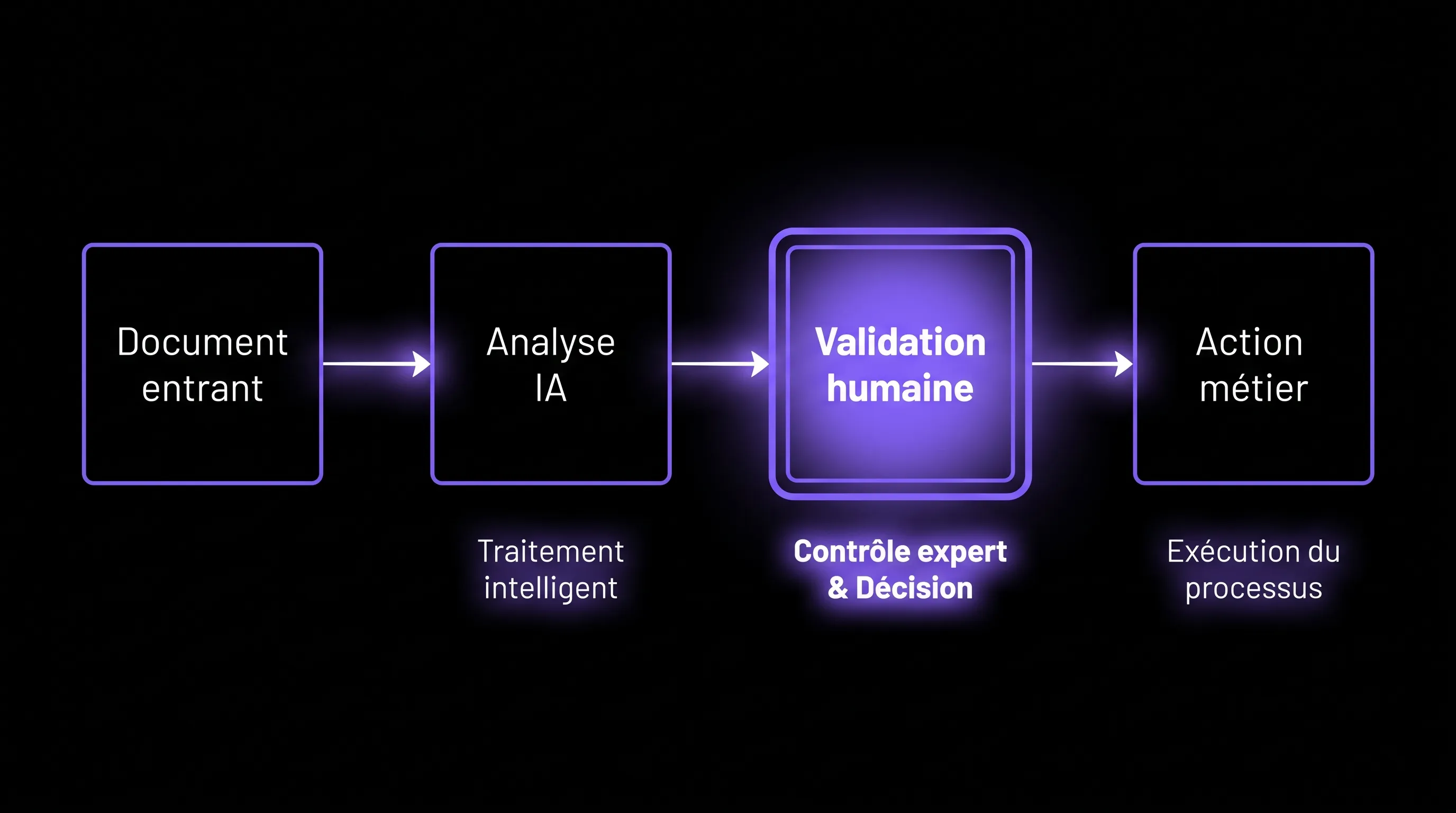
AI at work is useful when it removes friction, not when it replaces business judgment. For SMEs and scale-ups, the right question isn't "what can AI do for me?", but rather: "what tasks can I delegate to it to save time while keeping control?"
July 26, 2026·12 min read
AI at work is useful when it removes friction, not when it replaces business judgment. For an SME, a scale-up, or a growing team, the right question is therefore not "what can AI do for me?", but rather: "what tasks can I delegate to it to save time, while maintaining decision-making, quality, and accountability?"
In 2026, gains no longer come solely from a few well-written prompts. They primarily come from a better division of roles between humans, AI tools, and existing systems. AI prepares, summarizes, categorizes, rephrases, extracts, and suggests. The team verifies, arbitrates, contextualizes, and decides.
It is this logic that allows you to benefit from AI without disrupting your teams. As we explain in our article on AI gains at work without disrupting teams, the best use cases stem from specific business pain points, not from an abstract desire to "put AI everywhere."
The right filter before delegating a task to AI
Before entrusting a task to an AI tool, ask yourself a simple question: if the result is imperfect, can the team verify it quickly and correct it without major risk? If the answer is yes, the use case is often a good candidate.
A task that can be delegated to AI generally ticks several boxes: it occurs frequently, follows a fairly stable structure, takes time, produces a verifiable result, and does not require an irreversible strategic decision.
Criteria
Good candidate for AI
Bad candidate for AI alone
Frequency
Task performed daily or weekly
Rare and highly contextual task
Structure
Repeatable format, even if content varies
Ambiguous situation without a clear framework
Verification
Result can be checked in minutes
Result difficult to audit
Risk
Error correctable before client or legal impact
Binding decision without human validation
Data
Identified and accessible sources
Sensitive or scattered data without rules
The basic rule: delegate preparatory execution, keep validation. AI can go 70% of the way on certain tasks, but the remaining 30%—nuance, arbitration, prioritization—often remain where the business value lies.
1. Summarize meetings and extract decisions
Meetings are an excellent entry point for AI at work because they generate a lot of unstructured information. An assistant can transcribe a discussion, produce a summary, list decisions made, identify action items, and assign owners if they are explicitly mentioned.
The gain is immediate for sales, product, operations, or management teams. Instead of wasting 20 minutes writing meeting minutes, the team reviews, corrects, and validates a first draft. This also reduces oversights after meetings, especially when multiple topics are covered quickly.
What must be kept on the human side: validating decisions, finalizing the wording of commitments, and prioritizing actions. An AI summary can misinterpret a nuance, confuse a hypothesis with a decision, or miss a major disagreement. The right approach is therefore to treat the meeting notes as a working draft, never as an unreviewed official source.
2. Sort and prioritize incoming emails
Email remains one of the biggest attention thieves in business. AI can help categorize messages by urgency, topic, client, project, or expected response level. It can also provide summaries of long threads, detect recurring requests, and draft responses.
For an SME leader or a scale-up manager, the benefit is not just replying faster. It is above all about not missing the real signals: an unhappy client, a sales opportunity, an urgent supplier follow-up, a blocked decision.
The safeguard is clear: AI can prepare and prioritize, but humans must remain responsible for sensitive replies. Strategic sales messages, HR topics, disputes, or financial commitments should not be sent automatically without review. To dive deeper into this type of operational gain, you can also check out our article on AIs that simplify email, calls, and research.
3. Prepare initial research or market monitoring
AI is highly useful for launching research: mapping a topic, identifying major trends, comparing approaches, producing a list of questions to dig into, or summarizing multiple sources. For a marketing, sales, or product team, this allows moving faster from "I'm starting from scratch" to "I have an initial analytical structure."
For example, it can help prepare a competitive benchmark, industry monitoring, a memo on a new regulation, or a summary of customer expectations around a market. The benefit is particularly strong when the research doesn't need to be perfect initially but must accelerate thinking.
The limit: information must be verified. AI models can make mistakes, mix up sources, or present a hypothesis as a fact. For regulatory, financial, or medical topics, AI must remain a preparatory assistant, never a final authority. Always ask for sources, verify important figures, and keep a record of the documents used.
4. Draft internal documents
Scoping notes, reports, procedures, announcement messages, project briefs, internal FAQs: many professional documents start with a blank page. AI can transform a few raw ideas into a structured first draft, then suggest variations based on the audience.
This is particularly useful for fast-growing companies. As the team structures itself, methods must be documented, responsibilities clarified, and certain practices standardized. AI accelerates this formalization work, which is often postponed due to a lack of time.
But an internal document is only useful if it reflects your operational reality. Therefore, keep control over examples, internal rules, exceptions, and the level of detail. A generic procedure might look clean but create confusion if it doesn't match your company's tools, roles, and habits.
5. Rephrase a message with the right tone
The same information can be phrased differently depending on whether it is addressed to a client, an investor, a partner, an employee, or a supplier. AI can help make a message clearer, more direct, more diplomatic, shorter, or more educational.
This use case is simple but highly profitable. It avoids unnecessary back-and-forth, improves the quality of exchanges, and helps teams communicate more consistently. It is also valuable for profiles who master the substance but want to save time on the form.
Human control remains essential because tone is cultural. A "professional" phrasing suggested by AI might be too cold, too salesy, or too vague for your brand. The best reflex is to provide examples of successful messages, then ask the AI to draw inspiration from them without copying them.
6. Extract information from long documents
Contracts, calls for tenders, reports, audit summaries, specifications, support tickets: companies accumulate rich documents that are difficult to process quickly. AI can extract key dates, obligations, amounts, risks, open questions, or points of attention.
This type of delegation is very useful when the goal is to quickly spot what deserves an in-depth human read. For example, a sales team can identify the important requirements of a call for tenders. An operations team can extract the commitments from a supplier contract. Management can summarize the risks of a lengthy report.
The human hand must remain on interpretation and decision-making. On a contract or legal document, AI does not replace the advice of a qualified professional. It helps prepare the reading, ensures no points are forgotten, and prompts better questions.
7. Format data to make it usable
A lot of time is wasted cleaning, transforming, or reconciling data: poorly named columns, duplicates, heterogeneous CSV exports, free-text comments, different nomenclatures. AI can help restructure this information, detect inconsistencies, suggest categories, and prepare more readable formats.
For an SME, this is often where the gains are most concrete. A better-classified prospect database, a better-categorized customer feedback table, or a better-prepared billing export can directly improve decision-making.
The point of vigilance concerns data quality. AI can give an impression of order while masking errors. It is therefore necessary to define simple rules: which fields are mandatory, which categories are accepted, which duplicates must be flagged, and which data must never be modified without validation.
8. Prepare tier 1 support responses
Support teams often receive repetitive questions: account access, order status, simple configuration, refund procedure, feature availability, known issues. AI can suggest a response based on the knowledge base, customer history, and ticket context.
The right model is not necessarily full automation from day one. In many organizations, it is safer to start with suggested responses that the support agent validates, modifies, or rejects. This saves time while progressively enriching the knowledge base.
What must be kept under control: emotional cases, strategic clients, out-of-procedure requests, and situations where the company could be held liable. A support response may seem trivial, but it strongly influences customer trust.
9. Generate reports and explain variations
Monthly or weekly reports often follow the same logic: retrieve the numbers, compare them to the previous period, explain the variations, identify points of attention, and propose actions. AI can accelerate this step by generating a performance commentary from structured data.
This can apply to sales, marketing, support, operational finance, or human resources. AI can spot that a conversion rate is dropping, a channel is growing, a ticket volume is increasing, or an average delay is worsening.
But the explanation for a variation must not be invented. AI can suggest hypotheses, not decree a cause. The team must distinguish between observed facts, plausible hypotheses, and decisions to be made. This discipline prevents jumping to conclusions, especially when multiple factors intersect.
10. Turn an idea into an action plan
An idea alone does not move an organization forward. It must be broken down into steps, dependencies identified, risks anticipated, effort estimated, and roles defined. AI can help transform an intention into an actionable plan.
This is useful for launching a new offer, improving an internal process, preparing a recruitment, organizing a tool migration, or scoping a client project. In a few minutes, AI can propose a structure, milestones, open questions, and an initial task list.
Here again, delegation must not become an illusion of control. An automatically generated plan can overlook internal constraints, underestimate the effort, or propose overly generic steps. The team's role is to challenge the plan, simplify it, and connect it to ground reality.
How to keep control: 5 operational rules
Delegating to AI does not mean letting go of control. On the contrary, it requires more clarity on roles, rules, and validation thresholds. Companies that achieve good results do not just provide access to tools. They define what can be automated, what must be reviewed, and what remains strictly human.
Start by documenting authorized use cases. A simple rule can suffice: AI can produce drafts, summaries, and proposals, but any sensitive external communication must be validated. This sentence alone prevents many missteps.
Next, measure the real gain. The right indicator is not just "how much time AI saved," but also "how many errors were avoided," "how many follow-ups were eliminated," or "how many decisions were accelerated." If a use case saves 30 minutes but creates 45 minutes of verification, it must be reviewed.
To move from one-off uses to more robust workflows, you can draw inspiration from our guide on AI automation of workflows deployable in 30 days. The goal is not to automate everything, but to choose a few repetitive, well-defined, and measurable flows.
Rule
Objective
Concrete example
Human in the loop
Avoid unvalidated decisions
Review before sending to client
Visible sources
Reduce hallucinations
Link to the documents used
Limited data
Protect sensitive information
No HR data in an unvalidated tool
Standardized prompts
Obtain consistent results
Common meeting summary template
Gain measurement
Prioritize true ROI cases
Tracked time saved and correction rate
Where to start in an SME or scale-up?
The best starting point is rarely a large, cross-functional AI project. It is better to choose an irritating, frequent, and visible process, then build a controlled first use case. For example: meeting minutes for the executive committee, pre-qualification of support tickets, summarizing sales calls, or extracting information from calls for tenders.
Choose a business owner, define a validation rule, and test for two to four weeks. At the end, compare the time spent before and after, the quality of deliverables, and the team's feedback. If the gain is clear, standardize. If it is blurry, adjust or abandon.
This progressive approach builds trust. It avoids the "magic tool" effect and helps build sustainable adoption. AI then becomes a productivity layer, not an additional source of complexity.
FAQ
What tasks can really be delegated to AI at work? The best tasks to delegate are repetitive, verifiable, and low-risk: summaries, drafts, information sorting, data extraction, rephrasing, reporting, or preparing action plans.
Can AI send emails or reply to customers automatically? Technically yes, but it is not always desirable. For sensitive messages, it is better to use AI to draft a response, then let a human validate it before sending.
How to avoid losing control with AI? Define simple rules: which uses are authorized, what data can be used, which results must be reviewed, and who remains responsible for the final decision.
What are the first AI use cases to test in an SME? The most accessible are meeting minutes, email sorting, suggested support responses, document summarization, and generating internal drafts.
Should teams be trained before deploying AI? Yes, even short training helps prevent misuse. Teams must understand AI's limits, confidentiality rules, result verification, and good prompting habits.
Move from AI experimentation to concrete gains
AI at work becomes truly useful when it integrates with your existing processes, tools, and responsibilities. Proper delegation is not about replacing the team, but removing repetitive tasks to give them back time for analysis, customer relations, and decision-making.
At Impulse Lab, we help companies identify the right use cases, frame risks, automate relevant workflows, and train teams to turn AI into measurable gains. If you want to know which tasks to delegate as a priority in your organization, an AI audit can be the best starting point.
What Data Team Do You Need to Maintain Your Artificial Intelligence?
In an AI project, going live is only the start. Learn how to structure data, integration, and operational roles to maintain and monitor your AI effectively without unnecessarily over-hiring.