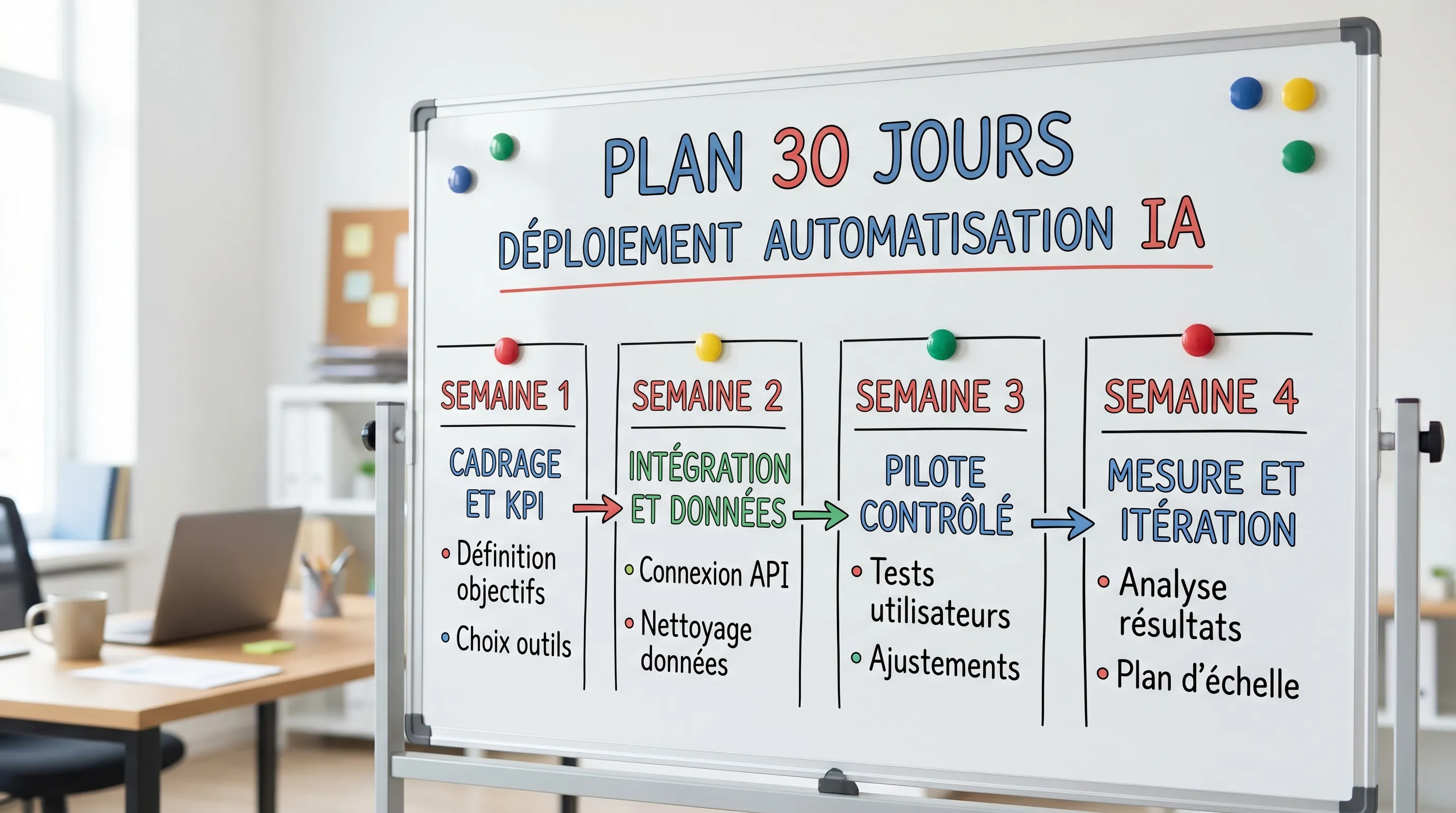
You can deliver **AI automation** in 30 days by avoiding two traps: aiming for a broad "magic assistant" and automating without integration or metrics. For SMBs and scale-ups, the right approach is deploying narrow, frequent, and measurable workflows.
You can deliver AI automation in 30 days, but only if you avoid two classic traps: (1) aiming for an overly broad "magic assistant", (2) automating without integration or metrics. The right angle, for an SMB or a scale-up, is to deploy narrow, frequent, measurable workflows connected to your existing tools (CRM, helpdesk, Google Workspace, Slack, ERP).
This guide proposes 10 concrete workflows that you can scope, build, and pilot in 30 days, along with the essential prerequisites, KPIs, and guardrails.
The (simple) prerequisites to meet the 30-day deadline
A fast deployment rarely depends on the chosen AI model. It depends on 5 operational decisions.
1) A business owner and a quantified objective
A workflow without an owner becomes just another POC. Choose a leader (Support, Sales Ops, Finance) and a measurable target (time saved, processing rate, response time).
2) A baseline before automating
Measure your "before". Without a baseline, you won't know if the automation creates value.
Examples of useful baselines: average first response time for support, time to create an opportunity, invoice processing time, number of manual follow-ups per week.
3) Classified data (green, orange, red)
Define what can be sent to an external model, what must be masked, and what must never leave (sensitive data, secrets, health, etc.). This is a GDPR and security reflex, not a luxury. Useful reference: CNIL resources on AI and personal data.
4) Minimal, but real integration
Even a V1 must write somewhere: an enriched ticket in the helpdesk, a note in the CRM, a task in the project tool. Otherwise, you are creating extra work.
Define what the workflow is allowed to do, and what it will never do without human validation (payment, deletion, external sending, sensitive modification). To properly scope this, the scoping checklist before developing is a good starting point.
Overview: 10 high-ROI workflows (SMBs and scale-ups)
The table below summarizes realistic workflows for 30 days, geared towards "light production" (integration, logs, pilot, measurement).
Objective. Reduce first response time and relieve the team of repetitive requests.
Principle. When a ticket arrives, the system proposes: a summary, missing info to ask for, and a draft response based on your documentation (FAQ, procedures, internal articles). In V1, aim for a "useful draft", not an "autonomous response".
KPI. First response time, first-contact resolution rate, average time per ticket.
Guardrails. Responses always accompanied by links to the internal source, automatic escalation if confidence is low, or if the topic is sensitive. To frame the risks, you can use a grid like in Key Risks and Controls.
Objective. Improve routing quality and smooth out the workload.
Principle. The AI proposes: category, sub-category, urgency, and destination team. The difference with a chatbot is that you automate the plumbing, not the conversation.
KPI. % of tickets correctly tagged the first time, triage time, resolution time.
Guardrails. Confidence threshold (otherwise "to be checked" queue), priority deterministic rules (VIP, production incidents), decision logging.
3) Sales: call summary + automatic task creation in the CRM
Objective. Prevent post-call information loss and increase follow-up quality.
Principle. After a call, generation of a structured summary (needs, objections, next steps) and creation of tasks (follow-up, demo, send doc) in the CRM. This is often one of the best "quick wins" because the input is already there (transcript).
KPI. Data entry time saved, CRM completion rate, time between call and follow-up.
Guardrails. CRM fields filled via a strict format, quick human validation before final synchronization if you are in a sensitive context.
4) Sales/Marketing: lead enrichment + assisted fit scoring
Objective. Accelerate qualification and reduce research time.
Principle. Starting from an email or a domain, enrich (industry, size, tech stack, signals) and propose a fit score based on your ICP.
KPI. MQL → SQL rate, qualification time, rate of "actionable" data in the CRM.
Guardrails. Clearly distinguish "verified" vs "inferred" data, keep the source when it exists, review a sample every week.
Objective. Reduce handling time and direct to the right person.
Principle. When a form arrives (website, Tally, Typeform), the AI normalizes the input (industry, need, indicative budget), detects intent, then routes: SDR, AE, support, or nurture.
KPI. Lead → first contact time, no-show rate, qualification rate.
Guardrails. Final routing based on rules (territory, segment, capacity), AI used to enrich and summarize, not to decide alone.
Objective. Decrease time-to-value and standardize the experience.
Principle. After signing, automatic generation of an onboarding plan: checklist, kickoff emails, information requests, creation of spaces (drive, project, access) according to the client type.
Guardrails. Mandatory steps, access and permission validation, event tracking (who received what, when).
10) Management/Ops: "1-page" weekly reporting with sourced figures
Objective. Reduce reporting time, increase the readability of decisions.
Principle. Every week, the system compiles 5 to 10 indicators (sales, support, cash, delivery), generates an actionable summary and posts it in Slack/Notion, with links to the sources.
KPI. Reporting production time, usage rate, decided actions (follow-up).
Guardrails. Figures come from stable extractions (CSV/BI), AI synthesizes but does not "fabricate" metrics, systematic links.
Execution plan: (really) deploy in 30 days
This plan is deliberately pragmatic. It aims for a V1 measured in real conditions, not a demo.
Week 1: scoping, baseline, terms of use
You choose a maximum of 2 workflows. For each: north star KPI, baseline, target system (CRM/helpdesk/accounting), data rules (what goes out, what is masked), and pilot success criteria.
Connectors, webhooks, CRM/helpdesk fields, output formats (JSON or strict templates). This is often the week that "makes" or "breaks" the ROI.
Week 3: controlled pilot (10 to 30% of the flow)
Limited scope deployment, with human validation, error collection (wrong categories, useless responses, missing fields). You create your improvement backlog.
You compare to the baseline, fix irritants, document the run (owner, thresholds, logs), then decide: extension, stabilization, or shutdown.
The signals that show your workflow is "production ready"
Without aiming for heavy industrialization from day 30, you should see these elements.
An integration that writes in the target tool (not a copy-paste)
Actionable logs (inputs, outputs, errors)
A clear degraded mode (manual fallback)
A simple measurement (3 to 5 KPIs) and a baseline
An explicit rule on data and human validation
FAQ
Which AI automation workflows are the fastest to deploy? Those that start from an already existing signal (ticket, call transcript, form) and write into an existing tool (CRM, helpdesk). The best quick wins are often "drafts + routing".
Do you need an autonomous agent to automate effectively? No. In 30 days, favor assisted and integrated workflows (summaries, tagging, tasks, drafts). Agents that execute multi-tool actions require more guardrails and validation.
How to avoid hallucinations in an AI workflow? By limiting the scope (narrow task), imposing structured formats, plugging the AI into internal sources (documentation), and keeping human validation on sensitive outputs.
Which KPIs to choose to prove ROI quickly? An "impact" KPI (time saved, delay, cash) plus 2 or 3 steering KPIs (correction rate, correct routing rate, reopening rate) and a guardrail (escalation rate, critical errors).
Can this be done with no-code tools? Yes for V1s, especially on simple workflows. The critical point quickly becomes governance (data, logs, permissions) and maintainability. When the workflow is central, a custom integration is often more robust.
Going from 10 ideas to 2 delivered workflows: the Impulse Lab approach
If you want to deploy an AI automation in 30 days without falling into the "demo" trap, Impulse Lab can help you: scope the 2 best workflows for your context, define the KPIs and baseline, integrate cleanly with your tools, and deliver a piloted V1 (with guardrails and measurement).
You can start with an AI opportunity audit or a short scoping session, then move on to a pilot: contact Impulse Lab to present your context and choose the 2 most profitable workflows to deliver this month.
Accelerating Product Sheet Creation with Artificial Intelligence
Exploring AI content creation addresses a key need for e-commerce SMBs: producing more product listings without monopolizing copywriting teams. AI can draft descriptions and adapt tone, but compelling copy does not ensure factual accuracy—making clean data and structured review essential.