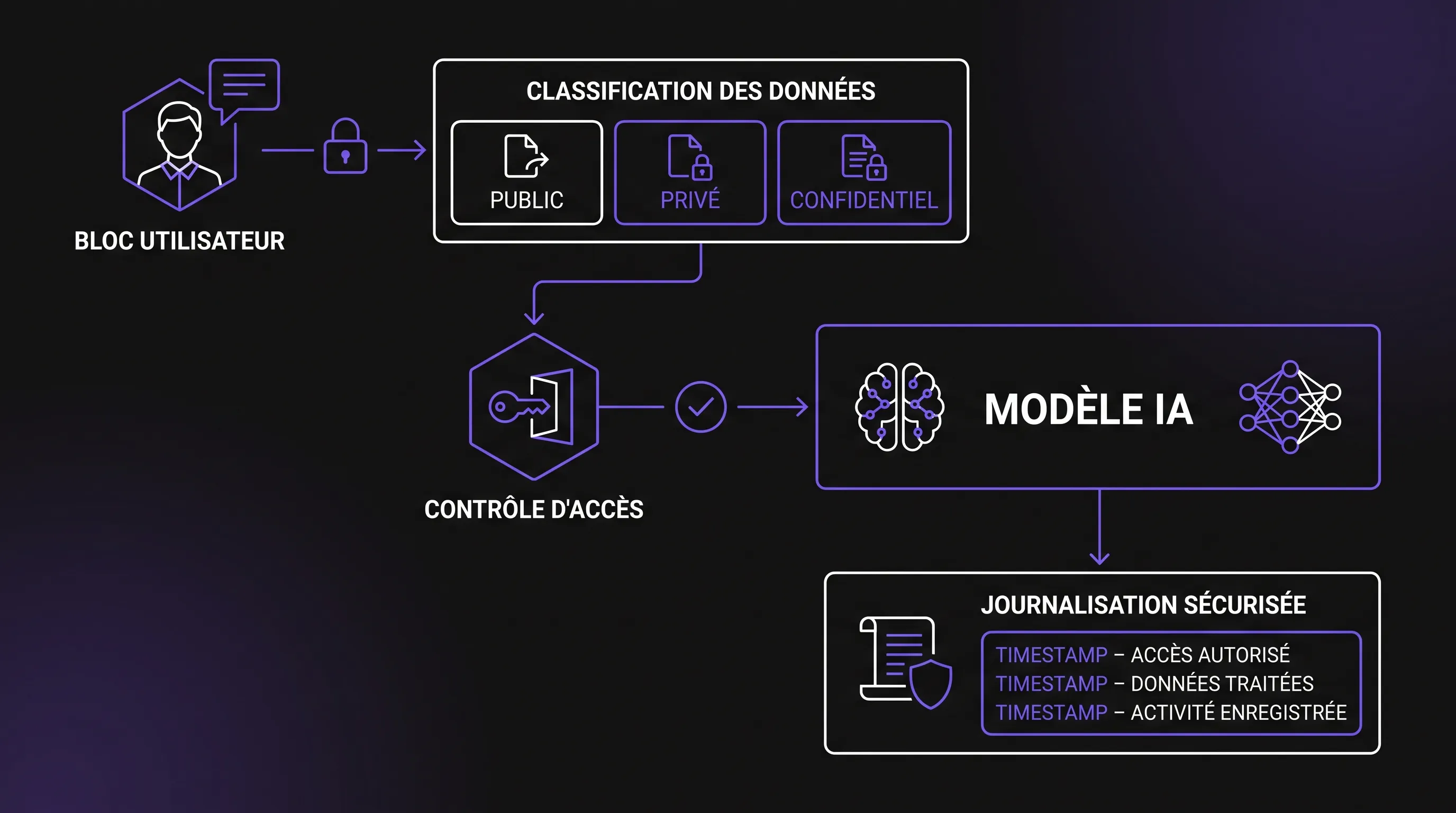
An AI chat can save time for an SME, help sales teams draft replies, or summarize docs. Yet it can also become a data leak risk without clear rules. Discover how to protect your internal data, set up governance, and safely deploy AI assistants.
An AI chat can save time for an SME, help a sales team prepare responses, speed up customer support, or summarize a knowledge base. It can also become a discreet point of data leakage if everyone pastes contracts, CRM exports, code, or HR data into it without a clear framework. The question is therefore not just "which tool to choose?", but "what information are we allowed to expose to it, under what conditions, and with what safeguards?"
For SME leaders, scale-ups, and structuring teams, the right reflex is to treat AI chat as a new work environment. The same requirements as for a CRM, an intranet, or a core business tool must apply: governance, access rights, traceability, usage rules, and regular risk reviews.
Why Protect an AI Chat from the Start
The first risk is not necessarily spectacular. It often comes from routine habits: an employee asks to rephrase an email containing a client's name, a manager copies an interview summary, a developer submits a snippet of proprietary code, or a finance team has a margin spreadsheet analyzed.
The main danger of an AI chat is that data entered in prompts, attachments, and sometimes generated outputs fall outside the company's usual sphere of control if the tool is not properly configured, contracted, or monitored.
Several risk areas must be distinguished. Data can be stored in conversation history, transferred to a third-party vendor, logged in technical journals, accessed by administrators, or exposed via misconfigured connectors. In an assistant connected to internal tools, the risk also extends to access rights: the AI could retrieve more information than the user should see if the system does not enforce permissions at the source.
Map Your Data Before Connecting the Tool
Before deploying an AI chat, start by classifying your internal data into categories that everyone can understand. The classification should be simple enough to apply daily, yet precise enough to avoid grey areas.
A good framework generally distinguishes public, internal, confidential, and strictly sensitive information. The goal is not to produce a 40-page legal document, but to establish an operational rule that teams can follow when writing a prompt or uploading a file.
Data Level
Examples
Permitted Use in an AI Tool
Public
Website pages, brochures, published offers, marketing documentation
Allowed, with verification of outputs
Internal
Procedures, document templates, project notes without personal data
Only with a vetted tool, restricted access, and an appropriate contract
Strictly Sensitive
Health data, payroll, litigation, trade secrets, identifiable HR data
Prohibited by default, unless using a dedicated architecture and legal clearance
This framework must be integrated into daily workflows, not just filed away in a compliance folder. Add it to training sessions, internal guides, and welcome messages in your AI assistants. A rule understood but rarely recalled soon fades away.
Choose an Architecture Suited to Your Risk Level
The right AI chat model depends on the required confidentiality level, integration needs, and the company's security maturity. Individual productivity use does not require the same architecture as an assistant connected to your CRM, customer support, and internal knowledge base.
For an SME, four options frequently emerge: a consumer SaaS tool, an enterprise SaaS version, an assistant built via API with custom security rules, or an isolated deployment for sensitive cases. Each option has its advantages, but also its governance constraints.
If you are in the purchasing phase, the enterprise AI chat buyer's guide can help you compare major tool categories before launching a more technical project.
Define Simple Usage Rules for Teams
An AI chat cannot be secured by technical measures alone. Usage rules are essential, especially in smaller organizations where decisions move fast and free tools are often tested before being officially approved.
The most effective rule is the clearest one: never enter any information into an unvetted tool that you would not publish in a document shared outside the company. This phrase does not replace a security policy, but it provides employees with an immediate benchmark.
Scenario
Best Practice
Rephrasing a client email
Remove names, amounts, contractual specifics, and identifiers
Summarizing a contract
Use a vetted tool, redact sensitive sections if possible
Analyzing a CRM export
Avoid public tools; prefer an approved environment with access controls
Generating code
Do not paste secrets, API keys, critical proprietary logic, or credentials
Preparing sales collateral
Use authorized public or internal documents
Training should be brief, practical, and recurring. Ten real-world cases from your operations are worth more than a long, abstract refresher on confidentiality. For managers, the challenge is also to avoid mixed messaging: encouraging AI adoption while leaving teams to guess what is acceptable on their own.
Implement Essential Technical Controls
Even a well-chosen AI chat remains vulnerable if basic controls are not in place. The baseline foundation includes centralized authentication, role-based access management, access reviews, conversation history restrictions, attachment protection, and a clear logging policy.
For assistants connected to internal tools, enforce the principle of least privilege. The assistant should not access the entire knowledge base "for convenience." It must retrieve only the documents the user is authorized to view, with enforcement at the system level rather than relying solely on the prompt.
API calls require special attention. TLS encryption secures transport, but does not address all questions: what data is sent in the request, where are logs stored, who can read them, how long are they retained, and how are secrets managed? To dive deeper, Impulse Lab outlines these points in its article on how to secure your AI API calls and sensitive data.
Prompt injection must also be treated as a concrete risk. A malicious document can contain hidden instructions directing the assistant to ignore its guidelines, exfiltrate data, or alter its behavior. OWASP highlights this risk in its Top 10 for LLM Applications, and straightforward safeguards exist: input filtering, strict separation of system instructions, restricting automated actions, and human-in-the-loop validation for sensitive operations. You can complement this approach with these simple safeguards against prompt injection.
GDPR, Contracts, and Liability: Checklist of Key Points
For an AI chat used in business, compliance is not just about ticking a "GDPR" box. You must know what personal data is processed, for what purpose, under what legal basis, for what retention period, and by which processors.
The CNIL highlights standard principles applicable to AI: data minimization, transparency, control over retention periods, security, and respect for individual rights. These principles provide a practical framework for an internal assistant: if data is not strictly required to generate an answer, it must not be sent to the model.
Contractually, verify at minimum the existence of a Data Processing Agreement (DPA), commitments not to reuse customer data for model training where relevant, hosting location and transfer mechanisms, sub-processors, deletion terms, and security commitments. For high-risk use cases, a Data Protection Impact Assessment (DPIA) may be required.
The European AI Act is progressively introducing obligations based on use cases and risk tiers. While not all companies will face the same restrictions, organizations that structure their practices now will avoid costly remediations later.
Secure Deployment Roadmap for SMEs and Scale-Ups
When an AI chat enters an organization without a clear methodology, adoption quickly scatters. The best plan is not the heaviest one; it is the one that enables progress without letting hidden risks accumulate.
A 30-day approach can be enough to establish a solid initial framework. Start by identifying priority use cases, such as customer support, sales, operations, or internal documentation. Next, select a small pilot group, classify the data involved, pick the right tool, and define acceptable prompt rules.
Timeline
Objective
Concrete Deliverable
Week 1
Scope use cases and risks
List of use cases, data involved, business owners
Week 2
Select architecture
Vetted tool, security parameters, contract clauses to review
Week 3
Train and test
Usage guide, prompt examples, testing with non-sensitive data
Week 4
Deploy and measure
User access, logging, checkpoints, user feedback
Keep tracking value creation straightforward: time saved, reduction in repetitive tasks, perceived quality, team adoption, and avoided incidents. An AI tool should not merely look impressive in a demo; it must integrate into your workflows without weakening your security.
Warning Signs to Monitor After Launch
A successful rollout is an ongoing process. Use cases evolve, teams discover new applications, and vendors occasionally update features. Schedule a regular review, for example quarterly, to ensure the framework remains aligned.
Warning signs are often easy to spot: proliferation of personal accounts, customer files shared in unapproved tools, prompts containing identifiable personal data, outputs accepted without human review, or an assistant connected to overly broad data repositories. When these occur, the issue is not always disciplinary; it may indicate insufficient training, an overly restrictive official tool, or ambiguous rules.
To manage risk, rely on key metrics: active user count, types of data processed, denied access requests, reported incidents, output quality, and unmet business needs. This visibility helps refine safeguards without stifling innovation.
Frequently Asked Questions
Can you use a free AI chat with internal data? Yes, for public or minimally sensitive information, but not for confidential, personal, or strategic data without approval. Free tiers typically lack governance, administrative controls, and contractual guarantees.
Does an enterprise AI tool automatically guarantee confidentiality? No. While it generally offers better controls, you still need to verify configuration, access rights, contractual terms, data retention, connectors, and system logs.
Should all prompts be anonymized? Anonymization is best practice when identity or specific business details are unnecessary. In some cases, pseudonymization or simply stripping sensitive fields suffices, but the policy should reflect the specific risk level.
Who should approve AI use in an SME? Approval should involve at least a business lead, an IT or security representative, and—if personal data is involved—a DPO or legal advisor. In a smaller team, these roles may be held by just a few individuals, but responsibilities must be clearly assigned.
How can you tell if your AI assistant is overly connected? It is likely overly connected if it accesses entire document repositories without role-based filtering, retrieves information that the requesting user should not see, or triggers actions in sensitive systems without human approval.
Moving from Experimentation to a Secure Framework
Protecting your internal data does not mean slowing down AI adoption. On the contrary, a clear framework accelerates effective use, reassures teams, and prevents shadow AI.
Impulse Lab helps businesses audit AI opportunities, design custom web and AI solutions, automate processes, integrate with existing systems, and train teams. If you want to structure your AI usage without putting your internal data at risk, start by mapping your use cases, then validate your architecture before scaling.