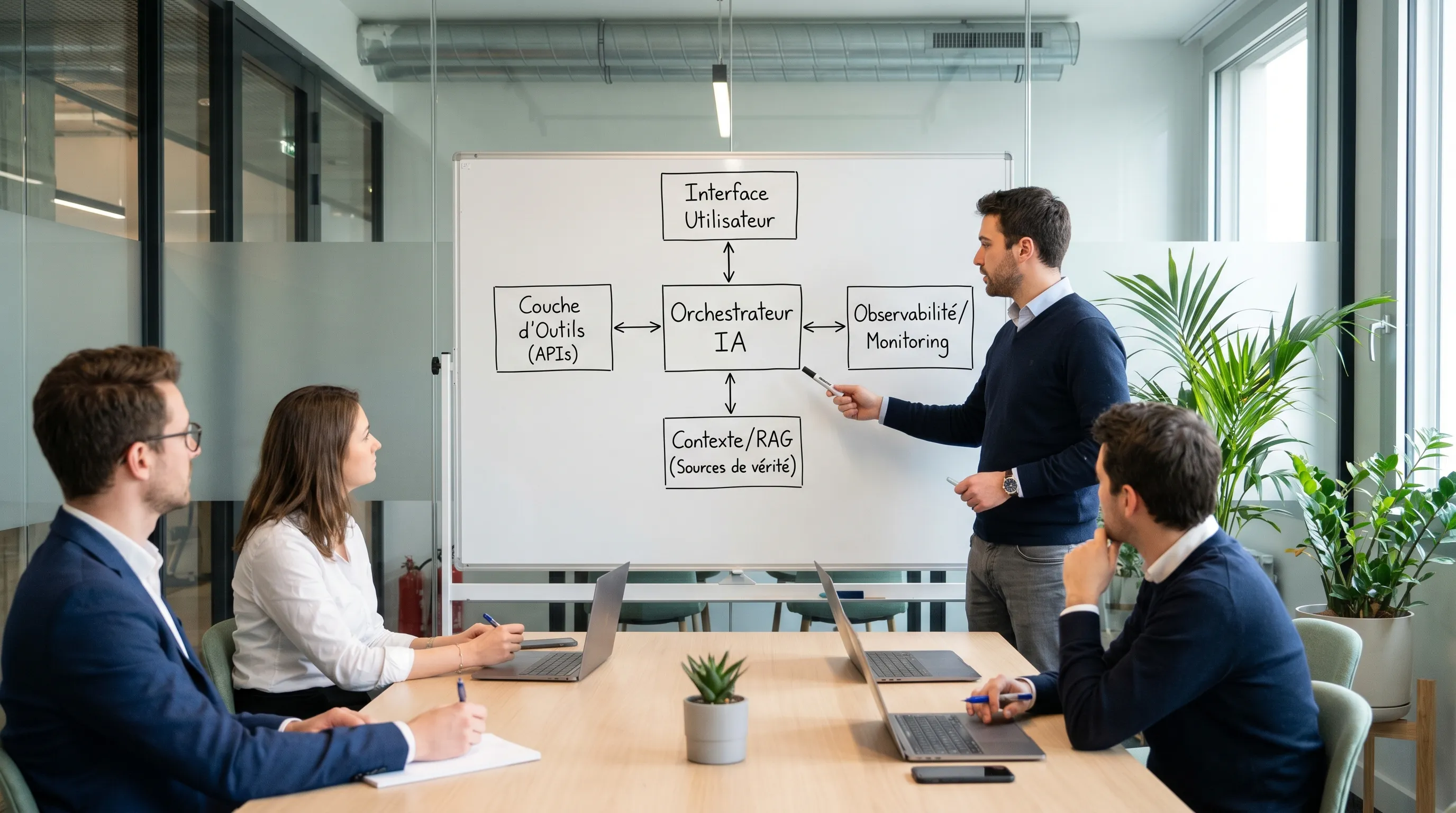
Many AI projects die after a convincing demo, before real-world use. The reason is simple: **moving to production** doesn't mean plugging in a model, but **delivering a usable product** that is integrated into your tools, measured, secured, and operated over time.
April 18, 2026·8 min read
Many AI development projects die in the same place: after a convincing demo, but before real-world use. The reason is simple: moving to production doesn't mean "plugging in a model," but delivering a usable product, integrated into your tools, measured, secured, and operated over time.
In this article, you will find a pragmatic roadmap, designed for SMEs and scale-ups, featuring the decisions and deliverables that make the difference between a nice POC and a value-creating solution.
What "moving to production" really means in AI development
In 2026, production is not an environment; it's a reliability contract.
An AI product is "in production" when:
It is used in an existing workflow (CRM, helpdesk, ERP, back-office, website).
It has an owner (business + technical), a clear scope, and a degraded mode (fallback).
It is measured (business KPIs + quality metrics + costs).
It is secured (access, data, logs) and compliant with your constraints (GDPR, industry requirements, etc.).
It is operable (monitoring, alerts, procedures, incident management).
If you don't have these elements, you likely have a prototype, not a production deployment.
Step 1: Frame a "production-friendly" use case
Framing is the most profitable step in AI development. It prevents building a solution that is impossible to make reliable, too risky, or never adopted.
The 4 decisions to lock in before developing
Job-to-be-done: what concrete problem, at what point in the workflow?
KPIs and baseline: how do we measure value, and what is the current baseline?
Usage contract: what the AI is allowed to do (and not do).
Risk level: impact of an error (low, medium, high) and control requirements.
A good signal: your use case is frequent, repetitive, measurable, and has an "actionable" output (ticket creation, pre-filling, recommendation, routing, etc.).
Step 2: Make the data usable (and governed)
In most companies, AI fails less due to a lack of models than due to inaccessible, inconsistent, or ungoverned data.
What you need to achieve quickly:
An inventory of useful sources (documents, databases, CRM, conversations, tickets).
Classification rules (sensitive vs. non-sensitive data).
Clear access rights (who can see what, and via which service account).
A source of truth strategy: which source prevails in case of contradiction?
Operational tip: if you cannot describe "the source of truth" in a single sentence, your RAG (or agent) will be difficult to make reliable.
Step 3: Choose the right architecture pattern (API, RAG, agent)
The design "determines" your ability to move to production. In practice, you have three main patterns:
Unintended actions if permissions and validations are weak
Don't look for the "most advanced" architecture. Look for the one that minimizes risk for maximum value.
Step 4: Design a V1 integrated into the workflow (otherwise, no adoption)
An AI solution used "on the side" (in a separate tab) has a low adoption rate. V1 must live where the work is done:
In the CRM, mailbox, helpdesk.
In a back-office.
In a customer portal.
On the website (form, chat, search, customer area).
If your AI project also touches the website and acquisition (SEO, landing pages, content), you can complement your setup with dedicated web expertise, for example, a web & SEO agency in Reunion Island for the visibility and marketing execution part.
Also measure useful failures: refusals, escalations, requests for clarification.
The goal is not 100% success, but a stable and acceptable performance level, with safeguards.
Step 6: Secure and comply (without slowing down delivery)
In AI development, security isn't just "encrypting traffic." Typical risks include: data leaks, exposed secrets, overly broad permissions, overly verbose logs, prompt injection, and usage drift.
Your "non-negotiable" controls in production:
Access management: service accounts, least privilege, environment separation.
Data minimization: send only what is strictly necessary.
Secrets management: API keys out of the frontend, rotation, scopes.
Useful logging: inputs/outputs, RAG sources, agent actions, but without sensitive data in plaintext.
Traceability: who triggered what, when, with what result.
Depending on your context, a DPIA (or equivalent analysis) may be necessary, especially if there is sensitive data, impactful decisions, or large-scale processing.
Step 7: Prepare for operations (the real move to production)
An AI "in prod" without a runbook becomes an incident waiting to happen.
Operational building blocks to plan for
Observability: latency, error rate, cost per request, saturation.
Quality: verified response rate, escalation rate, human correction rate.
Runbook: simple procedures (model outage, quality drift, data incident).
Responsibilities: who handles the alert, who arbitrates, who communicates.
Tip: if no one knows "who gets woken up" when it breaks, it's not ready.
Step 8: Deploy progressively (and learn fast)
AI production deployments rarely succeed in a "big bang." Prefer a controlled rollout:
Restricted scope (one team, one segment, one ticket category).
Feature flags and rollback.
Continuous measurement (weekly dashboard).
Rapid improvements on the cases that matter.
Example of a realistic trajectory
You can aim for a useful V1 in a few weeks if framing and integration are done properly, then stabilize over an additional 4 to 8 weeks with iterations focused on quality, adoption, and costs.
Vague use case: no KPIs, no baseline, no definition of success.
Unintegrated AI: the tool is "on the side," therefore not used.
Lack of operations: no logs, no alerts, no owner, no controlled costs.
The right reflex is to treat the AI solution like a software product: contract, tests, delivery, run.
FAQ
What are the key steps in AI development to move to production? Framing (KPIs, usage contract), data and access, architecture choice (API, RAG, agent), integrated V1, evaluation, security, then operations (monitoring, runbook) and progressive deployment.
How long does it take to move an AI project to production? For a useful and controlled V1, a few weeks can be enough if the scope is clear and integration is simple. Stabilization (quality, costs, adoption, run) often requires several iterations.
What is the difference between a POC, prototype, MVP, and production? A POC proves feasibility, a prototype tests an experience, an MVP delivers measured minimal value, and production adds operations, security, traceability, and reliability over time.
Do you necessarily need a RAG to put an AI in production? No. RAG is useful when you need to answer based on a documentary source of truth. For extraction, classification, scoring, or constrained generation, an encapsulated AI API can be simpler and more robust.
Which KPIs should you track to decide to "scale"? At a minimum: a business KPI (time saved, conversion, avoided cost), a process KPI (escalation rate, cycle time), a quality KPI (accuracy on critical cases), and a cost KPI (cost per action, monthly budget).
How to avoid hallucinations in production? By limiting the scope, relying on verifiable sources (often via RAG), implementing safeguards (refusals, escalation), and instrumenting continuous evaluation on real cases.
Moving from demo to value, with Impulse Lab
If you want to accelerate production-oriented AI development, Impulse Lab supports SMEs and scale-ups with: AI opportunity audits, custom web and AI solution development, automation and integration into your stack, and adoption training.
The goal is simple: deliver fast, but deliver something usable, measured, and maintainable. To get started, you can describe your use case and constraints on Impulse Lab to frame a realistic V1 and move to production without a graveyard of POCs.