In 2025, AI UI is more than just a chat widget. It understands intent, guides users to action, and secures every step. Well-designed, it boosts adoption, cuts resolution time, and transforms proofs of concept into measurable gains.
December 20, 2025·9 min read
In 2025, AI UI is not just a chat grafted onto a page. It is an interface that understands intent, guides the user toward useful action, secures every step, and makes AI actionable without friction. When well-designed, it increases adoption, reduces resolution time, and transforms a proof of concept into measurable gains.
What is AI UI, and how is it different from classic UI
An AI UI is a conversational interface, text or voice, capable of reasoning about context, calling tools, and explaining its answers. Unlike a classic UI based on fixed forms, it must handle language ambiguity, model uncertainty, data variability, and response times. The design is not centered on screens; it is centered on a dialogue that must remain controllable, explainable, and safe.
Nielsen Norman Group has highlighted for several years that conversational interfaces are not the best answer to every problem. An effective AI UI is therefore hybrid; it combines conversation and classic graphical components to move quickly toward action.
10 Key Principles of Conversational Design
1. Frame the intent, not the technology
Start with the jobs-to-be-done. What must the user be able to accomplish in 2 to 3 turns of conversation, and how will they know? Define primary intents, eligibility rules, and authorized sources. A good opening phrase reduces routing errors and sets expectations.
Example of clear onboarding: "Hello, I can help you find a product, check an order, or generate an invoice. Choose an action or describe your need."
2. Make useful paths visible
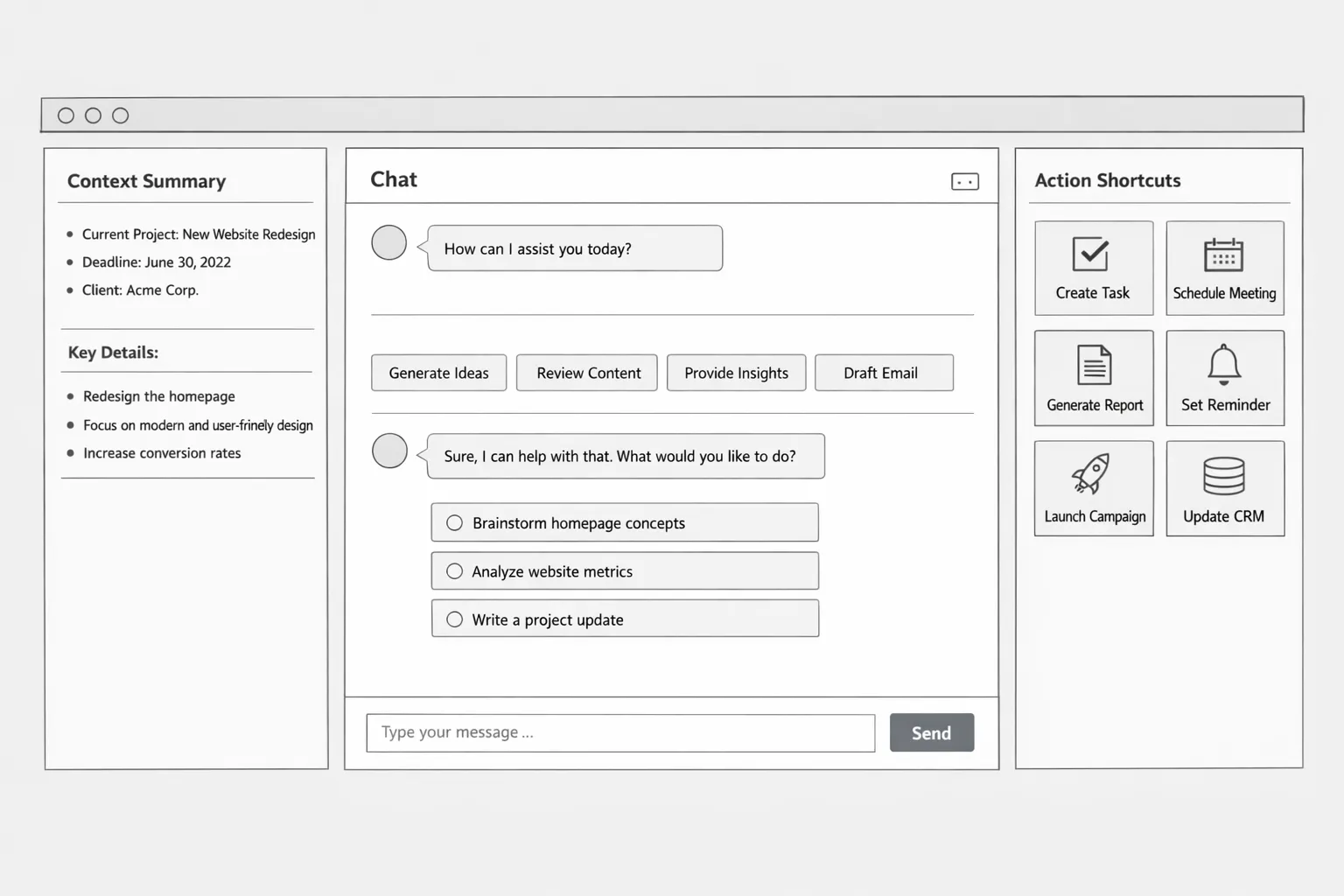
Conversation is not always enough. Add entry suggestions, intent buttons, filter chips, and context snippets to guide the request. Visual shortcuts improve onboarding and decrease cognitive load.
Good habit: after every important response, propose 2 or 3 relevant follow-up actions like "Export to PDF", "Open in CRM", "Schedule a reminder".
3. Design for turn-taking and latency
Perceived quality depends on time management. Display streaming states, thinking or searching steps when the response exceeds 1 second. If a backend action is long, split it into steps, confirm the command, and update the user continuously until completion.
4. Write a controlled personality
Define tone, formality level, response structure, and limits. Forbid useless filler, impose clear output formats, authorize admission of uncertainty. A controlled voice gives an impression of reliability and speeds up reading.
Example of useful microcopy: "I am not 100 percent certain. I can check the internal knowledge base or offer a cautious answer, which do you prefer?"
5. Transparent and manageable memory
Explain what the assistant retains and for how long, offer a "forget" button and an editable context summary. Always display the sources used for the response. Transparency and control reduce legal friction and mistrust.
6. Manage uncertainty and errors without drama
Plan responses for ambiguity, missing data, or triggered guardrails. Propose reformulations and a safety net towards a human. A well-managed failure maintains trust and avoids abandonment.
Good pattern: "To generate the invoice, I am missing the order number. Do you want to enter it now or search for recent orders associated with your email?"
7. Connect to real actions, with guardrails
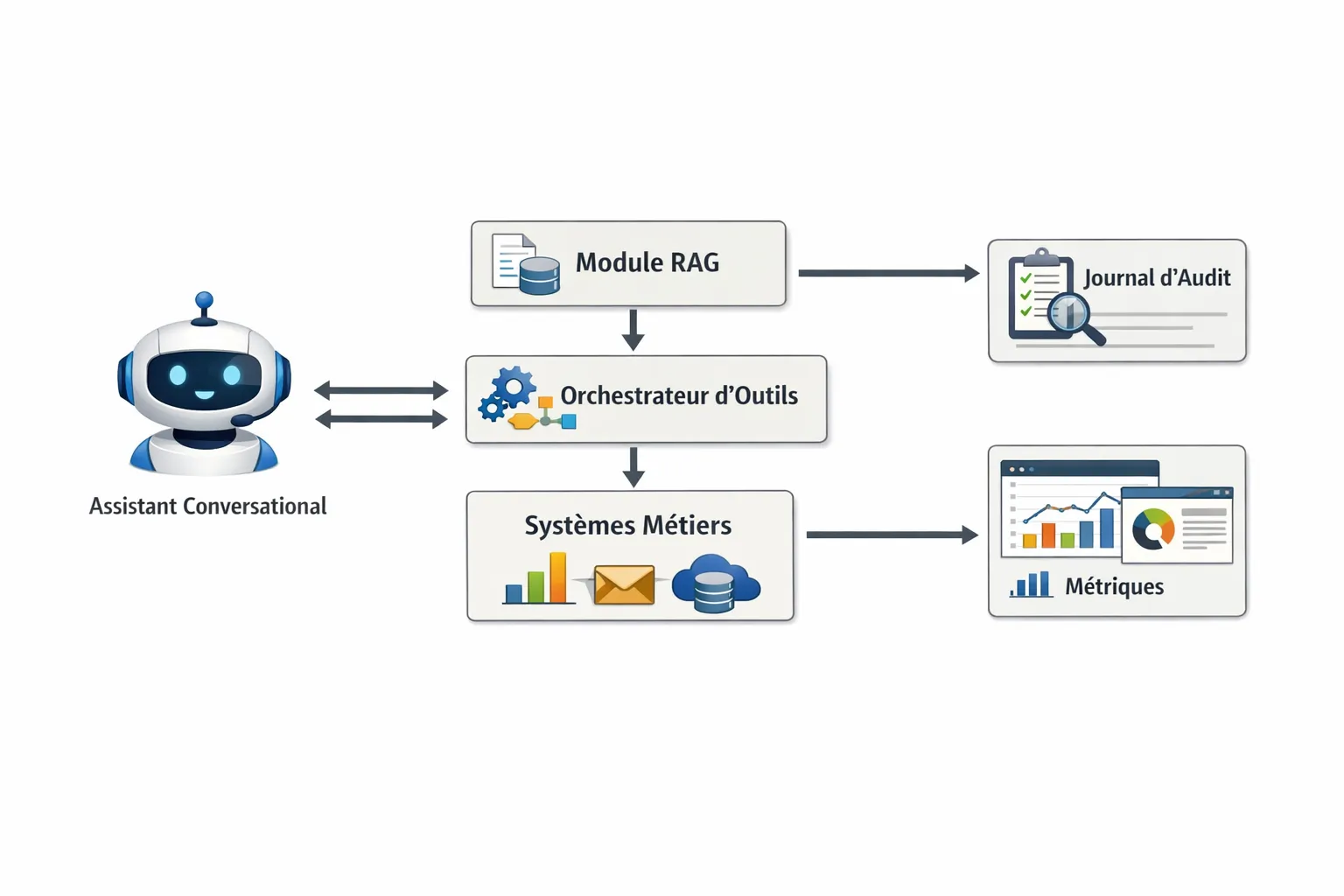
Value comes from execution, not just the response. Connect the assistant to your tools, CRM, ERP, helpdesk, calendars, with access control, explicit validations, and audit logs. Filter and validate model inputs to avoid prompt injection and data exfiltration. Refer to the recommendations of the OWASP Top 10 for LLM Applications.
8. Accessibility and inclusion by default
An AI UI must respect WCAG 2.2, contrasts, keyboard navigation, screen readers, and alternatives to the voice channel. Preserve a robust text mode, concise summaries, and the ability to slow down or pause the flow. See the W3C WCAG 2.2 guidelines.
9. Measure conversational quality continuously
Beyond CSAT, track resolution time, closure rate without transfer, reformulation rate, cost per resolution, and perceived accuracy. Tag dialogues by intent, result, and escalation. Use weekly reviews mixing analytics and qualitative reading of samples.
10. Privacy and explainability, by design
Inform the user if their data will be used to refine a model, offer an opt-out option, encrypt in transit and at rest, limit retention. Synthetically explain how the response was produced, sources consulted, and known limits.
AI UI Patterns that work in enterprise
Side-panel Copilot in an existing tool
A side panel that understands the active page, proposes contextual commands, and prepares drafts. Ideal for CRM, office suites, or back-office. High adoption because the user does not change their habits.
Chat plus quick actions
A conversation area enriched with intent suggestions and recurring actions. Suitable for customer support, internal search, and HR assistants. Conversational helps frame, quick actions go straight to the point.
Task-oriented assistant with dynamic forms
When a task involves strong constraints, the assistant first collects parameters via a mini-form, then confirms and executes. Good compromise to reduce errors and correction costs.
From conversational to agent, how to stay in control of risk
Agents capable of calling multiple tools and planning sub-tasks multiply impact. They require clear orchestration, permission policies, and fine-grained observability. We detail these points and the role of the MCP protocol in Agentic AI and MCP, The Automation Revolution.
A minimalist but value-oriented dashboard is often more effective than a wall of metrics. Here are indicators that help steer a real deployment.
KPI
Definition
Why it's useful
Health indicator
Resolution time
Duration between first request and applied solution
Measures perceived efficiency
Regular decrease over 4 weeks
Autonomous closure rate
Percentage of requests resolved without a human
Evaluates the real value of the bot
Increasing, without CSAT drop
Reformulation rate
Share of requests requiring clarification
Indicates clarity of UI and data
Must decrease after iterations
Cost per resolution
LLM and infra cost divided by resolved cases
Aligns ROI and performance
Stable or decreasing as it scales
Useful escalation rate
Transfers wisely to human
Measures a healthy safety net
Stable, without duplicates or ping-pong
Guardrail incidents
Blocked violations or injection attempts
Security and drift tracking
Low and decreasing with patches
Useful tip: sample 30 to 50 representative conversations every week, annotate intent, proof quality, response utility, and factual accuracy. The combination of analytics plus qualitative reviews accelerates gains.
Data, sources, and hallucination reduction
Use a polished RAG, an index that reflects real business objects, schemas, freshness policies. Summarize and cite sources in the response.
Normalize responses with expected formats, tables, JSON, bulleted summaries, then make them readable for the user.
Favor structured prompts and explicit functions rather than free injunctions. Separate system prompt, context, and user input.
Manage uncertainty; if confidence in a response is low, propose a verification or a safe alternative.
Security, compliance, and privacy, the non-negotiable basics
Authenticate the user and apply least privilege for every action.
Clearly declare the retention policy, duration, purpose, and user rights. Enable purge and forget on request.
Test against the OWASP LLM Top 10 to detect injections, exfiltrations, and privilege escalations.
Conversational design processes that deliver fast
1. Map opportunities
Identify the 5 to 10 high-frequency, high-impact micro-tasks. Example: finding an order, generating a quote, summarizing a ticket, qualifying a lead. Estimate value, risks, and data dependencies.
2. Prototype the hybrid AI UI
Assemble a first flow with intent suggestions, structured responses, and one secure real action. Test internally with 10 to 20 users. Measure TTR, reformulations, and satisfaction.
3. Harden data and integrations
Add RAG, guardrails, permissions, and two critical integrations. Stabilize schemas and logs, set up simple monitoring of costs and errors.
4. Expand scope and instrument
Open to a small pilot group. Add 2 high-value actions, set up weekly reviews on the project portal, and continuous improvement.
5. Train and govern
Train business teams to write effective prompts, interpret uncertainty, and escalate edge cases. Document the conversational charter and escalation procedures.
Common mistakes to avoid
Launching a chat without actions or verifiable sources; adoption collapses.
Replacing effective forms with forced conversation; the journey gets longer.
Neglecting latency; trust will drop after 2 to 3 seconds without feedback.
Forgetting purge or data governance; legal risk and brand image.
Measuring only traffic or time spent; prioritize value delivered per case instead.
Useful resources to go further
Nielsen Norman Group, vigilance points on conversational UI, consult the article.
Must an AI UI always take the form of a chat? No. The most performing interfaces combine a conversation area with intent buttons, dynamic forms, and links to specialized screens.
How to reduce hallucinations without complicating everything? Work on your sources with a clean RAG, cite them in responses, impose output formats, and manage uncertainty by proposing verifications when confidence is low.
Which KPIs to track first at launch? Resolution time, autonomous closure rate, reformulation rate, and cost per resolution. Supplement with weekly qualitative sampling.
How to handle GDPR and privacy? Clearly inform about data usage, offer the right to object, encrypt your flows, and limit retention. Give the user control over the assistant's memory.
Is an autonomous agent needed from the start? Not necessary. Start with well-secured unitary actions, gradually add multi-tool orchestration when you have the right guardrails and telemetry.
Which model to choose? The right model is the one that respects your data, latency, cost, and security constraints. The quality of design, guardrails, and integrations often counts more than the model itself.
Move from idea to an AI UI that delivers value
Impulse Lab designs and deploys custom AI UIs, with opportunity audits, integration into your tools, process automation, and team training. We deliver in weekly increments, with a dedicated client portal and continuous involvement of your business teams. You want to transform an assistant idea into concrete results? Let's take 30 minutes to frame your first high-ROI case and define an execution plan. Contact us via impulselab.ai. If you recommend us, our referral program might also interest you.