Automation and Artificial Intelligence: ROI and Pitfalls
Intelligence artificielle
Stratégie IA
ROI
Automatisation
Optimisation
Automation was long about rules, scripts, and RPA. In 2026, LLMs and agents changed the equation: you can now automate "semi-structured" tasks (emails, tickets, quotes, summaries, sorting, research) that were previously too costly to standardize.
April 24, 2026·10 min read
Automation has long been a matter of rules, scripts, and RPA. In 2026, the arrival of LLMs and agents changed the equation: you can now automate "semi-structured" tasks (emails, tickets, quotes, summaries, sorting, document research) that were previously too costly to standardize.
But the real question isn't "can we automate?", it's: what ROI to expect, and what pitfalls cause profitability to fail.
This article gives you a concrete framework to estimate a realistic ROI for automation and artificial intelligence, followed by a list of common pitfalls (with antidotes) to avoid POCs that impress but fail to hold up in production.
Automation + AI: what exactly are we talking about?
To calculate an ROI, you must first name the type of automation, because the costs, risks, and expected gains are not the same.
3 levels of enterprise automation
Level
What AI does
Typical example
Where the ROI risk hides
Assistive AI (copilot)
Helps a human produce faster
Call summary, drafting, ticket classification
Real gain depends on adoption and quality standards
Reliable AI (RAG/API)
Answers based on a source of truth and an input contract
Internal assistant on procedures, support FAQ with citations
Source quality, integration, measuring the "right answer"
Actionable AI (agent + tools)
Triggers actions via API with guardrails
Create a ticket, prepare a quote, route a request, follow up on an invoice
Guardrails, permissions, traceability, operating and run costs
If you are just starting out, the ROI is often faster on assistive AI and reliable AI, provided you instrument the gains and limit the scope. Agents "that act" can yield more, but they require more control (this is often the point that blows up the budget).
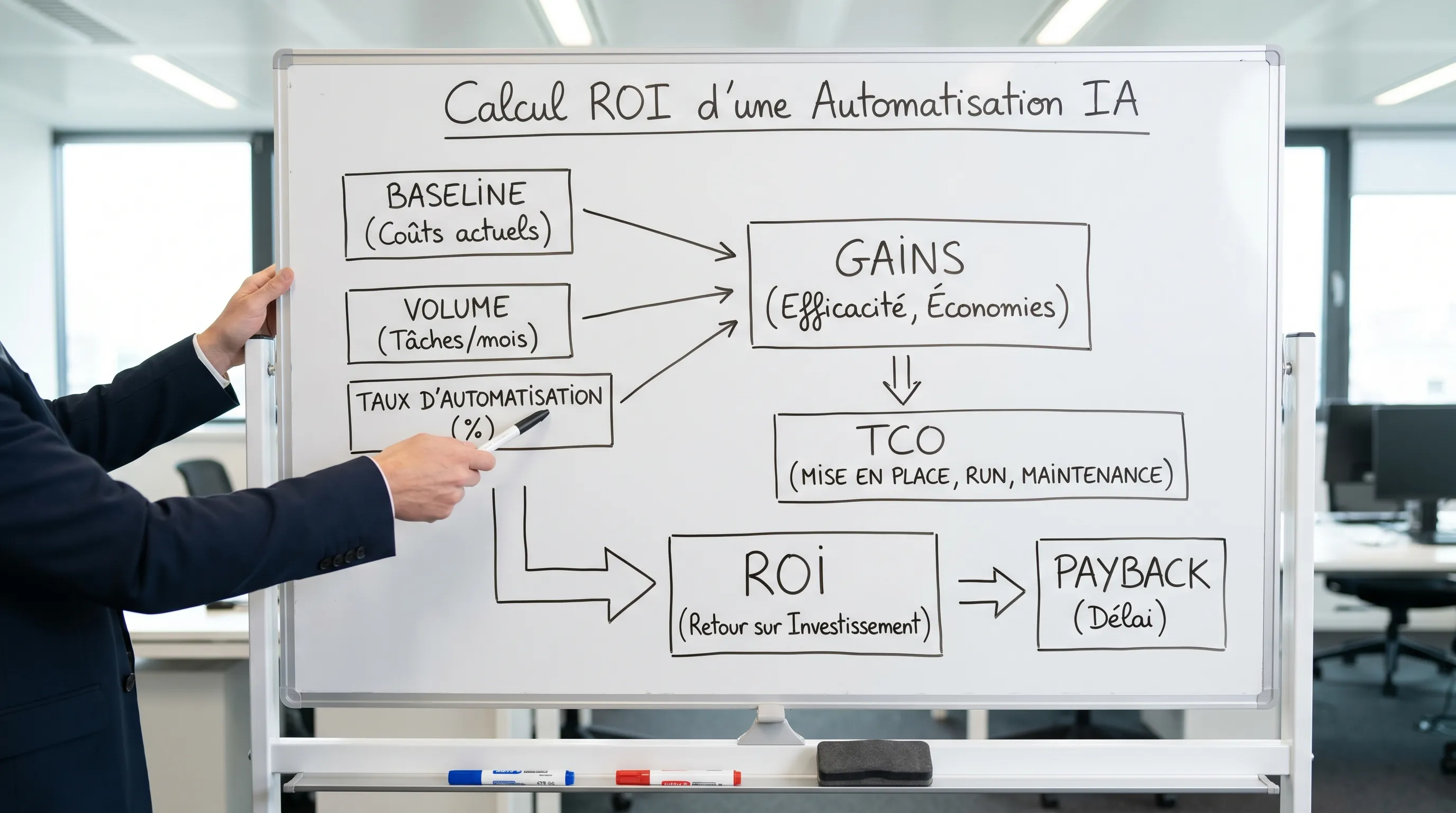
ROI = (net gains − implementation costs) / implementation costs
Payback = implementation costs / monthly net gains
The classic pitfall: calculating a "time saved" ROI without converting it into value, or without integrating the fact that a portion of cases must still be handled by a human.
The 4 families of gains to measure
Gain family
How to make it measurable
KPI example
Productivity
Minutes saved per unit × volume × adoption rate
Average Handling Time (AHT), tasks closed/day
Quality
Errors avoided × unit cost (rework, disputes, penalties)
Error rate, return rate, compliance
Revenue
Conversion, upsell, response speed, basket size
Conversion rate, SQL, quote turnaround time
Cash / risk
DSO, debt collection, legal risk, incidents
DSO, unpaid rate, security incidents
If you are looking for AI-oriented KPI examples, you can also check out: AI chatbots: essential KPIs to prove ROI (useful even outside of chatbots, as the "quality → ops → business" logic is highly reusable).
A simple (and realistic) ROI model: a quantified example
Let's take a common case in SMBs/scale-ups: triage + pre-response on incoming requests (support, pre-sales, operations). It's not "glamorous", but it's often very profitable because the volume is high.
Starting assumptions
Variable
Example value
How to get it
Monthly volume
1,200 requests/month
Helpdesk, email, form extraction
Current average time
6 min/request
Sample of 50 cases, timed
Fully loaded cost per minute
€0.60 / min
Fully loaded salary / productive minutes
Useful automation rate
35%
Pilot on real cases (not a demo)
Residual time on auto cases
1.5 min
Proofreading + validation + exceptions
Calculation of productivity gains (monthly)
Current time = 1,200 × 6 = 7,200 min
Time after automation = (auto cases) 420 × 1.5 + (non-auto cases) 780 × 6 = 630 + 4,680 = 5,310 min
Time saved = 1,890 min
Gain € = 1,890 × 0.60 = €1,134/month
This calculation is deliberately conservative: it does not count quality, speed, or the "better prioritization" effect, which can sometimes weigh just as much.
Costs not to forget (TCO)
This is where many ROIs "evaporate". For an AI automation, the TCO is rarely just "the subscription to a tool".
Cost item
What it covers
Why it's often underestimated
Implementation
scoping, integration, testing, guardrails
workflow integration takes longer than the demo
Run
model usage, hosting, observability
usage drift, latency, spikes, logs
Maintenance
source updates, prompts, rules
processes change, docs too
Governance
data rules, access, audit, compliance
necessary as soon as sensitive data is touched
Adoption
training, standards, rituals
without adoption, no sustainable gain
The pitfalls that destroy ROI (and how to avoid them)
Pitfall 1: starting from the tool, not the process
The symptom: "We got an AI tool, now let's find a use case". As a result, you automate tasks that are infrequent, inexpensive, or impossible to integrate properly.
Antidote: start with a recurring process with a clear metric. A good rule of thumb: high frequency + accessible data + subsequent action = more likely ROI.
Pitfall 2: forgetting the failure rate and exceptions
Automation does not replace 100% of the flow. There are ambiguous cases, missing information, out-of-scope requests.
Antidote: in your ROI model, systematically add:
a useful automation rate (what actually goes through)
a residual time (proofreading, validation)
an escalation rate (transfer to a human)
Pitfall 3: not instrumenting the baseline
Without a baseline, you don't know if you are actually saving time or if you are shifting the work elsewhere (rework, checks, escalations).
Antidote: before any automation, capture 2 to 4 weeks of data: processing time, volumes, error rates, backlog, SLAs.
Pitfall 4: underestimating integration (the real center of gravity)
AI that "answers in a chat" is easy. AI that integrates with your CRM, helpdesk, ERP, Google Workspace, billing, etc., is where the ROI is decided.
Antidote: choose a suitable integration pattern (API, RAG, agent) and hold to a simple requirement: the AI must live in the tool where the work is done. To go further: Enterprise AI integration: API, RAG, and agent patterns.
Pitfall 5: ignoring data quality and "sources of truth"
An assistant that draws from obsolete or contradictory documents generates noise, not value.
Antidote: a mini "data product" project is often enough:
1 content owner
1 standard format (titles, dates, version)
1 unpublishing rule
1 evaluation protocol on a set of real cases
Pitfall 6: confusing usage and impact
Many teams measure "the number of conversations" or "the number of generations" and conclude too quickly.
Antidote: measure business results: time, backlog, conversion, DSO, errors. Usage is only an indicator of adoption.
Pitfall 7: letting "run" costs drift
With generative AI, the cost varies with volume, context length, retries, tools called, and logs.
Antidote: impose cost guardrails from the start: context limits, caching for frequent requests, team quotas, cost monitoring, and a degraded mode (shorter response, or escalation).
Pitfall 8: lack of guardrails when AI acts
As soon as a system can create, modify, send, or delete, your risk changes by an order of magnitude.
Antidote: keep "action-first" protections: minimal permissions, human validation on sensitive actions, idempotency, logging, and rollback capability. If you deploy agents, the Impulse Lab article on guardrails can help you: Autonomous agents in the enterprise: guardrails and validation.
Pitfall 9: GDPR and compliance addressed too late
It's not just a legal question, it's a design question: what data goes in, where it goes, how long it stays, who accesses it.
Antidote: apply minimization and classification right from the scoping phase, and document the flows. For official resources:
An automation "that works" but that no one uses has zero ROI.
Antidote: treat automation like an internal product: owner, short training, playbook, review ritual, and weekly improvement.
A quick grid to decide if an AI automation case is "ROI-friendly"
Before launching, score your use case on 6 simple criteria.
Criterion
Question
Positive signal
Frequency
How many times a week?
Daily, or even multiple times/day
Integration
Is there an action behind it?
CRM/helpdesk/ERP accessible via API
Data
Do we have a source of truth?
Procedures, docs, usable histories
Measurement
Can we instrument it?
Clear KPI + baseline possible
Risk
What is the cost of an error?
Low to medium, escalation possible
Adoption
Who is the sponsor and the user?
Identified business owner, motivated team
If you don't have a "yes" on measurement and adoption, the ROI is almost always fragile.
Pragmatic roadmap to deliver an ROI in under 90 days
Without getting into an overly heavy plan, an effective sequence looks like this:
Days 1 to 15: value-oriented scoping
Define the north star KPI, the baseline, the scope (in-scope, out-of-scope), and the usage contract (authorized data, level of control, failure criteria).
Days 16 to 45: pilot on real cases, instrumented
Test on real requests, with logs, quality scoring, and impact measurement. Your deliverable is not "a chatbot", it's a curve (quality, time, cost, escalation).
Days 46 to 90: integration and minimal run
Industrialize what works: integration into the target tool, controls, monitoring, documentation, training, and a weekly improvement ritual.
What ROI to expect from an AI automation in an SMB? It depends mostly on the volume, the useful automation rate, and the TCO. The best cases have a payback in a few months when the process is frequent, measurable, and well-integrated.
What is the difference between classic automation and AI automation? Classic automation executes stable rules. AI allows processing language and semi-structured cases, but requires more guardrails, measurement, and governance.
What are the most common hidden costs? Integration with existing tools, maintenance of sources (documents, rules), observability, access management, and adoption (training, standards).
Do you always have to use an AI agent to maximize ROI? No. The fastest gains often come from assistive AI or a highly reliable RAG. Actionable agents can yield more, but greatly increase control requirements.
How to avoid the "demo" effect? By demanding a pilot on real cases, a baseline, KPIs, an evaluation protocol, and minimal integration into the workflow.
GDPR and AI Act: should I worry about them even for a simple automation? Yes, as soon as you process personal or sensitive data. Minimization, traceability, and access management must be framed from the start.
Going from idea to ROI, without pitfalls
If you want to automate a process with AI, the key point is not to choose "the best model". It is to select a measurable case, anticipate the TCO, integrate into your tools, and then steer with KPIs.
Impulse Lab supports SMBs and scale-ups via:
AI opportunity audits to prioritize ROI cases
development and integration of custom web and AI solutions
training to secure adoption and standardize practices
To discuss your case (and build a realistic ROI estimate, with explicit assumptions), you can start at impulselab.ai.
AI at Work: 10 Tasks to Delegate Without Losing Control
AI at work is useful when it removes friction, not when it replaces business judgment. For SMEs and scale-ups, the right question isn't "what can AI do for me?", but rather: "what tasks can I delegate to it to save time while keeping control?"