Web AI: 8 concrete use cases to boost conversions and support
Intelligence artificielle
Stratégie IA
Marketing
Automatisation
Optimisation
Traffic is getting more expensive, decision cycles are lengthening, and support quickly becomes a bottleneck as you scale. In this context, web AI (AI integrated into your site and connected to your tools) isn't a "gadget", it's a very concrete lever to...
Traffic is getting more expensive, decision cycles are lengthening, and support quickly becomes a bottleneck as soon as you start to scale. In this context, web AI (AI integrated into your site and connected to your tools) isn't a "gadget", it's a very concrete lever to gain conversion points while reducing the support load.
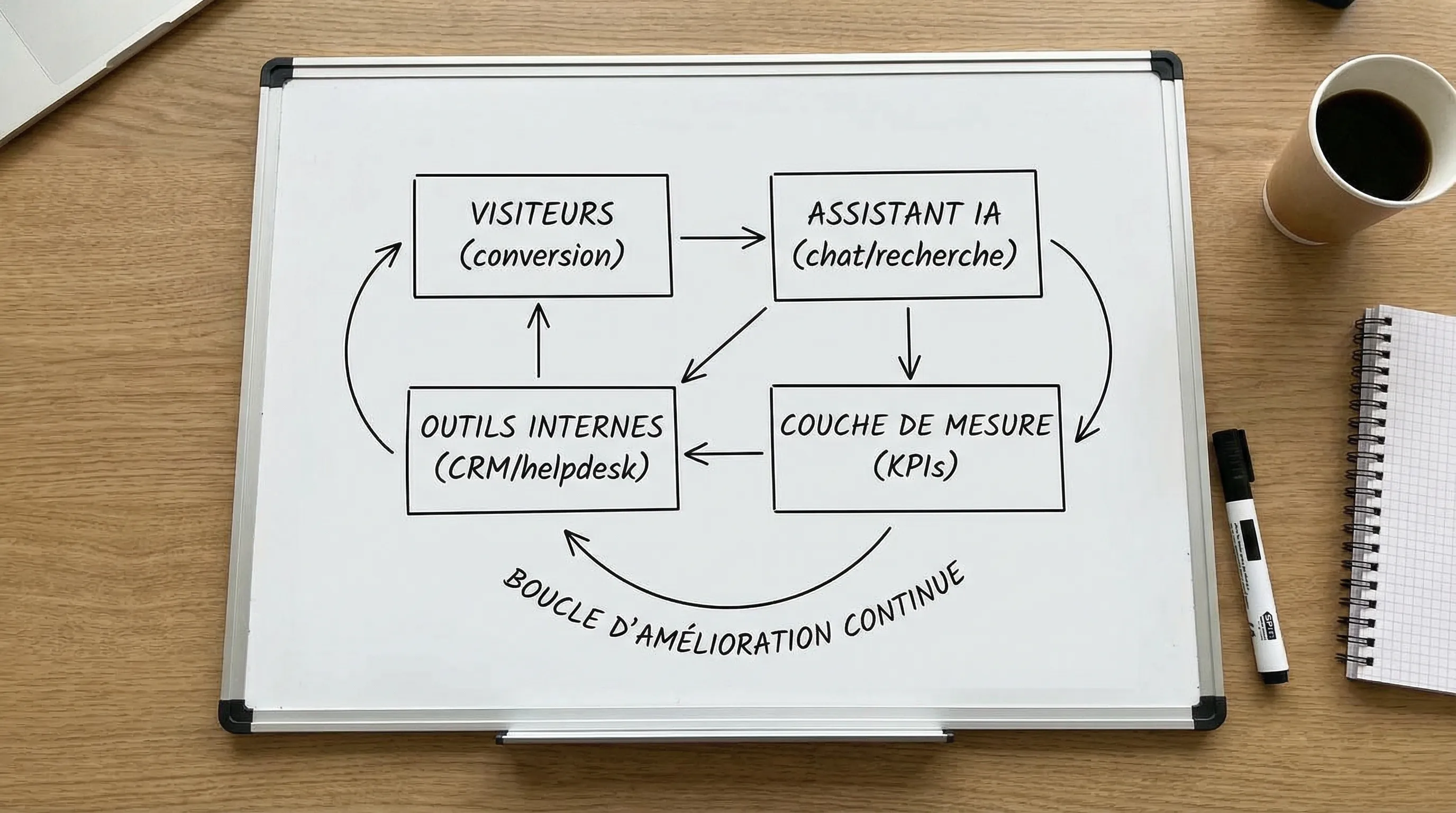
The key idea in 2026 is simple: models are powerful, but the value comes from integration (CRM, helpdesk, knowledge base, analytics) and measured deployment, with safeguards.
Web AI: what exactly are we talking about?
By "web AI", we mean AI put to work for your website and user journeys, for example via:
automations connected to your systems (CRM, ticketing, email, calendar)
The right framing is this: a web AI use case must either increase measurable revenue (conversion, cart size, appointment booking) or reduce a recurring cost (tickets, agent time, errors).
Before deploying: 5 prerequisites that (really) make a difference
You can launch a pilot quickly, but certain fundamentals prevent the "demo" effect.
1) A North Star metric, then 2 to 4 steering metrics
Support: deflection rate (self-service), first response time, CSAT
2) An actionable (and maintainable) "source of truth"
To avoid invented answers, favor an approach where the AI relies on your validated content (help, docs, T&Cs, product pages), via RAG-type patterns. As a starting point, OWASP publishes useful references regarding GenAI risks, including the LLM Top 10.
3) Minimal integration with your stack
Without a connection to the CRM/helpdesk, you often get "a nice chat" but little impact. Conversely, a lightweight integration (lead creation, ticket creation, routing) is already enough to generate ROI.
4) GDPR and transparency
As soon as personal data is collected, plan for consent, minimization, traceability, and clear information. The CNIL publishes useful resources and recommendations on compliance.
5) Instrumentation from Day 1
No need for a complex system, but you must be able to link:
the web event (e.g., click, question asked)
the AI's decision (e.g., recommendation, routing)
the business outcome (e.g., appointment booked, ticket avoided)
8 concrete web AI use cases to boost conversions and support
The common thread among the use cases below: they improve a specific step in the funnel and can be measured without waiting 6 months.
1) Contextual pre-sales chat on key pages (landing, pricing, comparison)
A useful pre-sales chat doesn't just "chat" randomly. It must:
understand where the user is (pricing page, feature, customer case)
answer based on verified content
push a clear action (demo, quote, trial, contact)
Why it converts: you handle objections right when they become blockers (budget, integration, deadlines, security), without forcing the user to search through the site.
KPIs to track: page conversion rate, chat engagement rate, click-through rate to CTA, appointment rate.
Points of vigilance (to protect conversion, brand, and compliance)
Hallucinations and broken promises
The number 1 risk with web AI is letting the AI answer without sources or limits. On the web, an incorrect answer can be costly (loss of trust, extra support, disputes). Hence the importance of a knowledge base, cited sources, and an escalation path.
Security and attack surface
As soon as an assistant is connected to tools (CRM, tickets, orders), the subject must be treated like a product: permissions, logs, testing, degraded modes. The NIST AI RMF is a good reference for risk governance.
Variable costs
Web AI often has inference costs tied to volume (visits, conversations). Instrument from the start: cost per conversation, cost per additional conversion, cost per avoided ticket.
FAQ
Is web AI reserved for high-traffic sites? No. The best results often come from high-value journeys (pricing, quotes, appointments) and repetitive tickets, even with moderate traffic.
Do you absolutely need a chatbot to do web AI? No. Semantic search, product finders, assisted qualification, or knowledge maintenance can have just as much impact, sometimes with less risk.
How can I prevent the AI from giving bad answers on my site? By grounding the answers in a source of truth (validated documents), limiting the scope, and planning for human escalation. "Sensitive" answers must be constrained.
Which KPIs should I track to prove impact quickly? A North Star per use case (page conversion, qualified appointments, support deflection, TTR) and 2 to 4 steering metrics (engagement, escalation, quality, costs).
How long for a useful V1? With clear scoping and minimal integration, a V1 can be tested in a few weeks. The important thing is to instrument and decide quickly: scale, adjust, or stop.
Implementing web AI without technical debt: the Impulse Lab approach
If you want to activate web AI to boost your conversions and relieve your support, the safest starting point is to scope 1 to 2 use cases with KPIs, sources, and minimal integration.
Impulse Lab supports SMBs and scale-ups with:
AI opportunity audits to identify quick wins
custom development (web and AI), integrated with your existing tools
adoption training so that usage lasts over time
You can start with a chat to validate the scope and choose the 2 most profitable use cases: Impulse Lab.