Website AI: Adding an assistant without breaking tracking
Intelligence artificielle
Stratégie IA
Confidentialité des données
Marketing
Optimisation
Adding an AI assistant to a website often seems simple: choose a widget, paste a script, and publish. In reality, it's a highly sensitive change for your marketing analytics. An assistant can move conversions away from classic forms and break your tracking if not integrated properly.
Adding an AI assistant to a website often seems like a simple operation: choose a widget, paste a script, connect a few sources, and publish. In practice, it is one of the most sensitive changes for your marketing measurement. An assistant can move conversions away from classic forms, alter the user journey, trigger third-party scripts, create invisible events in an iframe, and lose UTMs at the exact moment the prospect qualifies.
In a website AI project, the goal is therefore not just to add a conversational interface. The goal is to add a useful assistant without breaking tracking, attribution, consent, and CRM data. Otherwise, you risk improving the user experience while rendering your numbers useless.
Here is a pragmatic method to integrate an AI assistant on your site while maintaining clean measurement in GA4, Matomo, your CRM, your advertising tools, and your internal dashboards.
What not breaking tracking really means
Not breaking tracking doesn't mean adding two or three random click events. It means the AI assistant becomes a measurable point in the journey, without creating a gray area between the visit, the conversation, and the conversion.
Concretely, your tracking remains healthy if you can answer these questions:
Which source generated the visitor who used the assistant?
On which page was the assistant opened?
What intent was detected without unnecessarily storing the full text of the conversation?
Was the prospect qualified, transferred, subscribed, called back, or converted?
Is the conversion event deduplicated with forms, calendars, and CRM webhooks?
Do the sent data comply with consent and the company's GDPR policy?
Does site performance remain acceptable after adding the script?
The assistant must therefore not be treated as an isolated tool. It must be integrated as a building block of your web architecture, just like a form, a payment module, an A/B testing tool, or a CRM component.
The problem rarely comes from the AI model itself. It comes from the integration. Many assistants are added via a third-party script that creates its own environment, its own sessions, and sometimes its own statistics. If this system does not communicate properly with your analytics layer, you lose part of the journey.
Risk
Symptom in data
Recommended control
Widget loaded in an iframe
Clicks and messages do not show up in GA4 or Matomo
Use the tool's callbacks or a postMessage bridge to the dataLayer
Script loaded before consent
Events fire even though the user refused cookies
Connect the assistant and its tags to the CMP
Conversion in the chat
Historical form submissions drop without total leads being readable
Create a unique and deduplicated conversion event
Loss of UTMs
Leads from the chat appear as direct or unknown source
Pass UTMs to the CRM and the qualification backend
Full text sent to analytics
Risk of personal data in GA4, Matomo, or ads tools
Send intent categories, not raw messages
Heavy widget loading
Drop in Core Web Vitals and conversion rate
Lazy-loading, load after interaction, performance monitoring
Vendor's proprietary analytics
Bot numbers do not match site numbers
Make the dataLayer or internal backend the source of truth
The key point: your AI assistant tool must not become your main source of analytics truth. It can provide useful product metrics, but attribution, conversions, and business quality must be linked to your existing systems.
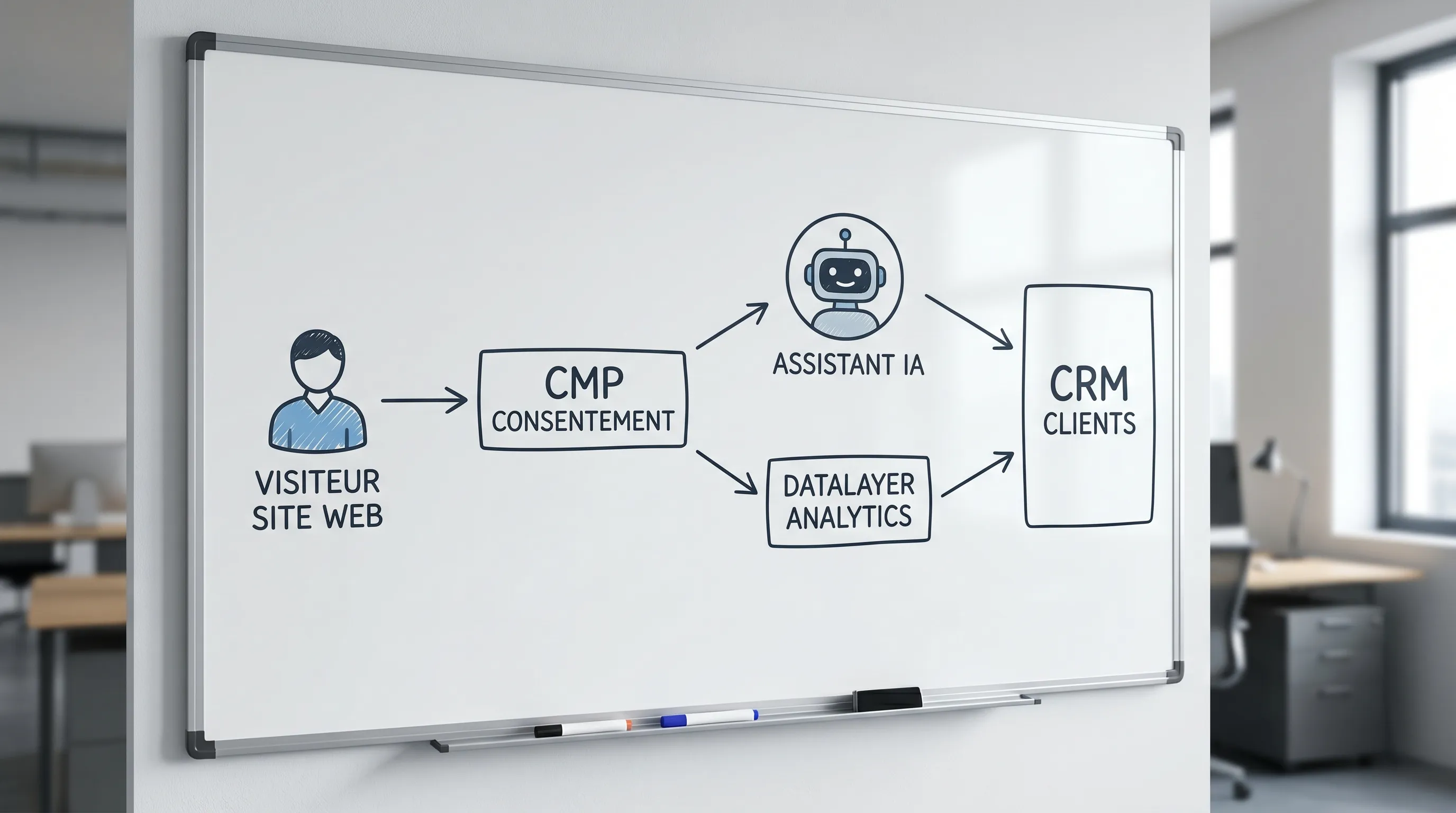
The clean architecture: assistant, tracking adapter, dataLayer, CRM
The best approach is to separate four layers.
The first layer is the assistant's interface: the button, the chat window, the suggestions, and any actions offered to the user. This is the visible part.
The second layer is the tracking adapter: a small technical layer that transforms widget events into standardized events. For example, assistant opened, question asked, answer displayed, contact request, meeting booked.
The third layer is the dataLayer or the site's event layer. It distributes events to Google Tag Manager, GA4, Matomo, your CDP, your CRM, or your data warehouse, depending on consent and internal rules.
The fourth layer is the backend or the AI gateway. It protects API keys, centralizes AI calls, filters sensitive data, logs useful actions, and synchronizes conversions with the CRM. This is particularly important if the assistant doesn't just answer, but can also qualify a lead, create a ticket, or trigger a workflow. On this topic, also check out HTTPS AI: securing your API calls and sensitive data.
This architecture avoids two common traps: letting each tool send its own tags without coordination, or sending everything on the browser side without filtering or control.
Defining an event taxonomy before installing the widget
Before choosing a vendor or pasting a script, write down the list of events you actually need. A good taxonomy must remain readable by marketing, product, sales, and tech teams.
Event
Trigger
Associated KPI
Data to avoid
assistant_visible
The widget is eligible to be displayed
Exposure rate
Personal identity
assistant_opened
The user opens the chat
Open rate
Full page text
assistant_question_submitted
The user asks a question
Conversational engagement
Raw message if unnecessary
assistant_answer_displayed
An answer is displayed
Response rate
Full prompt and sensitive context
assistant_source_clicked
The user clicks a source or resource
Usefulness of answers
Personal data
assistant_lead_started
The user enters a qualification flow
Commercial intent
Email before appropriate consent
assistant_lead_submitted
A lead is created or transmitted
Lead conversion
Unfiltered free text message
For each event, also document the allowed parameters. The most useful are often:
assistant_id
assistant_version
page_path
page_type
language
pseudonymous conversation_id
intent_category
outcome_type
traffic_source
utm_campaign
consent_status
latency_bucket
error_code
Avoid sending the raw content of conversations into your analytics. A user message can contain an email, a phone number, a medical need, HR data, a confidential budget, or client information. For marketing management, an intent category is often better than free text.
In GA4, you can use recommended events when they match the use case, for example, generate_lead for lead creation, then custom events for steps specific to the assistant. Google documents collection principles in its official help on GA4 events. The important thing is to keep a stable nomenclature and not create a new event for every conversation variant.
Consent, GDPR, and AI assistant: do not mix everything up
An AI assistant can serve several purposes: answering a question, qualifying a prospect, analyzing usage, personalizing the journey, feeding a CRM, or measuring an advertising campaign. All these purposes do not have the same status regarding consent.
In France, the CNIL reminds us that cookies and trackers that are not strictly necessary generally require prior consent. Recommendations evolve depending on the case, but the principle remains clear: you must separate what relates to the operation of the service from what relates to measurement, personalization, or advertising. See the CNIL resources on cookies and other trackers.
For an AI assistant, map at least four families of data.
Data
Example
Normal destination
Vigilance
Conversational content
Question asked to the bot
AI system or support
May contain personal data
Lead data
Email, phone, company
CRM
Legal basis, information, minimization
Analytics event
Chat opened, lead sent
GA4, Matomo, dashboard
No PII, respect consent
Technical log
Latency, error, version
Observability
Limited retention, restricted access
A good pattern is to let the assistant provide a basic service, if your legal analysis allows it, while conditioning analytics, marketing, and advertising tags on appropriate consent. This choice must be validated with your DPO or legal counsel, especially if the bot processes sensitive data or European users.
Also, do not forget transparency: the user must understand that they are interacting with an AI system, what data may be processed, and how they can contact a human if necessary.
Preserving attribution: the most underestimated point
The classic scenario is simple: before the assistant, your leads went through a form with hidden UTM fields. After the assistant, prospects chat, qualify themselves in the chat, then receive a Calendly link or create a ticket. Result: the CRM receives a lead, but the acquisition source disappears.
To avoid this, treat the assistant as a new conversion point, not as a new acquisition channel. The acquisition source remains LinkedIn Ads, Google, SEO, referral, email, or direct. The assistant is an interaction point that helped convert.
Situation
Bad practice
Good practice
Lead created in the chat
The bot vendor sends the lead alone to the CRM
The backend enriches the lead with UTM, page, consent, and conversation_id
Meeting booked
The calendar receives a visitor without context
Tracking fields are passed to the link or webhook
Form and chat active
Two conversions are sent for the same prospect
A lead_id or event_id allows deduplication
Handoff to a human
The session starts from scratch in the helpdesk
The ticket contains the page, intent, and original source
Marketing reporting
The bot is treated as a traffic source
The bot is treated as an interaction or conversion assistant
The rule of thumb: the conversion must be confirmed by the system that actually creates the business object. If a lead is created in the CRM, use the lead identifier or an event_id on the backend side to trigger the final event. This limits duplicates and makes it easier to reconcile analytics and the sales pipeline.
Example of a clean dataLayer
If your assistant exposes callbacks, you can transform them into standardized dataLayer events. The idea is not to send the whole conversation, but only what is used to steer the experience and the business.
In a more advanced environment, this event can also be sent server-side with a shared event_id. Server-side tracking can improve reliability, but it must never be used to bypass consent. It is used to better control quality, deduplication, security, and CRM integration.
Client-side, server-side, or hybrid?
The right choice depends on your maturity and your stack. For an SMB with a showcase site, a clean dataLayer via Google Tag Manager or Matomo Tag Manager may suffice. For a scale-up with paid acquisition, CRM, sales qualification, and pipeline reporting, a hybrid model is often preferable.
Approach
Advantages
Limitations
Suitable case
Client-side
Fast to deploy, easy to test
More fragile against blockers, duplication possible
First engagement events
Server-side
Better control, deduplication, CRM enrichment
Requires a backend architecture
Leads, meetings, business conversions
Hybrid
Combines UX visibility and business reliability
Requires event governance
B2B sites with acquisition and assisted sales
A simple principle works well: usage events can fire client-side if consent is respected, while final conversions and critical business actions must be confirmed server-side.
QA checklist before going to production
Before publishing the assistant on all pages, test the tracking as you would test a payment or a critical form. The goal is to detect discrepancies before they pollute several weeks of data.
Test
Method
Validation criteria
Consent refused
Refuse analytics and marketing in the CMP
No unauthorized tags fire
Consent accepted
Accept analytics, open and use the chat
Expected events show up
Duplication
Create a lead via chat then form
Only one final conversion is counted if same prospect
UTM
Arrive with UTM then convert in the chat
UTMs are visible in the CRM
Iframe
Test events from the widget
Callbacks or postMessage work
Mobile
Open the chat on a smartphone
No UX blocking or missing events
SPA or dynamic site
Navigate without full reload
The page_path remains correct
Performance
Measure loading before and after
No major degradation of LCP or INP
Personal data
Inspect analytics payloads
No unnecessary email, phone, or free text
Use the debug modes of your tools, for example, GTM Preview, GA4 DebugView, Matomo Tag Manager, server logs, and CRM events. Do not just check that the widget responds. Verify that the entire journey remains measurable.
KPIs to track after launch
An AI assistant should not be evaluated solely on the number of conversations. Many conversations can mean good adoption, but also a confusing page, insufficient documentation, or a bot that attracts unqualified requests.
Structure your KPIs into four layers.
Layer
Useful KPIs
Business question
Adoption
Open rate, interaction rate, usage pages
Are visitors using the assistant?
Quality
Positive feedback, fallback, escalation, latency
Is the assistant answering correctly?
Conversion
Leads, meetings, SQLs, tickets avoided
Is the assistant creating measurable value?
Safeguards
Cost per conversation, errors, PII detected, consent
Does the system remain under control?
The most important KPI depends on the use case. For a pre-sales assistant, you will rather track the qualified lead rate and the meeting booked rate. For a support assistant, you will rather track the resolution rate, the escalation rate, and satisfaction. For an internal assistant, you will measure the time saved and the quality of the answers.
Many AI assistant solutions offer their own dashboard. This is useful for exploring conversations, spotting frequent intents, and improving answers. But this dashboard is not enough to steer your acquisition, your funnel, or your ROI.
Your source of truth must remain your internal measurement system: analytics, CRM, data warehouse, or business dashboard. The vendor dashboard should be a complementary source, not a replacement.
Ask these questions before choosing a solution:
Does the tool expose usable JavaScript callbacks?
Can it send webhooks during key events?
Can certain cookies or tags be disabled based on consent?
Can you avoid sending personal data to analytics tools?
Can you version prompts, knowledge bases, and flows?
Can you export useful conversations for audit, with controlled retention?
Can you link a conversation to a CRM lead without exposing identity in GA4?
If the answer is no to several of these questions, the integration may remain acceptable for a very limited test, but it will become fragile as soon as the assistant influences revenue.
Recommended deployment plan
To add an assistant without breaking tracking, move forward in short, verifiable steps.
Audit the existing setup: List your current tools, events, conversions, CMP, forms, UTMs, and CRM integrations. Record baseline volumes over 14 to 30 days so you can compare after launch.
Define the assistant's terms of use: Specify its exact role: support, qualification, appointment booking, document search, choice assistance, onboarding. An assistant that does everything will be harder to measure and secure.
Write the event taxonomy: Choose the events, parameters, consent rules, destinations, and deduplication rules. This document must be validated by marketing, tech, and sales.
Build the tracking adapter: Connect the widget's callbacks to the dataLayer or your event layer. Add consent controls, PII filters, and pseudonymous identifiers.
Synchronize business conversions: Link lead, meeting, ticket, or sales action to the CRM. The final conversion must be confirmed by the business system, not just by a click in the browser.
Test in staging: Replay critical journeys with consent accepted, refused, mobile, desktop, UTM, key pages, handoff, and errors. Document discrepancies.
Deploy gradually: Start on a few pages or a limited audience. Monitor metrics, compare with the baseline, and verify that historical conversions remain consistent.
Iterate with versioning: Version prompts, sources, flows, and events. When a metric changes, you need to know if it comes from traffic, the bot, tracking, or the offer.
This logic aligns with good practices for scoping an AI project: start with the use case, instrument from the beginning, then industrialize what creates value. To scope the perimeter before development, see AI Project: scoping checklist before developing.
Common mistakes to avoid
The first mistake is installing the assistant across the entire site without a baseline. If your conversion rate changes, you won't know if the assistant helped, hindered, or simply shifted conversions.
The second mistake is measuring conversations instead of results. A useful assistant must reduce friction, qualify better, speed up a response, or increase a conversion. Chat volume is just an intermediate indicator.
The third mistake is sending raw messages to analytics tools. This is rarely necessary and often risky. Prefer intent categories, flow statuses, and outcomes.
The fourth mistake is letting the vendor handle attribution alone. A conversational tool can very well measure its own performance while losing UTMs, CRM identifiers, or consent rules.
The fifth mistake is treating the assistant as a simple front-end script. As soon as it creates leads, consults internal sources, or triggers actions, it becomes an application building block that deserves an architecture, logs, tests, and an owner.
Should you buy a tool or build a custom integration?
An off-the-shelf tool may suffice if your needs are simple: public FAQ, little sensitive data, no critical business action, basic tracking, and low CRM dependency.
A custom or hybrid integration becomes relevant if you have stronger constraints: paid acquisition, B2B sales cycle, structured CRM, scoring, sales handoff, internal sources, GDPR requirements, deduplication needs, pipeline reporting, or an actionable assistant.
For an SMB or a scale-up, the best compromise is often to assemble: use an existing model or conversational building block, but cleanly build the integration, tracking, safeguards, and business synchronization. This is where value is most often played out.
Can an AI assistant lower my measured conversions? Yes, if visitors convert in the chat instead of the form and this conversion is not properly reported. It is not necessarily a real drop, but an instrumentation problem.
Can I track an AI assistant with GA4 or Matomo? Yes, provided you use a clean event taxonomy, respect consent, and avoid personal data in analytics payloads. For critical conversions, server-side confirmation is often preferable.
Should I ask for consent before loading the assistant? It depends on what the assistant does, the trackers used, and the associated purposes. Analytics or marketing tags must be controlled by the CMP. Validate the specific case with your DPO or legal counsel.
How can I avoid sending sensitive data into tracking? Do not send raw messages. Send intent categories, journey statuses, pseudonymous identifiers, and outcomes. Add a PII filter on the adapter or backend side if necessary.
Is the chatbot vendor's dashboard enough? No, not if the assistant influences your leads, sales, or support. The vendor dashboard is useful for improving the bot, but your source of truth must remain connected to your analytics, CRM, and business KPIs.
What is the first test to do before going to production? Test a complete journey with UTMs, consent accepted, conversion in the chat, and CRM creation. If the source, event, lead, and deduplication are correct, you have a solid foundation.
Need a measurable AI assistant, not just a visible one?
Adding an assistant to a site is easy. Adding it without breaking tracking, attribution, consent, and the CRM requires a real product and technical approach.
Impulse Lab supports SMBs and scale-ups on AI opportunity audits, the design of custom web assistants and platforms, automation, integration with existing tools, and team training. If you want to transform your site into a measurable AI experience, start by auditing your tracking, your journeys, and your priority use cases.
You can contact Impulse Lab to scope a clean, secure integration driven by KPIs.