Your online AI stops responding, requests pile up, and no one knows whether to wait or switch tools. For an SMB or growing company, the issue quickly extends beyond the chat window: blocked quotes, pending customer tickets, or automated workflows stuck in limbo.
Your online artificial intelligence is no longer responding, requests are piling up, and no one knows whether to wait or switch tools. For an SMB or growing business, the issue quickly spreads beyond the chat window: blocked quotes, pending customer tickets, or automations with uncertain outcomes.
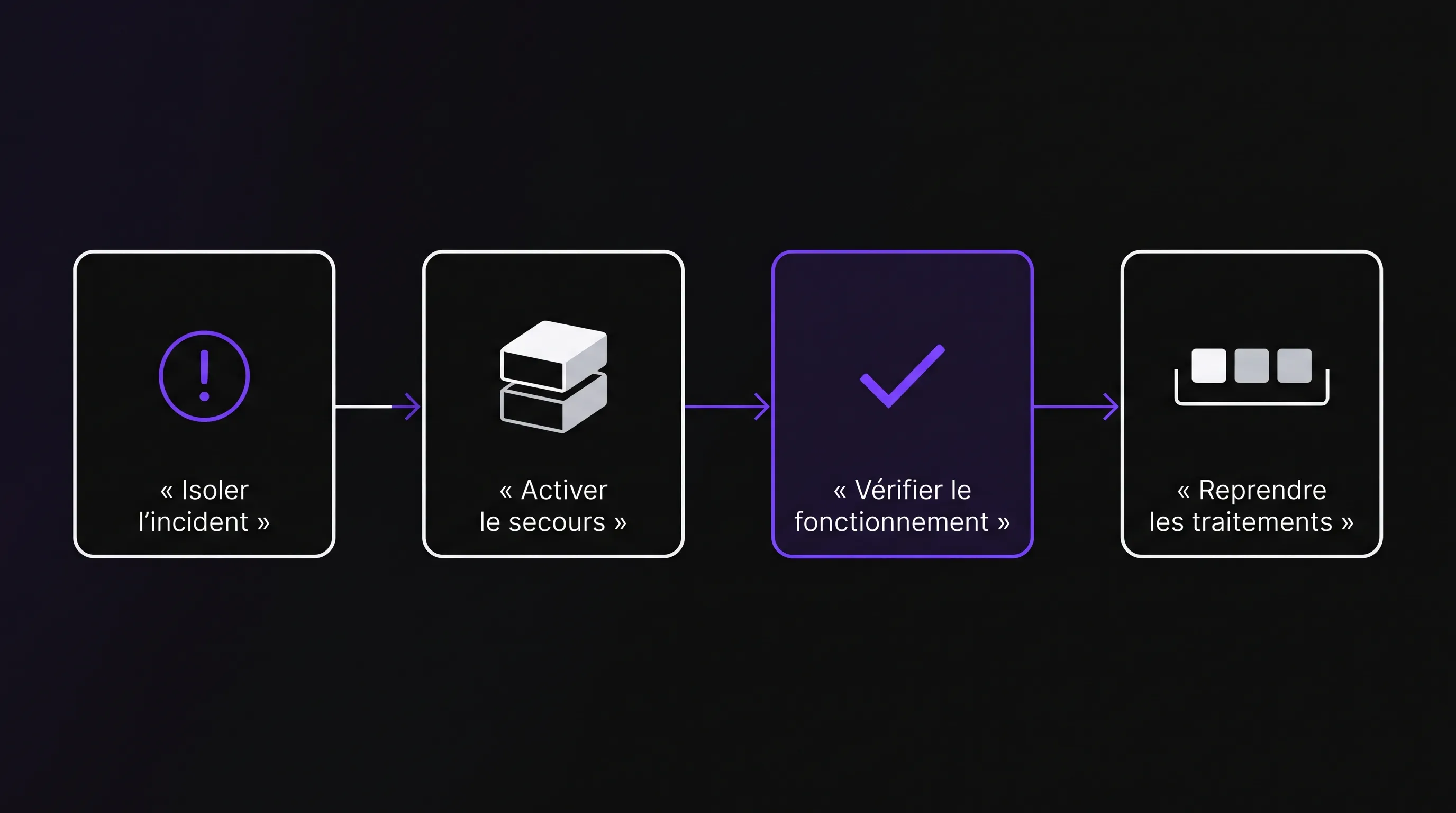
The priority is not to get the AI back up at all costs, but to protect your work and avoid mistakes. An outage justifies neither transferring sensitive data to an improvised service nor rerunning an operation twenty times. Here is a procedure to diagnose the incident, maintain business continuity, and resume operations without creating duplicates.
The first ten minutes: protecting your work
Start by identifying what has actually stopped. Can a team member no longer open their assistant? Is an automation failing to process orders? The consequences and precautions are not the same.
When your online artificial intelligence goes down, designate one person to coordinate checks. Everyone else should report symptoms to them instead of tweaking settings on their own. In a small team, this role can fall to the tool owner or the company leader.
Then, apply these four actions in order:
Save what remains accessible: copy useful drafts to an authorized space, without multiplying copies of confidential data.
Suspend risky operations: pause automated sends, CRM writes, or financial actions that could inadvertently be repeated.
Log the facts: start time, affected feature, exact error message, and impacted users.
Assess business urgency: distinguish between a deferrable task and a process that immediately blocks a customer or delivery.
Do not immediately clear history, cookies, or configurations. These actions can cause lost work or erase useful clues. First, preserve the elements needed for diagnosis, masking sensitive information in shared screenshots.
Diagnosing an outage with your online artificial intelligence
A frozen interface does not prove the provider is down. The issue could come from the browser, authentication, a rate limit or quota, the network, or a connector between two applications.
Proceed by comparison: try the same task with another authorized user, then on another approved browser. If your organization allows it, a different network connection can help isolate a local issue. Do not bypass security controls to run this test.
Symptom
Potential Cause to Check
First Useful Check
Only one workstation is affected
Session, extension, or browser
Try an approved browser without additional extensions
The whole team is affected
Provider, network, or shared account
Compare access points and check the status page
401 or 403 error
Authentication or authorization
Check session, permissions, and access settings
429 error
Rate limit or quota
Read the message and check account usage
5xx error
Server-side or gateway error
Inspect service status and available logs
Empty or inconsistent response
Documents, context, or faulty step
Test a simple prompt without sensitive data
The status pages for OpenAI and Anthropic allow you to check reported incidents. However, a green status page does not rule out a recent, regional, or account-specific issue. Also verify the specific component involved: the web application and the API may be affected differently.
Fixing according to symptoms without aggravating the incident
If the browser assistant stops working
After saving drafts, refresh the page only once. Then check that you are logged into the right account and workspace. An expired session or a change in permissions can easily look like a widespread outage.
If your online artificial intelligence works for a colleague but not for you, focus troubleshooting on your session and local environment. Avoid altering organization-wide settings to resolve an individual issue.
A free plan may also have hit a usage limit. Check notifications from the service rather than creating multiple accounts to circumvent limits. Upgrading to a paid tier alone does not guarantee uptime: applicable commitments depend on your contract.
If an automation or API fails
For an integration, have the technical lead record the error code, timestamp, request ID, and the affected step. An expired key is not handled the same way as temporary overload. HTTP status codes documented by MDN provide a reference framework to be supplemented by provider documentation.
In case of rate limiting or temporary errors, retries should be spaced out and capped. Respect the Retry-After header when provided. Concurrent retries can prolong congestion and increase costs.
If your online artificial intelligence triggers actions in downstream software, verify the outcome before retrying anything. A request may have succeeded despite failing to return a confirmation. Resubmitting the same operation risks generating duplicate tickets, messages, or database entries.
If the tool responds, but the output is unusable
An outage can be functional rather than technical. The assistant replies, but can no longer access the expected documents, uses outdated data, or outputs a format rejected by the downstream tool.
Run a baseline test with a known expected output. Separately verify access to source documents and the execution of external actions. A simple "hello" test does not validate an entire processing pipeline.
As long as this test fails, consider the process unavailable. Quietly replacing a missing response with invented content turns a visible technical incident into a hard-to-detect business error.
Switching to fallback mode without exposing data
The best fallback isn't necessarily another AI. For some tasks, a validated document template, a manual reply, or a clearly tracked queue is enough.
For your online artificial intelligence, define fallback procedures per use case. Drafting a social post can wait. An urgent customer inquiry can receive a short human reply. Reviewing a sensitive contract must remain on hold unless an approved alternative environment exists.
An alternative solution must be evaluated before copying internal information into it. Review contractual terms, data usage policies, retention rules, and access controls. Just because a tool is freely accessible in a browser does not make it interchangeable with your enterprise environment.
Whether prompts and outputs are used to train models depends on the vendor, plan, and settings. Never assume terms are identical from one product to another. Our guide to protecting internal data in an AI chat helps frame these decisions.
A locally hosted model is also not an instant fallback: it requires prior installation, compute resources, and testing. For a small business, a well-defined manual procedure is often far more realistic than an improvised migration in the middle of an incident.
Finally, collect deferred tasks in an authorized workspace. For each task, track an owner, deadline, and clear status. Avoid maintaining parallel lists, which will only create confusion upon recovery.
Communicating a decision rather than a fragile estimate
The team needs to know what to do right now, not every technical hypothesis. A useful update specifies the affected scope, the fallback procedure, and the time of the next check-in.
For example: "As of 10:20 AM, automated meeting notes generation is suspended. Please use the shared template and keep requests in the standard queue. Do not retry any automated workflows. Next update at 11:00 AM." This outlines an operational decision without promising an unknown fix time.
If your online artificial intelligence powers customer support, communicate the practical impact: extended response times, manual processing, or temporarily unavailable features. Never present unverified output as completed work.
Establish an escalation threshold as well. For example, an internal team might decide to switch to manual processing after thirty minutes of downtime on a priority workflow. This timeframe is not a universal rule: it depends on transaction volume, SLAs, and available staffing.
If there are signs of unauthorized access or a data breach, switch procedures immediately. Notify your security lead and, depending on your organization, your DPO. Suspected compromises must not be treated as simple service disruptions.
Restoring service without creating duplicates
The reappearance of the user interface does not mean the incident is over. Before reenabling automations, test a representative end-to-end operation: input, processing, recorded result, and any action triggered in downstream systems.
To bring your online artificial intelligence back into production, start with a small, controlled batch. Compare actual results against expected outputs, then scale volume gradually if everything functions properly. This precaution is essential if a backlog of requests has accumulated.
Categorize interrupted operations into three groups: confirmed failures, confirmed successes, and ambiguous states. Ambiguous requests must be checked in the destination system before being rerun.
For integrations, check with your developers how duplicates are prevented. Depending on the architecture, this may involve unique idempotency keys or pre-write checks. This protection must cover downstream business side effects, not just the raw API call.
Finally, define conditions for returning to normal operations. For example: priority checks pass, no blocking errors recur over an observation window, and every pending request has a confirmed status. Closing the incident does not necessarily mean the entire backlog has already been cleared.
Inform the team clearly on what has been restored and what remains to be caught up. Without this clarity, some team members will continue manual work while others resubmit the same requests.
Keeping a quick-reference runbook tailored to your business
After the incident, conduct a brief post-mortem focused on facts: root cause (identified or unknown), duration, affected tasks, and effective fixes. The goal is to shorten the next downtime, not produce a lengthy report.
An incident cheat sheet (runbook) for your online artificial intelligence can easily fit on a single page. It should be accessible even when everyday systems are down, include up-to-date contact details, and contain no plaintext credentials.
Element
Decision to Record
Priority process
What must keep running first
Coordinator and backup
Who decides and who replaces them
Communication channel
Where the team finds instructions
Fallback mode
How to work without the service
Cutover threshold
When to stop waiting and activate fallbacks
Request tracking
Where to track successes, failures, and uncertain cases
Recovery test
How to verify genuine recovery
Test this runbook on a simple scenario. For instance, ask a team member to handle a request without using the AI assistant and ensure they can locate the template, instructions, and correct point of contact. An unfindable or misunderstood plan is useless during an actual outage.
How do I know if my online artificial intelligence is down or if the problem is on my end? Compare access with an authorized colleague, test on an approved browser, and check the vendor's status page. If only one session is affected, inspect the account and local environment first. These checks guide troubleshooting without definitively pinpointing the cause on their own.
Should we switch providers immediately? No. An impromptu migration can introduce data privacy, compatibility, or quality risks. Only switch to an alternative solution if it has already been approved and tested for that specific use case. Otherwise, prioritize manual handling or explicit postponement.
Does a paid plan prevent downtime? No. Paid plans may offer higher quotas or dedicated support channels, but uptime commitments depend on your specific agreement. Review service level agreements (SLAs) and their exclusions. A subscription does not replace a business continuity plan.
Can we automatically retry all failed requests? Only if their exact status is confirmed and unintended side effects are under control. A request that received no confirmation may still have executed. Check destination systems, cap retry attempts, and prevent duplicates before reprocessing a backlog.
What should we send to support to get useful help? Include the timestamp with timezone, affected service, exact error message, reproduction steps, and request ID if available. Never share API keys, passwords, or complete confidential customer documents in a support ticket.
Securing the process, not just the tool
If your online artificial intelligence has become business-critical, start with the process where downtime is most costly. Identify its owner, fallback procedure, and recovery validation test. That alone will give you a solid foundation for the next incident.
Impulse Lab supports businesses with AI opportunity audits, custom developments, integrations, and adoption training. To frame a project, bring an example of a blocked workflow, the tools involved, and your data constraints. These details allow for a discussion on real business requirements, including what must remain operational when AI services are offline.