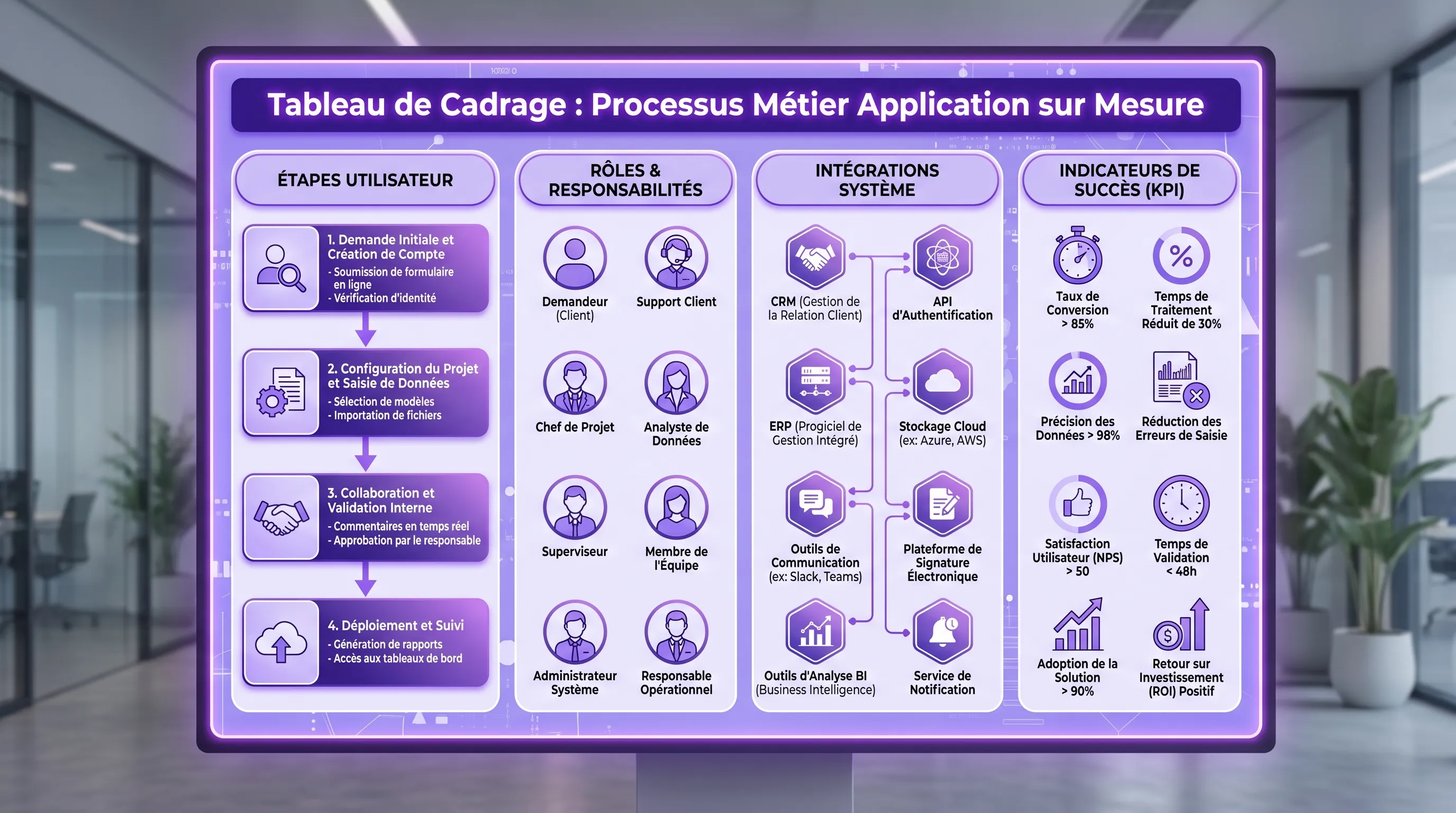
Custom Software Development: 8 Choices That Matter
Stratégie d'entreprise
Automatisation
Développement logiciel
Gestion de projet
A **custom software development** project almost never fails because of a bad framework chosen on day one. It fails because structural decisions were postponed: what problem are we solving, for which users, with what data, which integrations, wh...
June 11, 2026·11 min read
A custom software development project almost never fails because of a bad framework chosen on day one. It fails because structural decisions were postponed: what problem are we solving, for which users, with what data, which integrations, what level of security, and what operating cost?
For an SME or a scale-up, custom-built solutions can become a strong operational advantage: less double data entry, a smoother customer portal, a truly adapted internal tool, an automation that finally connects the CRM, ERP, and teams. But it can also turn into an expensive mess if everything is coded without trade-offs.
Here are the 8 choices that truly matter before launching or reframing a project.
Why these choices outweigh the tech stack
Custom development is not an end in itself. It is an answer to a gap between your way of working and what standard tools actually allow. If this gap is minor, a SaaS or a no-code automation might suffice. If it affects a critical, differentiating process, or one that is impossible to connect properly, custom-built becomes relevant.
Proper scoping therefore consists of deciding what must be specific, what can remain standard, and what must be measured from the first version. To dive deeper into the classic phases of a project, you can read this guide on custom software creation, steps, deadlines, and deliverables. Here, let's focus on the trade-offs.
Choice
Decision that matters
Control question
1. Build, buy, or hybrid
Develop only what creates an advantage
What truly deserves custom code?
2. Business goal
Start from a KPI, not a feature list
Which metric must improve after launch?
3. V1 scope
Deliver a complete and limited workflow
Which user action will be better from V1?
4. Users
Involve real operators, not just the sponsor
Who will validate that the tool works in real conditions?
5. Data and integrations
Choose the sources of truth from the start
Where is the reliable data and who owns it?
6. Architecture and security
Plan for useful scalability, without over-engineering
What happens if usage doubles or if data leaks?
7. AI and automation
Use AI where it brings a measurable gain
Is the need probabilistic, documentary, or deterministic?
8. Delivery and run
Organize cycles, maintenance, and adoption
Who steers, who arbitrates, who maintains after going live?
Choice 1: Build, buy, or assemble?
The first mistake is treating custom development as a direct opposition to off-the-shelf tools. In reality, the best projects are often hybrid. You keep an existing CRM, payment solution, billing tool, or document base, and then develop the layer that orchestrates, simplifies, or differentiates the process.
Custom-built is relevant if your workflow is specific, if your teams are already bypassing tools with spreadsheets, if multiple systems need to be connected cleanly, or if the customer experience constitutes a competitive advantage. It is less relevant if you simply want to replicate a standard tool with less product maturity.
The right question is therefore not: what can we code? The right question is: which part of our business deserves to be proprietary, reliable, and adapted to our way of working?
Choice 2: Choose a business outcome before screens
A mockup can be appealing and yet solve nothing. Before talking about interfaces, you must formulate a performance contract: reduce the processing time of a request, decrease data entry errors, accelerate quote generation, improve the conversion rate, reduce support tickets, or make reporting more reliable.
A good goal contains three elements: a current situation, a realistic target, and a measurement method. For example: today, processing a customer request takes two days with three manual re-entries; V1 must allow processing in less than a day with a single entry; tracking will be based on average time, number of errors, and usage rate.
Without a KPI, the project becomes a discussion of opinions. With a KPI, every functional choice can be settled: does this feature contribute to the result, or does it simply weigh down V1?
Choice 3: Limit V1 without making it useless
A V1 is not an empty demo. Nor is it a miniature version of everything you imagine for the next three years. A useful V1 covers a narrow but complete workflow.
Take a customer portal. A bad V1 would display a few pages, an incomplete menu, and promises of future integration. A good V1 would allow a customer to log in, submit a request, track its status, receive a notification, and allow the internal team to process the request in a simple back-office.
This vertical slicing avoids the trap of horizontal construction: many modules started, no real usage delivered. For a leader or an operational manager, the question to ask is simple: what concrete action will be better for the user right from the first production release?
Choice 4: Decide who truly validates usage
Custom software is often bought by an executive, scoped by a business manager, and used by field teams. If these three levels are not aligned, adoption becomes fragile.
The sponsor sets the goal and arbitrates the budget. The business product owner prioritizes needs and answers questions quickly. Pilot users test screens, data, exceptions, and pain points. This trio is more important than a very large but unavailable project committee.
Validation should not happen at the end. It must be continuous, ideally with regular demos, real test scenarios, and understandable acceptance criteria. A user shouldn't validate a feature just by saying it looks nice. They must be able to say: with this screen, I can do my job faster, with fewer errors, or with more visibility.
Choice 5: Treat data and integrations as a product topic
Integrations are rarely a technical detail. They determine the reliability, adoption, and maintenance cost of the project. If your custom application needs to read data from a CRM, push information to an ERP, generate documents, or synchronize statuses, these flows must be scoped from the start.
The central point is the source of truth. Customer data might exist in the CRM, billing, support, and a sales spreadsheet. If no one decides which source is authoritative, the application will produce inconsistencies, even with excellent code.
Data to transfer, expected quality, consistency tests
You also have to accept a reality: not all integrations are created equal. A well-documented API can speed up the project. A manual export, a legacy tool, or a poorly structured database might require cleanup work. It is precisely this type of topic that creates hidden costs. To anticipate them, also consult the article on custom software development and hidden costs.
Choice 6: Choose a robust architecture, not a spectacular one
A successful architecture isn't necessarily complex. For an SME or a scale-up, the goal is to have a maintainable, secure, observable foundation capable of evolving with real usage. This generally implies well-separated modules, stable APIs, clear rights management, activity logs, backups, and test environments.
Security must be integrated by design, especially if the tool handles customer, financial, HR, or commercial data. In France and the European Union, the GDPR framework notably requires limiting collected data, securing access, and documenting certain processing. The CNIL remains a useful reference to frame these obligations.
On the application security side, OWASP frameworks, notably the Application Security Verification Standard, provide concrete benchmarks on authentication, permissions, input validation, or sensitive data protection.
The right trade-off consists of avoiding two extremes: a cobbled-together architecture that will have to be rewritten at the first usage peak, and an overly ambitious architecture that consumes the budget before proving business value.
Choice 7: Integrate AI only where it truly changes the outcome
In 2026, many custom software development projects include an AI question: should we add an assistant, a chatbot, a document search engine, automatic classification, or an agent capable of taking action? The answer depends on the type of task.
If the rule is stable and explicit, classic automation is often enough. For example, sending a notification when a status changes does not require AI. If the task involves understanding text, summarizing a document, classifying a request, searching a document base, or proposing a contextualized answer, AI can become relevant.
For assistants connected to internal documents, RAG-type architectures allow answers to be backed by verifiable sources. If this topic concerns you, the definition of Retrieval-Augmented Generation can help clarify the principle.
The most important choice is not the AI model. It is the level of control: what data is sent, what actions are authorized, what answers must be validated by a human, what usage costs are tracked, and how do we measure quality? To scope this point before developing, you can also use this AI project scoping checklist.
Choice 8: Organize delivery, run, and adoption from the start
A custom project doesn't stop at production release. It truly begins when users work with the tool. That is why delivery must be thought out alongside the run: maintenance, support, bug fixes, evolutions, training, and usage tracking.
Short cycles are often more effective than a long development tunnel. A weekly demo, even an imperfect one, allows you to quickly detect misunderstandings, test integrations progressively, and maintain alignment between business and tech.
The run must also be budgeted. Hosting, monitoring, logs, dependency updates, bug fixes, documentation, user support, and business evolutions are part of the total cost of ownership. A quote that is too low and ignores these topics is not necessarily good news. It simply postpones the cost.
Finally, adoption cannot be decreed. You must plan for pilot users, brief documentation, support rules, targeted training, and a feedback mechanism. Good custom software doesn't just replace a tool; it changes a work habit.
A simple grid before requesting a quote
Before contacting an agency or a tech team, you can score your project on 5 criteria. The goal is not to obtain an absolute truth, but to spot blurry areas before they become expensive.
Criterion
1 point
3 points
5 points
Business problem
Vague need
Identified pain point
Measured loss with KPI
V1 scope
Broad list
Priority modules
Complete and limited workflow
Data
Uncertain sources
Accessible data
Validated source of truth
Integrations
To be seen later
Listed tools
APIs, flows, and responsibilities scoped
Adoption
Users not consulted
Identified sponsor
Pilots, criteria, and training planned
If your score is low, do not launch development yet. Instead, launch a short scoping phase: process mapping, choice of indicators, data audit, clarification of integrations, and definition of a V1. If your score is high, you can request a much more precise quote, with less risk of surprises.
Mistakes to avoid
Even with a good idea, certain reflexes weaken a custom project. The most frequent ones are easy to spot.
Wanting to develop everything instead of intelligently assembling existing building blocks.
Prioritizing visible features over measurable business problems.
Postponing integrations to the end when they condition feasibility.
Adding AI without guardrails, without tests, and without quality KPIs.
Forgetting the run, documentation, and user support.
The best protection against these mistakes remains a product approach: scope, deliver small but complete, measure, learn, then expand.
FAQ
When to choose custom software development over a SaaS? Custom-built is relevant when your process is specific, differentiating, hard to connect with standard tools, or critical to your growth. If the need is standard, a well-integrated SaaS will often be faster and less risky.
How long does it take to get a useful first version? It depends on the scope, integrations, and expected security level. A well-scoped V1 is generally measured in weeks or a few months, not years. The key point is to deliver a complete workflow rather than a long list of incomplete modules.
How to prevent a custom project from drifting? You must define a KPI, limit V1, appoint a business product owner, organize regular demos, and maintain a prioritized backlog. Each new request must be evaluated based on its impact on the initial goal.
Should AI be integrated from V1? Only if AI directly improves the business outcome. For a stable workflow, classic automation may suffice. For document search, request sorting, answer generation, or decision support, AI can be useful if it is tested and framed.
What deliverables to ask for before signing? Ask at a minimum for a V1 scope, acceptance criteria, an integration map, a security approach, a demo schedule, a run estimate, and a clarification of code and data ownership.
Go from a vague need to a measurable V1
If you are considering custom software development, start by scoping the right choices before writing too much code. Impulse Lab supports SMEs and scale-ups with opportunity audits, custom web and AI platforms, process automation, integration with existing tools, and team training.
You can start from a priority business process, a customer portal, an internal tool, or an AI automation idea. The goal remains the same: transform an operational need into a useful solution, delivered in short cycles, measurable, and maintainable.
Contact Impulse Lab to scope your V1, secure your technical trade-offs, and build a tool truly aligned with your growth.