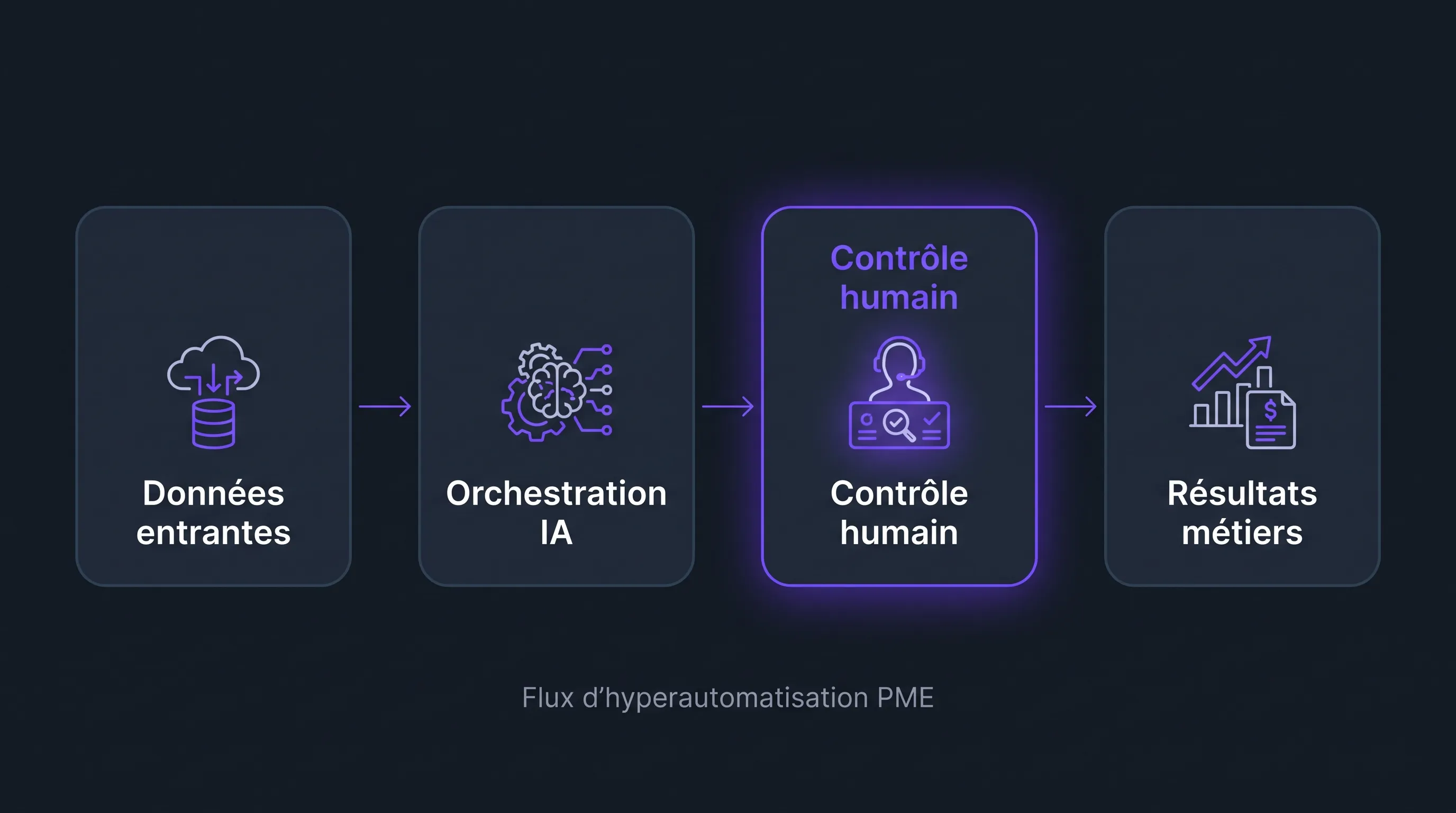
For many SME leaders, automation still brings to mind an isolated script, a connector between two tools, or an Excel macro that saves a few minutes. Hyperautomation goes further: it involves connecting multiple building blocks—workflows, RPA, AI, APIs, OCR, CRMs, ERPs, and business tools...
For many SME leaders, automation still brings to mind an isolated script, a connector between two tools, or an Excel macro that saves a few minutes. Hyperautomation goes further: it involves connecting multiple building blocks—workflows, RPA, AI, APIs, OCR, CRMs, ERPs, business tools—to automate an end-to-end process, while keeping human control points where necessary.
The goal is not to replace teams. It is to eliminate double data entry, forgotten follow-ups, repetitive administrative tasks, and disconnects between tools. For a growing SME, this is often what makes the difference between an organization that absorbs growth and one that saturates as soon as volume increases.
Hyperautomation: A simple definition for SMEs
Gartner defines hyperautomation as an approach that combines multiple technologies to rapidly identify, automate, and orchestrate as many business processes as possible. In an SME, this definition must be translated into more concrete terms: a complete process becomes manageable, measurable, and partially autonomous.
A simple example: an inbound request arrives via a form, AI qualifies it, the CRM is updated, a quote is pre-filled, a manager validates sensitive elements, the client receives the document, and then follow-ups are triggered based on their behavior. This is no longer a one-off automation. It is an operational chain.
Approach
What it does
Example in an SME
Main limitation
Simple automation
Executes a repetitive action
Sending an email after a form submission
Little business context
RPA
Reproduces human actions in software
Copying data from a supplier portal to the ERP
Fragile if interfaces change
Assistive AI
Analyzes, classifies, summarizes, or suggests
Summarizing a customer ticket and proposing a response
Requires validation and framing
Hyperautomation
Orchestrates multiple building blocks across a complete process
Transforming a lead into a quote, order, and follow-up
Requires clear governance
The nuance is important: an SME does not need to automate the entire company at once. Instead, it should select a high-impact business workflow, make it reliable, and then expand it gradually.
When is an SME ready for hyperautomation?
The right time is not necessarily when the company has a massive IT budget. It is often when operational irritants become visible: teams spend too much time looking for information, customer data is scattered, approvals block sales, or reports always arrive too late.
An SME is generally ready if three conditions are met. First, the process is frequent: it repeats every week, or even every day. Second, it follows fairly stable rules, even if some decisions remain human. Finally, the data already exists somewhere, even if it is poorly structured.
Before talking about tools, it is useful to go back to the field. If your team cannot clearly explain the steps, exceptions, and key decisions, automation risks making the mess faster. To structure this initial reflection, you can rely on a process-centric method like the one described in this article on process automation in SMEs.
The most profitable concrete use cases in SMEs
The best hyperautomation use cases have one thing in common: they cross multiple tools and multiple teams. This is precisely where time is lost, because no one has a complete view of the workflow.
1. Transforming leads into quotes without friction
In many B2B SMEs, moving from lead to quote still relies on a succession of manual actions: reading the request, checking the sector, looking up history, creating an opportunity, asking for details, preparing a quote, and then following up. Each step seems short, but the whole process slows down the sale.
A hyperautomation workflow can qualify the inbound request, enrich the company profile, create or update the contact in the CRM, suggest a need category, pre-fill a quote, and schedule a follow-up. The sales rep retains control over the price, terms, and final message.
The benefit is not just administrative time saved. It is also an improvement in the response rate, as hot requests are processed faster and opportunities no longer disappear into an inbox.
2. Accelerating customer support without losing quality
Support is an ideal testing ground for hyperautomation because requests are numerous, repetitive, and often easy to categorize. An AI can read a message, identify the intent, check the urgency level, suggest a response, and route the ticket to the right person.
The knowledge base then becomes a strategic asset. The cleaner it is, the more reliable the suggested responses will be. Simple issues can be resolved automatically, while sensitive cases—disputes, cancellations, critical incidents—remain handled by a human.
For SMEs that want to start with a more targeted scope, a chatbot can be a relevant first building block. The important thing is to anchor it in scenarios that create value, such as qualification, first-level support, or appointment scheduling, rather than making it a generic interface.
3. Automating supplier invoices and matching
Accounts payable is one of the most concrete use cases. Invoices arrive via email, portal, or digitized mail. They must be read, classified, matched with a purchase order, validated by the right manager, and then integrated into the accounting tool.
With a hyperautomation approach, OCR extracts key information, the system verifies amounts and suppliers, a workflow triggers validation, and then an integration updates the ERP or accounting software. Exceptions—for example, a new IBAN, an unusual amount, or an invoice without an order—are escalated to a manager.
This use case is particularly useful when the company grows, as invoice volume increases faster than the size of the administrative team. It reduces errors, but above all, it makes the process traceable.
4. Producing reliable reporting without copy-pasting
SME leaders often spend too much time consolidating figures from the CRM, accounting, support, e-commerce, or production tools. The problem is not just the time spent. It is the gap between operational reality and decisions made on outdated data.
Hyperautomation can extract data from multiple sources, normalize it, generate dashboards, and produce automated commentary on variances. For example, the system can flag a drop in conversion rate, an increase in processing time, or a discrepancy between projected and actual billing.
Human validation remains essential, as an AI should not decide on strategic interpretation alone. However, it can prepare the analysis and save several hours each week.
5. Streamlining client onboarding
After a commercial signature, many SMEs lose time in the transition between sales, production, support, and billing. Documents are requested multiple times, access is created too late, quote information is not carried over correctly, and the client experiences a drop in quality right after the purchase.
An automated workflow can trigger a checklist as soon as the opportunity moves to "won" status. The client receives a tailored form, documents are stored in the right place, internal tasks are created, access is prepared, and teams are notified. If a document is missing, a follow-up is sent automatically.
This use case improves productivity, but also the customer experience. It transforms a fragile moment into a controlled journey.
6. Managing purchasing, inventory, and procurement
In industrial, e-commerce, field service, or distribution SMEs, purchasing and inventory are often managed with quick trade-offs. Poorly framed automation can create over-ordering. Well-designed hyperautomation, on the contrary, helps detect weak signals while maintaining human validation.
The system can monitor stock thresholds, cross-reference projected sales, generate a purchase request, compare suppliers, prepare the order email, and track delivery. Orders above a certain amount or unlisted suppliers remain subject to approval.
The goal is not to let a machine buy on its own, but to reduce oversights, stockouts, and dead time between decision and execution.
7. Structuring repetitive HR and administrative tasks
HR and administrative teams handle many standard processes: employee arrival, departure, role change, equipment request, mandatory training, document collection. These tasks often involve multiple tools and multiple people.
A hyperautomation workflow can create access, trigger document signing, inform the manager, open an IT ticket, schedule training, and verify that everything is ready before the first day. In a growing SME, this level of rigor prevents the organization from depending solely on the memory of a few key people.
How to prioritize the right use cases
The classic trap is launching too many projects at the same time. Hyperautomation becomes profitable when it starts with a limited, measurable process that is painful enough to mobilize the teams.
A simple grid can help make trade-offs: volume, time lost, risk of error, data quality, ease of integration, customer impact, and required level of control. A use case with high volume, few exceptions, and accessible data will be faster to deploy than a rare, political, or poorly documented process.
It is also useful to distinguish three horizons. The first concerns quick wins, for example, follow-ups, data extraction, or report generation. The second touches cross-functional workflows, like quotes, invoices, or client onboarding. The third concerns more strategic processes, where automation must be accompanied by organizational evolution.
If you must choose only a few priorities, it is better to formalize a real AI strategy rather than multiplying tests. This approach is detailed in this guide to prioritizing three profitable AI use cases in SMEs.
The technical building blocks to combine
Hyperautomation is not a single tool. It is an architecture. Depending on your context, it can combine several building blocks:
Workflows: They orchestrate steps, validations, notifications, and statuses.
APIs and integrations: They connect CRMs, ERPs, accounting tools, helpdesks, forms, and internal databases.
RPA: It automates actions in tools that lack APIs or have limited integration.
Generative AI: It summarizes, classifies, writes, extracts, and proposes decisions, with human validation.
OCR and document processing: They transform PDFs, scans, and attachments into actionable data.
Dashboards: They make the process measurable and detect anomalies.
RPA remains very useful, especially when legacy software does not communicate easily. It becomes even more relevant when integrated into a complete workflow rather than used alone. To dig deeper into this point, you can consult these examples of IT RPA in SMEs.
Indispensable safeguards
The more automated a workflow is, the clearer the governance must be. An SME must know who is responsible for the process, who validates exceptions, what data is used, what logs are kept, and how to roll back in case of an error.
Security and compliance must not be treated as an afterthought. Personal data, HR documents, financial information, and customer data require a specific framework. In France and Europe, the recommendations of the CNIL on artificial intelligence are a good benchmark for integrating confidentiality, transparency, and risk management from the design stage.
A good principle is to automate execution, but not responsibility. AI can suggest, prepare, or alert. Binding decisions—financial, legal, sensitive commercial—must remain validated by an identified person.
Pragmatic deployment plan in 6 to 8 weeks
An SME does not need a heavy transformation program to start. A first project can be conducted on a reduced scope, provided it aims for a measurable operational result.
Step
Objective
Concrete deliverable
Scoping
Choose a priority process and its limits
Workflow map, irritants, decision rules
Prototype
Test the chain on a real case
Functional workflow on a sample
Securing
Add validations, logs, and error scenarios
Control points and recovery procedure
Deployment
Train users and track KPIs
Process in production and tracking dashboard
Extension
Add other cases or tools
Progressive automation roadmap
The key factor is not technical sophistication, but adoption. Teams must understand what changes, what remains under their control, and how to report exceptions. Without this education, even good automation can be bypassed.
Common mistakes to avoid
The first mistake is automating a bad process. If the rules are not clear, if each case is handled differently, or if the data is inconsistent, you must simplify first.
The second mistake is wanting to remove all humans from the workflow. In an SME, value often comes from business expertise. The goal is to focus this expertise on important decisions, not to exclude it.
The third mistake is failing to measure. A hyperautomation project must track simple indicators: time saved, processing time, errors avoided, customer satisfaction, conversion rate, or volume absorbed without additional hiring.
Finally, avoid spectacular demonstrations that do not connect to any real tool. Useful automation is less impressive in a meeting, but much more profitable on a daily basis.
FAQ
Is hyperautomation reserved for large enterprises? No. SMEs can benefit from it as soon as a repetitive process crosses multiple tools or teams. The right reflex is to start small, on a specific workflow, and then expand gradually.
What is the difference between hyperautomation and classic automation? Classic automation handles an isolated task. Hyperautomation orchestrates a complete process with multiple building blocks, such as AI, workflows, RPA, APIs, and dashboards.
Which first use case should an SME choose? The best first cases are frequent, measurable, and unambiguous. Quotes, supplier invoices, sales follow-ups, support tickets, and reporting are often good starting points.
Should AI be used in all automated workflows? No. Some steps must remain deterministic, for example, a threshold validation or a status update. AI is useful for reading, classifying, summarizing, writing, or detecting anomalies.
How to avoid losing control? You must plan for human validations, decision thresholds, logs, alerts, and a rollback procedure. Automation must make the process more controllable, not more opaque.
Moving from use case to the first operational workflow
Hyperautomation becomes concrete when it starts from a specific business problem: quotes that are too slow, overdue invoices, saturated support, manual reporting, or fragile client onboarding. The right project is not necessarily the most ambitious. It is the one that produces a visible, measurable gain adopted by the teams.
Impulse Lab supports SMEs and scale-ups in this approach, from auditing AI opportunities to creating custom web and AI platforms, including process automation, integration with existing tools, and team training. To transform your operational irritants into useful automated workflows, you can chat with the team via Impulse Lab.