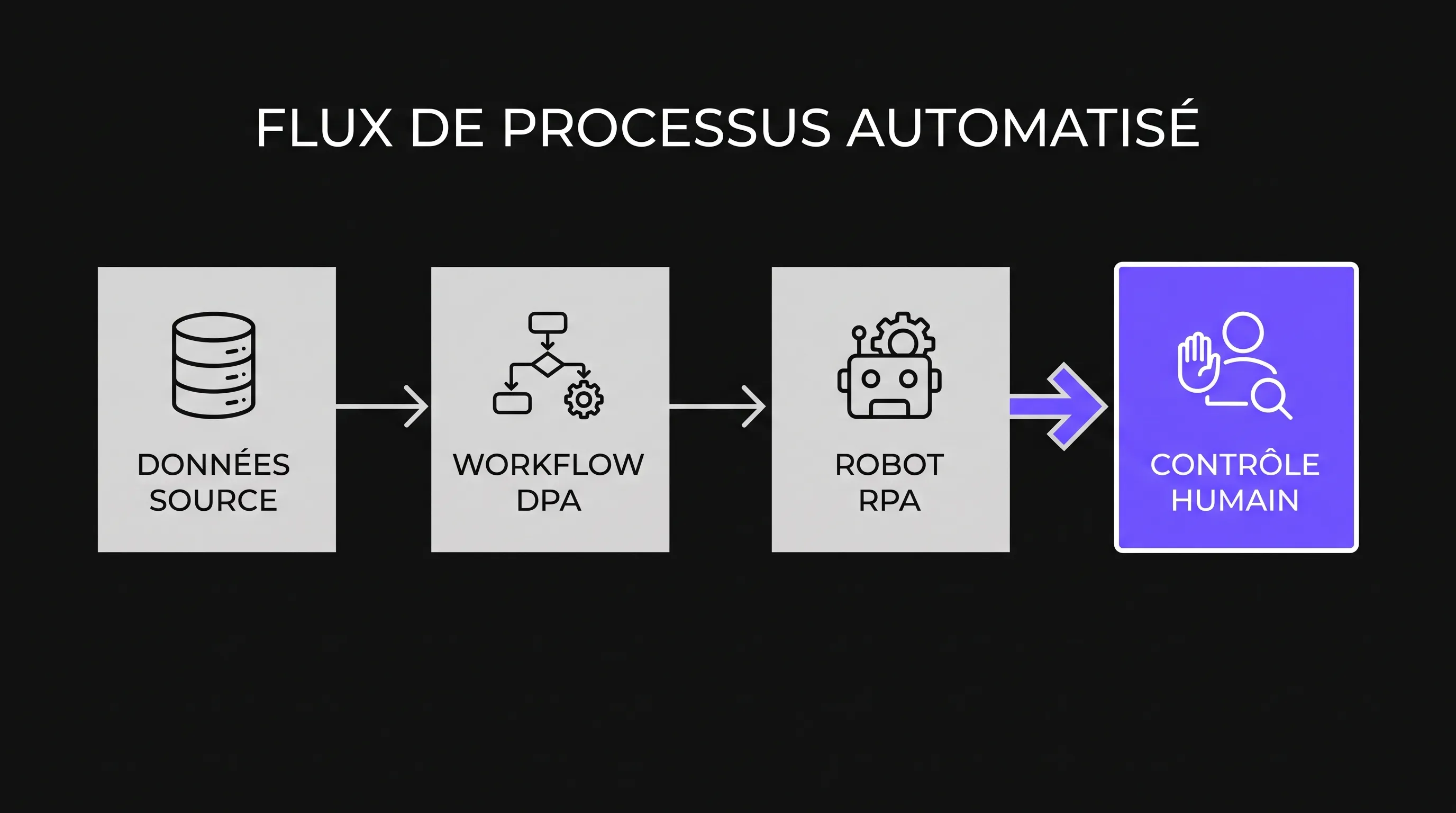
For an SMB or scale-up automating operations, DPA and RPA are more than a productivity matter. As soon as a bot copies customer data, validates an invoice, or triggers a workflow, it becomes part of the IT system—requiring strict controls, least privilege, and governance.
September 27, 2026·9 min read
For an SMB or scale-up automating its operations, the topic of DPA and RPA is not just a question of productivity. As soon as a bot copies customer data, validates an invoice, feeds a CRM, or triggers a workflow, it becomes part of the information system. It must therefore be treated as such, with limited privileges, controls, audit logs, and real governance.
The good news is that you don't need to build an overly complex system to secure your data automations. Above all, you need to distinguish the roles of each technology, identify the data handled, decide who can validate what, and plan for what happens in case of an error. This framework enables you to automate without losing control.
DPA and RPA: Understanding the Scope Before Securing
In this article, DPA refers to Digital Process Automation, meaning the digital orchestration of business processes with rules, steps, approvals, and integrations. RPA stands for Robotic Process Automation, referring to software bots that replicate human actions within user interfaces—for instance, copying data from an Excel file into an ERP.
There is a useful ambiguity worth noting: in a legal context, DPA can also mean Data Processing Agreement. Here, we are specifically discussing process automation. However, legal and GDPR compliance remains crucial, as automations often handle sensitive personal or commercial data.
DPA Orchestrates, RPA Executes
DPA structures the path of a process: who receives a request, which rule applies, what level of approval is required, and which system needs updating. It is especially useful when a process involves multiple teams, multiple tools, or several validation steps.
RPA comes into play when interacting with an application lacking a straightforward API, when a legacy tool must remain in place, or when a repetitive task is too costly to perform manually. For a broader overview of the tasks involved, you can consult this guide on useful RPA use cases for SMBs.
Dimension
DPA
RPA
Security Consideration
Primary role
Orchestrating a process
Executing repetitive actions
Avoid automating vague business rules
System access
APIs, connectors, workflows
User interface, files, emails
Restrict bot or workflow permissions
Handled data
Structured business data
Copied, entered, or extracted data
Avoid unnecessary copies and local files
Human oversight
Approvals, exceptions, supervision
Review on failure or critical threshold
Maintain human validation on sensitive decisions
A secure DPA/RPA project therefore begins with a simple question: which decision or action is worth automating, and within what boundaries? If the answer is unclear, the initial risk is not technical—it is operational.
Most Common Risks in Data Automation
Incidents don't always stem from spectacular breaches. In most automation projects, issues arise from overly broad access, poorly qualified data, unanticipated interface changes, or a lack of supervision.
Shared Accounts and Excessive Permissions
An RPA bot should never use an employee's personal account. It must have a dedicated account with permissions strictly limited to its tasks. The principle of least privilege, a core cybersecurity best practice, prevents a bot designed to read invoices from also editing vendor profiles or exporting the entire customer database.
The ANSSI cybersecurity hygiene guide highlights the critical importance of controlling accounts, rights, and access. This is even more essential when actions are executed automatically without the daily oversight of a human user.
Poorly Protected Technical Secrets
Passwords, API tokens, access keys, and credentials must never be stored in plain text within a script, shared file, or spreadsheet. This information should be stored in a secrets vault or a secure mechanism provided by your technical environment.
The security of a DPA/RPA system often hinges on these details. An automation that is brilliantly conceived from a business perspective can quickly become a liability if its credentials circulate via email or if a former contractor retains access.
Personal Data and Data Minimization
Not all available data needs to be automated. The GDPR specifically requires limiting processing to what is strictly necessary, documenting purposes, and protecting personal data. The CNIL personal data security guide provides a practical framework for assessing expected measures.
In practice, this means a bot tasked with checking order statuses does not need to export a customer's entire history. The less data an automation handles, the lower the risk.
A Simple Security Framework for DPA and RPA
Security must be addressed before deployment, not after the first incident. For an SMB, the goal is not to slow teams down with heavy governance, but to make automations understandable, testable, and auditable.
Map Data and Systems
Before choosing a tool, list the systems involved: CRM, ERP, accounting software, messaging, document storage, spreadsheets, databases, core business platforms. For each, document which data is read, modified, transferred, or deleted.
This mapping helps identify sensitive processing activities. It also clarifies whether an automation should rely on an API, a DPA workflow, an RPA bot, or a combination of all three.
Separate Environments
An automation should never be built directly on production data without testing. At minimum, set up a staging/test environment or an anonymized dataset to test rules, edge cases, and potential errors.
In a DPA/RPA environment, execution logs must also be tested. A useful log details what happened, when, on which business object, and with what outcome, without unnecessarily exposing sensitive data.
Keep Human Validations in the Right Places
Automating everything end-to-end is not always desirable. Decisions with financial, legal, HR, or customer impact often require human validation, at least beyond a specific threshold.
For example, a bot can prepare a refund request, verify attachments, compare the amount against internal policy, and generate an approval task. The final decision remains human if the amount exceeds a threshold or if a discrepancy is flagged.
Plan for Exceptions and Emergency Stops
A well-designed automated process knows what to do when it doesn't know what to do. Unrecognized cases should be routed to a human queue with a clear error message, rather than forced through an approximate rule.
A kill switch, a deactivation procedure, and a designated owner are also essential. If an interface changes, a connector fails, or a bot starts generating errors, the team must be able to suspend the automation without halting the entire business operation.
Governance: Who Oversees Your Automations?
Governance isn't just for large corporations. As soon as multiple automations run across teams, you need to know who owns them, who maintains them, and who approves changes. Otherwise, bots turn into invisible dependencies.
A DPA/RPA initiative thrives when led by a joint business and technical pairing. The business side knows the rules, exceptions, and operational impacts. The technical side understands access, integrations, logs, and tool constraints.
Role
Primary Responsibility
Question to Ask
Business Sponsor
Prioritizing processes to automate
What business value justifies the risk?
Process Owner
Defining rules and exceptions
What should happen when an anomaly occurs?
Technical Lead
Securing integrations and access
Are permissions restricted and auditable?
Compliance Lead
Ensuring GDPR and documentation compliance
Are the purpose and retention period clearly defined?
Operational Support
Monitoring incidents and requests
Who steps in if the automation fails?
KPIs should look beyond just time saved. Track error rates, exception counts, access incidents, manually re-run jobs, and internal user satisfaction. These metrics prevent mistaking fast automation for reliable automation.
Choosing Between RPA, APIs, DPA, and AI
Not every process warrants an RPA bot. If a reliable API exists, it will often be more robust than a bot clicking through an interface. If the process involves validations, multi-step rules, and multiple teams, a DPA approach provides better clarity. If data is unstructured, AI can help extract, classify, or summarize—provided it remains governed.
As a DPA/RPA roadmap expands, the best choice is often a combination of building blocks: an API retrieves data, a DPA workflow orchestrates steps, an RPA bot handles legacy tools, and human review secures sensitive cases.
To avoid starting with a tool rather than a business need, it is best to scope an initial process with a tight perimeter, familiar data, and an available business lead. This aligns with the approach outlined in our guide on how to start a Robotic Process Automation project.
A 30-Day Action Plan to Secure Your Automations
If your automations are already running, start by making them visible. Many companies discover too late that an undocumented spreadsheet, script, or bot powers a critical part of their reporting, invoicing, or customer support.
Here is a straightforward roadmap to regain control without slowing down your teams:
Week 1: Inventory existing automations, accounts used, data handled, and designated owners.
Week 2: Classify automations by risk level, particularly personal data, financial impact, operational dependency, and lack of supervision.
Week 3: Remediate high-priority risks, such as plain-text passwords, shared accounts, excessive privileges, or inadequate logging.
Week 4: Formalize an approval process for new automations, including a process spec sheet, owner, testing protocol, and rollback plan.
This plan is not a substitute for a comprehensive audit, but it establishes a solid baseline. It also helps identify which processes require a deeper overhaul, API integration, or external support. If you are comparing partners, this checklist complements the criteria to check before choosing an automation agency.
FAQ
What is the difference between DPA and RPA? DPA orchestrates a process with steps, rules, and validations. RPA executes repetitive tasks within user interfaces, mimicking a human user. Both can complement each other, but they address different needs.
Why secure an automation if it only copies data? Copying data can introduce errors, expose sensitive information, or trigger incorrect actions in another tool. A simple task becomes critical when it involves billing, customer data, or access permissions.
Is a DPA/RPA project suitable for an SMB? Yes, provided you start with a well-defined, frequent, and stable process. The right scope avoids unnecessary costs and mitigates security risks from the outset.
Should you always prefer an API over an RPA bot? When a reliable API is available, it is generally more stable and easier to monitor. RPA remains relevant for legacy tools, systems without APIs, or temporary workflows that don't justify extensive custom development.
Which controls should be implemented first? Priorities include dedicated bot accounts, least privilege access, secrets management, execution logging, non-production testing, and an emergency stop procedure. These controls cover the vast majority of operational risks.
Secure Before Accelerating
Automation generates real value when it reduces friction without making your systems opaque. For an SMB or scale-up, the best practice is to treat every bot, workflow, or agent as a full-fledged business component—with an owner, documentation, boundaries, and controls.
Impulse Lab helps companies identify AI and automation opportunities, build custom platforms, integrate existing tools, and train teams. If you want to transform your processes without creating hidden technical debt, get in touch with the team via Impulse Lab.