HTTPS AI: Securing Your API Calls and Sensitive Data
Intelligence artificielle
Stratégie IA
Confidentialité des données
Gouvernance IA
Gestion des risques IA
When a team "plugs in" an AI API (LLM, vision, transcription, scoring, etc.), they often do two things simultaneously: open a data stream to a third party and deploy a new technical entry point. In many SMEs and scale-ups, the first security barrier that comes to mind is...
When a team "plugs in" an AI API (LLM, vision, transcription, scoring, etc.), they often do two things simultaneously: they open a data stream to a third party, and they put a new technical entry point into production. In many SMEs and scale-ups, the first security barrier that comes to mind is simple: "we're on HTTPS, so it's fine".
That's a good start. But HTTPS is just one layer. To secure AI API calls and sensitive data, you also need to address secret management, authentication, data minimization, logs, and integration guardrails.
What does "HTTPS AI" mean in practice?
The term HTTPS AI is not an official standard. In practice, it most often refers to this need: securing HTTP(S) calls to AI services (internal or external), and protecting the data transiting through these requests.
In 2026, this topic has become central for three reasons:
AI workflows more frequently handle sensitive data (support tickets, documents, CRM extracts, contracts, emails).
"Copilot" and "agent" usages are multiplying integrations (CRM, helpdesk, ERP, Slack/Teams, document drives) and thus attack surfaces.
Compliance requirements (GDPR, AI Act depending on use cases) make traceability and governance more important.
What HTTPS protects (and what it doesn't)
HTTPS is HTTP over TLS. Concretely, TLS aims for three essential properties:
Confidentiality: content is encrypted "in transit".
Integrity: prevents discreet modification of messages.
Server Authentication: via certificates, the client can verify it is talking to the right service (if the chain of trust is valid).
However, HTTPS does not protect against:
Sending "too much data" (for example, a full email containing useless information).
Leaks via logs, exports, observability tools, or debug environments.
An API key exposed in a browser, a Git repository, or a no-code tool.
Authorization errors (overly broad rights), bad scopes, or lack of environment separation.
To frame the subject, a useful reference is the OWASP API Security Top 10 (real-world problems often stem more from auth, access control, and poor hygiene than from TLS).
Typical threats to AI API calls
Without getting paranoid, here are the most frequent scenarios encountered in production:
1) Exposed API Keys
An API key on the front-end (JS), in a mobile app, or in a poorly configured automation tool can be copied and used to:
Exfiltrate data (if the API allows retrieving artifacts).
Generate significant costs.
Bypass guardrails (if you have multiple models or routes).
2) Sensitive data "leaving" without control
Classic examples:
An internal assistant sending HR data or customer data to the AI provider when a summary or anonymized fields would have sufficed.
Attachments or documents ingested without filtering (contracts, invoices, CRM exports).
3) Leaks via logs and observability
We want to monitor quality and costs, so we log. But if we log raw prompts, raw responses, or attachments, we create an involuntary "data lake".
4) Interception or redirection attacks (less frequent, but real)
Even with HTTPS, certain risks exist if the configuration is weak (TLS downgrade), if DNS is compromised, or if certificates are poorly managed.
"HTTPS AI" Checklist: securing your API calls and sensitive data
The goal here is pragmatic: reduce risk without slowing down delivery.
1) Enforce HTTPS everywhere, and eliminate weak configurations
Simple but often forgotten attention points:
Block HTTP (redirect to HTTPS, no "forgotten" endpoints).
Enable HSTS (web side) to avoid accidental HTTP access.
Limit TLS to modern versions (TLS 1.2 minimum, TLS 1.3 if possible).
Automated and monitored certificate renewal.
Quick check: use a public TLS configuration test, for example SSL Labs (Qualys) on your exposed endpoints.
2) Never call an AI API directly from the browser (unless controlled)
In an SME, this is a major source of secret leaks.
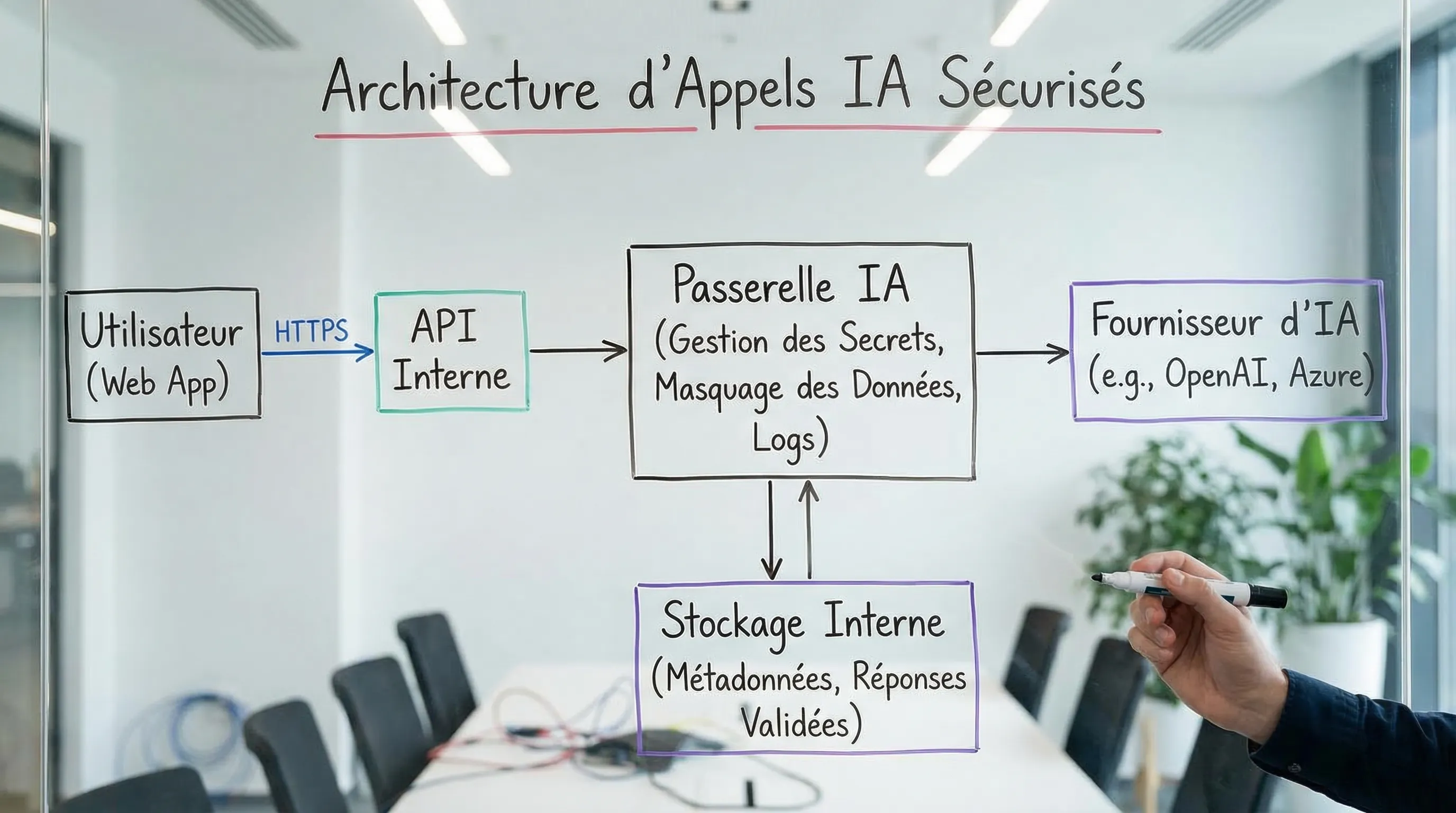
Good principle: calls to the AI provider go through your back-end (or an internal gateway), and the front-end only calls your API.
Possible exception: scenarios with limited ephemeral tokens, generated server-side, with strict scopes and short lifespans. This is an architecture to be explicitly designed, not a "shortcut".
3) Properly authenticate and authorize your internal calls
HTTPS encrypts, but does not decide "who has the right". On platforms that are structuring themselves, errors often come from access control.
Consistent user or service-to-service authentication.
Scopes and roles (least privilege).
Strict separation of environments (dev, staging, prod).
If you need a refresher on concepts and protocols (OAuth2, OIDC, etc.), the Impulse Lab glossary sheet can help: Authentication.
Secrets in a secret manager or at minimum environment variables injected at runtime.
Planned rotation (and revocation procedure).
No keys in code, tickets, docs, or chat tools.
Even if your transport is perfect (TLS), a compromised key nullifies everything.
5) Data minimization and classification (the real AI "firewall")
Before sending data to an AI API, ask a simple question: "What does the AI actually need to produce the right output?"
Concrete best practices:
Classify your data (public, internal, confidential, sensitive) with a simple rule.
Replace direct identifiers (name, email, phone) with pseudonyms where possible.
Send extracts rather than complete documents.
Separate "writing" tasks from "truth" tasks (when the answer must be factual, rely on a controlled internal source).
For GDPR issues regarding tool and AI usage, the CNIL publishes useful guidelines (often a good starting point for framing minimization and purpose).
6) Redaction (masking) before the call, and "safe by default" logging policy
Two rules that avoid 80% of incidents:
Mask what is not necessary (PII, numbers, IBAN, identifiers, etc.) before sending.
Log metadata first, not the full content.
Examples of useful metadata: latency, prompt size, route used, estimated cost, error rate, request ID, and potentially a content hash.
7) Limits, throttling, and abuse protection
Even internally, a bug or an agent can trigger call loops.
Rate limiting per user and per service.
Quotas per environment.
Strict timeouts, controlled retries.
Idempotency when applicable.
8) Security testing and continuous validation
In AI, it is tempting to test only "quality". You must also test:
Error paths.
Logs.
Access.
Behavior under load.
Regarding references, ANSSI is a useful resource in France for basic security culture (hygiene, risk management, general recommendations).
Summary table: common risks and quick controls
Risk
Example
Mitigation Measure
Simple Control
Exposed API Key
Key in front-end or repo
Calls via back-end, secret manager, rotation
Repo scan, CI review, no-code app audit
Excessive data sent
Full support ticket + PII
Minimization, pseudonymization, redaction
Review of prompt samples in staging
"Toxic" logs
Prompts/responses in cleartext in observability
Log policy, redaction, short retention
Audit of dashboards and exports
Poor access control
Everyone can launch an "agent" action
RBAC, scopes, human approval
Authorization tests, role reviews
Downgrade / bad TLS config
Legacy endpoint still on HTTP
HSTS, TLS min 1.2, redirection
SSL Labs + endpoint inventory
Abuse / call loop
Runaway agent
Rate limiting, quotas, timeouts
Load tests and failure scenarios
Recommended architecture: AI Gateway and separation of concerns
To secure "HTTPS AI" beyond transport, a robust architecture consists of centralizing AI calls in a dedicated layer (back-end or gateway). This layer manages:
Secrets (never in the client)
Redaction / minimization
Safe logs
Quotas
Routes (models, providers) and fallback
A good mental test: if you have to change AI providers tomorrow, you want the change to be primarily in this layer, without touching all apps.
Concrete example: support assistant, customer data, and API calls
Imagine an assistant that helps answer tickets.
Recommended flow:
The agent opens a ticket in your tool.
Your back-end retrieves the necessary fields (problem, product, useful history).
A redaction step removes or pseudonymizes useless data.
The AI API call leaves via HTTPS to the provider.
The response returns, then your system:
Adds citations or internal references if you use RAG.
Saves the proposed response.
Logs only necessary metrics (cost, latency, route, status), not raw content.
The important point: HTTPS protects the journey, but real security comes from the fact that you control what goes out, what is kept, and who can trigger the action.
When to go beyond HTTPS (mTLS, private networks, self-host)
Depending on your context (highly sensitive data, regulated sector, client requirements), you can reinforce the transport and network layer:
mTLS (mutual authentication) for critical service-to-service communications.
Private connectivity (depending on your providers' options and your infra).
Hybrid approaches, or even self-hosted models for certain processing.
These are architectural and cost choices. They do not replace minimization, secret management, and a clean logging policy.
Frequently Asked Questions
Is HTTPS enough to protect my data when I use an AI API? HTTPS is necessary (encryption in transit), but insufficient. Leaks often come from API keys, logs, excessive data sent, or overly broad authorizations.
Should I call the AI API from my front-end (JavaScript)? Generally, no. This exposes your secrets. Prefer a call via back-end or an AI gateway, possibly with very limited ephemeral tokens if you have a specific use case.
What data should never be sent to an AI? It depends on your policy and legal basis, but by default, minimize: direct identifiers, banking data, health data, sensitive HR information, trade secrets. Send only what is indispensable.
How do I avoid my prompts and responses ending up in logs? Define a logging policy (metadata rather than content), apply redaction, and control the retention and exports of your observability tools.
Is TLS 1.3 mandatory for "HTTPS AI"? No, but TLS 1.2 minimum is a good standard. The essential part is to avoid HTTP, weak suites, and properly maintain certificates and configurations.
Where should I start if I suspect my AI integration is not secure enough? Make an inventory of endpoints, data flows, secrets, and logs. Then, fix high-risk points (exposed keys, excessive data, lack of RBAC) before optimizing response quality.
Moving from "we are on HTTPS" to "we are truly secure"
If you are deploying (or will deploy) AI API calls in your processes, the right reflex is to treat security as an architecture and governance subject, not just a simple network parameter.
Impulse Lab assists SMEs and scale-ups on these topics via:
AI opportunity and risk audits (prioritizing the right cases, defining guardrails)
Development and integration of AI solutions (API, automations, platforms)
Adoption training (team rules, data and security best practices)
To quickly frame your flows and avoid costly errors, you can start with related content, then contact us: