Building a Chatbot: Steps, Costs, and Mistakes to Avoid
automatisations
Intelligence artificielle
Stratégie IA
Conception conversationnelle
Building a chatbot in 2026 has little to do with just "adding a chat bubble" to a site. Between user expectations (immediate, contextual answers), compliance constraints (GDPR, AI Act), and integration challenges (CRM, ticketing, ERP), the difference between a...
January 13, 2026·10 min read
Building a chatbot in 2026 has little to do with just “adding a chat bubble” to a site. Between user expectations (immediate, contextual answers), compliance constraints (GDPR, AI Act), and integration challenges (CRM, ticketing, ERP), the difference between a gadget bot and a useful bot lies in the method.
This guide gives you an operational view on building a chatbot: key steps, cost centers, and frequent mistakes that blow up the budget or degrade the experience.
Before building: clarify the type of chatbot you are targeting
The word “chatbot” covers several realities. Your budget, deadlines, and risk level depend mainly on this choice.
Type of chatbot
What it does well
Typical limits
Good use case
Rule-based chatbot (menus, scenarios)
Total control, stable answers, low risk
Not flexible, maintenance needed as soon as the offer changes
Simple qualification, fixed FAQ, routing to a human
Can execute tasks (create a ticket, book, update CRM)
Complexity, security, more demanding tests
Process automation, advanced self-service
If you are starting out, the most robust trajectory is often: Hybrid MVP (rules + AI + RAG), then adding actions (agent) when reliability is proven.
To lay the foundations, you can also consult the definition and scope of a chatbot in the Impulse Lab glossary.
Steps to build a chatbot (from zero to production)
1) Frame the need: “job”, scope, and success criteria
A chatbot rarely fails because of tech; it fails because of vagueness.
Concretely, you must lock in:
The main job: reduce tickets? qualify leads? help internal teams?
The scope: which themes are covered, which exclusions (legal, medical, complex refunds, etc.)
The acceptable risk level: tolerance for error, legal impacts, client impacts
The metrics: resolution rate without human, CSAT, handling time, conversion, cost per conversation
Simple tip: write down 20 real questions (emails, tickets, chats) and classify them into “answerable by bot” vs “to escalate”. This list becomes your backlog.
2) Choose the channel (and don’t underestimate omnichannel)
A chatbot is not “on your site” only. It lives in a context:
Website or landing pages
In-app (product)
Intercom/Zendesk/Freshdesk (support)
WhatsApp / Instagram (commerce, retail)
Slack/Teams (internal)
Each channel imposes constraints (authentication, identity, history, attachments, response time). Decide early if you are doing a single-channel MVP (often preferable) or if you must unify multiple channels from the start.
3) Design the conversational experience (before the prompt)
Conversational UX is a discipline in its own right. A good chatbot:
A classic trap: betting everything on a long and “magical” prompt. In practice, the conversation structure (intents, steps, error messages, escalation) often counts more than the wording.
4) Prepare knowledge: documents, quality, and governance
If you go with an AI bot (generative or RAG), your production depends on your content:
Help pages, docs, FAQ, T&Cs, internal procedures
Structured data (prices, options, hours, warranties)
Ticket history, support macros
RAG works even better when your content is:
Up to date (otherwise the bot answers “true” but obsolete)
Cleanly cut (short sections, explicit titles)
Without contradictions
A good signal: if your content is already well classified, like a filterable directory, you start with an advantage. For example, communities structure their information by categories, versions, and modes, as a French Minecraft server list does with filters and detailed sheets. This taxonomy logic (clear categories, attributes, dedicated pages) is very close to what we look for to feed a RAG chatbot.
5) Define the architecture: simple, then extensible
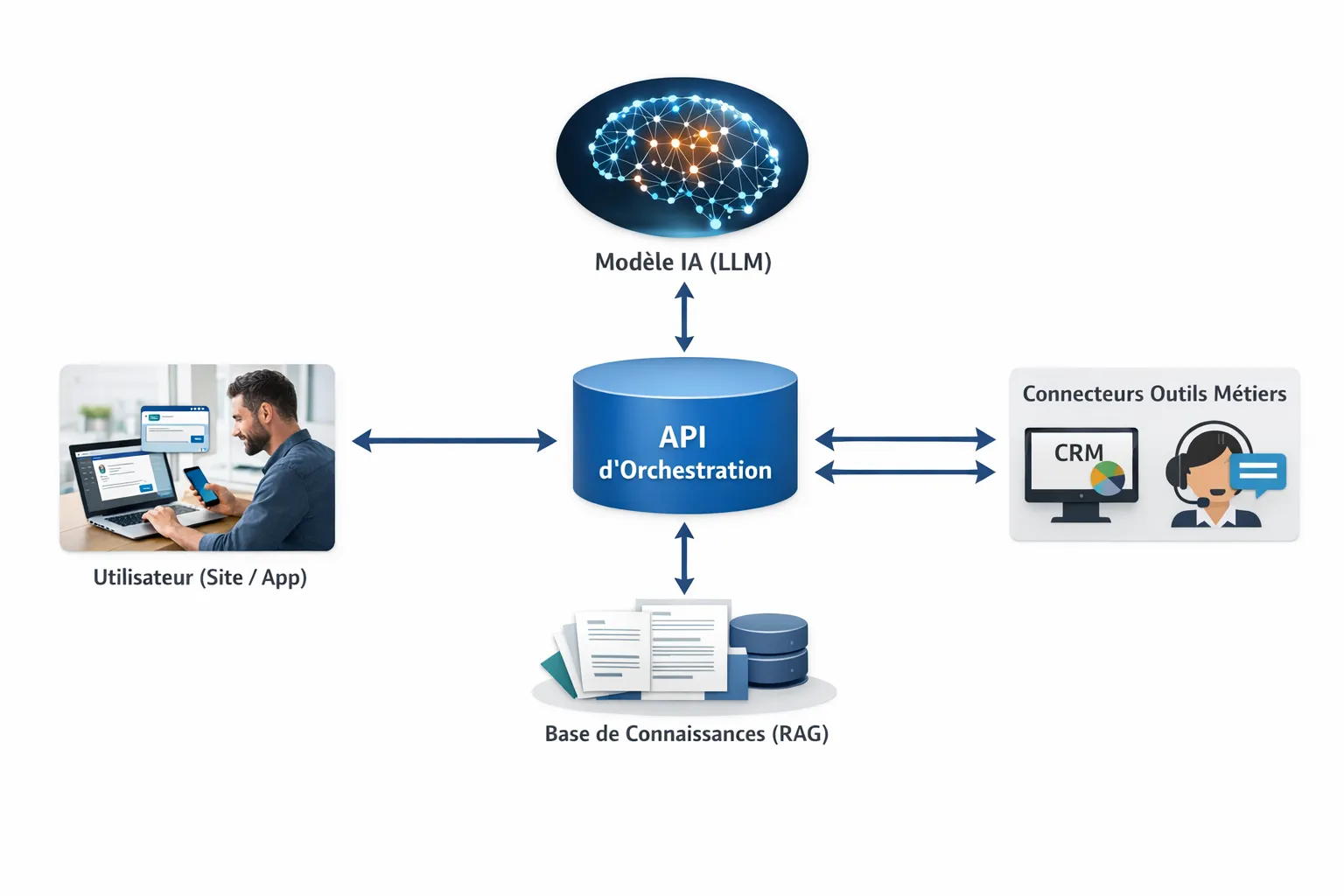
A “production-ready” architecture aims for three things: reliability, security, costs.
In many SME/scale-up contexts, we find:
An interface (widget, app, Slack/Teams)
An orchestration back-end (API) that centralizes logic, guardrails, logs
A search brick (document index if RAG)
Integrations (CRM, helpdesk, calendar)
An observability system (quality, errors, costs)
6) Security and compliance: treat as a feature
Two subjects systematically come up in business:
Personal data: minimization, legal basis, retention periods, rights of individuals (GDPR)
Application security: secrets, access control, protection against prompt injections, logging
Even for an MVP, define:
What you log (and what you don’t log)
Who can access conversations
How you mask sensitive data
For a reference on LLM risk best practices, you can rely on the OWASP Top 10 for LLM Applications. And regarding the French framework on AI and data issues, the CNIL regularly publishes useful resources.
7) Build the MVP: short iterations, instrumentation from day 1
A chatbot MVP shouldn’t be “small”, it must be measurable.
To include from the start:
A tagging system: “resolved”, “escalated”, “dissatisfied”, “out of scope”
A “this answer helps / doesn’t help me” button (even basic)
Reasons for escalation (lack of context, sensitive request, bug)
This is what will allow you to prioritize improvements based on something other than gut feeling.
8) Test, then deploy: functional validation + “reality” validation
“Classic” tests (unit, integration) are not enough. Add:
Conversational test sets (your 50 to 200 most frequent questions)
Security tests (rule circumvention, info extraction, jailbreak)
Load and cost tests (usage peaks, long prompts)
Only then, progressive deployment:
Internal (support team)
Small percentage of users
Generalization
Costs: how much does a chatbot cost (really)
There is no single price. The cost depends mainly on: business complexity, conversation volume, integrations, security requirements, and expected reliability level.
The main cost centers
Center
What it covers
What causes variation
Framing and design
scope, scripts, conversational UX, KPIs
number of journeys, legal requirements, multi-language
Orders of magnitude (indicative) according to approach
These figures are indicative ranges observed on the market (they vary strongly according to scope and requirements). The goal is to help you frame a budget and ask the right questions.
Option
Typically
Initial cost
Recurring costs
“Plug-and-play” solution (SaaS)
Simple FAQ, low integration
low to zero
monthly subscription + sometimes usage surcharge
Custom “support” chatbot (AI + rules)
1 channel, escalation to human, analytics
~ €8,000 to €30,000
hosting + maintenance + AI usage
Custom RAG chatbot (quality and traceability)
document base, citations, hallucination reduction
~ €20,000 to €80,000
doc maintenance + monitoring + AI usage
“Agent” chatbot (business actions)
ticket creation, CRM, orders, workflows
~ €40,000 to €150,000
more tests, more monitoring, ops costs
How to prevent AI costs from spiraling
Variable costs come mainly from model calls (tokens) and tool calls. The most effective levers:
Reduce the context sent (better filtered RAG, clean chunking)
Route to a less expensive model when the request is simple
Cache frequent questions
Set limits (response length, number of steps)
Errors to avoid (the ones that cost the most)
Wanting to “cover everything” from day one
A generalist bot is seductive, but it’s the fast track to:
Average answers everywhere
An explosion of special cases
An inability to measure value
Start with 1 to 3 high-volume, low-risk journeys.
Not integrating the chatbot into the real workflow
A chatbot that answers but triggers no useful action (ticket, appointment, CRM) becomes a “wall of text”. Even an MVP should at minimum:
Know how to transfer to a human
Create a well-pre-filled ticket
Or properly collect necessary info
Skipping content quality
In RAG, if your documents are:
obsolete,
contradictory,
poorly structured,
then your bot will be “persuasive” but wrong. The documentation workload is often the real difficulty, not the AI model.
Not instrumenting quality
Without metrics, you are flying by intuition. Vital minimum:
Escalation rate
Resolution rate
CSAT (or binary feedback)
Top 20 questions
Cost per conversation
Forgetting failure scenarios (and escalation)
Users judge a bot on its ability to:
Recognize its limits
Return to a simple option
Pass to a human without repeating info 3 times
A “happy path only” design results in a frustrating experience.
Underestimating LLM security
A chatbot connected to your tools can become an attack surface. Without guardrails, a user can attempt to:
Extract data (prompt injection)
Force unauthorized actions
Bypass internal policies
Security is not a “bonus”, it is part of the product.
Build vs buy: how to decide without dogma
The right choice depends on your speed, your differentiation, and your constraints.
Criterion
Buy (market tool)
Build (custom)
Time-to-market
Very fast
Slower at the start
Specific integrations
Often limited
Adapted to your stack
Data control
Variable depending on providers
More controllable
Conversational experience
Standard
Custom (tone, rules, journeys)
Organizational scalability
Simple
Very good if clean architecture
Long-term cost
Can climb with usage
Higher initial investment
Pragmatic rule: buy to validate usage, build when you need to integrate finely, secure, or differentiate the experience.
FAQ
How long does it take to build a chatbot? It depends mainly on the scope and integrations. An MVP on a single channel with a clear scope can be done in a few weeks, while a multi-source RAG bot or an agent connected to several tools may require several months (framing, security, tests, progressive deployment).
Which is the best choice: rule-based chatbot or AI chatbot? If you need stable and highly controlled answers, a rule-based bot is effective. If you need to handle many different phrasings, or use a living document base, an AI chatbot (often with RAG) is more suitable, provided guardrails are put in place.
Why does my AI chatbot “hallucinate” and how to avoid it? Hallucinations come from a lack of reliable context, a poorly framed prompt, or a system that doesn’t enforce citing sources. The most effective approaches are: limit the scope, use RAG with quality documents, force citation, and plan for escalation when information is missing.
What KPIs to track to know if the chatbot is worth it? The most useful at the start are: resolution rate without human, escalation rate, satisfaction (CSAT or feedback), average handling time, and cost per conversation. The important thing is to have a baseline (before/after) and link these KPIs to business impact.
Is an audit necessary before starting development? If you have several possible use cases, sensitive data, or many integrations, an audit (opportunities, risks, data, governance) avoids starting on a costly solution that won’t make it to production.
Need a reliable, integrated, and measurable chatbot?
Impulse Lab accompanies SMEs and scale-ups on useful chatbots in production: ROI-oriented framing, architecture choice (rules, AI, RAG, agents), integration into your stack, and quality improvement via short iterations.
If you want to secure your project from the start (scope, data, risks, costs), you can start with an AI opportunity audit or a chatbot framing, then move to iterative construction. Discover the approach on Impulse Lab or explore technical bases like RAG before launching your V1.