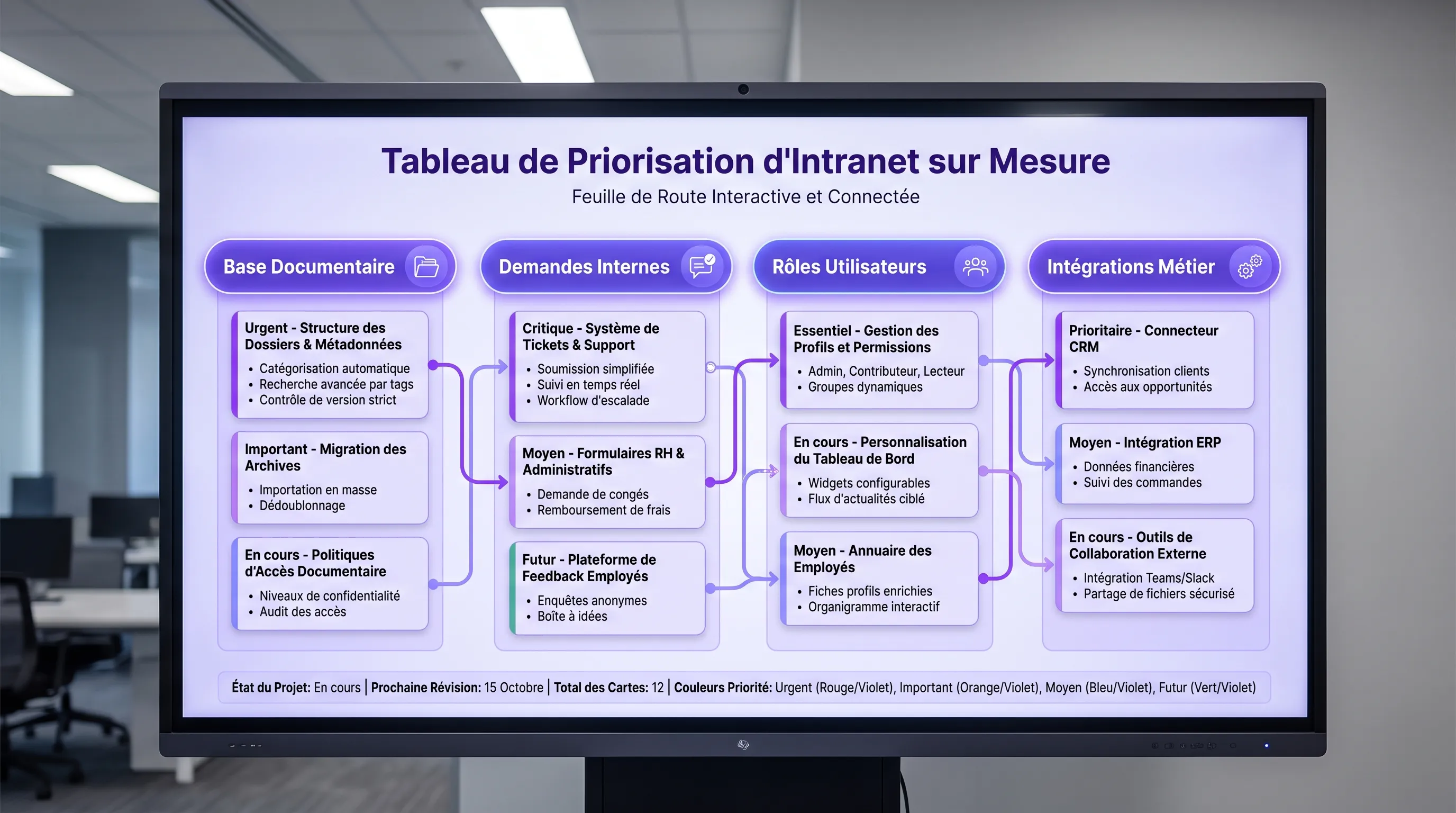
A custom intranet isn't useful just because it has many features. It becomes useful when it removes daily irritants: searching for a procedure, requesting validation, finding the right document, knowing who does what, or tracking a request without following up with three people.
July 02, 2026·11 min read
A custom intranet doesn't become useful just because it packs a lot of features. It becomes useful when it removes daily irritants: searching for a procedure, requesting an approval, finding the right document, knowing who does what, or tracking a request without having to follow up with three people.
For a structuring SME or a growing scale-up, the right question is therefore not "what can we put in our intranet?". The real question is: which features should be prioritized first so that teams use it from V1?
The goal of a first version is not to replace all your tools. It is to create a reliable, clear entry point connected to the most frequent processes. Here is a simple method to make the right trade-offs.
Start with problems, not modules
Many intranet projects start with a wishlist: internal news, directory, documents, HR forms, scheduling, onboarding, knowledge base, search engine, chatbot, internal social network. The list seems logical, but it doesn't say what should be developed first.
Before choosing features, start from the concrete situations that cost your teams time. For example:
A manager doesn't know where to find the latest purchase approval procedure.
A remote employee doesn't know who to ask for software access.
The HR team receives the same questions via Slack, email, and verbally.
Documents are scattered across Drive, Notion, SharePoint, and local folders.
Newcomers rely too much on their colleagues' availability.
These irritants reveal the real needs. A custom intranet must first reduce friction on recurring use cases, and only then enrich the experience.
If you are hesitating between several internal tools to develop, the same prioritization logic can be applied to other projects. We detailed it in this guide on which internal tools to develop first.
The 4 criteria to prioritize intranet features
To avoid subjective debates, you can evaluate each feature according to four simple criteria.
Criterion
Question to ask
Why it matters
Frequency
Will this feature be used every week?
A frequent feature quickly drives adoption.
Impact
Does it reduce a real operational cost or time waste?
The intranet must improve daily life, not just inform.
Process clarity
Is the current workflow already understood?
A vague process cannot be fixed by software.
Delivery simplicity
Can we deliver a reliable first version quickly?
A visible V1 builds trust and limits the tunnel effect.
A highly visible but barely useful feature, like a poorly maintained news feed, can wait. Conversely, a well-designed internal request space can immediately reduce follow-ups and improve the quality of service between teams.
Feature #1: An action-oriented homepage
An intranet homepage shouldn't be a corporate showcase. It must answer a simple question: what does the user need to do or find right now?
For a first version, the homepage can group the most useful access points: key procedures, ongoing requests, shortcuts to business tools, the latest important information, and internal contacts. The goal is to reduce the number of clicks between the need and the action.
A good homepage can also adapt based on roles. A salesperson, a manager, an HR person, and a field worker do not have the same priorities. There is no need to over-personalize from the start, but it is often relevant to plan different blocks according to the main user families.
The document base is often the first promise of an intranet. But it fails when it becomes a simple file repository. To be useful, it must be designed as a single source of truth.
This means that every important document must have an owner, an update date, a clear category, and an understandable status. An employee must quickly know if they are consulting the right version of a procedure, a contract template, an HR policy, or a business guide.
The documents to prioritize are not necessarily the most numerous. They are the ones that answer the most frequent questions or prevent costly mistakes: time off, purchases, security, sales approval, onboarding, customer support, expense reports, tool access, quality processes.
An effective V1 can start with little content, provided it is well structured. It is better to have 30 reliable resources than 300 files imported without any logic.
Feature #3: Internal requests and simple workflows
This is often where a custom intranet brings the most value. Internal requests are the meeting point between communication, organization, and automation.
Some examples of requests to centralize:
Tool access request.
Equipment request.
Expense approval.
Internal incident reporting.
Recurring HR question.
Request to create or modify a document.
The point is not just to create a form. The point is to provide visibility: who is processing the request, what is its status, what information is missing, what is the expected timeframe?
In a growing SME, this logic prevents everything from relying on private messages. It professionalizes exchanges without weighing down the organization. For a scale-up, it also helps standardize processes that become too dependent on individuals.
Feature #4: Role-based access rights
Access rights are not a technical detail. They determine the trust in the intranet.
From V1, you must define who can view, create, modify, approve, or administer content. Without this logic, two problems quickly arise: some sensitive information circulates too widely, while other information remains blocked due to a lack of access.
The right approach is to start with simple roles: employee, manager, HR, finance, administrator, support team, management. There is no need to create a complex matrix on day one. However, you must plan a structure that can evolve.
This is particularly important when the intranet touches on sensitive topics: HR data, contractual documents, financial information, quality processes, or client procedures. In certain sectors, such as healthcare, legal, or financial services, access management must be thought out very early on.
A medical services company, for example, may already invest heavily in patient acquisition and relationships with specialized partners like a healthcare marketing agency focused on SEO, ads, and patient automation. In this case, the intranet must also secure and streamline the internal organization that makes it possible to keep the promise made to patients or clients.
Feature #5: Useful, but framed, search
A search engine is often requested very early. This is understandable: when information is scattered, everyone wants to be able to "search like on Google". However, an effective search depends first and foremost on the quality of document organization.
Before investing in advanced search, verify that your content is named correctly, categorized by themes, associated with simple tags, and updated. Otherwise, the search engine will only make the existing mess visible.
For a V1, a simple search may suffice if it covers priority content: approved documents, procedure pages, internal contacts, requests, and FAQs. More advanced features, like semantic search or an AI assistant, can come later when the base is clean enough.
This is an important point in 2026: AI can improve access to information, but it does not compensate for non-existent document governance. If the sources are obsolete or contradictory, the assistant risks producing unreliable answers.
Feature #6: An enriched internal directory
The internal directory seems basic, but it quickly becomes indispensable as the company grows. Its role is not just to list names. It must help everyone understand the organization.
A good directory can include the role, team, scope, manager, expertise, topics to contact the person about, and recommended contact channels. This information reduces unnecessary interruptions and accelerates the onboarding of new employees.
For a first version, focus on the truly useful fields. Avoid turning the directory into a mini social network if it's not a priority need. Detailed profiles, recommendations, communities, or internal posts can be added later, once the basic usages are established.
Feature #7: Integrations with existing tools
A custom intranet is not meant to replace all your tools. Its value often comes from its ability to connect them.
The first integrations to consider are those that prevent double data entry or broken workflows: SSO, messaging, calendar, document storage, HR tool, CRM, support tool, project management tool. The idea is not to integrate the entire ecosystem from the start, but to connect the two or three tools that make the intranet immediately more useful.
Integration
Possible priority
Value for teams
SSO
Very high
Simpler login and better adoption.
Document storage
High
Centralized access to approved files.
HR tool
Medium to high
Smoother employee requests and information.
CRM or support tool
Depends on business
Better continuity between internal operations and clients.
Internal messaging
Depends on usage
More effective notifications and reminders.
These choices must be carefully framed. A poorly thought-out integration can create more complexity than it removes. That is why it is useful to clarify technical and business decisions upfront, as in any custom software development.
What is better to deprioritize at the start
Some features can be interesting, but are rarely a priority in a first version. This is the case for advanced social features, gamification, highly sophisticated news feeds, complex community spaces, or exhaustive dashboards.
They are not useless. They simply create little value if the fundamentals are not in place. An employee will more easily adopt an intranet that helps them get an approval in two minutes than a platform rich in content but unreliable for their daily needs.
The same caution applies to AI assistants. They can become very useful for summarizing procedures, guiding users, or finding information. But they must rely on clean sources, solid access rights, and well-defined use cases.
Example of a roadmap for a useful V1
A first version of a custom intranet can be built in three stages. The goal is to quickly deliver value without locking the company into an overly limited architecture.
Stage
Included features
Goal
Foundation
Secure access, roles, homepage, navigation
Create a reliable entry point.
Productivity
Document base, directory, internal requests
Reduce follow-ups and information searching.
Automation
Workflows, notifications, key integrations
Streamline recurring processes.
This roadmap can be adapted according to your maturity. A highly operations-oriented company will prioritize workflows. A distributed or fast-growing company might prioritize onboarding, the directory, and documentation. A multi-site organization will give more importance to rights, procedures, and governance.
How to measure if the right features were chosen
The success of an intranet is not measured solely by the number of logins. High traffic can mask a poor experience if users log in often because they cannot find what they are looking for.
The right indicators are more operational: a drop in repetitive questions, reduced processing times, fewer follow-ups, request completion rates, newcomer satisfaction, number of obsolete documents detected, average time to find a procedure.
It is also useful to organize short user feedback sessions after the first few weeks. Ask what is missing, what saves time, what remains confusing, and what should be removed. A custom intranet must evolve with the organization, not remain frozen in the vision of the initial specifications.
FAQ
What is the first feature to develop in a custom intranet? The first feature depends on your internal irritants, but in many SMEs, the trio of a useful homepage, a reliable document base, and internal requests brings value the fastest.
Should AI be integrated from the first version of the intranet? Not necessarily. AI becomes relevant if your content is reliable, well-structured, and associated with clear access rights. Otherwise, it is better to start by consolidating the document base and processes.
Should a custom intranet replace Slack, Teams, or Notion? No, not necessarily. Instead, it can become the entry point that organizes information, formalizes requests, and redirects to the right existing tools.
How many features should be planned for a V1? It is better to limit the V1 to a few highly useful features. An overly broad first version increases the risk of delays, complexity, and low adoption.
How to prevent the intranet from quickly becoming obsolete? You must define content owners, update rules, clear rights, and a rhythm of continuous improvement. Governance matters as much as development.
Need to prioritize your custom intranet?
A successful intranet starts with good scoping: which use cases, which processes, which roles, which integrations, and which V1 to deliver first.
At Impulse Lab, we help companies transform their internal needs into useful web and AI platforms, with an approach focused on productivity, automation, and adoption. If you want to structure your intranet without developing an overly heavy tool from the start, begin by clarifying the features that will create the most value for your teams.