The different internal communication tools you need to know
Stratégie d'entreprise
Productivité
Communication interne
Outils internes
In an SME or scale-up, internal communication often structures itself in stages. Initially, everything is verbal, via a few emails and a messaging group. Then the team grows, projects multiply, decisions get lost, and new hires ask the same questions...
June 28, 2026·14 min read
In an SME or scale-up, internal communication often structures itself in stages. At first, everything happens verbally, through a few emails and a messaging group. Then the team grows, projects multiply, decisions get lost, newcomers ask the same questions, and managers become permanent information relays.
This is when the question of tools becomes strategic. Not because every exchange needs to be "digitalized," but because a good internal communication system allows the right information to be transmitted at the right time, with the right level of detail.
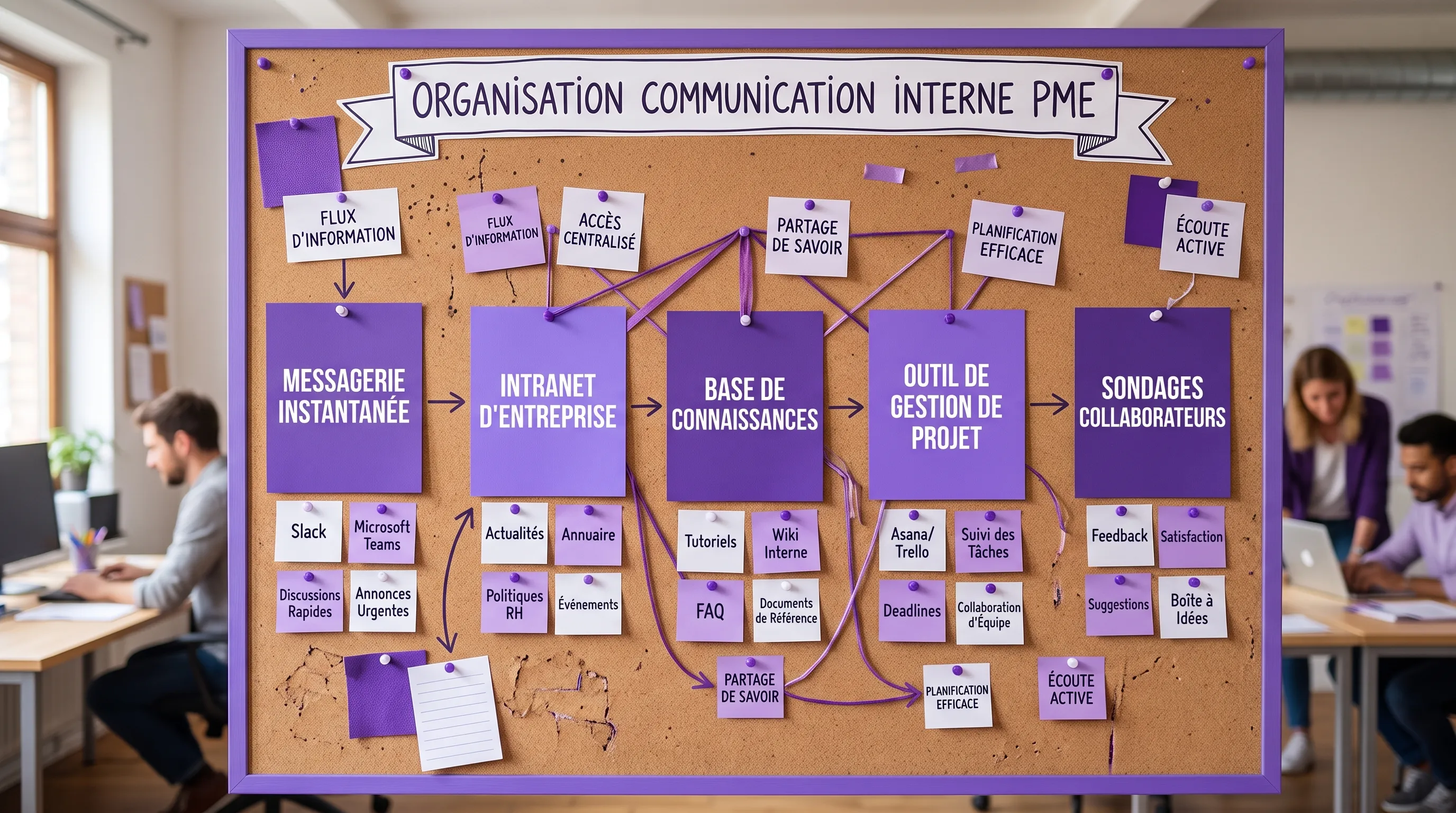
Before choosing a solution, it is therefore necessary to understand the different internal communication tools, their actual uses, and their limits. Instant messaging does not replace a knowledge base. An intranet does not replace a project tool. An internal newsletter is not enough to align hybrid teams.
The goal is not to add tools, but to compose a clear, coherent, and adopted environment.
Why distinguish tools by use rather than by brand?
Most comparisons pit well-known names against each other: Slack vs. Teams, Notion vs. Confluence, Google Workspace vs. Microsoft 365. This is useful, but insufficient.
The real issue is less "which tool is the best?" than "what communication problem do we want to solve?".
An organization generally needs to cover several flows:
Inform the company widely about priorities, news, and major changes.
Exchange quickly between colleagues or teams.
Document knowledge to avoid dependency on a few key people.
Coordinate project progress.
Surface weak signals, questions, pain points, or field needs.
Welcome and train new employees.
These flows do not require the same tools. Some messages must be instantaneous, others must remain accessible for months. Some exchanges are informal, others involve structural decisions. Maturity consists of assigning a clear function to each channel.
According to the Work Trend Index 2023 by Microsoft, employees using Microsoft 365 spend on average more time communicating than creating. This observation illustrates a well-known risk for growing companies: when channels are not structured, communication can become a burden rather than a productivity lever.
The main families of internal communication tools
Here are the main types of tools to know, with their strengths, their limits, and the cases where they are most useful.
1. Instant messaging
Instant messaging tools, like Slack, Microsoft Teams, or Google Chat, serve to streamline daily exchanges. They are particularly effective for asking a quick question, sharing operational information, or coordinating a team in real time.
Their main advantage is responsiveness. They reduce the reliance on emails for short topics and foster proximity, especially in hybrid or multi-site contexts.
Their limit is just as clear: if everything goes through chat, information becomes difficult to find. Important decisions drown in discussion threads, notifications fragment attention, and new employees do not have access to historical context.
Instant messaging must therefore be considered an exchange tool, not the company's memory.
2. Internal email and newsletters
Email remains essential for formal communications, important announcements, HR messages, or information that must reach the entire company. It retains strong value when a validated, stable, and identifiable message needs to be transmitted.
The internal newsletter is a more editorialized variant. It allows for grouping key news, monthly figures, customer successes, new arrivals, events, and company priorities.
Its strength is creating a regular touchpoint. Its weakness is the lack of interaction. An email can inform, but it guarantees neither understanding, nor buy-in, nor action. It should therefore be avoided for managing projects or gathering complex decisions.
3. The intranet or internal portal
The intranet centralizes reference information: news, HR resources, procedures, official documents, directory, access to tools, internal policies, and company life information.
For a structuring company, it is often the first step towards more stable internal communication. The intranet answers a simple question: "Where do we find official information?".
A good intranet must not become a file graveyard. It must be organized around employee needs: quickly accessing a procedure, finding a document, understanding priorities, identifying the right contact. To go further on this topic, Impulse Lab details the useful functions of an internal communication intranet in a dedicated guide.
The intranet is particularly relevant when teams grow, documents scatter, and you want to reduce repetitive requests to support functions.
4. The knowledge base or internal wiki
The knowledge base is the space where the company documents its operational knowledge: processes, methods, decisions, best practices, tutorials, sales playbooks, support procedures, or product documentation.
It differs from the intranet in its level of detail. The intranet informs and guides. The wiki explains how to do things.
Tools like Notion, Confluence, Slite, Coda, or Guru can fulfill this role, depending on the level of complexity and team culture. The most important thing is not the tool, but the editorial discipline: who creates the pages, who validates them, who updates them, how to avoid duplicates?
A successful knowledge base reduces reliance on verbal exchanges. It accelerates onboarding, facilitates scaling, and makes the company less vulnerable when a key person is absent.
5. Collaborative platforms and office suites
Google Workspace, Microsoft 365, or Zoho Workplace allow for creating, commenting on, sharing, and co-editing documents. These tools are often at the heart of internal communication, even when they are not perceived as such.
A shared document can be used to prepare a meeting, build a strategy, draft a decision memo, or align several teams. Comments, suggestions, and version histories make collaboration more transparent.
The risk arises when documents multiply without a filing logic. A file can be shared in a chat, duplicated in a drive, then replaced by a newer version sent by email. To avoid this, the company must define simple rules: where to create documents, how to name them, where to archive final versions, and which spaces are official.
6. Project management tools
Project management tools, like Asana, Trello, Monday.com, ClickUp, Jira, or Linear, are not solely production tools. They also play a major role in internal communication.
They answer essential questions: who is doing what, by when, with what status, what are the blockers, and what are the priorities?
Their strength is transforming communication into action tracking. Instead of asking "where do we stand?" in a chat channel, everyone can check the progress directly in the project tool.
They are particularly useful when several teams contribute to the same goal, for example, marketing, product, sales, and operations. Their limit is adoption: if tasks are not updated, the tool quickly loses its credibility.
7. Videoconferencing and meeting tools
Zoom, Google Meet, Microsoft Teams, or Whereby help maintain connection when teams are hybrid, remote, or spread across multiple sites. They remain indispensable for coordination meetings, managerial check-ins, workshops, and sensitive discussions.
Their value lies in the richness of the dialogue. Video allows for faster handling of certain ambiguous or emotional topics than a written discussion thread.
But videoconferencing can also become excessive. Too many meetings create fatigue, slow down decision-making, and give the impression that every topic deserves a meeting. Mature companies reserve meetings for exchanges that require discussion, arbitration, or co-construction.
8. Asynchronous video
Asynchronous video involves recording a message, a demonstration, feedback, or an update that employees can watch later. Tools like Loom, Vidyard, or the recording features built into collaborative suites facilitate this use.
It is useful for explaining a complex topic without organizing a meeting, presenting a new feature, commenting on a mockup, training a team, or sharing a progress update.
Its main advantage is combining clarity and flexibility. The recipient can view the message at the right time, rewind, and share the video with others. Its limit is searchability: without transcription, a clear title, or categorization, videos become difficult to utilize over time.
9. Employee feedback and listening tools
Internal communication should not only be top-down. Survey tools, social barometers, suggestion boxes, or continuous feedback allow for measuring team sentiment and detecting pain points before they become deeper problems.
They can take the form of short questionnaires, pulse surveys, engagement surveys, anonymous forms, or feedback rituals integrated into meetings.
These tools are valuable in growing companies, as leaders no longer naturally perceive all signals from the field. However, they must be used seriously. Asking for teams' opinions without communicating the results or taking action afterward can create more frustration than trust.
10. Mobile apps and field tools
In companies where a portion of employees does not have a computer on a daily basis—for example, retail, logistics, manufacturing, healthcare, catering, or on-site services—traditional tools are not always enough.
Internal mobile applications, field information platforms, digital signage screens, or communication tools for operational teams make it possible to reach employees who are often disconnected from office channels.
These solutions must be simple, fast, and accessible. The challenge is to avoid two-speed communication, where office teams are informed in real time while field teams discover information late.
11. AI assistants and internal automations
In 2026, artificial intelligence is gradually transforming internal communication. AI assistants can help find information in a document base, summarize a meeting, generate a first draft of a newsletter, direct a request to the right department, or answer frequently asked employee questions.
AI is particularly useful when the company already has content scattered across multiple tools. It can reduce the time spent searching, rephrasing, or transmitting repetitive information.
But it does not solve underlying problems if the sources are obsolete, contradictory, or poorly governed. Before automating, it is necessary to clarify processes, clean up information, and define responsibilities. It is precisely in this logic that an audit of uses and AI opportunities can help a company identify useful automations, without complicating its environment.
Summary table of the different internal communication tools
Tool type
Main use
Ideal for
Limit to anticipate
Instant messaging
Quick exchanges
Short questions, daily coordination
Information difficult to find
Email and newsletter
Formal communication
Announcements, HR messages, regular news
Low interactivity, risk of overload
Intranet
Official entry point
Internal resources, news, document access
Can become static without governance
Knowledge base
Operational documentation
Processes, tutorials, onboarding
Requires regular updating
Collaborative suite
Co-editing and sharing
Work documents, comments, versions
Risk of file dispersion
Project management tool
Action tracking
Priorities, tasks, responsibilities
Heavily dependent on adoption
Videoconferencing
Synchronous discussion
Arbitrations, workshops, sensitive topics
How to compose the right mix without creating duplicates?
The classic trap is to add a tool for every new problem. One channel for internal support, another for projects, another for announcements, another for documents, then a new AI tool to search across everything. Quickly, no one knows where to talk, where to decide, and where to find information.
To avoid this, a simple architecture must be defined. Each tool must have a clear mission.
A practical rule is to separate four spaces:
Real-time, for quick exchanges and emergencies.
Durable, for information that must remain accessible.
Action, for tracked tasks, projects, and decisions.
Listening, for employee feedback and weak signals.
With this grid, an SME can often operate with few tools: a collaborative suite, a messaging app, a document space, a project tool, and a feedback channel. A scale-up will need more advanced governance, more robust integrations, and sometimes an intranet or an AI layer.
If your main challenge is to choose a solution adapted to your growth stage, you can complement this overview with this guide to choosing the right internal communication tool. If you already have too many solutions in place, the priority will instead be to avoid piling up communication tools without clarifying their uses.
Selection criteria not to be overlooked
Before deploying a new tool, ask yourself a few simple questions.
Is the usage frequent? A tool used once a month is unlikely to create a lasting habit. It is better to integrate this need into an existing channel, unless there is a strong constraint.
Must the information be found later? If so, avoid leaving it only in an instant messaging app. It must be documented in a structured space.
Who is responsible for the content? Without a clear owner, information ages poorly. An internal communication tool needs roles, not just access.
Does the tool integrate with the existing setup? Good integration reduces double entry and flow disruptions. For SMEs and scale-ups, this is often a decisive criterion.
Do employees understand when to use it? Adoption rarely depends on lengthy training. It depends mostly on simple rules, repeated and embodied by managers.
Is the data secure? Internal information can contain HR, financial, commercial, or strategic data. Access rights, GDPR compliance, and security must be evaluated from the start.
An example of a simple stack for a structuring SME
Let's take a company of 40 to 80 people, with some teams working hybrid. It can structure its internal communication around a relatively lightweight system.
Instant messaging is used for daily exchanges. The collaborative suite hosts work documents. A knowledge base centralizes procedures and onboarding content. A project tool tracks tasks and responsibilities. A monthly newsletter summarizes priorities, successes, and major changes. A short quarterly survey takes the pulse of the teams.
This setup is intentionally simple. It covers essential needs without multiplying platforms. As the company grows, it can add a more structured intranet, automate certain internal requests, or connect an AI layer to its existing knowledge.
The key is to evolve the architecture with usage, not with current trends.
The real issue: internal communication governance
Tools do not replace communication rules. A messaging app can be excellent, but become noisy if no one defines the channels, response expectations, or expected types of messages. A knowledge base can be powerful, but useless if no one maintains it. An intranet can be beautiful, but ignored if the content does not meet real needs.
For a system to work, the company must formalize a few principles: which channel to use depending on the type of information, which decisions must be documented, which meetings can be replaced by asynchronous communication, who validates official information, and how employees can ask questions.
This is often where scaling plays out. Fast-growing companies don't just need more communication. They need more reliable, more accessible communication that is less dependent on individuals.
FAQ
What are the main internal communication tools? The main tools are instant messaging, email, the intranet, the knowledge base, the collaborative suite, the project management tool, videoconferencing, asynchronous video, employee surveys, internal mobile apps, and AI assistants.
Does an SME really need an intranet? Not always. A small SME can start with a well-organized document base. The intranet becomes useful when official information, HR resources, news, and tool access need to be centralized for a growing number of employees.
What is the difference between internal communication and collaboration? Internal communication aims to inform, align, and engage teams. Collaboration aims to produce together: documents, projects, decisions, deliverables. The two complement each other, but do not always rely on the same tools.
How to avoid having too many tools? You have to start from usage, not features. Each tool must have a clear role: exchange, document, manage, inform, or listen. If two tools fulfill the same function, one of them risks creating confusion.
Can AI replace internal communication tools? No. AI can improve information search, automate certain responses, summarize exchanges, or facilitate the production of internal content. But it must rely on reliable sources, clear processes, and solid governance.
Structuring your internal communication tools methodically
Knowing the different internal communication tools is a first step. The real lever then consists of mapping your uses, eliminating duplicates, better connecting your tools, and automating what can be automated without degrading the employee experience.
Impulse Lab supports SMEs and scale-ups in this process with AI opportunity audits, custom web and AI solutions, process automation, integration with existing tools, and team training. The goal: to transform your work environment into a clearer, more productive, and truly adopted system.
For an SMB or scale-up automating operations, DPA and RPA are more than a productivity matter. As soon as a bot copies customer data, validates an invoice, or triggers a workflow, it becomes part of the IT system—requiring strict controls, least privilege, and governance.